


Category filter
UEM deployment guide for iboss cloud connector 2020
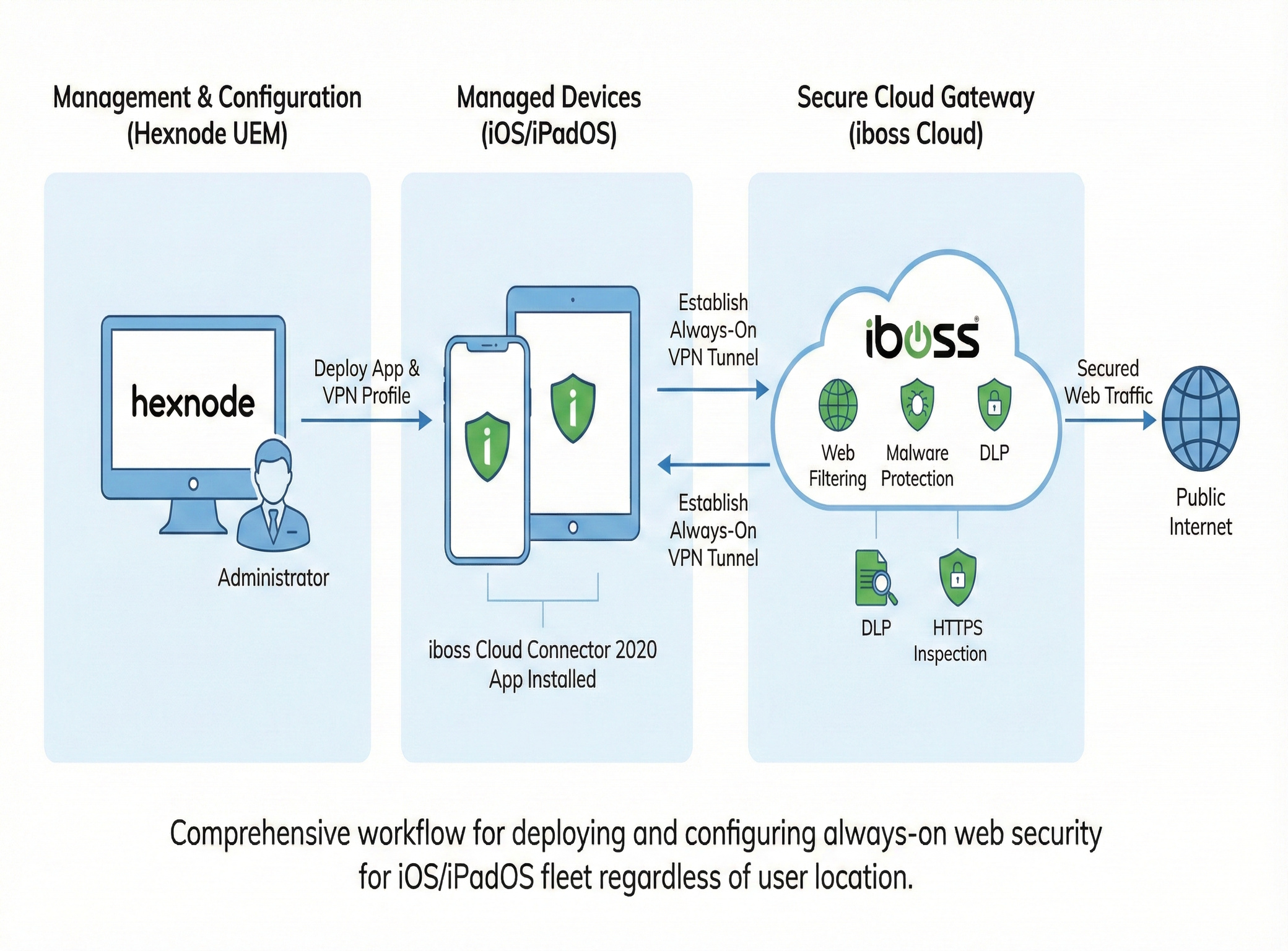
This guide provides a comprehensive resource for integrating Hexnode Unified Endpoint Management (UEM) with the iboss cloud connector 2020. This integration is designed to remotely deploy and configure an always-on Secure Web Gateway (SWG) solution for your iOS and iPadOS device fleet, ensuring consistent web security and content filtering regardless of user location.
Key Benefits of iboss Integration
Hexnode’s integration with iboss provides a scalable, cloud-based solution for securing mobile network traffic, delivering the following key advantages:
- Always-On Enhanced Web Security: The iboss cloud connector ensures that the user’s internet traffic is directed through the iboss Secure Web Gateway (SWG) at all times, securing the device whether it is on-site or off-site.
- Granular Web Content Filtering: The policies configured in the iboss cloud enforce filtering. This filtering is applied globally across all apps, not just the device’s browser, protecting the device from malware and fraudulent sites.
- Automated Remote Deployment: Hexnode simplifies IT operations by enabling the remote, silent deployment of the iboss cloud connector app to all targeted iOS and iPadOS devices.
- Remote VPN Configuration: Administrators can remotely add the necessary Virtual Private Network (VPN) configurations, including VPN On Demand settings and proxy details, directly from the Hexnode UEM console.
- Enhanced Visibility and Audits: The iboss cloud generates detailed event logs, real-time dashboards, and granular user-based web reports, providing deep insights into users’ network activities and alerting administrators to high-risk behavior.
- Advanced Data Protection: The solution provides deep file-based Data Loss Prevention (DLP) and uses top-ranked malware engines to safeguard sensitive data accessed via the cloud.
- HTTPS Inspection: The iboss connector automatically deploys the necessary SSL decryption certificate to devices, allowing for the selective inspection and filtering of encrypted HTTPS traffic.
Remote Configuration Steps (VPN Policy)
The iboss cloud connector is deployed and configured on iOS/iPadOS devices by creating a standard VPN policy within the Hexnode UEM console.
Step 1: Create a New VPN Policy
- Log in to the Hexnode UEM portal.
- Navigate to Policies > Device Policies.
- Create a New Policy or select an existing one to modify.
- Go to the iOS settings section.
- Choose Enterprise.
- Select iOS > Network > VPN and click Configure.
Step 2: Define the iboss Connection Details
Configure the VPN profile using the following settings provided by your iboss deployment:
| Setting | Required Input | Purpose |
|---|---|---|
| Connection Name | A descriptive name (e.g., “iboss Secure Web Gateway”). | Name displayed to the user on the device. |
| Connection Type | Select iboss cloud connector 2020. | Required for the iboss app integration. |
| Server | Enter the IP address or Fully Qualified Domain Name (FQDN) of your iboss VPN endpoint. | Specifies the target server for all device traffic. |
| Account | Enter the username for VPN authentication. | Use Hexnode wildcards like %name% or %email% to automatically populate user data. |
| User Authentication | Select Certificate (required for VPN On Demand). | Certificate-based authentication is recommended for automated, seamless connection. |
| Certificate | Select a credential certificate already deployed to the device (or deploy one via iOS > Security > Certificates). | Used to silently authenticate the user to the VPN server. |
Step 3: Configure Proxy Settings (Optional)
If required by your deployment, configure a proxy within the VPN policy:
- In the same VPN configuration panel, select the Proxy option.
- Choose Manual or Automatic and enter the corresponding details (Server/Port or Proxy PAC URL).
Step 4: Associate and Save the Policy
- Navigate to Policy Targets.
- Select the Devices, Users, or Groups (including Azure AD groups) to whom this policy should be applied.
- Save the policy.
The iboss cloud connector app will be deployed, and the VPN configuration will be silently deployed to all targeted iOS devices, immediately securing their web traffic.
Frequently Asked Questions
What is the primary purpose of the iboss cloud connector with Hexnode?
The primary purpose is to enforce consistent, cloud-based web security and content filtering policies on mobile devices, ensuring protection against malware and access to malicious sites, regardless of where the device is located.
Why do admins need to use the "iboss cloud connector 2020" VPN Connection Type?
Because iboss is a third-party application, you must select the “iboss cloud connector 2020” connection type in Hexnode’s VPN policy. This tells the iOS operating system to use the iboss app for the VPN connection instead of a native VPN protocol (like IKEv2 or L2TP).
Is this integration supported on Android or Windows devices?
No, the iboss cloud connector 2020 integration detailed here is specifically designed to leverage Apple’s native networking framework and is intended for securing iOS and iPadOS devices. Other platforms may require different deployment methods.


