


Category filter
Deploy Hexnode UEM on-premises
Hexnode UEM offers both Cloud and On-premises deployment models. The on-premises edition is packaged as a virtual appliance (.ovf) file. This file, along with your required Hexnode UEM login credentials, is provided upon successful processing.
Deploying the on-premises edition requires a Virtual Workstation, where the virtual appliance file must be imported. Ensure all system requirements for both the Virtual Workstation and Hexnode UEM are met before beginning installation. Once the Virtual Workstation is installed and the mandatory setup settings are configured, you can begin enrolling devices.
Virtual Workstation System Requirements
Hardware Requirements
- Processor: X86-based hardware with 64-bit Intel or AMD Processors (2.0 GHz with 32 CPU cores or more).
- Memory: 160 GB RAM (Recommended).
Software Requirements
The Virtual Workstation supports the following 64-bit host Operating Systems across Windows and Linux:
- Ubuntu 14.04 and above
- CentOS 6.0 and above
- Oracle 6.0 and above
- Red Hat Enterprise Linux 6 and above
- SUSE Linux 12 and above
- Windows Server 2016
- Windows Server 2012
- Windows 11
- Windows 10
- Windows 8
- Windows 7
Hexnode UEM System Requirements
Ensure your machine meets the following requirements before installing Hexnode UEM.
Hardware Requirements (Scale-based)
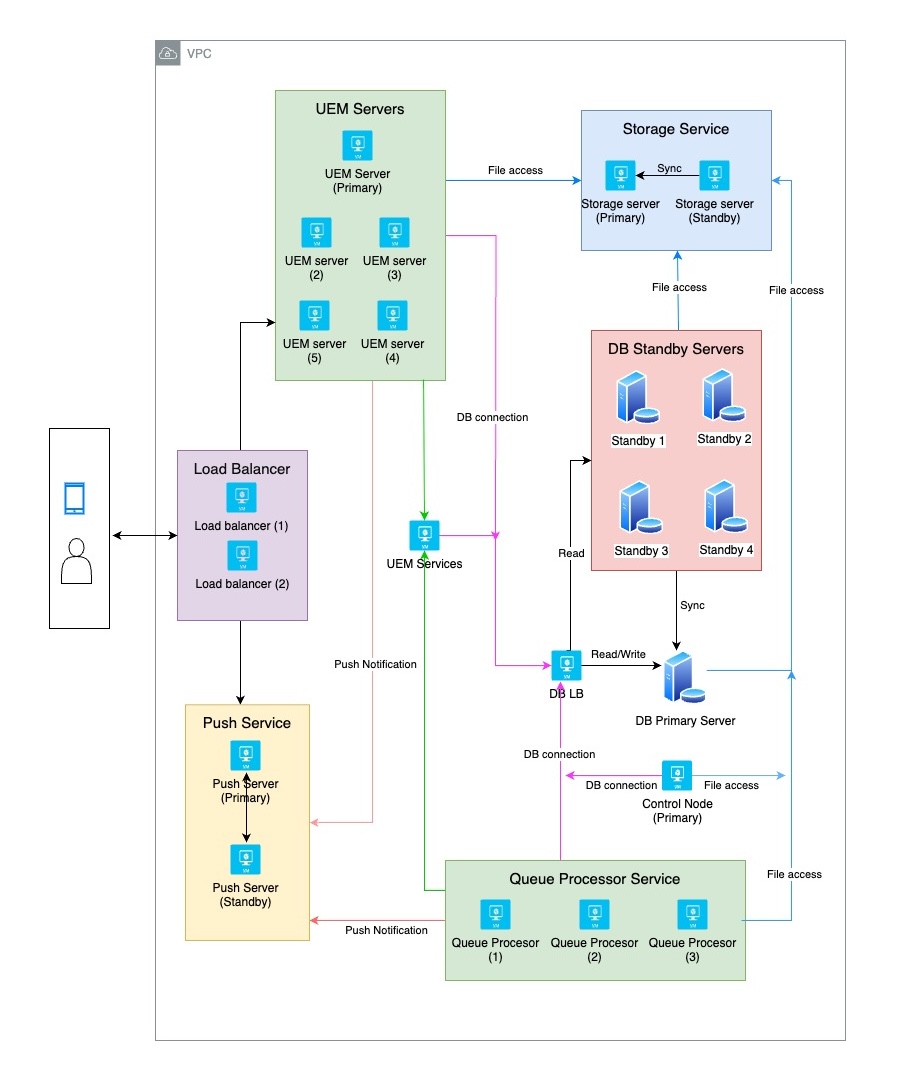
- Up to 5,000 devices: Requires 14 servers with 16 GB of RAM and at least 4 virtual CPUs.
- Up to 10,000 devices: Requires 16 servers with 16 GB of RAM and at least 4 virtual CPUs.
- Up to 40,000 devices: Requires 22 servers with 16 GB of RAM and at least 4 virtual CPUs.
Software Requirements
- Supported Platforms: x64
- Supported Databases: PostgreSQL
- Supported Browsers:
- Google Chrome 40 and later
- Safari 7 and later
- Mozilla Firefox 36 and later
- Microsoft Edge 80 and later
- Internet Explorer 9 and later
Network Requirements
Minimum network speed of 5 Mbps is required.
Communication Ports
Hexnode UEM requires the following communication ports to remain open:
| Port Number | Direction | Application / Purpose |
|---|---|---|
| 8998 | Inbound | AD Agent Service. |
| 587 | Outbound | Default port number for the outgoing email server. |
| 143 | Inbound | Default port number for the incoming email server. |
| 2195 | Outbound | Required for the Hexnode UEM server to communicate with APNs and push device policies (Host Address: gateway.push.apple.com). |
| 2160 | Inbound | SSH Port. |
| 443 | Bidirectional | HTTPS port used for secure and encrypted communication between Hexnode UEM and mobile devices. |
| 80 | Bidirectional | The default application port used during the installation of Hexnode UEM. |
Setup
Before enrolling devices in Hexnode UEM, you must configure the following settings:
NAT Settings
The router uses Network Address Translation (NAT) to manage mobile devices through a centralized system, connecting them to the internet via a public IP address.
Proxy Settings
A proxy server is required to establish a secure internet connection for your devices. Hexnode UEM allows you to configure these proxy settings directly for the on-premises edition.
E-mail Server Configuration
To send email notifications (such as enrollment requests) to end-users, the administrator must configure the outgoing email server.
Enrolling Devices
Hexnode UEM supports iOS, iPadOS, Android, Windows PC/tablets, Mac, and tvOS devices. The initial setup and enrollment process varies depending on the device platform.
Devices Managed
- iOS: Devices running iOS 11 and later.
- iPadOS: Devices running 13.0 and later.
- Windows: Tablets and desktops running Windows 10 and later.
- Android: Devices running 5.0 and later.
- MacOS: Devices running 10.7 and later.
- Linux: Devices running Debian, Fedora, and Ubuntu distributions.


