


Category filter
Understanding Declarative Device Management
Declarative Device Management (DDM) represents a paradigm shift in how Apple devices are managed. Traditional “reactive” MDM works by the server repeatedly polling every device to ask “are you still compliant?” — a constant back-and-forth that scales poorly as your fleet grows. DDM flips this: the device monitors its own state and reports to Hexnode only when something actually changes.
What this means in practice: in a traditional MDM setup, a compliance violation might sit undetected until the next scheduled poll — potentially hours later. With DDM, Hexnode finds out the moment it happens, because the device tells it, instead of waiting to be asked.
Reactive vs. Proactive Management
To understand the value of Declarative Device Management, it is essential to compare it with the traditional MDM protocol.
| Aspect | Reactive Approach (Traditional MDM) | Proactive Approach (DDM) |
|---|---|---|
| Logic Location | Server-side. The server asks, “Are you compliant?” | Device-side. The device knows the rules and acts on them. |
| Communication | Constant polling (periodic check-ins). High traffic. | Asynchronous notifications. The device “pushes” updates only when needed. |
| Latency | High. Status updates wait for the next check-in cycle. | Low. Critical updates (e.g., non-compliance) are reported instantly. |
| Scalability | Lower. Large fleets put immense strain on the server. | Higher. Server load is significantly reduced. |
| Autonomy | Low. Relies on server instructions. | High. Applies policies autonomously. |
Key Benefits of DDM for IT Administrators
Hexnode leverages DDM to provide a more robust and responsive management experience:
- Autonomous Remediation: If a user changes a setting that violates a declaration — say, weakening a passcode policy — the device automatically reverts the change without waiting for a command from Hexnode.
Why this matters: under the old model, a policy violation stays live on the device for however long it takes the server to notice and push a correction — a real window of exposure. With DDM, the correction happens on-device, immediately, closing that window to effectively zero.
- Proactive Status Reports: Instead of Hexnode asking “Are you encrypted?”, the device proactively sends a status update the moment encryption status changes.
- Reduced Server Load: By offloading logic to the device, Hexnode can manage massive fleets (10,000+ devices) with significantly reduced latency.
- Future-Proofing: Apple is prioritizing DDM for all new management features. Using Hexnode ensures you are ready for the latest iOS, macOS, and iPadOS capabilities.
Core Components of DDM Architecture
Declarative Device Management operates on three foundational pillars: Declarations, the Status Channel, and Extensibility.
1. Declarations
Declarations are JSON-based payloads that define the policy logic. There are four distinct types:
- Configurations: Similar to standard MDM profiles but sent as JSON. These apply settings (e.g., Wi-Fi, VPN, Restrictions).
- Assets: Reference data needed to support configurations, such as Identity Certificates or User credentials. A single asset can be referenced by multiple configurations.
- Activations: The “rules of engagement.” These define when and how configurations are applied (e.g., “Apply this Wi-Fi config only if the device is Company Owned”).
- Management: Defines what static information the device should report to the server (e.g., Device Model, OS Version).
2. Status Channel
This is the communication pipeline. Instead of the server asking for data, the device uses the Status Channel to proactively push updates. For example, if a passcode is changed or an app finishes installing, the device sends a status report immediately.
3. Extensibility
This ensures forward compatibility. Devices and servers advertise their capabilities to each other. If a device updates its OS and gains a new management feature, it informs the server, which can then utilize that new capability without requiring a full protocol overhaul.
Implementing DDM in Hexnode UEM
Hexnode integrates DDM alongside the standard MDM protocol to enhance efficiency.
Supported Platforms and Requirements
Device Enrollment:
- macOS: 13.0+
- iOS / iPadOS / tvOS: 16.0+
- watchOS: 10.0+
- visionOS: 1.1+
User Enrollment:
-
iOS / iPadOS: 15.0+
Activation and Verification
When a compatible device is enrolled in Hexnode, an activation command is sent automatically after the initial scan.
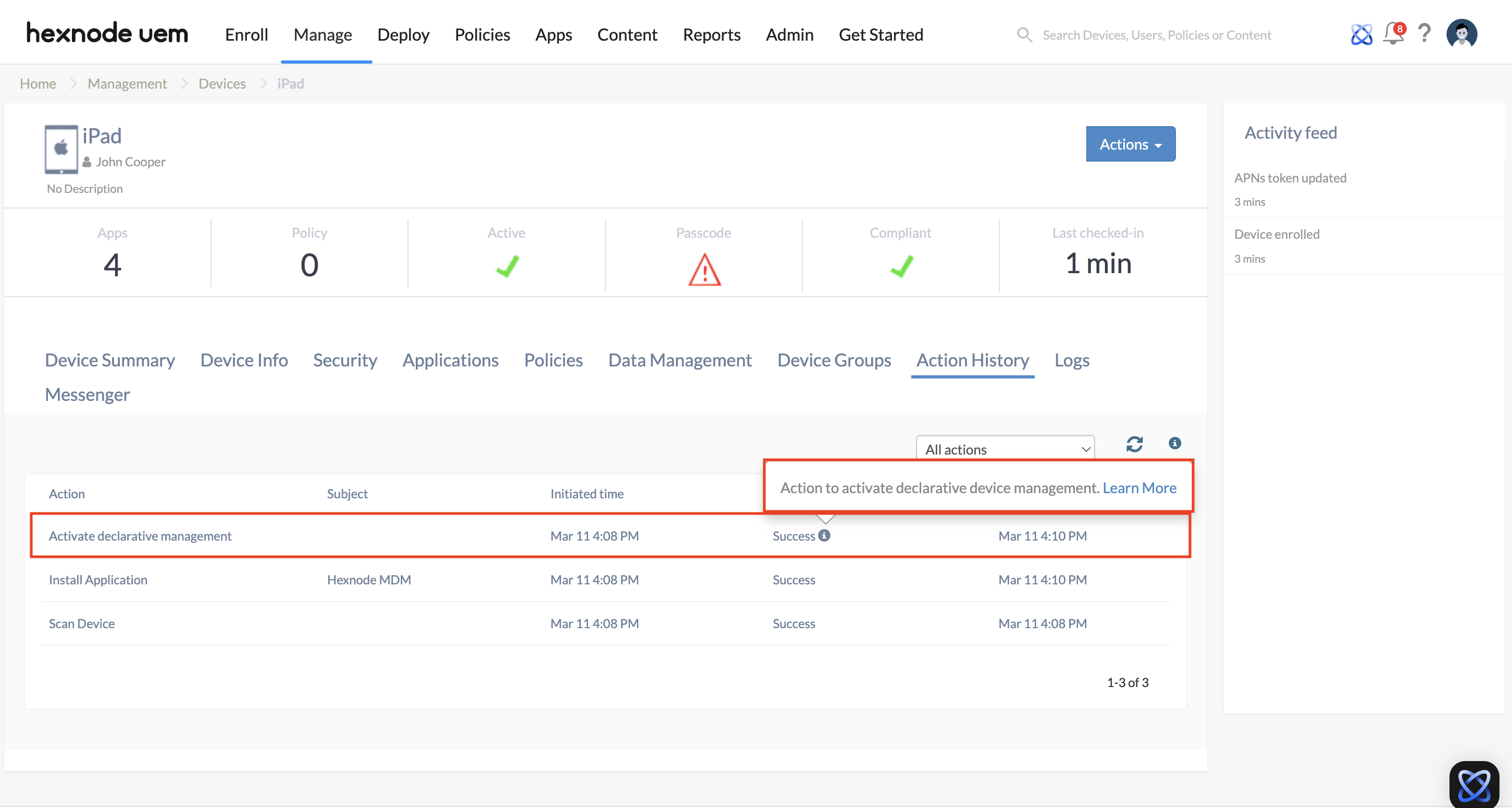
To verify DDM status:
- Navigate to Manage > Devices.
- Click on the specific device.
- Go to Device Summary > Enrollment Details.
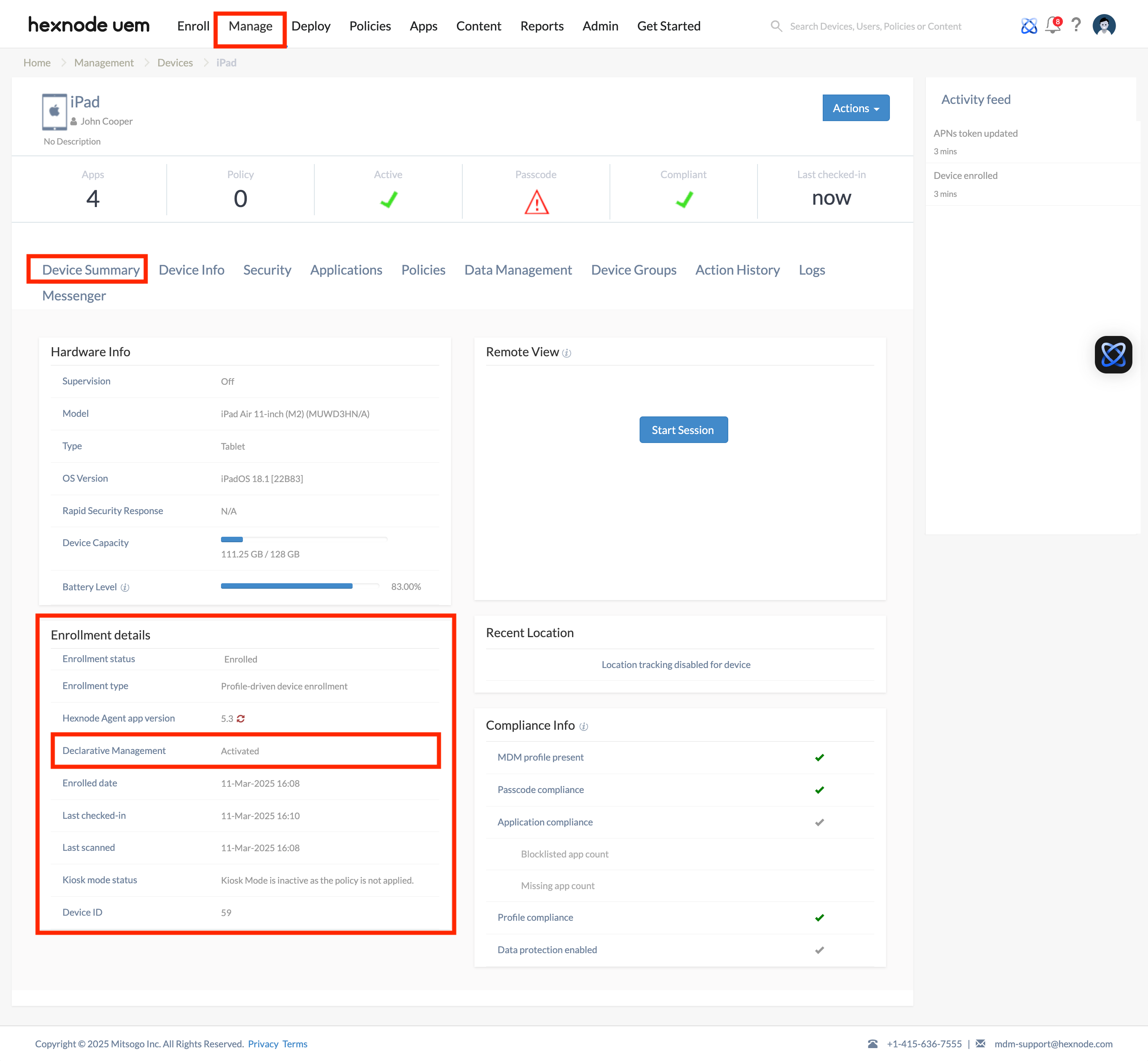
- Look for the Declarative Device Management field.
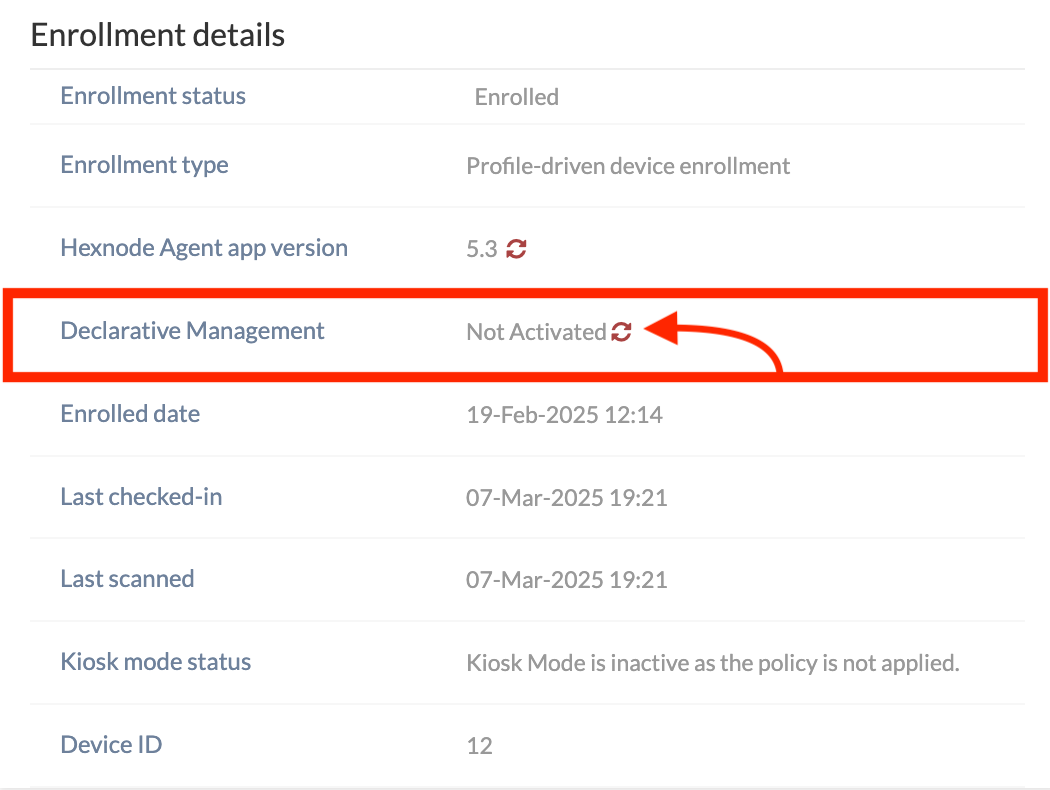
- Note: If inactive, click the refresh icon to retry the activation.
Current Hexnode DDM Features
Hexnode currently utilizes DDM for the following real-time data points:
- Password Compliance — instant notice the moment a user sets a non-compliant passcode, not at the next scheduled check.
- App Installation (iOS/iPadOS) — live status (Pending, Downloading, Installing, Installed, Failed), so a stalled rollout is visible immediately instead of being discovered when someone asks “did that app ever install?”
- OS Updates — real-time download and install progress, useful for confirming a critical security update actually landed rather than assuming it did.
- Battery Health — periodic hardware-level reporting, useful for catching aging device batteries before they fail during business hours.
Troubleshooting DDM Issues
| Issue | Potential Cause | Solution |
|---|---|---|
| DDM Status is “Inactive” | Device OS is outdated or the initial activation command failed. | Ensure the device meets the OS requirements (e.g., iOS 16+). Click the “Refresh” icon in the Device Summary page to re-push the activation command. |
| Status Updates Not Received | Network restrictions or firewall blocks. | Ensure the device has access to Apple’s APNs servers and the Hexnode portal URL. |
| Cannot Disable DDM | By design, DDM is persistent. | You cannot toggle DDM off while the device is managed. To remove the declarative state, you must disenroll the device from Hexnode. |
| App Status Lagging | Device is in Low Power Mode or asleep. | While DDM is proactive, severe device restrictions (battery saving) may slightly delay non-critical updates. |
Frequently Asked Questions
Does Declarative Device Management replace the existing MDM protocol?
No. DDM coexists with the standard MDM protocol. Hexnode uses traditional MDM commands for actions like “Lock Device” or “Wipe,” while using DDM for status monitoring and autonomous policy application.
Does Declarative Device Management replace traditional MDM?
No. DDM works alongside the existing MDM protocol rather than replacing it — Hexnode uses DDM for the real-time data points listed above, while continuing to use standard MDM commands for everything else. You don’t need to choose one or the other.
Can I use DDM on Android or Windows devices?
No. Declarative Device Management is a proprietary framework specific to the Apple ecosystem (iOS, macOS, tvOS, watchOS, visionOS).
What happens if a device goes offline?
The device continues to enforce DDM policies locally (e.g., passcode rules). When connectivity is restored, it will push all queued status updates to the Hexnode server via the Status Channel.
Is DDM more secure than traditional MDM?
Yes. Because the device evaluates its own compliance locally, it can react to security threats (like removing a passcode) instantly, rather than waiting for the server to detect the issue during the next polling cycle.


