


Category filter
Configuring Shared Device Settings for iOS via Hexnode UEM
This document helps provides an overview of how Shared Device Settings for iOS devices can be configured through enrollment profiles in Hexnode UEM.
What is Shared iPad?
Shared iPad is a specialized iPadOS feature designed for multi-user environments. It allows multiple authorized people to sign in to a single device using their Managed Apple Account, ensuring a personalized experience for every user.
- Persistent Accounts: User data can remain on the device, making subsequent sign-ins faster through local caching.
- Temporary Sessions: Guest users can access the device without an account; however, all session data is permanently deleted upon sign-out to maintain privacy.
Context within ADE Enrollment
In Hexnode, Shared iPad functionality is integrated directly into the Automated Device Enrollment (ADE) workflow. These settings are configured while creating or editing an ADE profile for devices synced via Apple Business Manager (ABM) or Apple School Manager (ASM).
Navigation: Enroll > iOS > Apple Business or School Manager > Enrollment Profile > Create Enrollment Profile > Shared Device Settings
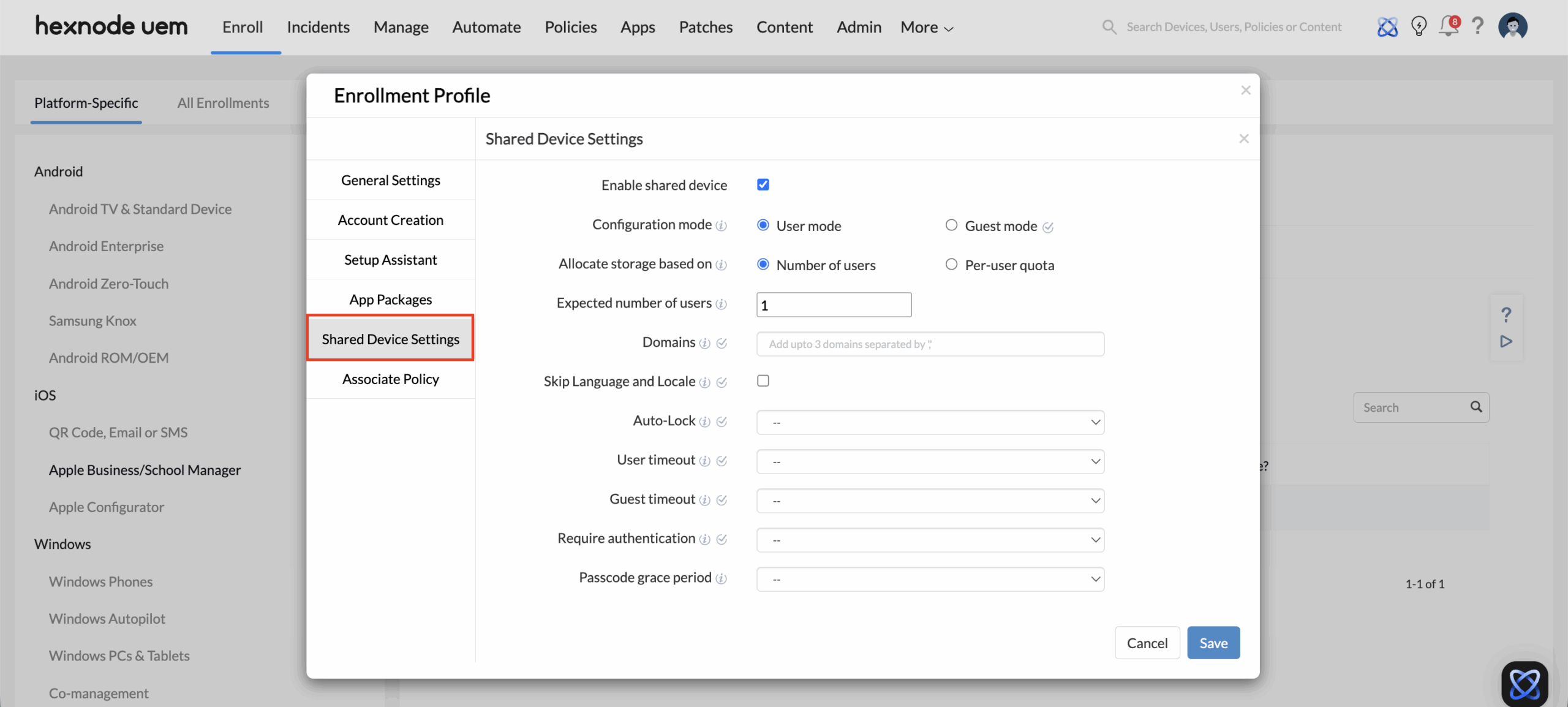
Crucial Step: You must enable and customize shared behaviour—including user modes, storage quotas, and timeouts, before the device reaches the end user. This ensures the shared configuration is provisioned during the initial setup.
Core Shared Device Settings
To enable these features, the iPad must be running iPadOS 13.4 or later and belong to an organization using X-Server-Protocol-Version 2 or later.
Configuration Modes
| Mode | Description | Key Feature |
|---|---|---|
| User Mode | Supports multiple Managed Apple Accounts. | Locally cached data for fast switching. |
| Guest Mode | Supports temporary sessions only. | Data is wiped immediately after logout. |
Settings Breakdown
1. User Mode
When User Mode is selected, administrators have granular control over how the device handles multiple identities and storage.
1. Storage Allocation Methods
- Number of Users: Maximum number of users in shared iPadOS settings refers to the limit on how many individual user accounts can be created and stored on a single shared iPad. When selected, the Expected Number of Users field is used to enter the required user count.
- Per-User Quota: Refers to the amount of storage (in megabyte/gigabyte) allocated to each individual user account on a Shared iPad. When this option is selected, the storage value can be defined along with the preferred unit (MB/GB). If the device runs out of space, older user data is automatically removed to accommodate new users.
2. User Experience & Security
- Domains: Define specific email domains for the login process. Once configured, the domain suffix is automatically populated in the username field when a user attempts to sign in to a Shared iPad. Consequently, users only need to enter their unique username to complete the sign-in.
- Skip Language and Locale: Enabling this option helps new users skip the language and region selection screen and sign in faster without setting it manually.
- Auto-Lock: Specifies the period of inactivity after which the device is automatically locked.
- User/Guest Timeout: Defines the period of inactivity after which the current user or guest session is automatically signed out from the shared iPad.
- Require Authentication: This option allows configuring a time period- (such as always, everyday, once a week, once in 30 days or never) – after which a user must complete authentication with their Managed Apple ID. It ensures that access to the Shared iPad is granted only after successful sign in, enabling secure, user specific sessions where data, apps and settings remain isolated.
- Passcode Grace Period: The window of time a user can unlock the device without re-entering their passcode.
2. Guest Mode
For environments prioritizing quick, non-persistent access, Guest Mode limits the available settings to session management:
- Auto-Lock: Controls the period of inactivity before the device locks.
- Guest Timeout: Sets the maximum idle time before the guest session is terminated and data is wiped.
| Setting | Minimum OS Requirement | |
|---|---|---|
| Allocate Storage Based On | iPadOS 13.4+ | |
| Expected Number of Users | iPadOS 13.4+ | |
| Per-User Quota | iPadOS 13.4+ | |
| Domains | iPadOS 16.0+ | |
| Skip Language & Locale | iPadOS 16.2+ | |
| Auto-Lock | iPadOS 9.3+ | |
| User Timeout | iPadOS 14.5+ | |
| Guest Timeout | iPadOS 14.5+ | |
| Require Authentication | iPadOS 16.0+ | |
| Passcode Grace Period | iPadOS 13.4+ |
Frequently Asked Questions
Why are the “Shared iPad settings” option greyed out during the Enrollment Profile configuration in Hexnode?
The Shared iPad settings remain inactive until the profile’s prerequisite device requirements are met. To resolve this, navigate to General Settings > Device Settings within the Enrollment Profile and check the Enable Supervision box. Once Supervision is active, the Shared iPad option will become clickable, allowing you to configure multi-user settings.
How is storage space allocated on a Shared iPad?
Storage is automatically divided between the system, shared apps, and individual users based on the device’s total capacity:
- For 32GB Devices: 10GB is reserved for the system and 8GB for apps and media. The remaining space is split among users, with a 1GB minimum per person.
- For 64GB or Larger Devices: 10GB is reserved for the system and 16GB for apps and media. The remaining space is split among users, with a 2GB minimum per person.
If no specific number of users is set, the system defaults to 10 users and divides the remaining space accordingly.


