


Category filter
Bulk SCEP Certificate Automation for iOS: 1,000+ Device Blueprint
Executive Summary
Deploying secure, certificate-based authentication across 1,000+ iPhones requires a shift from manual provisioning to zero-touch automation. By utilizing the Simple Certificate Enrollment Protocol (SCEP) paired with Hexnode UEM, enterprises can establish an automated pipeline where devices dynamically request, receive, and implement unique identity certificates. This strategy outlines the architectural blueprint, dynamic payload design, and lifecycle management required to achieve silent, bulk certificate injection for enterprise Wi-Fi, VPNs, and secure email.
Strategic Pillar 1: Infrastructure and Automation Blueprint
To achieve true zero-touch provisioning at scale, the foundational infrastructure must bridge your Certificate Authority (CA), your mobile fleet, and Hexnode UEM smoothly.
- Apple Automated Device Enrollment (ADE) Integration: For corporate-owned fleets, the strategy mandates integrating Hexnode with Apple Business Manager. This enables devices to fetch the SCEP policy during the initial iOS Setup Assistant phase, provisioning the identity certificate before the end-user reaches the home screen.
- Certificate Authority (CA) Bridging: Whether utilizing Microsoft Active Directory Certificate Services (AD CS) or a Generic CA, the communication pathway must be secure. For on-premises AD CS, deploying the Hexnode AD Agent is critical to securely route traffic from the cloud UEM to your internal infrastructure without exposing the CA to the public internet.
- Trust Verification: To prevent Man-in-the-Middle (MitM) attacks during bulk enrollment, the strategy requires injecting the Root or Intermediate CA certificate fingerprint directly into the payload. This ensures all 1,000+ devices mathematically verify the SCEP server’s identity before initiating a Certificate Signing Request (CSR).
Strategic Pillar 2: Dynamic Identity Payload Design
The core challenge of bulk deployment is ensuring that a single Hexnode policy can generate 1,000 fundamentally unique certificates. Hardcoding identifiers are entirely unscalable.
- Dynamic Wildcard Mapping: The strategy relies entirely on Hexnode’s dynamic variables within the X.500 Subject Name and Subject Alternative Name (SAN) fields.
- Critical Variables: Utilizing variables like %name%, %email%, and %userprincipalname% ensures that as the policy hits the device, Hexnode resolves the variable against the assigned user’s directory attributes.
- Outcome: A single, centralized SCEP policy automatically spawns 1,000 distinct CSRs, resulting in certificates explicitly tied to the cryptographic identity of the individual employee.
Strategic Pillar 3: Resiliency and Server Load Management
When associating a policy to 1,000+ endpoints simultaneously, the enterprise infrastructure will experience a massive spike in concurrent CSRs.
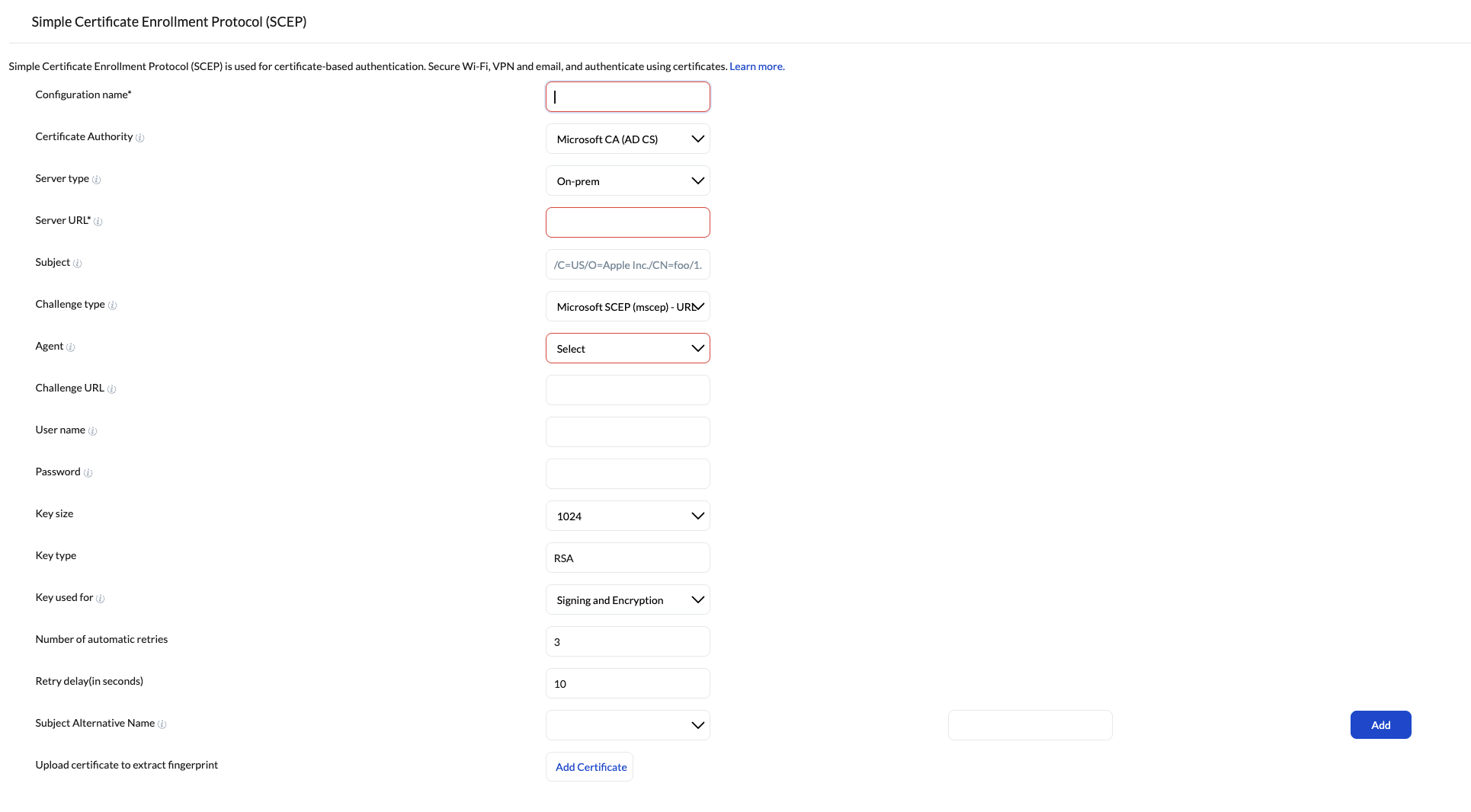
- Traffic Shaping: The SCEP policy must be configured with strategic “Retry” and “Delay” parameters.
- Configuration Standard: Setting the system to automatically retry pending responses with a specified delay (e.g., 30–60 seconds) prevents the CA from timing out or dropping requests during the initial mass-enrollment surge.
- Key Size Standards: Standardizing the cryptographic key size to 2048-bit RSA ensures the highest level of enterprise security without placing unnecessary computational strain on the CA during bulk generation.
Strategic Pillar 4: Service Synergy and Lifecycle Management
An injected certificate provides zero value until it is bound to an access protocol. Furthermore, certificates are ephemeral and require strict lifecycle governance.
- Unified Payload Architecture: The SCEP payload must not be deployed in isolation. The overarching Hexnode policy must bundle the SCEP configuration alongside the target network payloads (iOS Wi-Fi or VPN).
- Protocol Binding: Network payloads must be configured for EAP-TLS (or similar certificate-based authentication) and explicitly pointed to the SCEP payload. This creates a seamless, passwordless authentication loop for the end-user.
- Automated Renewals: Certificates possess strict expiration dates. The strategic lifecycle dictates leveraging Hexnode’s compliance dashboards to monitor certificate health. The SCEP profile must be designed to allow the iOS device to autonomously negotiate a certificate renewal with the CA before the expiration window hits, preventing fleet-wide network lockouts.
Phased Rollout Methodology
Deploying to 1,000+ devices introduces significant blast radius risk. A phased deployment matrix is required to ensure stability.
| Phase | Target Group | Strategic Objective |
|---|---|---|
| 1. Lab Validation | 2-5 IT Devices | Validate the SCEP server connection, CA fingerprint trust, and the correct resolution of %userprincipalname% and %email% wildcards. |
| 2. Pilot Ring | 20-50 End Users | Deploy to a cross-functional department to monitor CA server load, silent provisioning success via ADE, and seamless EAP-TLS network authentication. |
| 3. Fleet Expansion | 500 Devices | Large-scale deploy. Monitor Hexnode compliance logs for failed CSRs or CA timeouts, adjusting retry delays if necessary. |
| 4. Global Enforcement | 1,000+ Devices | Full deployment encompassing all remaining endpoints, establishing certificate-based access as the mandatory standard for enterprise connectivity. |
Frequently Asked Questions (FAQ): SCEP on Hexnode UEM
Q: Does Hexnode store or intercept the device’s private key?
A: No. The cryptographic private key is generated locally and securely within the iOS device’s hardware (Secure Enclave). It is never transmitted to the Hexnode UEM portal, nor is it sent to the SCEP server. Only the public key is transmitted during the Certificate Signing Request (CSR).
Q: Can SCEP certificates deployed via Hexnode be used for multiple enterprise services?
A: Yes. A single SCEP identity certificate can be cross-referenced and utilized by multiple iOS payloads within the same Hexnode policy. You can map it simultaneously to your Enterprise Wi-Fi, VPN setups, and Exchange ActiveSync configurations.
Q: Does Hexnode support Dynamic SCEP Challenges for AD CS?
A: Yes. Relying on static challenge passwords across a fleet of 1,000+ devices is a major security vulnerability. By deploying the Hexnode AD Agent (Cloud Broker) on-premise, Hexnode communicates directly with your Active Directory to generate a unique, single-use, dynamic challenge password for every individual device request.
Q: Do we need an Apple Enterprise/Developer account to deploy these payloads?
A: No. Managing iOS devices and deploying SCEP configurations via Hexnode does not require a paid Apple Developer or Enterprise account. You only need a standard Apple Push Notification service (APNs) certificate to maintain MDM communication.
Troubleshooting SCEP Deployments on iOS
Even with automated provisioning, environmental variables can interrupt the certificate delivery pipeline. Here is how to address the most common roadblocks when scaling to 1,000+ iPhones.
Symptom 1: The SCEP Profile Fails to Install / Retries Exhausted
- Root Cause: The iOS device is unable to resolve or reach the defined SCEP Server URL over the network.
- Resolution: Ensure that the SCEP Server URL is publicly reachable if devices are enrolling off-premises (e.g., at an employee’s home). If your CA infrastructure is strictly internal, the device must first be connected to the corporate Wi-Fi or connected via a pre-logon VPN before Hexnode deploys the SCEP payload.
Symptom 2: Certificate Installs Successfully, but Wi-Fi/VPN Authentication is Rejected
- Root Cause: A mismatch in identity mapping. The Subject Name or Subject Alternative Name (SAN) generated by Hexnode does not align with what your RADIUS server or VPN gateway expects to see for authentication.
- Resolution: Audit the wildcard variables used in your Hexnode SCEP policy. Ensure that variables like %email% or %userprincipalname% precisely match the user attributes populated in your Active Directory or Identity Provider. Cross-reference the RADIUS server logs (e.g., Cisco ISE, ClearPass) to identify exactly which identity parameter is failing validation.
Symptom 3: NDES 500 Server Error or “Incorrect Password” Prompts
- Root Cause: The Network Device Enrollment Service (NDES) service account lacks the exact permissions required to request the certificate on behalf of the Hexnode-managed device, or the Hexnode AD Agent has fallen offline.
- Resolution: Do not apply blanket Domain Admin rights to fix this (The “Over-Privilege Pitfall”). Instead, strictly verify that the NDES service account possesses the following specific permissions:
- Logon as a Service
- Read/Enroll on your specific certificate template
- Request Certificates on the Certificate Authority
- Note: Ensure the Hexnode AD Agent service is actively running on your Windows Server and showing a “Connected” status in the Hexnode console.
Symptom 4: Certificate Fails to Renew Before Expiration
- Root Cause: The device is disconnected from the network during the renewal window, or the Hexnode policy lacks a proper automatic retry mechanism.
- Resolution: Check the policy settings under iOS > Security > SCEP. Ensure that the Number of automatic retries and Retry delay are configured to give the device ample opportunity to re-attempt the SCEP request if the initial renewal handshake drops.


