


Category filter
Linux Network Hygiene: Auditing Wi-Fi Profiles via Hexnode UEM
Technical Summary: Linux Network Hygiene in Hexnode UEM utilizes nmcli orchestration to manage the lifecycle of saved wireless credentials. By executing remote Bash scripts with root-level authority, administrators can audit the UUIDs of saved connections across a distributed fleet. This framework enables the automated purging of legacy SSIDs, neutralizing Honeypot/Evil Twin vulnerabilities and ensuring that corporate hardware connects exclusively to authorized enterprise backbones.
To maintain a secure and high-performing fleet of Linux endpoints, IT administrators must move beyond simple connectivity and focus on Network Hygiene. Over time, Linux systems accumulate a “digital footprint” of stale Wi-Fi profiles. If left unmanaged, these profiles can lead to authentication loops, performance degradation, and increased vulnerability to “honeypot” attacks.
Hexnode UEM provides the centralized infrastructure to identify, audit, and purge these legacy network profiles across your entire Linux distribution—silently and at scale.
Technical Overview: Wi-Fi Profile Auditing via Hexnode
The most effective way to manage Linux network configurations is through nmcli (NetworkManager Command Line Interface). Hexnode leverages this tool via Remote Custom Scripting to give you total visibility into the saved connections.
The Audit Script
The following Bash command is deployed through the Hexnode portal to extract a precise list of wireless connection profiles:
|
1 |
nmcli -f NAME,UUID,TYPE connection show | grep wifi |
Why these parameters?
- -f NAME,UUID,TYPE: This flag ensures the output is structured for automation. By capturing the UUID, an administrator can later target a specific stale network for deletion without affecting others with similar names.
- connection show: Queries the NetworkManager for all saved profiles, including those currently inactive.
- grep wifi: Strips away Ethernet, VPN, and Bridge interfaces, presenting a clean list of only the Wi-Fi credentials stored on the hardware.
Enterprise Applications of Hexnode UEM
Managing Wi-Fi profiles isn’t just about “cleaning up”—it is a critical security and operational requirement for modern enterprises.
Let’s look at some scenarios, the challenges enterprises face, and how Hexnode helps solve them.
- Post-Migration Cleanup: After shifting to a new ISP or rebranding SSIDs, devices continue to “probe” for old office networks. Use Hexnode to mass-deploy a script that identifies and removes the legacy UUIDs, ensuring devices only connect to the authorized enterprise backbone.
- Honeypot Mitigation: Traveling employees often have “Airport_Free_Wifi” profiles that attackers can spoof to hijack traffic. Periodically run an audit via Hexnode to flag unauthorized SSIDs. You can then automate the deletion of these high-risk profiles to reduce the attack surface.
- Zero-Touch Provisioning: New devices may come with factory-tested Wi-Fi profiles that interfere with corporate 802.1X settings. Execute a “Wipe-and-Sync” policy during the enrollment phase to clear all pre-existing profiles before pushing the corporate Wi-Fi payload.
- Privacy Compliance: A long list of saved SSIDs can be used by malicious actors to reconstruct a user’s travel history. Enforce a “Network Retention Policy” where profiles not seen for 90 days are automatically purged via a scheduled Hexnode Bash script.
Strategic Utility Matrix
| Enterprise Challenge | Technical Resolution | Strategic Impact |
|---|---|---|
| Digital Footprint | Audit via nmcli UUID fields. | Reduces user tracking and travel history leakage. |
| Honeypot Attacks | Purge unauthorized/Free Wi-Fi SSIDs. | Prevents automatic connection to malicious APs. |
| Auth Loops | Clear stale 802.1X profiles. | Reduces helpdesk tickets for “Wi-Fi not connecting.” |
| Rebranding | Mass-delete legacy company SSIDs. | Forces fleet migration to the new network backbone. |
Deployment Guide: Executing via Hexnode Portal
Follow these streamlined steps to audit or manage your Linux fleet’s Wi-Fi history:
- Script Integration
- Log in to the Hexnode UEM Portal.
- Navigate to Content > My Files and upload your .sh script, or prepare to use the Hexnode Repository.
- Alternatively, use Hexnode Genie within the Script Editor to refine the logic (e.g., adding a loop to delete profiles based on specific criteria).
- Targeting & Execution
- Go to the Manage tab and select your target Linux devices or Device Groups.
- Select Actions > Execute Custom Script.
- Choose the Bash platform.
- Select your script from the repository. The Binary Path (usually /bin/bash) will be auto-populated.
- Monitoring & Validation
- Once deployed, navigate to Manage > [Device Name] > Action History.
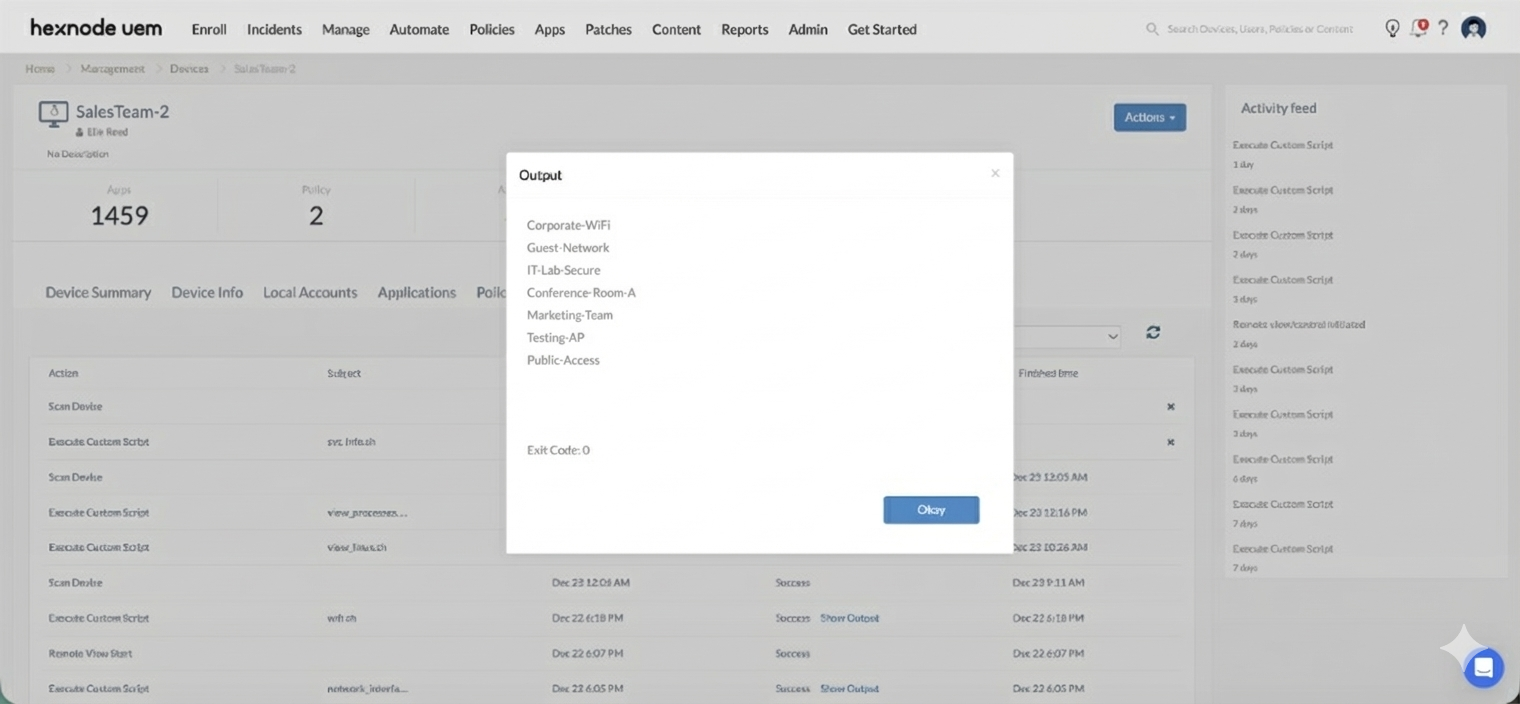
- Click Show Output next to the “Execute Custom Script” action.
- Hexnode will display the terminal output (SSIDs and UUIDs), allowing you to verify which networks are currently residing on the endpoint.


