


Category filter
Operationalizing Patch Intelligence: A Risk-Centric Framework for Enterprise Compliance
Overview
In modern enterprise security, simply knowing “updates are available” is insufficient. Hexnode UEM elevates patch management from a basic maintenance task to an enterprise-grade security operation. By integrating Common Vulnerabilities and Exposures (CVE) mapping, CVSS scores, and Real-Time Telemetry (via Declarative Device Management for Apple), Hexnode provides a risk-centric view of your fleet.
This document details how to leverage Hexnode’s patch metrics to establish Service Level Agreements (SLAs), visualize risk through executive dashboards, and automate remediation for high-risk devices across Windows, macOS and Linux platforms.
Prerequisites
- Agent Requirements:
- Hexnode Agent installed and active on target devices.
- Windows: Windows 10/11 (Pro, Enterprise, Education).
- macOS: macOS 11.0 (Big Sur) or later for DDM capabilities.
- Linux:
- Ubuntu: Version 18.04 and above
- Linux Mint: Version 21 and above
- Fedora: Version 36 and above
- Debian: Version 10 and above
- Network: Devices must have access to the Hexnode server and relevant OS update servers (e.g., Windows Update, Apple Software Update).
Configuration Steps
-
Defining SLA Compliance (Time-to-Remediate)
Move beyond “Installed vs. Missing” by defining a Time-to-Remediate (TTR) metric. This ensures that devices remaining non-compliant beyond a specific threshold trigger alerts for the Security Operations Center (SOC).
- Navigate to Patches > Reports.
- Select Applicable Patches.
- Use the filter options to set criteria. For example, filter by Release Date to identify available patches older than $X$ days.
- Identify the devices missing updates.
- Click Schedule Report to automatically email this data to the security team daily or weekly.
- Goal: Identify any device non-compliant for more than 14 days (or your internal SLA) to prioritize manual intervention.
-
Visualizing Risk via Graphical Insights
Hexnode converts raw data tables into executive-level dashboards to assess “Fleet Health at a Glance.” This allows stakeholders to instantly distinguish between critical vulnerabilities and routine updates.
- Go to the Patches tab, Dashboard tab.
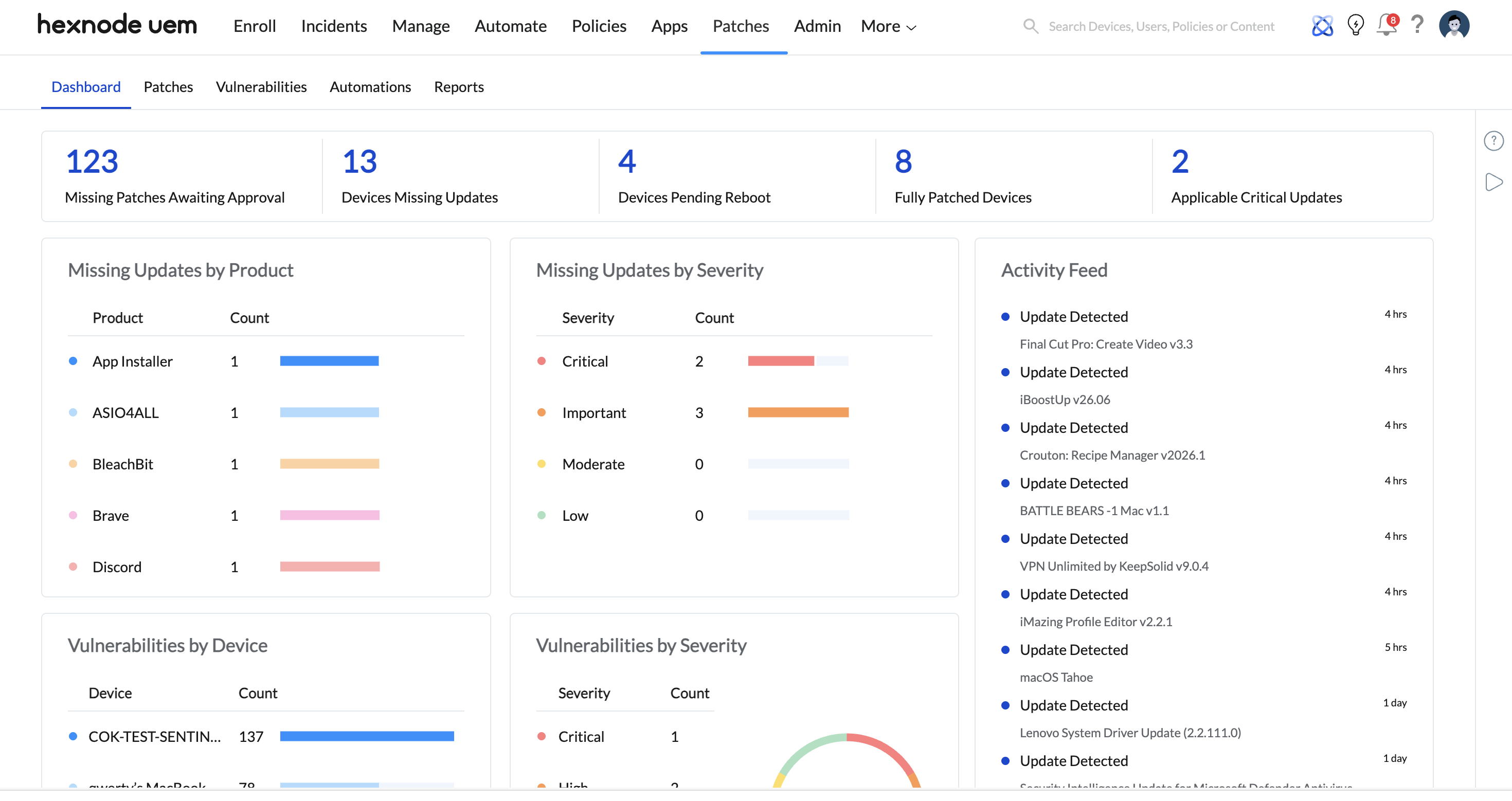
- Understand the patch severity distribution.
- Go to the Patches tab, Dashboard tab.
-
Triggering Automated Remediation from Metrics
Use patch metrics as a condition to trigger automated security actions. If a device’s vulnerability count exceeds a safe threshold, it should be automatically isolated.
- Navigate to Patches > Reports > Vulnerability > Vulnerable Devices.
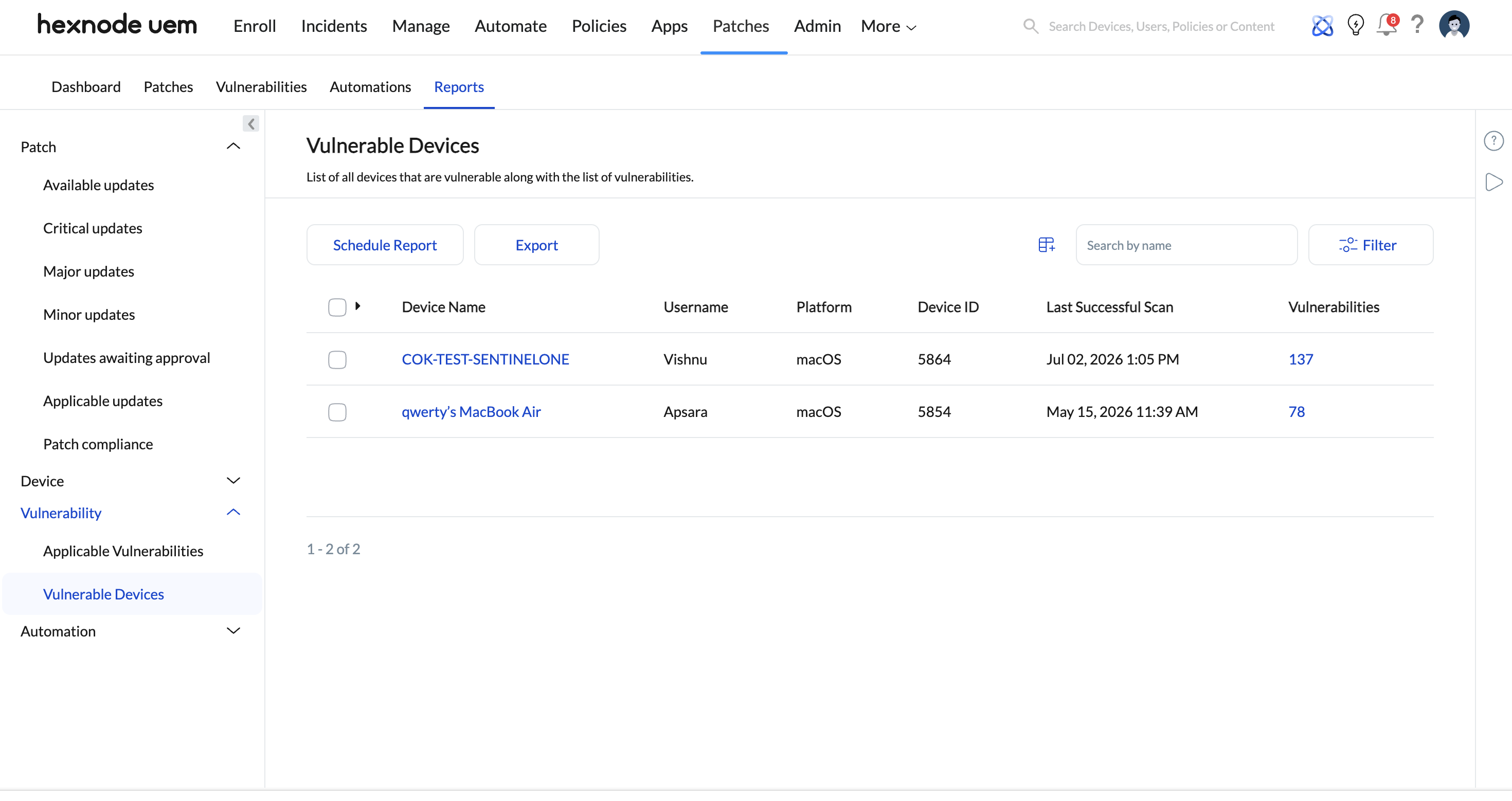
- Identify the devices with vulnerabilities greater than 5.
- Click on the device to assign a strict policy:
- Remove any Enterprise Wi-Fi profiles
- Impose Kiosk Mode
- Send broadcast messages warning the user
- Navigate to Patches > Reports > Vulnerability > Vulnerable Devices.
-
Managing the “Pending Reboot” Blind Spot
A patch is not effective until the device restarts. “Reboot Pending” statuses are a common cause of failed compliance audits.
- Go to Patches > Reports > Devices > Devices Pending Reboot.
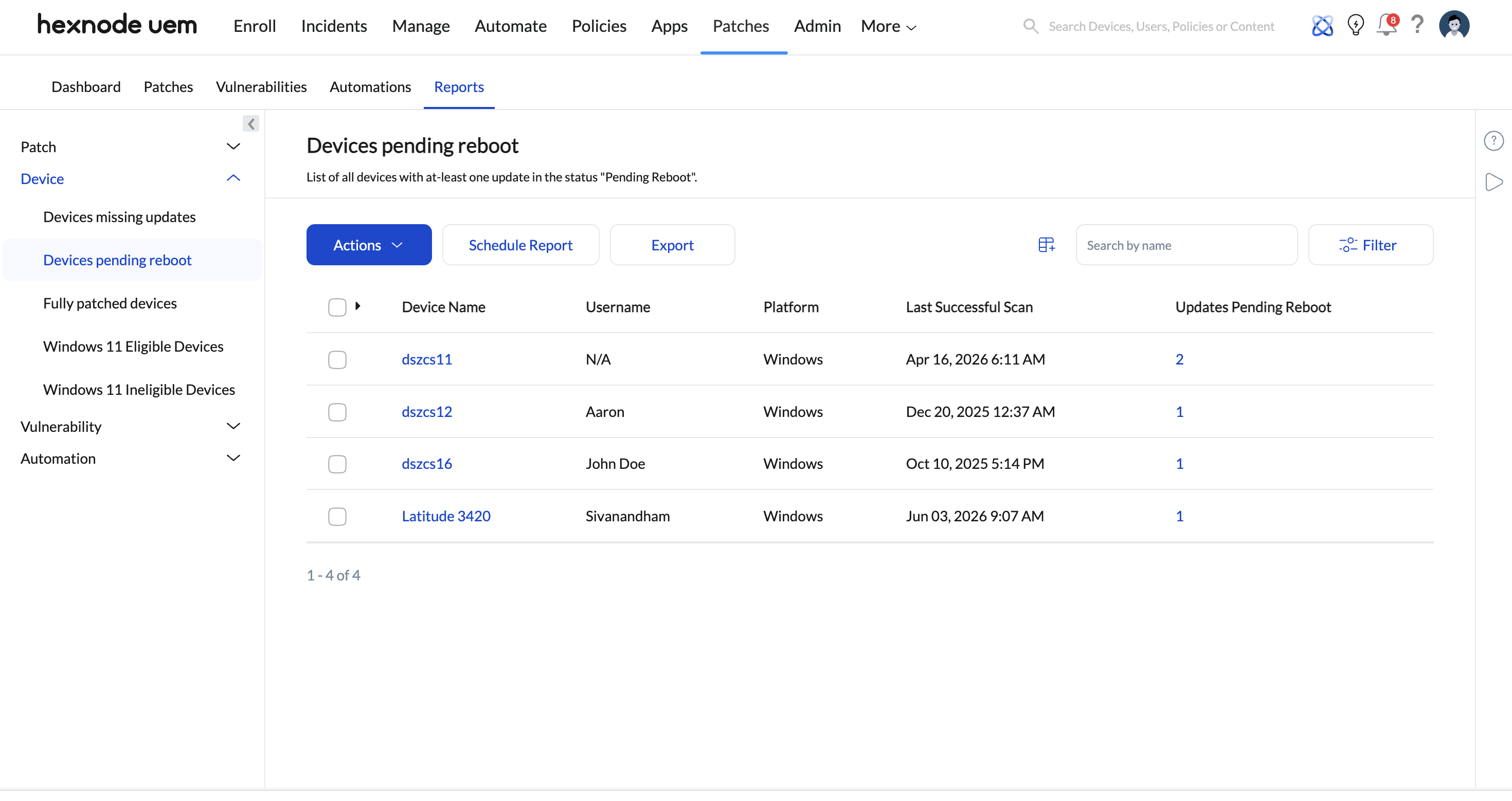
- Select the affected devices and click Actions > Broadcast Message.
- Send a notification: “Critical security updates installed. Please restart your device within 4 hours to avoid a forced reboot.”
- Go to Patches > Reports > Devices > Devices Pending Reboot.
Associate with Devices
While metrics are global, remediation policies must be associated with the correct entities to be effective.
- For SLA Monitoring: Associate Scheduled Reports with Auditor or Admin email addresses.
Troubleshooting & Best Practices
| Issue | Best Practice |
|---|---|
| Audit Preparation | Use the “Drill-Down” capability in Missing Patches to link directly to Device Identity and Update History. This provides the granular proof needed for SOC2 or HIPAA audits regarding who was affected and when remediation was scheduled. |
| Apple DDM Latency | Ensure macOS devices are updated to at least Big Sur. Hexnode utilizes Declarative Device Management (DDM) for these devices, meaning the device proactively reports status changes (Zero-Latency) rather than waiting for the server to poll every 24 hours. |
| Cross-Platform data | Remember that Hexnode normalizes metrics. An “Applicable Critical Patch” appears identical in reports whether it is for Windows, Linux, or macOS, simplifying cross-platform reporting. |


