


Category filter
Maintenance Windows & Patch Scheduling Reference in Hexnode UEM
TL;DR
A maintenance window defines when disruptive actions — patch installs, app updates, reboots — are allowed to run on a device. They are defined once, reused across policies, evaluated in the device’s local timezone by default, and interact with deadlines, grace periods, and forced reboots according to a fixed precedence: a deadline always outranks a window, and a window never delays a deadline. When multiple scheduled policies target one device, conflicts resolve by explicit rules documented on this page — not by chance of sync order.
Executive Summary
This document consolidates all patch and deployment scheduling behavior in Hexnode UEM into a single reference. Moving away from scattered per-policy settings and separate automation triggers, Hexnode UEM treats the Maintenance Window as a central, first-class object. Maintenance Windows govern when disruptive actions—such as patch installations, app updates, and reboots—are permitted to execute on a device.
This page defines the strict operational hierarchy (where deadlines outrank Maintenance Windows, and grace periods govern only the reboot) and establishes explicit conflict resolution rules for devices targeted by multiple scheduled policies.
1. The Maintenance Window Object
A Maintenance Window defines a recurring span of time during which disruptive actions may execute on member devices. Maintenance Windows are designed as reusable objects: you define a Maintenance Window once and attach it to any number of patch policies, app deployments, or actions.
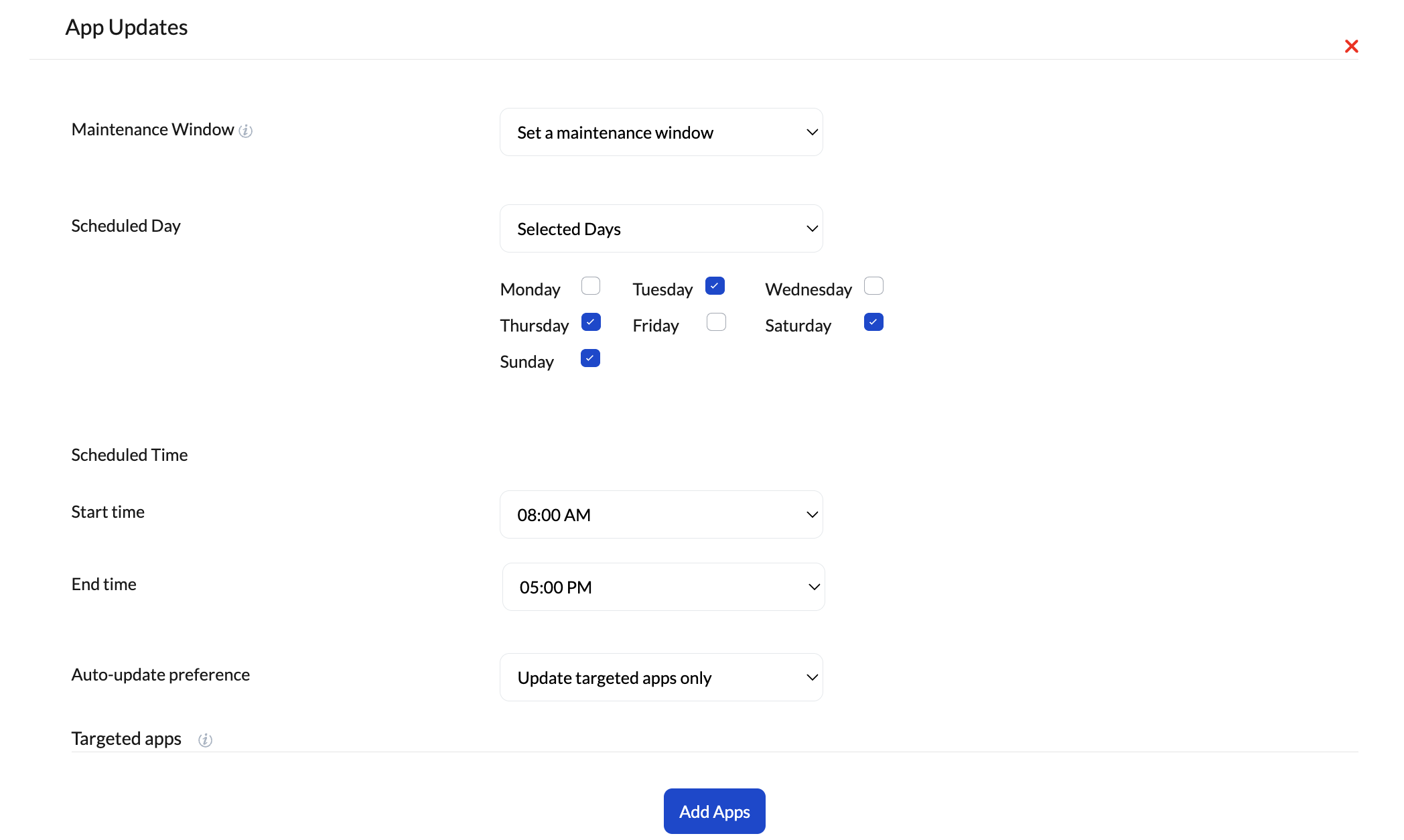
| Property | Description |
|---|---|
| Name | Unique identifier, referenced by policies. |
| Time span | Start and end time (may cross midnight, e.g., 22:00–04:00). |
| Recurrence | Daily, weekly, or monthly calendar pattern. |
What a Maintenance Window does NOT control:
- Content delivery: Downloads and DAFS (Distributed Apps and Files Server) pre-staging happen ahead of the Maintenance Window. Maintenance Window hours are spent installing, not downloading.
- Scans and inventory: Detection of missing patches runs on its normal scheduled cadence.
- Non-disruptive actions: Policy evaluation, messaging, and compliance checks remain unaffected.
2. Timezone Handling for Global Fleets
Hexnode UEM evaluates Maintenance Windows exclusively against each device’s local OS clock.
Device-Local Execution: A “Weeknights 22:00–04:00” Maintenance Window patches a device in London at London’s 22:00 and a device in Sydney at Sydney’s 22:00. This achieves a global, follow-the-sun overnight patch cycle using a single configuration, requiring zero regional policy duplication. (Note: Hexnode UEM does not support fixed-timezone absolute cutovers; schedules always adapt to the endpoint’s local time).
Edge Cases:
- DST transitions: Maintenance Windows are evaluated against local wall-clock time. A 22:00 Maintenance Window opens at 22:00 on both sides of a Daylight Saving Time change. It does not double-fire on fall-back.
- Travel (Timezone changes): If a device changes timezones mid-window, the current Maintenance Window instance completes under the timezone in which it opened. The next instance will use the new timezone.
- Midnight crossing: A Monday 22:00–04:00 Maintenance Window runs into Tuesday morning, but counts strictly as Monday’s occurrence.
3. Recurrence cycles
Hexnode UEM supports complex, real-world calendar logic for maintenance cycles.
| Pattern | Options |
|---|---|
| Daily | Every day, or weekdays/weekends only. |
| Weekly | Selected weekdays (e.g., Tuesday + Thursday). |
| Monthly (by date) | A specific calendar date (e.g., the 15th of the month). |
| Monthly (by ordinal weekday) | e.g., “Second Tuesday” to seamlessly align with Microsoft’s Patch Tuesday for Windows devices. Supports offsets (e.g., “Second Tuesday + 3 days” for vendor release soaking). |
4. The Enforcement Hierarchy
Administrators frequently configure Maintenance Windows, Deadlines, Grace Periods, and Forced Reboots. In Hexnode UEM, their relationship is an unbreakable hierarchy:
- The Maintenance Window governs routine installation. While a patch is before its deadline, installation attempts occur only inside an open Maintenance Window. If a device is offline or busy, it retries in the next occurrence.
- The Deadline overrides the Maintenance Window. Once a deadline passes (e.g., 7 days from patch availability), the install proceeds at the next opportunity regardless of Maintenance Windows. A deadline is the ultimate security backstop; if the two conflict, the deadline always wins.
- The Grace Period governs the reboot, not the install. After an install finishes, the grace period is the span during which the user is notified and may postpone the reboot. The install has already happened; only the restart is negotiable.
- Forced Reboot ends the negotiation. When the grace period expires, the device reboots. If reboot enforcement is scoped to a Maintenance Window, it waits for the next Maintenance Window; otherwise, it executes immediately.
Worked Example
Policy Setup: Maintenance Window = Weeknights 22:00–02:00; Deadline = 7 days; Grace Period = 24 hours.
Sequence of Events:
- Days 1–6 (Pre-Deadline): The laptop is shut down every night. No Maintenance Window occurrence succeeds.
- Day 7, 14:30 (Deadline Passes): The install executes immediately during work hours. The Maintenance Window no longer applies.
- 14:30 to Next Day (Grace Period Active): The user sees reboot prompts and utilizes their grace period to postpone the restart and keep working.
- 24-Hour Mark (Forced Reboot): The grace period expires, triggering an immediate, un-deferrable forced reboot.
5. Conflict Resolution (Multiple Policies on One Device)
When multiple scheduled policies target the same device, Hexnode UEM resolves conflicts deterministically—never by chance of sync order.
- Maintenance Windows combine for eligibility: The device is eligible for each policy’s actions during that policy’s attached Maintenance Windows. Maintenance Windows do not cancel each other out; a device covered by a “Servers” Maintenance Window and a “Finance” Maintenance Window is simply eligible during both.
- Strictest deadline wins: If two policies target the same patch with different deadlines, the earlier deadline governs per patch.
- Reboots are consolidated: If multiple policies complete installs in the same Maintenance Window and require restarts, the device reboots once after the final install, honoring the shortest applicable grace period.
- Automate workflows: Workflows that explicitly trigger an “install now” command are treated as deadline-class actions and execute immediately. To make automation respect Maintenance Windows, the workflow’s action must target the policy (which carries the Maintenance Window) rather than the raw install command.
6. Default Templates
To simplify scheduling, Hexnode UEM provides standard templates for common deployment scenarios:
| Template | Definition | Intended use |
|---|---|---|
| Overnight | Daily 22:00–04:00 | General fleets, follow-the-clock global patching. |
| Patch Tuesday +3 | Monthly, 2nd Tuesday + 3 days, 20:00–06:00 | OS updates for Windows devices after vendor-release soak. |
7. Troubleshooting
-
A patch installed during business hours despite the Maintenance Window.
Almost always, the deadline had passed—check the patch’s deadline against its availability date. Relative deadlines (“7 days from availability”) often start earlier than admins expect. The second most common cause is an Automate workflow triggering the raw install action, which ignores Maintenance Windows.
-
Device rebooted twice in one night.
Check whether one of the involved policies enforces a reboot outside the Maintenance Window scope while another consolidates within it. Mixed “Scope of enforcement” settings across policies prevent reboots from being consolidated.
-
Maintenance Window never seems to fire for some devices.
Verify the device’s OS timezone is correct. Because Hexnode UEM trusts the OS clock, a device with an incorrect timezone offset will open its Maintenance Window at the wrong real-world time.
-
Installs pile up in the first minutes of the Maintenance Window and saturate the site link.
Confirm DAFS pre-staging is active for the site. If devices are downloading at window-open, delivery scheduling isn’t completing before the Maintenance Window begins.
Frequently Asked Questions
Do Maintenance Windows delay patch downloads?
No. Delivery (cloud-direct or DAFS) is pre-staged before the Maintenance Window. Maintenance Windows gate execution only, ensuring limited time is spent installing.
What happens if a device is offline for its entire Maintenance Window?
The install retries at the next Maintenance Window occurrence. If the deadline passes first, the install runs at the next check-in regardless of Maintenance Windows.
Can a user's deferral push a reboot past the grace period?
No. Deferrals operate within the boundaries of the grace period; they cannot extend it. Once the grace period expires, it triggers the forced reboot.
We have devices in 14 countries. Do we need 14 Maintenance Windows?
No. One Maintenance Window covers all of them at each region’s local time, because Hexnode UEM utilizes the device’s local clock.
How do Maintenance Windows interact with Deployment Rings?
They compose: a ring decides whether a device is eligible for the deployment yet; the Maintenance Window decides when an eligible device may execute it. A device in an active ring still waits for its Maintenance Window (until the deadline is reached).


