


Category filter
How to Setup Business Container for iOS Devices
TL;DR: Hexnode Business Container for iOS
- Hexnode Business Container for iOS creates a managed data boundary between work apps and personal apps.
- The policy controls document sharing, clipboard behavior, managed contact access, and AirDrop sharing for managed documents.
- Configure the policy from Policies > iOS > Hexnode Business Container > Business Container, then assign it to iOS devices or user groups from Policy Targets.
- The Copy/Paste restriction applies to Device Enrolled devices and User Enrolled BYOD devices.
The Hexnode Business Container for iOS separates corporate data from personal content by controlling how managed and unmanaged apps exchange documents, clipboard content, contacts, and AirDrop files. IT administrators use this Hexnode UEM policy to reduce data leakage on Device Enrolled and User Enrolled iOS devices while preserving user privacy on BYOD or corporate-owned devices. After deployment, managed corporate apps follow the configured data flow restrictions, and personal apps remain outside the managed container unless a setting explicitly permits interaction.
Managed apps are apps installed through the Hexnode UEM console. Unmanaged apps are apps installed directly by the user, such as apps downloaded from the App Store outside Hexnode UEM management.
What is the Hexnode Business Container for iOS?
The Hexnode Business Container for iOS is a policy-based security framework that limits the flow of corporate documents and information between managed and unmanaged apps. The container does not create a separate user space on the device. Instead, Hexnode UEM uses iOS management controls to define whether work data can move into personal apps and whether personal data can be opened inside managed work apps.
When configured, sensitive corporate data remains within managed apps unless the policy permits a specific type of data exchange. This model supports BYOD deployments because personal apps, photos, messages, and other unmanaged user data remain outside Hexnode UEM control.
Configure the Hexnode Business Container Policy for iOS
Use the following workflow in the Hexnode UEM portal to set up Business Container restrictions for iOS devices:
- Navigate to the Policies tab.
- Click New Policy or select an existing policy.
- Go to iOS > Hexnode Business Container > Business Container.
- Configure the required data flow restrictions for documents, clipboard content, contacts, and AirDrop sharing.
Available Data Flow Configurations for iOS Business Container
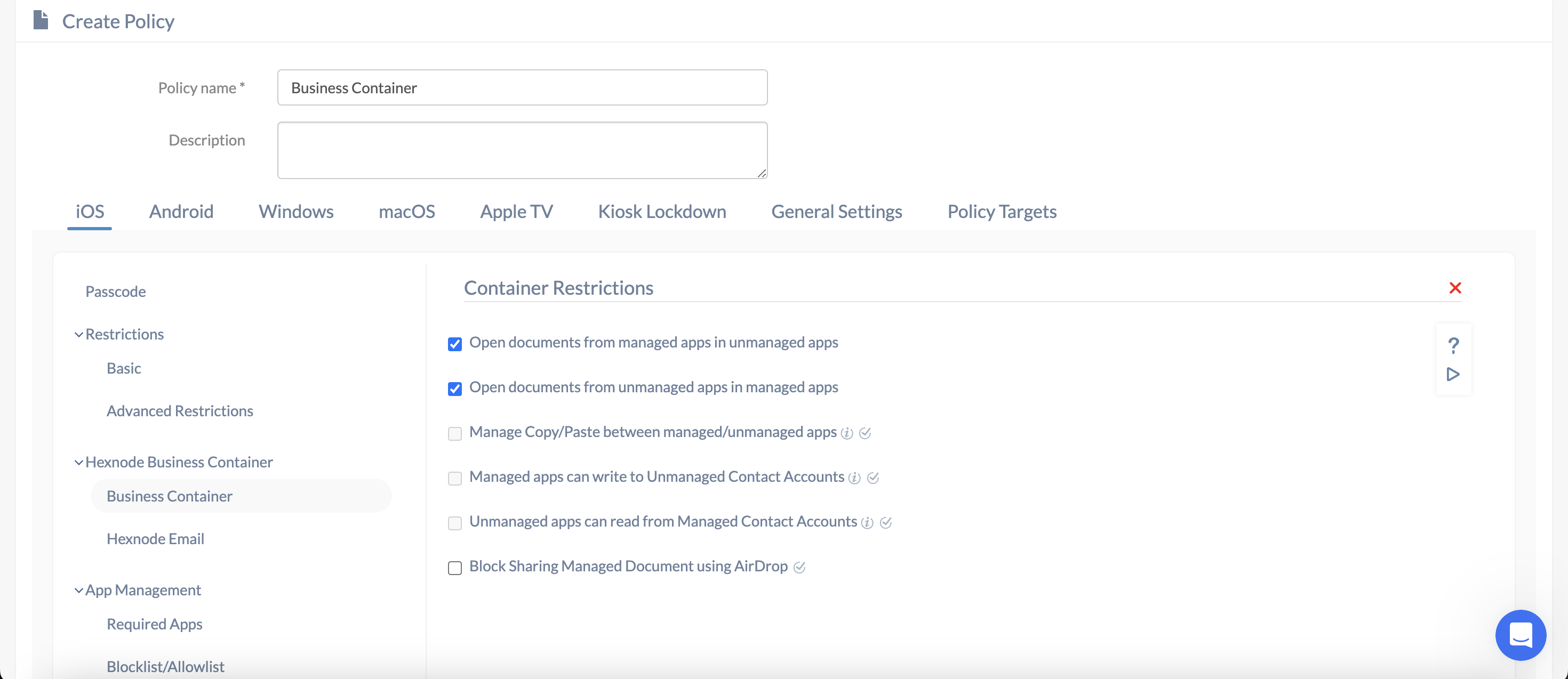
This table lists the Hexnode Business Container settings for iOS, explains what each setting controls, and shows the default state for document sharing, clipboard restrictions, contact access, and AirDrop sharing.
Hexnode Business Container data flow settings for iOS
| Setting | Technical Description | Default State |
|---|---|---|
| Open documents from managed apps in unmanaged apps | Controls whether files from work apps can be shared with personal apps. If unchecked, corporate data is confined to managed apps. | Allowed |
| Open documents from unmanaged apps in managed apps | Controls whether personal files can be imported into managed work applications. | Allowed |
| Manage Copy/Paste between managed/unmanaged apps | Restricts clipboard functionality across the managed and unmanaged app boundary. Note: This option requires at least one document-opening setting to be restricted. | Disabled |
| Managed apps can write to Unmanaged Contact Accounts (iOS 12+) | Allows work applications to save contacts to the user’s personal contact list. | Disabled |
| Unmanaged apps can read from Managed Contact Accounts (iOS 12+) | Allows personal apps, such as WhatsApp, to view contacts stored within the managed work container. | Disabled |
| Block Sharing Managed Document using AirDrop | Disables AirDrop sharing for files that originate from a managed corporate application. | Disabled |
Deploy the Business Container Policy to iOS Devices
After configuring the Business Container settings, navigate to Policy Targets and associate the policy with the required iOS devices or user groups. Click Save to deploy the restrictions to the selected targets.
Key Considerations for iOS Business Container Implementation
Managed and unmanaged app definitions
- Managed Apps: Applications installed through the Hexnode UEM console.
- Unmanaged Apps: Applications installed directly from the App Store by the user.
Copy/Paste restriction enrollment support
The Manage Copy/Paste between managed/unmanaged apps restriction is supported on the following enrollment types:
- Device Enrolled devices.
- User Enrolled (BYOD) devices.
Troubleshoot Hexnode Business Container for iOS
- Copy/Paste setting is greyed out
If the Manage Copy/Paste between managed/unmanaged apps option is unavailable, check the two document-opening settings in the Business Container policy. Clipboard management becomes available only when at least one data flow direction is restricted. If both Open documents from managed apps in unmanaged apps and Open documents from unmanaged apps in managed apps are allowed, the Copy/Paste restriction cannot engage.
- AirDrop still works for managed documents
If users can still share managed documents through AirDrop, confirm that Block Sharing Managed Document using AirDrop is enabled in the policy. This setting is visible and active only when the policy initially allows managed documents to be opened in unmanaged apps.
Frequently Asked Questions
Does the Hexnode Business Container wipe personal data from iOS devices?
No. The Business Container manages interactions between work data and personal data. It does not access or delete personal photos, messages, or apps.
Can personal apps see work contacts on iOS devices?
Personal apps cannot read managed contact accounts unless the Unmanaged apps can read from Managed Contact Accounts setting is explicitly enabled in the Business Container policy.
Does the Business Container affect the native Mail app?
The native Mail app is affected only when the mail account is configured as a managed account through Hexnode UEM.
Does the Copy/Paste restriction support User Enrolled BYOD devices?
Yes. The Copy/Paste restriction is supported on User Enrolled BYOD devices and Device Enrolled devices.


