


Category filter
Corporate-Owned Personally Enabled Devices: COPE Management with Hexnode UEM
At a Glance
Corporate-Owned, Personally Enabled (COPE) is a strategic endpoint management model designed to provide organizations with the deep administrative control of a fully managed device while granting employees a private, separate space for personal use. In the Hexnode UEM ecosystem, this architecture is officially classified as Android Enterprise: Work Profile on Company-Owned Device (WP-C).
By utilizing containerization, Hexnode creates a cryptographically isolated work profile on the corporate device. This ensures that enterprise applications, corporate data, and strict security policies remain completely segregated from the employee’s personal applications, photos, and browsing history. Hexnode supports this robust deployment model for standard Android devices running version 10.0 and above, and Samsung Knox devices running Android 11.0 and above. COPE effectively balances stringent corporate compliance with user privacy, eliminating the need for employees to carry two separate mobile devices.
COPE vs. BYOD vs. COBO (Deployment Matrix)
To design an effective mobility strategy, system architects must understand how COPE differs from other Android Enterprise deployment methodologies.
| Feature | COPE (Corporate-Owned, Personally Enabled) | BYOD (Bring Your Own Device) | COBO (Corporate-Owned, Business Only) |
|---|---|---|---|
| Device Ownership | Organization | Employee | Organization |
| Privacy Level | High (Strict separation of work and personal data) | Highest (Admin cannot control device-level settings) | None (No personal usage permitted) |
| App Deployment | Silent installation within the Work Profile only | Silent installation within the Work Profile only | Silent installation across the entire device |
| Device-Level Control | Moderate (Admin can enforce device passcodes and work profile wipe) | Minimal (Admin can only remove the Work Profile) | Maximum (Complete lockdown, Kiosk mode) |
| Ideal Use Case | Sales, executives, and field teams needing a primary daily driver | Contractors, temporary staff, and organizations reducing hardware costs | Logistics, retail kiosks, and dedicated task workers |
Enterprise Use Cases for COPE
Implementing a COPE strategy is highly advantageous in scenarios where hardware consistency is required, but strict operational lockdown would hinder employee productivity and morale.
- Executive Mobile Fleet: C-level executives frequently handle highly sensitive corporate data (requiring strict Data Loss Prevention policies) but refuse the friction of carrying a secondary personal phone. COPE allows IT to strictly secure corporate emails and documents in the work container while allowing executives to securely use personal apps on the same corporate-issued flagship device.
- Global Sales and Field Teams: Road warriors rely on corporate hardware for CRM access, client communications, and expense tracking. During travel, these employees also need access to personal banking, ride-sharing, and personal messaging apps. COPE ensures that if the device connects to an untrusted public Wi-Fi network, the corporate data remains encrypted and isolated from any personal app vulnerabilities.
- Regulated Industries (Healthcare & Finance): Organizations adhering to HIPAA or PCI-DSS must prove that corporate data cannot leak into consumer applications. COPE hardware allows IT to enforce strict clipboard restrictions (preventing copy/paste) and block screenshots exclusively within the work profile, satisfying compliance audits while still permitting employees to use the device casually off-the-clock.
Privacy and Control: What IT Can and Cannot See
A successful COPE deployment requires clear communication regarding user privacy. The Android Enterprise architecture enforces strict cryptographic boundaries between the personal and work profiles.
What Hexnode IT Admins CAN Do / See (Work Profile & Device Control):
- Application Inventory: View, silently install, update, and delete applications strictly within the Work Profile.
- Data Wipes: Execute a wipe to permanently remove the Work Profile and all associated corporate data, leaving the user’s personal data and the rest of the device entirely untouched.
- Policy Enforcement: Enforce complex passcodes for the Work Profile or the device itself, configure Wi-Fi/VPN settings, and block screenshots within work applications.
- Data Loss Prevention (DLP): Restrict users from copying data from a work application and pasting it into a personal application.
- Location Tracking: Track the physical geolocation of the device to recover lost or stolen corporate hardware.
What Hexnode IT Admins CANNOT Do / See (Personal Profile Privacy):
- Personal App Inventory: Administrators cannot view, modify, or delete applications installed by the user in the personal profile.
- Personal Communications: Administrators cannot read personal SMS text messages, personal emails, or listen to phone calls.
- Browsing History: Traffic routed through personal web browsers is not visible or logged by the Hexnode UEM console.
- Personal Media: Photos, videos, and files stored in the personal partition are completely inaccessible to the IT department.
Prerequisites for COPE Enrollment in Hexnode
Before initiating a WP-C enrollment, ensure your environment and hardware meet the following strict prerequisites:
- Operating System: Standard Android devices must run Android 10.0 or later. Samsung Knox devices must run Android 11.0 or later.
- Device State: The target device must be completely wiped and in a factory-reset, out-of-the-box state.
- Android Enterprise Integration: Your Hexnode UEM portal must be successfully enrolled and integrated with the Android Enterprise program (via Managed Google Play/Managed Domain).
- Network Access: The device requires an active, stable internet connection (Wi-Fi or Cellular) to contact the Google provisioning servers during the initial setup screen.
Configuration and Enrollment Workflow
For comprehensive instructions on building the required enrollment profile and provisioning the physical endpoint from a factory-reset state, refer to our dedicated guide: How to enroll a device in Android Enterprise as Work Profile on Company-Owned Device.
Managing Policies and Restrictions on COPE
Hexnode allows architects to deploy granular configurations that govern the COPE environment without crippling the utility of the personal partition.
When deploying policies via Policies > Android > Advanced Restrictions, administrators can establish distinct Data Loss Prevention (DLP) rules. For example, you can disable Copy contents between normal and work profiles to ensure a user cannot copy a client’s social security number from a corporate CRM app and paste it into their personal WhatsApp.
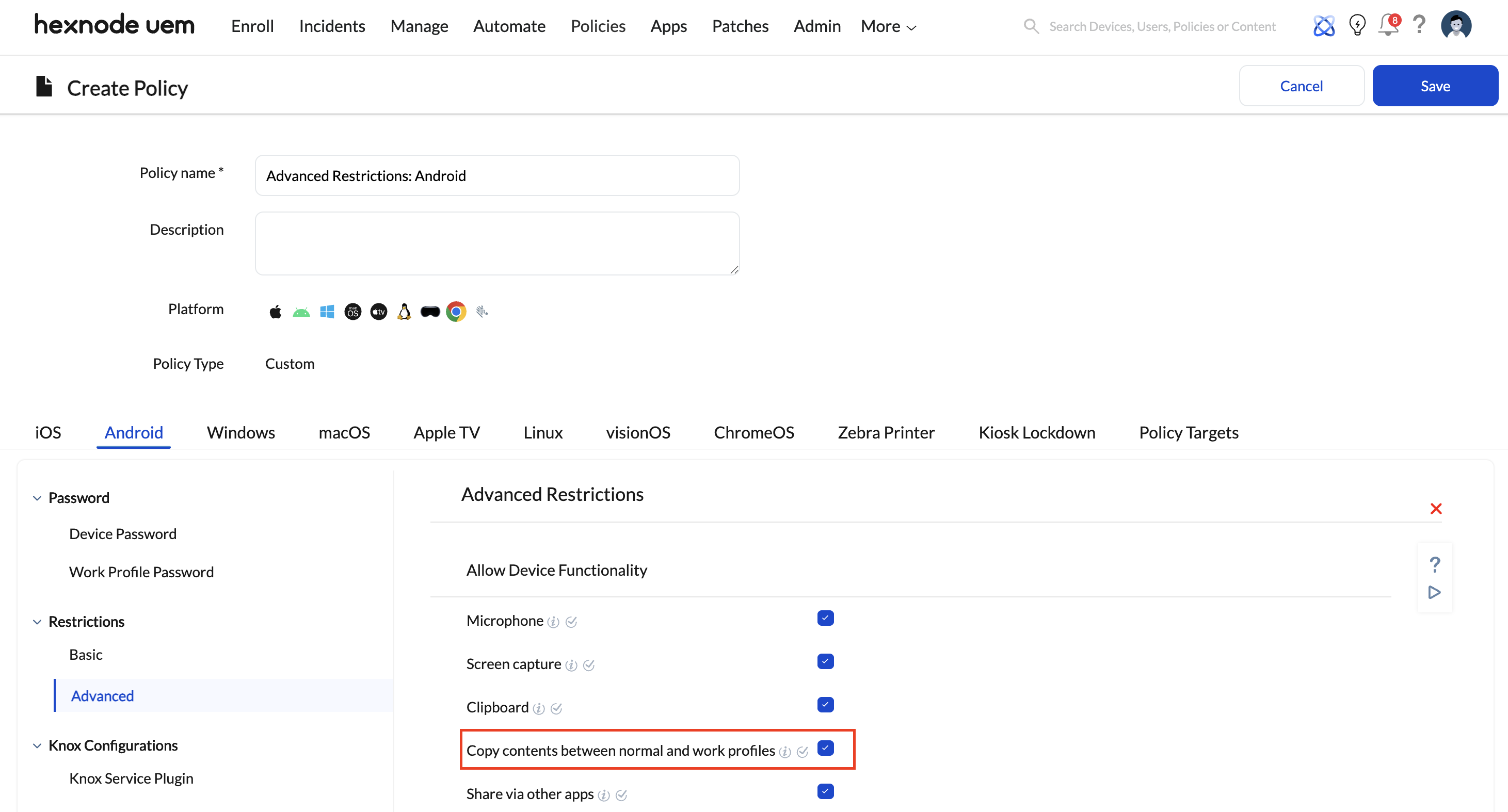
Similarly, network routing can be tightly controlled. Administrators can deploy a corporate VPN configuration specifically to the Work Profile. This ensures that all corporate traffic is securely tunneled through the enterprise firewall, while personal apps (like Netflix or Spotify) route directly out to the public internet, preserving corporate bandwidth and maintaining user privacy.
Frequently Asked Questions
Can an administrator wipe the entire COPE device, or just the work data?
For WP-C devices, executing the Wipe Device remote action in Hexnode will actually only wipe the work profile. This permanently destroys the encrypted corporate container and corporate data, while leaving the user’s personal data untouched.
Does COPE support iOS devices, or is it Android only?
The specific “COPE / Work Profile on Company-Owned Device” architecture and nomenclature is native to the Google Android Enterprise framework. However, Hexnode supports a conceptually similar deployment model for Apple devices utilizing iOS User Enrollment, which similarly separates Managed Apple Accounts and corporate data from personal Apple IDs and applications.
What happens if the employee tries to copy data from a work app to a personal app?
If the IT administrator has applied the standard DLP restrictions within the Hexnode policy, the Android OS will actively block the action. When the user attempts to paste the corporate text into a personal application, a system toast notification will appear stating that the action is not allowed by the IT admin.
Can Hexnode track the location of a COPE device?
Yes. Because the organization owns the device, IT administrators can apply a Location Tracking policy within Hexnode to monitor the physical geolocation of the endpoint. This is critical for asset recovery and compliance auditing.


