


Category filter
Shared iPad for Business: Orchestrating Multi-User Workflows with Hexnode
Overview: Orchestrating Shift-Based Login for Retail & Healthcare
In dynamic, fast-paced environments like hospital wards or retail sales floors, deploying a 1:1 hardware model (one tablet for every single employee) is highly inefficient and cost-prohibitive. The operational reality requires a Shared Device Architecture: a fleet of communal hardware used continuously across multiple shifts.
However, sharing hardware introduces a massive security and compliance risk. When Nurse A finishes their shift, Nurse B cannot be allowed to access Nurse A’s cached session, logged-in accounts, or protected patient data (HIPAA).
Hexnode UEM resolves this by orchestrating Apple’s Shared iPad infrastructure. By leveraging Automated Device Enrollment (ADE), Hexnode transforms a standard iPad into a containerized, multi-user workstation. Employees log in with Managed Apple Accounts to access their secure, encrypted data partition, and log out to lock their data away—leaving a clean slate for the next shift.
Shared iPad Mode Comparison
| Feature | User Mode (Strict Identity) | Guest Mode (Temporary) |
|---|---|---|
| Prerequisite | Managed Apple Account (ABM/ASM) | iPadOS 14.5+ |
| Data Persistence | Persistent (Saved to iCloud) | Ephemeral (Deleted at Logout) |
| Ideal Use Case | Doctors, Nurses, Long-term staff | Retail staff, checking inventory |
| Storage Logic | Set a specific limit (e.g., 5GB) | Temporary session space |
| Security Trigger | Forced Login Screen | Single-Tap Access |
The Architectural Blueprint: How It Works
Standard MDM policies apply after a device is set up. However, turning an iPad into a multi-user machine requires altering its fundamental operating system behavior before it ever reaches the home screen.
To achieve this, Hexnode relies on an Automated Device Enrollment (ADE) Profile. When a brand-new, ABM-registered iPad is turned on, it checks in with Apple, recognizes it belongs to your Hexnode instance, and downloads this specific profile to rebuild its file system (APFS) for shared use.
Phase 1: Designing the Multi-User Environment (The ADE Profile)
The Objective: Define exactly how the device handles multiple identities, partitions its hard drive, and enforces security timeouts.
The Execution Strategy: Within the Hexnode console (Enroll > Apple Business/School Manager > Enrollment Profiles), the IT architect builds a new ADE profile configured for Shared Devices. The architect makes three critical routing decisions:
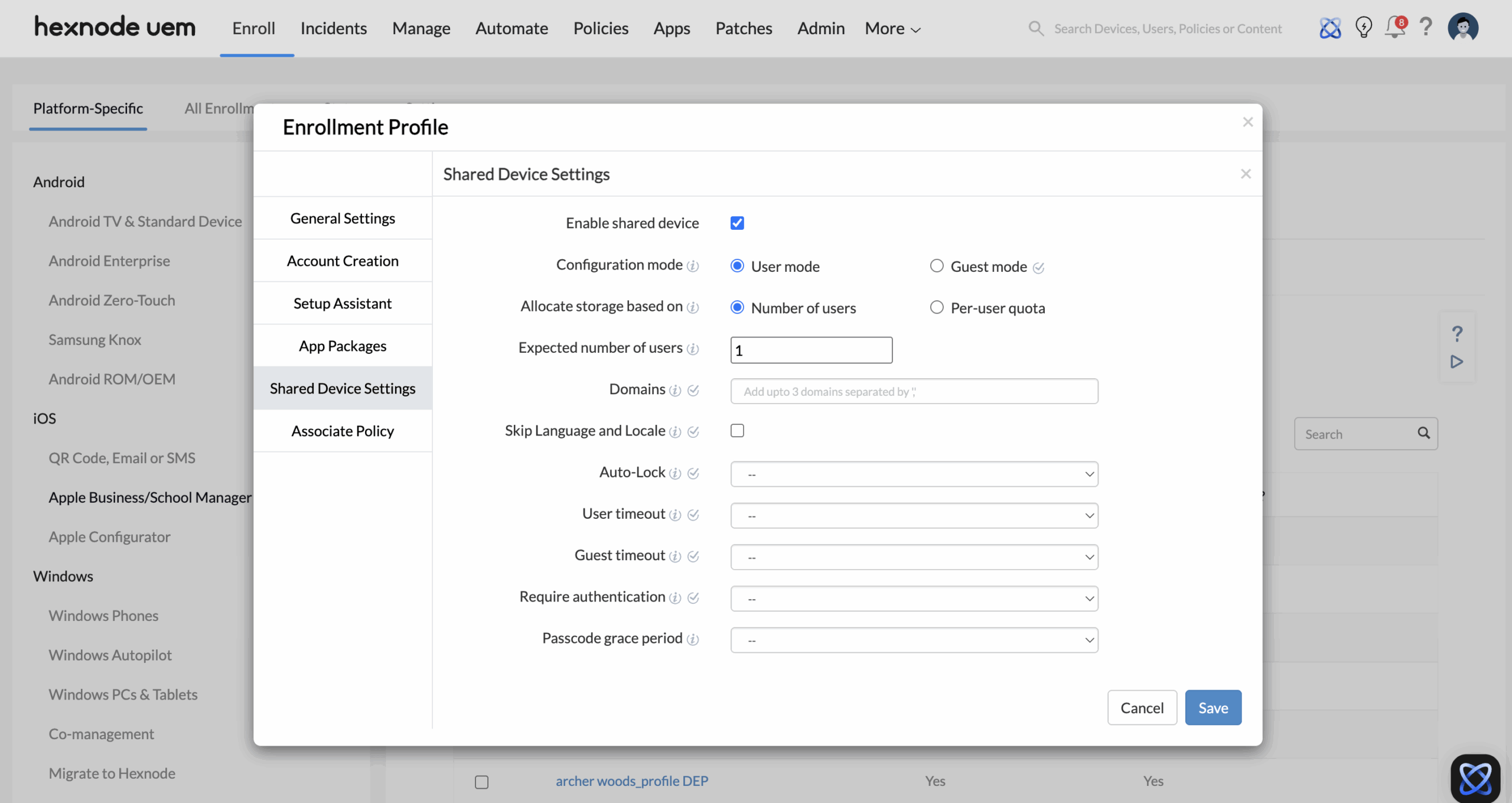
- Authentication Mode (User vs. Guest):
- For healthcare or environments requiring strict identity tracking, the architect selects User mode. This forces the iPad to display a customized login screen requiring the employee’s Managed Apple Accounts (which is created and managed within your ABM portal).
- For lightweight retail use cases (e.g., floor staff checking inventory), the architect can select Guest mode (requires iPadOS 14.5+), allowing staff to tap a button for a temporary session that instantly self-destructs upon logout.
- Storage Allocation (Preventing Device Bloat): Because multiple users are caching data on a single hard drive, IT must prevent the disk from filling up. Hexnode allows you to partition the storage based on an Expected number of users (dividing space equally) or a strict Per-user quota (e.g., 5GB per identity). If the drive gets full, the device automatically purges the local data of the oldest, inactive user to make room for the new login.
- The Compliance Safety Net (User Timeout): To prevent data breaches when an employee inevitably forgets to sign out, the architect configures a strict User timeout (e.g., 15 minutes of inactivity). Once the timer hits, Hexnode forces an automated logout, securing the session.
Phase 2: Zero-Touch Provisioning & Deployment
The Objective: Route the newly purchased hardware to Hexnode and deploy the Shared architecture without IT unboxing the devices.
The Execution Strategy:
- ABM Server Assignment: When the iPads are purchased via an authorized Apple reseller, their Serial Numbers automatically populate in your Apple Business Manager portal. The admin assigns these devices to the Hexnode UEM Server within ABM.
- Hexnode Sync & Profile Association: In the Hexnode UEM portal, the admin syncs the ADE account to pull in those assigned devices. The architect then associates the “Clinical Shared Device” ADE profile to this hardware.
- The Zero-Touch Boot: The shrink-wrapped iPads are shipped directly to the hospital ward. When the local manager unboxes the device and turns it on, it bypasses standard consumer setup, locks into Supervised mode, and boots directly to the enterprise Shared iPad login screen.
Phase 3: Edge-Case Security (Restricting Temporary Access)
The Objective: If you designed the architecture for strict identity tracking (User Mode), you must ensure that no employee can bypass the login screen by launching an anonymous guest session.
The Execution Strategy: Hexnode allows you to completely remove the guest option using a baseline security policy.
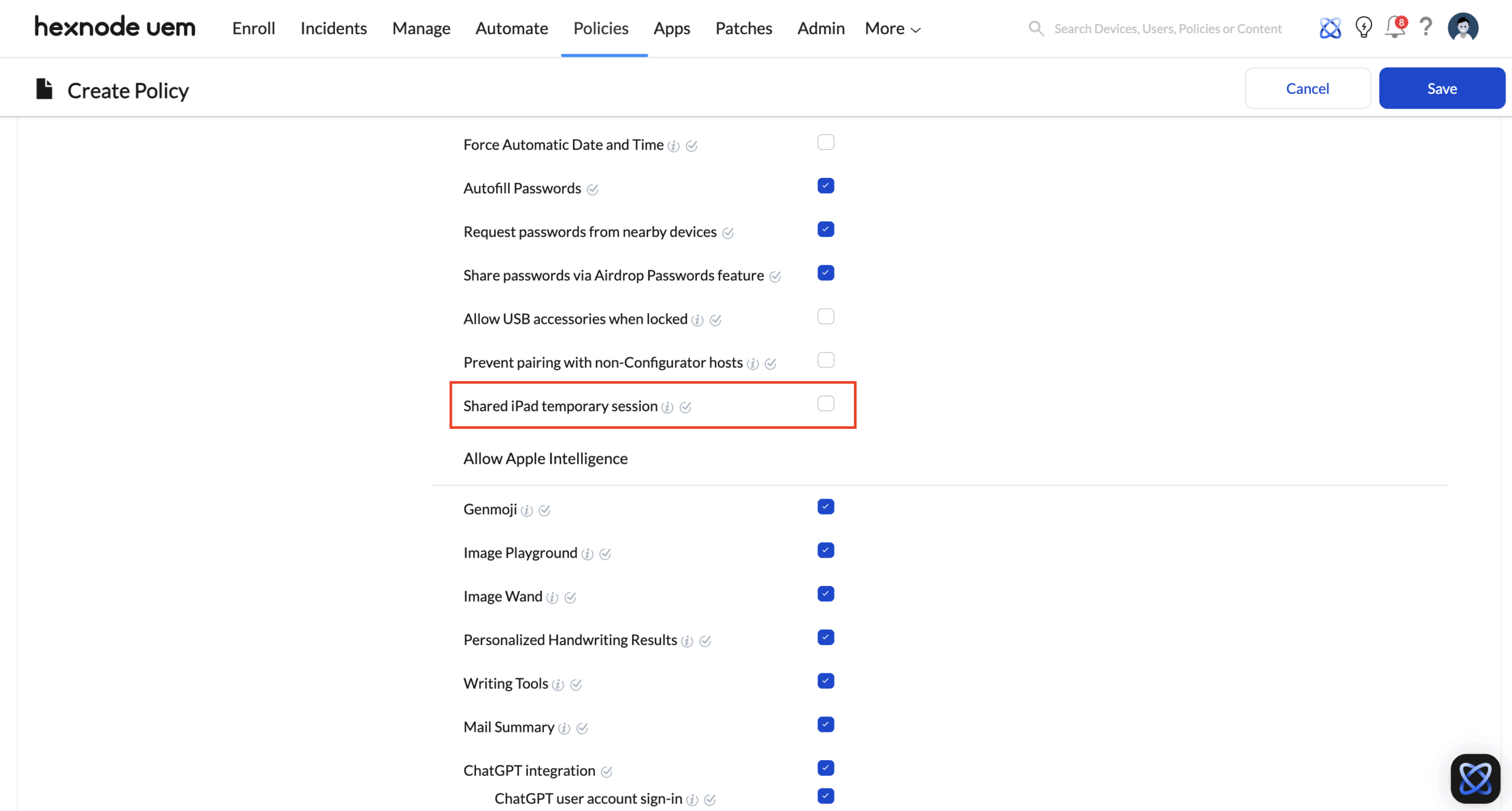
- Go to Policies > New Policy > Create a fully custom policy > iOS > Advanced Restrictions.
- Locate the Shared iPad Temporary Session setting under Allow Security and Privacy Settings and ensure it is Disabled (Unchecked).
- Deploy this policy to your Shared iPads. The device is now a fortress—no Managed Apple Account, no access.
The Workflow in Action: App Segregation and The Shift Change
A common misconception is that a Shared iPad downloads apps every time a new user logs in. This is not the case. To save bandwidth and time, IT pre-installs the necessary corporate apps device-wide using Apple VPP (Volume Purchase Program). What Hexnode segregates is the app data.
- 7:00 AM (Start of Shift): Nurse A picks up any iPad from the ward’s charging station. The corporate apps (like an EHR system or secure messaging) are already installed on the device. Nurse A enters their Managed Apple Account. Hexnode UEM securely decrypts Nurse A’s specific partition. When Nurse A opens the EHR app, it automatically loads their specific credentials and patient lists.
- 3:00 PM (End of Shift): Nurse A taps “Sign Out” on the lock screen (or the 15-minute inactivity timeout triggers). Their partition is instantly encrypted. The iPad returns to the primary login screen.
- 3:15 PM (Next Shift): Nurse B picks up the exact same iPad and logs in. Because the apps are installed device-wide, Nurse B doesn’t have to wait for anything to download. However, because Hexnode UEM is managing the containerization, Nurse B cannot see Nurse A’s cached session. When Nurse B opens the exact same EHR app, it acts as a fresh install, presenting a clean slate for Nurse B’s shift.
Conclusion
Hexnode UEM’s implementation of Shared Device Architecture provides a standardized framework for managing multi-user endpoints in high-density environments. By bridging Apple’s native containerization with enterprise-grade policy orchestration, Hexnode ensures that each user session remains cryptographically isolated and compliant with data privacy regulations. This architecture maximizes hardware efficiency while delivering a secure, personalized user experience without the operational overhead of manual device re-provisioning.


