


Category filter
Run scripts on Android devices
Running custom scripts on Android devices allows IT administrators to instantly execute specific commands and automate complex device management tasks remotely. Using Hexnode UEM, admins can deploy two distinct types of scripts directly from the unified management portal: Android Shell Scripts (.sh) and Hexnode Custom Scripts (.txt).
Android Shell Scripts interact directly with the device’s operating system at the command-line level, making them ideal for deep system, file, and app-level configurations (e.g., uninstalling apps). Conversely, Hexnode Custom Scripts are designed to remotely trigger Mobile Device Management (MDM) specific actions (e.g., locking a device) without needing OS-level shell access.
To successfully deploy either script type, the target device must have the latest Hexnode Agent app installed. Once deployed, scripts execute silently in the background unless a specific user interface action is commanded.
1. Understanding Script Types: When to Use Which?
Hexnode supports two distinct types of scripting for Android:
Android Shell Scripts (.sh)
- Best for: Interacting directly with the device’s operating system at the command-line level.
- Use cases: Deep system, file, and app-level configurations (e.g., moving files, killing background processes).
- Technical Constraint: Because these commands execute at the OS level, many require the Android device to be rooted.
- Example Syntax: To uninstall an application, use
su -c "pm uninstall < package_name>"
Hexnode Custom Scripts (.txt)
- Best for: Remotely triggering Mobile Device Management (MDM) specific actions without needing OS-level shell access.
- Use cases: Automated workflows and remote troubleshooting using specialized commands designed exclusively within the Hexnode ecosystem.
- Example Syntax: To lock a device, use
DeviceLock (Message) (PhoneNumber)
2. Prerequisites for Script Execution
To prevent deployment failures, ensure the following requirements are strictly met before pushing a script:
- Agent Application: The latest version of the Hexnode Agent (Hexnode UEM or Hexnode For Work) app must be installed on the target device.
- Strict File Formatting:
- Android shell scripts must use the .sh file extension.
- Hexnode custom scripts must use the .txt file extension.
3. Step-by-Step Configuration Guide
Follow this sequence to deploy and execute a custom script on managed Android devices:
- Log in to your Hexnode UEM portal.
- Navigate to the Manage tab and select your target device(s).
- Click on Actions > Deployments > Execute Custom Script.
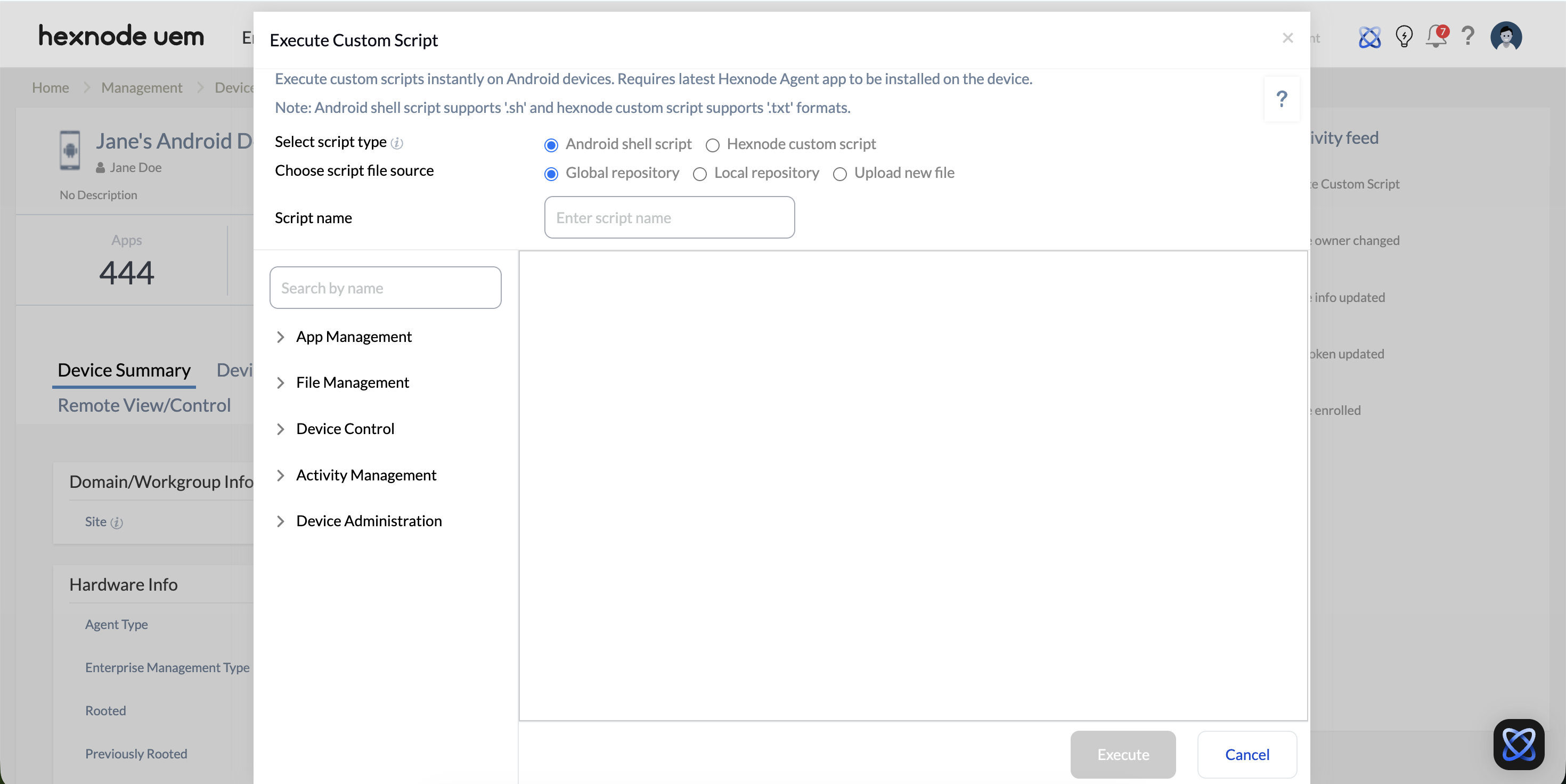
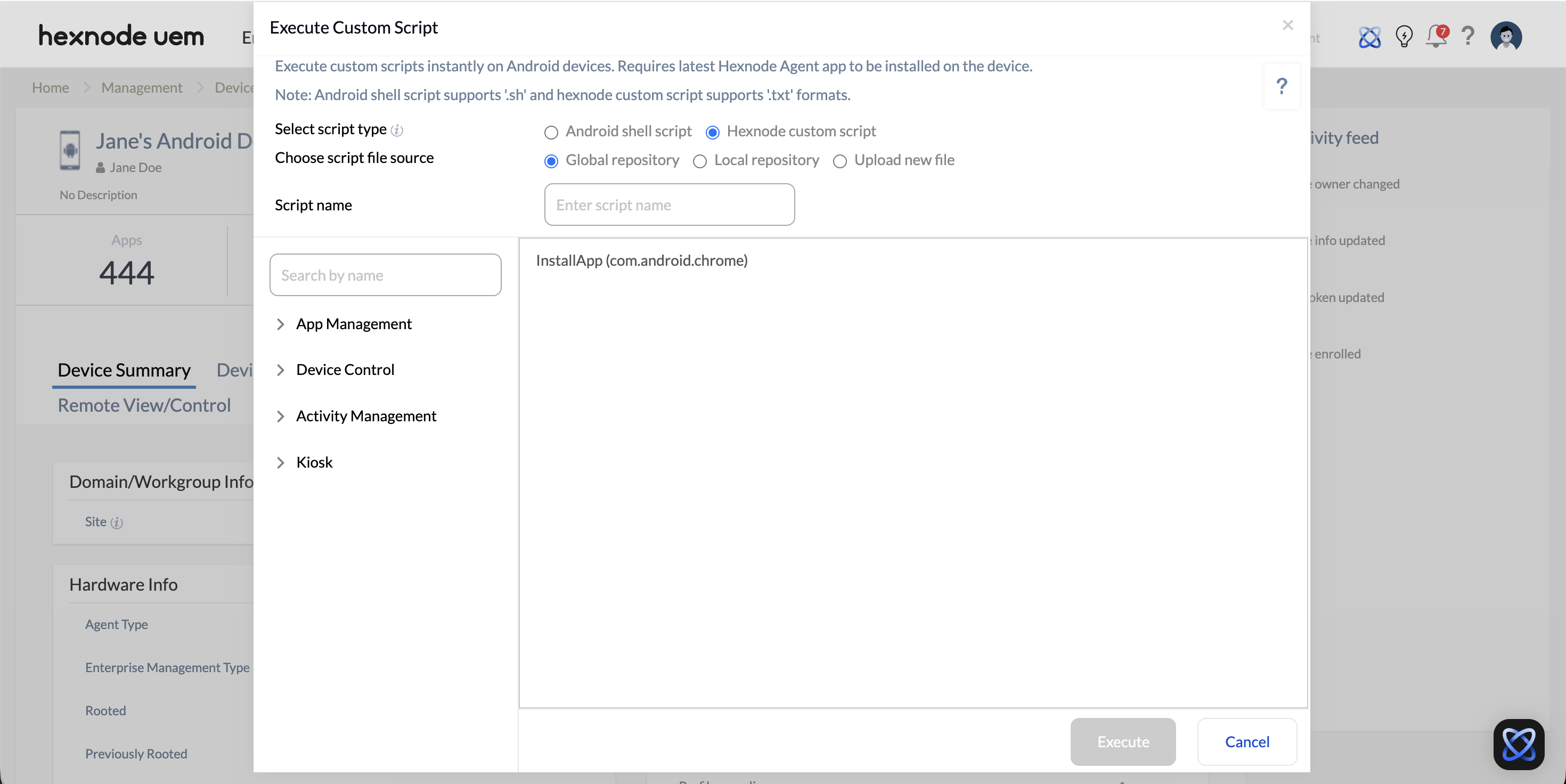
- Select the script type to deploy (Android shell script OR Hexnode custom script).
- Choose the script file source:
- Global repository: Select from a pre-defined list of Hexnode’s built-in scripts.
- Local repository: Select a previously saved file from the Content tab, or generate a brand-new script using Hexnode Genie.
- Upload new file: Upload a script file directly from your local machine.
- Provide a name for the script and click Execute.
Global Repository Capabilities
If you choose the Global repository, Hexnode provides a suite of ready-to-use scripts. The available actions depend entirely on the script type selected.
A. Android Shell Script Capabilities (.sh)
| Category | Action | Description & Requirements |
| App Management (For rooted devices) | Uninstall application | Uninstalls an application from the device. |
| Grant app permission | Grants a specific permission to an app without user intervention. | |
| Revoke app permission | Removes a specific permission from an app. | |
| Force stop app | Forcefully terminates a running application and its background processes. | |
| Kill app processes | Kills all background processes associated with a specific app. | |
| File Management | Create a folder | Creates a new folder in the internal storage at a specified location. |
| Change directory | Navigates to a different directory within the internal storage. | |
| Rename file/folder | Changes the name of a file or folder in the internal storage. | |
| Move file/folder | Moves a file or folder to a new location within the internal storage. | |
| Delete file/folder | Permanently removes a specific file or folder. | |
| Device Control (For rooted devices) | Reboot device | Restarts the device. |
| Power off device | Completely powers off the device. | |
| Set system property | Changes the value of a system-level property. | |
| Activity Management (For rooted devices) | Launch device home screen | Navigates the device back to its main home screen. |
| Open URL | Opens a web URL in the device’s default browser. | |
| Open dialer with number | Opens the phone dialer with a pre-entered number. | |
| Device Admin (For rooted devices) | Set device owner | Assigns Hexnode UEM as the Device Owner for full policy control. |
| Activate device admin | Activates device administrator rights for an app, granting special management privileges. |
B. Hexnode Custom Script Capabilities (.txt)
| Category | Action | Description & Requirements |
| App Management | Install application | Installs apps from the app inventory directly to the device. |
| Uninstall application | Uninstalls an application from the device. | |
| Clear app data | Clears the stored data for a selected app.
Requirement: Works only on Samsung Knox devices and Android Enterprise (AE) devices running Android 8 or below (AE < 9). |
|
| Device Control | Lock device | Locks the device and displays a custom message/phone number on the lock screen. |
| Power off device | Completely powers off the device. | |
| Reboot device | Restarts the device.
Requirement: Works on rooted devices, OR Android Enterprise devices running Android 6 or below (AE < 7) enrolled as Device Owner (DO). |
|
| Set password | Sets a new password for the device. | |
| Clear password | Clears the device password if the user has forgotten it. | |
| Enable lost mode | Blocks all device features and locks it down with a custom message.
Restriction: Works on all devices except Profile Owner (PO) enrollments. |
|
| Disable lost mode | Disables the lockdown, returning the device to its normal state.
Restriction: Works on all devices except Profile Owner (PO) enrollments. |
|
| Remote ring | Plays a sound on the device even if the volume is muted. | |
| Change ringtone | Sets a custom ringtone on the device. | |
| Activity Management (For PO/WPC enrollments, this only executes if the app is open) | Import contacts | Imports contacts from a vCard (.vcf) file to the device. |
| Launch app | Remotely launches a specified application or activity. | |
| Launch Settings | Remotely launches the device’s Settings app. | |
| Launch device home screen | Navigates the device back to its main home screen. | |
| Open URL | Opens a web URL in the device’s default browser. | |
| Open dialer with number | Opens the phone dialer with a pre-entered number. | |
| Kiosk Management (Works on all devices except PO enrollments) | Enable kiosk mode | Restricts the device to kiosk mode when the kiosk policy is active. |
| Disable kiosk mode | Disables kiosk mode from the device. |
4. On-Device Execution
Once the script execution command is deployed from the Hexnode UEM portal, the Hexnode Agent app on the target Android device receives the payload.
User Experience: The script executes silently in the background by default. The device user will not be interrupted unless the script specifically commands a User Interface (UI) action, such as remotely opening the dialer, launching a specific application, or enabling Lost Mode.
5. Frequently Asked Questions (FAQs)
- Is rooting the Android device required to run custom scripts?
- Is the device user notified when a script is running?
- How can custom scripts be generated automatically within the Hexnode console?
It depends on the script type. Android Shell Scripts (.sh) interact deeply with the OS, and actions like rebooting, uninstalling apps, or setting system properties require the device to be rooted.
Generally, no. When Hexnode UEM deploys a script, the Hexnode Agent processes the payload silently in the background. The user is only aware if the script explicitly commands a User Interface (UI) change, such as locking the screen, opening a specific URL, or launching the dialer.
Administrators can utilize Hexnode Genie, an integrated AI scripting assistant, to automatically generate scripts. By describing the desired outcome in plain language within the console, the prompter translates the intent into syntax-perfect code. This generated script can then be edited, validated, and saved directly to the Local Repository for deployment.


