


Category filter
Configure iOS network relays to tunnel traffic thru relay servers
TL;DR: Network Relay Summary for iOS Devices
- Objective: Route selected iOS device traffic through configured HTTP/3 or HTTP/2 relay servers.
- Scope: Enrolled iOS devices running iOS 17 and above.
- Routing control: Apply the relay to managed apps, specific domains, excluded domains, or broader device traffic depending on the policy configuration.
- Expected result: Matching TCP and UDP traffic is tunneled through the configured relay servers, while excluded domains connect directly.
Network Relay in Hexnode UEM configures secure HTTP/3 or HTTP/2 relay tunneling for enrolled iOS devices running iOS 17 and above. A network relay is a proxy configuration that routes matching TCP and UDP connections through relay servers so users can access designated organizational resources without deploying a traditional VPN. IT administrators use the Hexnode UEM Network Relay policy to define relay servers, route traffic by managed app relay UUID, match domains, exclude domains, or apply routing to the device when no match domains are specified.
How Network Relay Works in Hexnode UEM
Hexnode UEM deploys the Network Relay configuration as an iOS policy payload. The payload defines one or more relay servers, the relay identifier used by managed apps, and the domain rules that determine whether traffic is routed through the relay or sent directly.
Network Relay supports secure tunneling for TCP and UDP traffic through relay servers. Domain-based routing applies to exact domains and their subdomains, and the policy can be configured for managed apps, selected domains, or the entire device when no match domains are specified.
Network Relay configurations can be used simultaneously with other configured relays or iCloud Private Relay, based on the device and policy configuration.
Core Network Relay Capabilities
- Secure tunneling: Proxies TCP and UDP traffic through secure relay servers.
- Domain-based routing: Routes traffic directed to designated internet domains or subdomains through the configured relay.
- Granular application: Applies the configuration to managed apps, specific domains, or the entire device depending on the policy settings.
- Interoperability: Supports use with other configured relays or iCloud Private Relay.
Network Relay Prerequisites for iOS Devices
- Supported OS: Devices must be running iOS 17 or later.
- Enrollment: Devices must be enrolled in the Hexnode UEM portal.
Configure a Network Relay Policy in Hexnode UEM
Use a fully custom iOS policy in Hexnode UEM to create the Network Relay payload and define the relay behavior.
- Log in to the Hexnode UEM portal.
- Navigate to Policies > New Policy > Create a fully custom policy > iOS > Network > Network Relay.
- Provide a suitable Name and Description for the policy.
- Click Configure.
Network Relay Policy Settings
This table lists the Network Relay settings available in Hexnode UEM for iOS devices, including relay identifiers, relay server definitions, matched domains, and excluded domains.
| Setting | Description |
|---|---|
| Relay UUID | A globally unique identifier for the relay configuration. This UUID routes traffic from managed apps through the configured relay servers. |
| Relays | An array of dictionaries that define one or more relay servers. The relay servers can be chained together. This is a required field. |
| Match domains | A list of domains where connections are routed through the relay. Matches apply to exact domains and all subdomains. If this field is empty, all traffic except excluded domains is routed through the relay. |
| Excluded Domains | A list of domains that bypass the relay and connect directly. Matches apply to exact domains and subdomains. |
Add Relay Servers to the iOS Network Relay Policy
Click +Add under the Relays section to configure the relay server details.
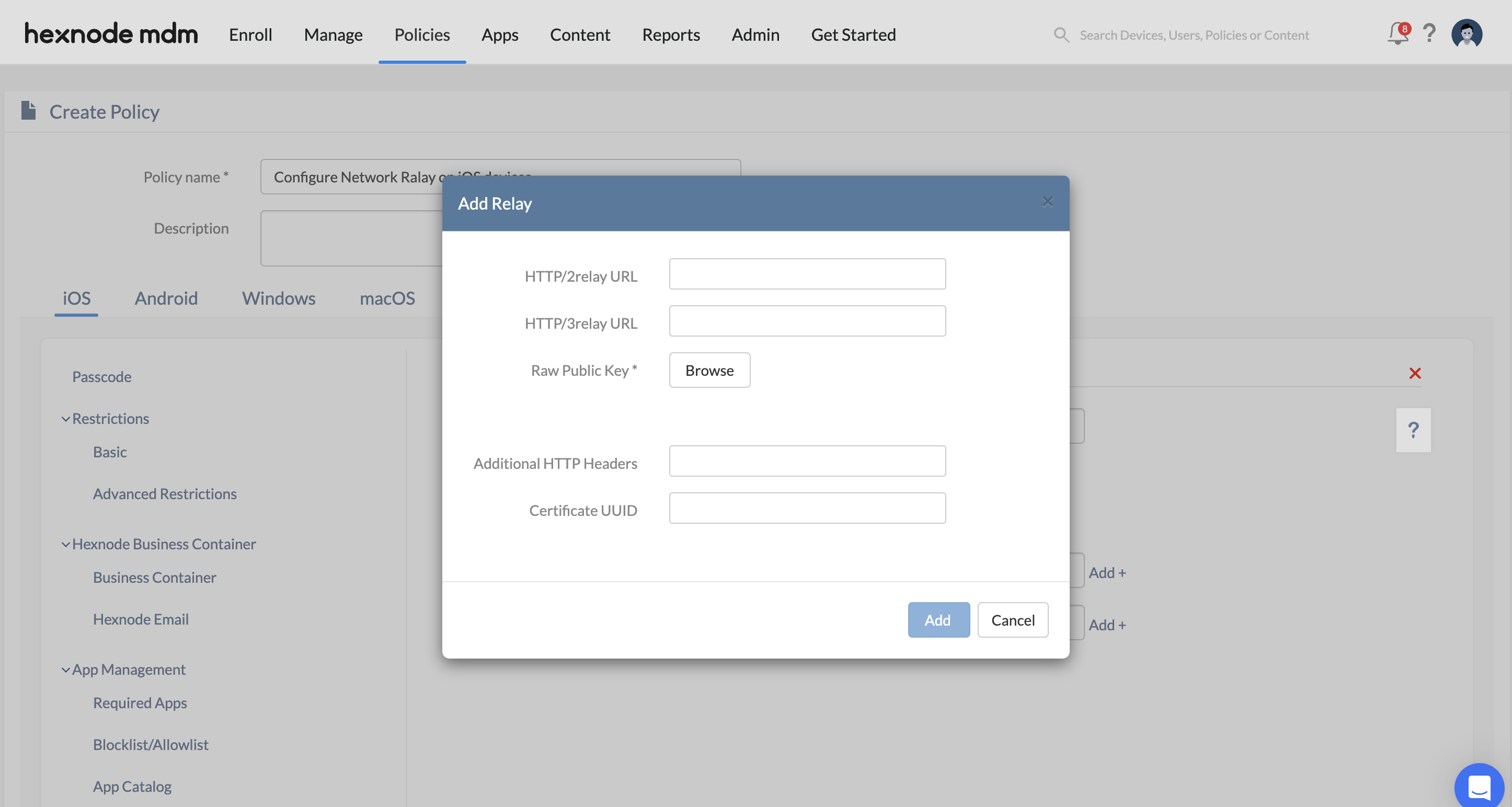
Relay Server Fields
This table explains the relay server fields used in a Hexnode UEM iOS Network Relay policy, including HTTP relay URLs, raw public keys, custom headers, and certificate UUID.
| Field | Description |
|---|---|
| HTTP/3 relay URL | The URL for the relay server that supports the HTTP/3 protocol. |
| HTTP/2 relay URL | The URL for the relay server that supports the HTTP/2 protocol. |
| Raw public keys | An array of TLS raw public keys presented by the relay server during the TLS handshake to establish a secure connection. |
| Additional HTTP Headers | A dictionary of custom HTTP headers sent as part of the CONNECT requests to the relay. |
| Certificate UUID | The unique identifier for the certificate used by the relay server for authentication. |
Associate the Network Relay Policy with Targets
After configuring the Network Relay payload, associate the policy with the required devices, groups, users, or domains to deploy the configuration.
- For new policies: Navigate to Policy Targets, select the target type such as Devices, Groups, Users, or Domains, add the required entities, and click Save.
- For existing policies: Open the policy from the Policies tab, click Manage > Associate Targets, select the required targets, and click Associate.
Troubleshoot iOS Network Relay in Hexnode UEM
- Network Relay settings do not apply to a device: Verify that the device is enrolled in Hexnode UEM, runs iOS 17 or later, and is included in the associated policy targets.
- Connectivity fails after the relay policy is deployed: Verify that the configured relay URLs are accessible and that the Raw public keys match the keys presented by the relay server during the TLS handshake.
- Expected domains are not routed through the relay: Review the Match domains list. The domain or subdomain must be included, unless the list is empty for broader routing.
- A matched domain bypasses the relay: Check whether the same domain is listed under Excluded Domains. Excluded domains bypass the relay and connect directly.
- Managed app traffic does not use the relay: Confirm that the Relay UUID in the Network Relay policy matches the relay identifier associated with the managed app configuration.
Frequently Asked Questions
Does Network Relay require iOS 17 or later?
Yes. The Network Relay policy applies to enrolled iOS devices running iOS 17 and above.
Does Network Relay work with personal apps on iOS?
Network Relay can tunnel all device traffic, including traffic from personal apps, when no Match domains are specified. The configuration can also be restricted to managed app traffic by using the Relay UUID.
Can Hexnode UEM configure multiple relay servers for Network Relay?
Yes. The Relays setting supports an array of relay server dictionaries, and the relay servers can be chained together for multi-hop tunneling.
What happens if a domain is listed in both Match domains and Excluded Domains?
The Excluded Domains list takes precedence. A domain listed under Excluded Domains bypasses the relay servers even if it is also included in Match domains.
Can Network Relay coexist with iCloud Private Relay?
Yes. Network Relay can be used simultaneously with other configured relays or iCloud Private Relay.


