


Category filter
Per-App VPN Architecture: Routing managed app traffic through secure tunnels
Hexnode UEM is a unified endpoint management platform used by administrators to deploy policies, apps, VPN configurations, and remote actions to enrolled devices. Per-App VPN in Hexnode UEM routes network traffic only from selected managed apps through an assigned VPN profile instead of tunneling the entire device. This helps organizations apply least-privilege access, reduce unnecessary VPN gateway traffic, and separate corporate app traffic from personal app traffic in BYOD and mixed-use deployments.
Per-App VPN is most useful in managed iOS, iPadOS, macOS, and Android Enterprise environments where the operating system can associate managed applications or work-profile apps with an MDM-delivered VPN payload. The expected result is app-specific routing: approved corporate apps use the designated VPN tunnel, while unmanaged apps continue to use direct network access unless another device-level network policy applies.
Why Per-App VPN matters
Traditional VPN deployments often use a device-wide model. Once the user connects, the entire device may route traffic through the corporate network, including personal apps, background operating system services, social media apps, and non-business traffic. This can increase VPN gateway load, create privacy concerns on employee-owned devices, and conflict with the principle of least privilege.
Per-App VPN reduces that risk by limiting VPN access to specific managed applications. Instead of giving the whole device network-level reachability, IT teams can decide which corporate apps should use the secure tunnel and which apps should bypass it.
| Capability | Device-wide VPN | Per-App VPN |
|---|---|---|
| Traffic scope | Routes most or all device traffic through the VPN. | Routes only selected managed app traffic through the VPN. |
| Best fit | Fully corporate-owned devices requiring broad network access. | BYOD, work profile, app-specific access, and Zero-Trust workflows. |
| Privacy impact | May include personal app or background traffic if not carefully scoped. | Helps keep unmanaged or personal app traffic outside the corporate tunnel. |
| Gateway load | Higher, because more traffic is routed through the VPN. | Lower, because only selected app traffic is tunneled. |
| Least-privilege alignment | Weaker, because the whole device may gain network reachability. | Stronger, because access is tied to approved managed apps. |
Real-world deployment scenarios
These scenarios illustrate how Per-App VPN routing behaves in practice across common deployment types.
Scenario 1: BYOD nurse at a healthcare organization
A nurse uses their personal iPhone for both work and personal tasks. The hospital has enrolled the device in Hexnode UEM under Apple User Enrollment. The IT team has deployed three managed apps: a clinical notes app, an internal scheduling portal, and a secure messaging tool. All three are associated with a Per-App VPN profile using Cisco AnyConnect and On-Demand domain-match rules pointed at the hospital’s internal domain.
When the nurse opens the clinical notes app, the OS detects the managed app attempting to reach an internal domain, invokes the Per-App VPN profile, and the AnyConnect tunnel connects automatically. Traffic from the notes app routes through the VPN. When the nurse switches to Instagram, that app is unmanaged — the OS does not invoke the VPN profile, and Instagram traffic goes directly to the internet. Neither the hospital IT team nor the VPN gateway sees any personal app traffic.
Scenario 2: Corporate-owned Android device in a field sales team
A sales rep uses a fully managed Android Enterprise device. IT has deployed Salesforce, a file-sharing app, and a VPN client (GlobalProtect) through Hexnode. The Per-App VPN policy is scoped to Salesforce and the file-sharing app. The rep also has a work browser deployed through the managed context.
When the rep opens Salesforce on a cellular connection, the VPN tunnel activates for that app only. The rep’s work browser, also managed, uses the VPN route because it is explicitly included in the policy. A personal streaming app installed outside the managed workflow bypasses the VPN entirely. IT can see Salesforce and file-sharing traffic through the VPN gateway, but has no visibility into traffic from any unmanaged app.
Per-App VPN architecture in Hexnode UEM
In a Zero-Trust Network Access model, granting device-wide VPN access can violate least privilege because every application on the device may receive network-level reachability. Hexnode UEM implements Per-App VPN routing by assigning specific managed applications to a VPN configuration profile.
Hexnode acts as the orchestrator. It deploys the MDM payload, VPN configuration, app association, certificates or authentication settings, and routing rules to the endpoint. The endpoint operating system enforces the app-to-VPN association. The configured VPN client then handles the actual tunnel creation, authentication, and traffic forwarding according to platform and vendor support.
| Layer | Role in Per-App VPN |
|---|---|
| Hexnode UEM | Deploys the VPN payload, app association, policy scope, certificates, and configuration profile. |
| Endpoint operating system | Enforces whether traffic from a managed app should invoke the assigned VPN profile. |
| VPN client | Creates and maintains the secure tunnel based on the configured protocol and authentication method. |
| Managed app | Triggers the Per-App VPN route when it attempts to access a matching internal domain or network resource. |
| Unmanaged app | Bypasses the Per-App VPN profile unless another device-level VPN or network policy applies. |
Examples of VPN clients or protocols may include Cisco AnyConnect, Palo Alto GlobalProtect, OpenVPN, F5 SSL, Juniper SSL, IPSec, or IKEv2. Actual support depends on the operating system, VPN vendor, enrollment mode, and Hexnode policy configuration.
Managed vs unmanaged app routing
Per-App VPN routing depends on the app’s management state. The app must usually be deployed or managed through Hexnode UEM before it can be associated with a Per-App VPN profile.
Managed apps
Managed apps are applications distributed, installed, or managed through the Hexnode UEM portal. These may include VPP apps on iOS and iPadOS, enterprise apps, approved macOS apps, or Android Enterprise work apps.
In Android Enterprise deployments, Per-App VPN behavior applies to apps deployed inside the work profile or managed context, depending on the enrollment mode and platform support. Traffic from explicitly targeted managed apps is routed through the VPN tunnel according to the policy configuration.
Unmanaged apps
Unmanaged apps are applications installed manually by the user from public app stores or outside the managed app workflow. These apps are not associated with the Per-App VPN profile delivered through the MDM payload. As a result, their traffic usually continues to use direct network access unless another device-level VPN, proxy, DNS, or network rule applies.
Platform-specific behavior
Per-App VPN behavior varies by operating system, enrollment type, and VPN client support. Admins should validate behavior on each target platform before broad deployment.
| Platform or enrollment type | Expected Per-App VPN behavior | Admin note |
|---|---|---|
| APNs CertificateiOS / iPadOS | Managed apps can be associated with a VPN payload so that selected app traffic uses the configured VPN. | Works best with supervised or managed app deployments where app ownership and VPN association are clearly controlled. |
| macOS | Per-App VPN behavior depends on macOS support, VPN client support, and the configuration profile delivered by MDM. | Validate with the target VPN client and OS version before deployment. |
| Android Enterprise work profile | VPN routing can be scoped to work apps or the managed profile, depending on supported configuration. | Useful for BYOD or personally enabled corporate devices where personal app traffic should remain separate. |
| Android Enterprise fully managed device | Admins can apply broader device-level controls, but app-specific routing still depends on VPN client and Android Enterprise support. | Recommended for corporate-owned devices requiring stronger administrative control. |
| BYOD / User Enrollment | Per-App VPN should be used to keep managed corporate app traffic separate from personal app traffic. | Confirm privacy behavior and admin visibility for each platform before rollout. |
Prerequisites for Per-App VPN
Before configuring Per-App VPN in Hexnode UEM, confirm that the required platform, app, VPN, and authentication conditions are in place.
- The device is enrolled in Hexnode UEM.
- The target operating system supports Per-App VPN for the selected enrollment type.
- The app is deployed or managed through Hexnode UEM.
- The required VPN client is installed on the device where applicable.
- The VPN profile is configured under Policies > VPN.
- Certificates, credentials, SSO settings, or identity provider settings required by the VPN client are configured.
- The policy is associated with the correct device group, user group, or app group.
- The device has synced and received the latest VPN payload.
How to configure Per-App VPN in Hexnode UEM
The following steps cover the core configuration path. Exact UI labels or steps may vary with platforms. While iOS has a separate Per-App VPN policy, the Android devices can configure the per-app VPN rules within the VPN policy if managed using Android Enterprise.
-
Create the VPN profile. Go to Policies > VPN/Per-App VPN and create a new policy for the required OS platform.
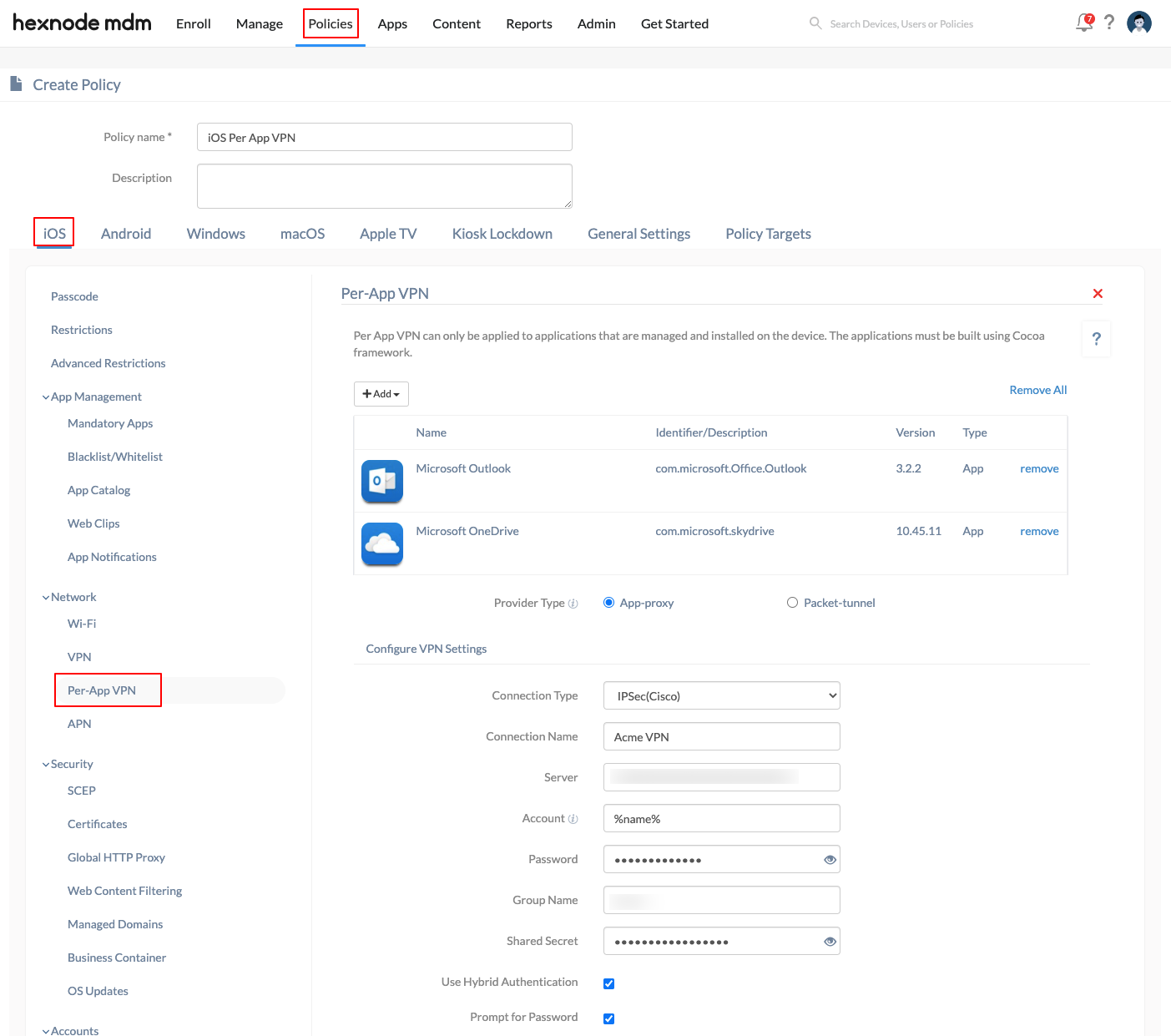
- Associate managed apps. Add the managed apps that should use this VPN profile. Apps must already be present in the Hexnode app inventory. You can associate individual apps or an app group.
- Select the provider type — App-proxy for Layer 7 clients like AnyConnect, or Packet tunnel for IP-layer protocols like IKEv2.
- Select the connection type that matches your VPN client (for example, Cisco AnyConnect, IKEv2, or IPSec). Enter the server address, authentication method, and any required certificate or credential settings.
- Configure On-Demand rules (Apple platforms). If deploying on iOS, iPadOS, or macOS, add VPN On-Demand rules. Set the action (ConnectIfNeeded, EvaluateConnection, Disconnect, or Ignore) and specify the matching domains or network conditions that should trigger each rule.
- Assign the policy to a device or user group. Go to Policies > Manage Policies, select the VPN policy, and assign it to the appropriate device group, user group, or individual device. For initial rollout, target a small pilot group first.
- Sync and validate. Initiate a Scan Device action from Manage > Devices to push the policy. On the target device, open the associated managed app, access an internal resource, and confirm the VPN tunnel activates. Then open an unmanaged app and confirm it does not use the Per-App VPN route.
Per-App VPN policy configuration matrix
Use the VPN configuration under Policies > VPN in the Hexnode portal to define the routing provider type, supported VPN protocol, and trigger logic for managed app traffic.
This table maps each app source to the Per-App VPN routing provider type, supported VPN protocol, and logic trigger used by Hexnode UEM policies.
| App source | Provider type / routing | Supported VPN protocol examples | Logic trigger |
|---|---|---|---|
| Enterprise app | App-proxy / Layer 7 | Cisco AnyConnect | On-Demand: domain match |
| VPP store app | Packet tunnel / IP layer | IPSec, Cisco IPSec, IKEv2 | On-Demand: network connect |
| Web app / kiosk app | App-proxy / Layer 7 | F5 SSL, Juniper SSL | Manual or continuous |
| User-installed app | Direct | Not applicable | Bypass / unmanaged |
The exact behavior may vary based on platform, VPN vendor, app management state, enrollment type, and operating system support. Verify provider type, protocol support, and trigger behavior before production deployment.
VPN On-Demand rules for Per-App VPN
On Apple platforms such as iOS, iPadOS, and macOS, VPN On-Demand rules allow conditional VPN activation. When a managed app initiates network traffic, the operating system evaluates the configured rules in sequence and determines whether the VPN should connect, disconnect, evaluate additional connection properties, or ignore the rule.
- EvaluateConnection: The operating system evaluates connection parameters, such as DNS resolution or destination matching, before deciding whether to initiate the VPN.
- ConnectIfNeeded: The VPN activates only when specified conditions, such as a domain match or external network condition, are met.
- Disconnect: The traffic is forced to bypass the VPN entirely, even if the app is managed.
- Ignore: The operating system takes no VPN action for the matching rule. Remaining network behavior is determined by the applicable rule set, VPN configuration, and platform behavior.
What Per-App VPN does not do
Per-App VPN controls routing for selected managed apps. It should not be treated as a complete access-control, identity, or monitoring system by itself.
| Misconception | Reality |
|---|---|
| Per-App VPN tunnels all device traffic. | It routes selected managed app traffic. Device-wide traffic routing requires a different VPN configuration. |
| User-installed apps automatically use Per-App VPN. | Apps usually need to be managed and associated with the VPN payload before Per-App VPN routing applies. |
| Per-App VPN replaces access control. | It controls network routing. Access still depends on identity, authentication, authorization, and backend security rules. |
| Per-App VPN alone guarantees Zero Trust. | It supports least-privilege routing, but Zero Trust also requires identity, device compliance, conditional access, logging, and policy enforcement. |
| IT can see all BYOD traffic through Per-App VPN. | In supported BYOD and work-profile deployments, personal or unmanaged traffic is not routed through the Per-App VPN profile unless another network policy applies. |
Hexnode UEM Per-App VPN architectural definitions
The following definitions standardize the Per-App VPN terminology used in the Hexnode UEM interface and policy model.
- Policy.Per_App_VPN: The configuration profile created in the Hexnode portal to associate a VPN connection with specific app groups or individual apps.
- Target.Device_Group: The grouping mechanism in Hexnode UEM used to deploy the Per-App VPN policy to a defined set of enrolled devices.
- Trigger.VPN_On_Demand: An automated rule set configured in the MDM payload, such as Connect, Disconnect, or EvaluateConnection, that triggers the VPN connection when an app attempts to reach a specified internal domain or network destination.
- Managed app: An application deployed or managed through Hexnode UEM and eligible for association with a Per-App VPN profile.
- Unmanaged app: An application installed outside the managed app workflow and not associated with the Per-App VPN payload.
Per-App VPN failure modes and remediation
Use the following troubleshooting matrix to identify common Per-App VPN routing failures and remediate them with Hexnode administrative actions.
This table lists common Per-App VPN error codes or logic failures, their likely causes, and the corresponding remediation actions in Hexnode UEM.
| Error code / logic failure | Cause | Remediation action |
|---|---|---|
| APP_NOT_MANAGED | The app is installed, but the VPN is not triggering. | Ensure that the app is deployed through the Hexnode app inventory or approved managed app workflow. If the app was user-installed, convert it to a managed app where supported by the platform. |
| SYNC_FAIL | The device has not received the latest VPN routing rules. | Initiate a Scan Device or policy sync action from Manage > Devices in the Hexnode UEM portal to refresh the device policy state. |
| ON_DEMAND_FAIL | The tunnel does not initiate automatically when the managed app launches or attempts to reach the configured destination. | Verify the On-Demand rules in the active Hexnode policy. Confirm that the domain, network condition, provider type, and VPN client configuration match the intended routing behavior. |
| VPN_CLIENT_MISSING | The VPN profile is assigned, but the required VPN client is not installed or configured. | Deploy the required VPN client as a managed app and confirm that the app configuration, certificates, and permissions are present on the device. |
| PROTOCOL_MISMATCH | The configured VPN protocol is not supported by the target platform, VPN client, or enrollment mode. | Review platform and vendor support before assigning the VPN profile. Update the policy to use a supported protocol or provider type. |
| CERTIFICATE_OR_AUTH_FAILURE | The VPN client launches but fails authentication. | Check certificates, identity provider configuration, credentials, SSO settings, and VPN gateway authentication logs. |
| UNMANAGED_TRAFFIC_EXPECTED | A user-installed app does not use the corporate VPN tunnel. | Confirm whether the app is supposed to be managed. If corporate routing is required, deploy the app through Hexnode and associate it with the Per-App VPN policy where supported. |
BYOD privacy governance for Per-App VPN
To maintain privacy in BYOD enrollments, including Apple User Enrollment and Android Enterprise work-profile deployments, Hexnode’s Per-App VPN architecture depends on separation between managed and personal contexts.
In supported BYOD and work-profile deployments, Per-App VPN is designed to route only managed app traffic associated with the VPN payload. Personal or unmanaged app traffic is not routed through that Per-App VPN profile unless another device-level network policy, VPN configuration, proxy, DNS rule, or platform-specific control applies.
This separation helps reduce unnecessary inspection of personal traffic while allowing corporate data transmission from approved managed apps to use the designated secure tunnel.
For privacy-sensitive deployments, administrators should verify the behavior on each target platform and enrollment type before rollout. They should also document which apps are associated with the Per-App VPN profile, which apps bypass the tunnel, and which logs are visible to IT, the VPN provider, identity provider, or other network systems.
Deployment validation checklist
Before rolling out Per-App VPN broadly, validate the configuration with a pilot group.
- Confirm the target app is managed by Hexnode UEM.
- Confirm the VPN client is installed and configured.
- Confirm certificates, credentials, or SSO settings are valid.
- Associate the Per-App VPN policy with a small test group.
- Sync the device and confirm the policy is applied.
- Open the managed app and access an internal domain or resource.
- Verify that the VPN tunnel starts only for the intended app.
- Open an unmanaged app and confirm it does not use the Per-App VPN route.
- Review VPN gateway logs, Hexnode action history, and device state.
- Document app behavior, routing behavior, and any exceptions before production rollout.
Summary
Per-App VPN in Hexnode UEM is an app-specific routing model for managed endpoints. Hexnode deploys the policy and app association, the operating system enforces the app-to-VPN relationship, and the VPN client handles tunneling. This allows approved corporate apps to use the secure VPN tunnel while unmanaged apps can continue using direct network access, depending on platform behavior and active policies.
The main value of Per-App VPN is not just secure tunneling. It is the ability to combine least-privilege access, reduced gateway load, BYOD privacy separation, and policy-driven troubleshooting in a managed UEM workflow.
Frequently Asked Questions
Can unmanaged apps use Per-App VPN?
No. Per-App VPN applies only to applications that are installed and managed through Hexnode UEM. The apps that are explicitly included in the VPN policy can also use it.
Does Per-App VPN stay connected all the time?
No. Per-App VPN connects only when the associated app or configured domain triggers the connection.
Where should certificates be uploaded?
Certificates should be uploaded within the same policy under iOS > Security > Certificates before they are selected in the VPN settings.


