


Category filter
Why Android Kiosk Mode Takes Time to Launch After Reboot?
TL;DR
On Android devices managed with Hexnode, Kiosk mode may take time to reactivate after a reboot if the device was powered off while it was outside Kiosk mode. If no Kiosk policy delay or relaunch timer is configured, the delay is usually caused by device-side startup behavior: the device must boot, start the Hexnode UEM agent or launcher, sync, and process the Kiosk Lockdown policy. On affected hardware, this delay cannot always be reduced to zero from the Hexnode UEM console.
Executive Summary
Android Kiosk mode is designed to restrict the device once the Kiosk Lockdown policy is active. However, if a user exits Kiosk mode locally and then powers off or restarts the device before reactivating Kiosk mode, the device may briefly load the default Android launcher or system interface before Hexnode reapplies Kiosk mode.
To rectify Android kiosk launch delay, start by checking whether the active Kiosk Lockdown policy contains a configured relaunch delay or auto-launch restriction interval. If the policy is already set to the minimum interval and the delay still occurs, the behavior is likely tied to the device hardware, Android build, or startup sequence rather than a Hexnode configuration issue.
Why Kiosk mode may be delayed after reboot?
The delay usually appears in this sequence:
- Kiosk mode is exited manually or locally.
- The Android device is powered off or restarted while outside Kiosk mode.
- After startup, the device briefly shows the Android launcher or system interface.
- Kiosk mode activates only after the Hexnode UEM agent starts, communicates, and processes the applied policy.
Note: If the device is powered off while it is still in Kiosk mode, it may return to Kiosk mode immediately after startup. The delay is more likely to occur when the device is powered off while it is outside Kiosk mode.
Check whether the Android kiosk launch delay delay is caused by Kiosk Lockdown policy settings
- Go to Policies in the Hexnode UEM console.
- Open the active Android Kiosk Lockdown policy, either Single App or Multi-App, applied to the Android device.
- Review Kiosk Exit Settings, Launcher, and Peripheral Settings.
- Under Kiosk Exit Settings, confirm the seconds mentioned in “Relaunch app ____ seconds after reboot”.
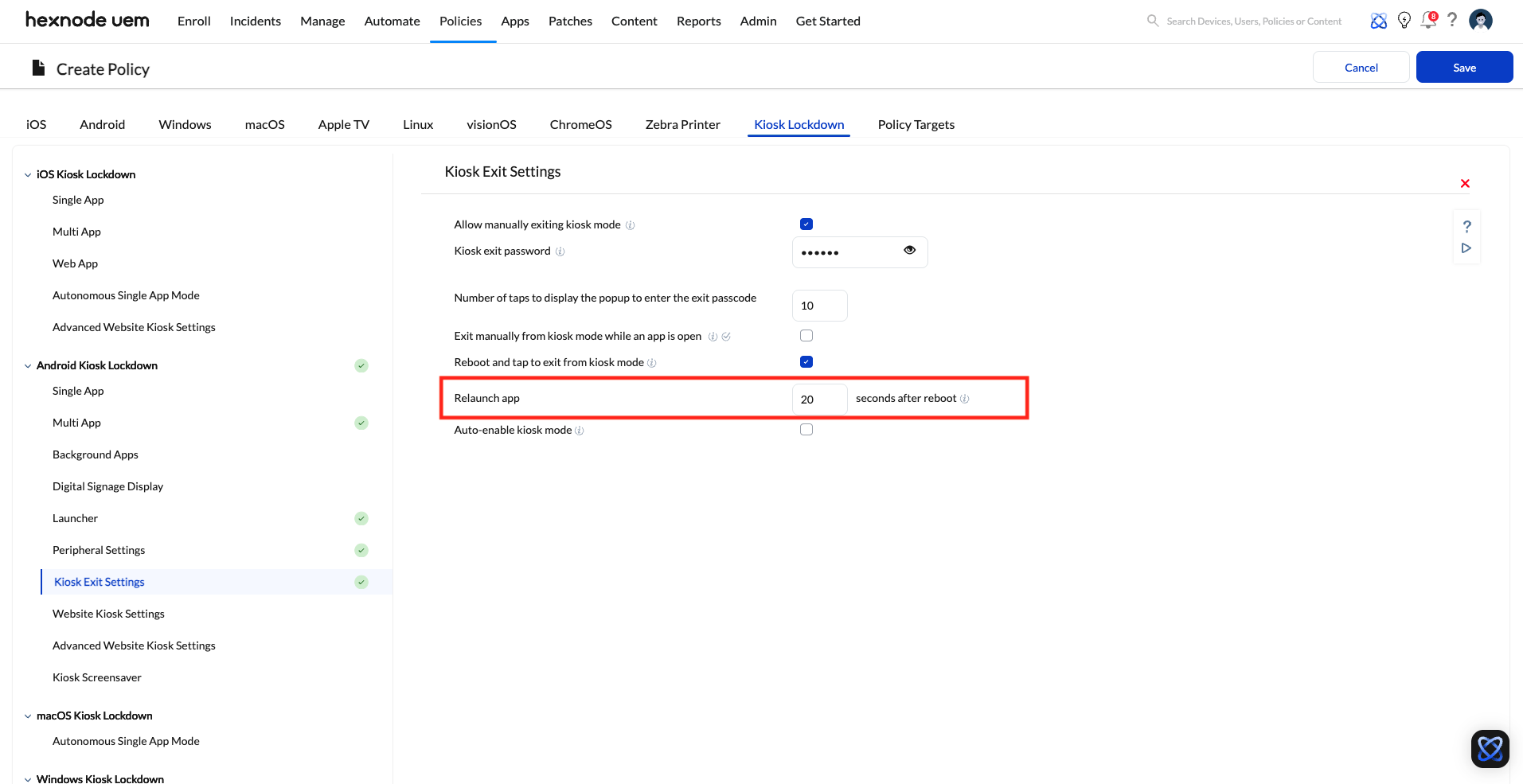
Device details page in Hexnode UEM. - Next, go to Launcher and look for the setting “App auto-launch delay”. Ensure the timing is configured in alignment with your requirements.
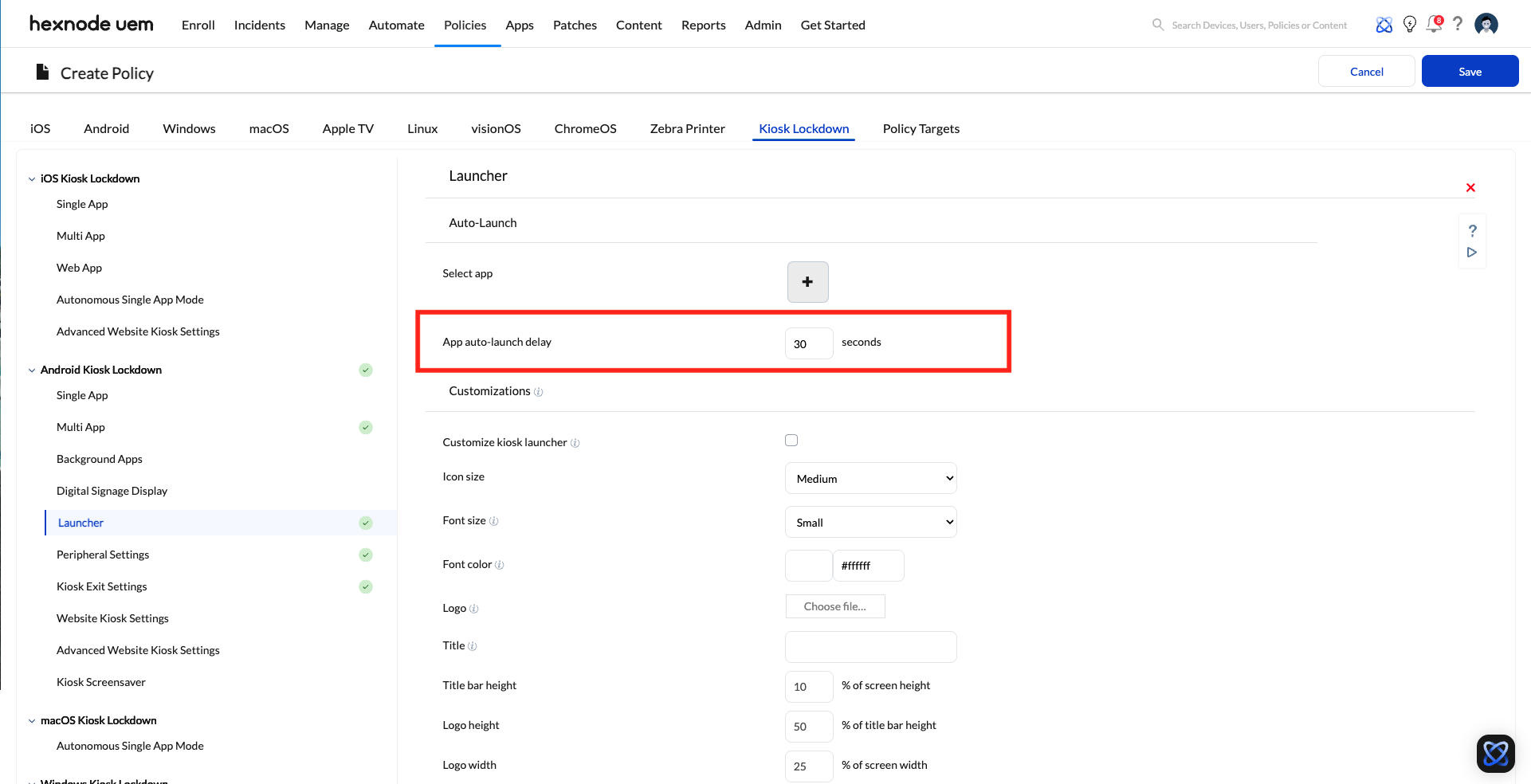
Device details page in Hexnode UEM.
- Under Kiosk Exit Settings, confirm the seconds mentioned in “Relaunch app ____ seconds after reboot”.
- If a delay timer is configured, reduce it to 0 or to the lowest interval suitable for the deployment.
- Save the policy changes and allow the device to sync.
- Restart the device while it is outside Kiosk mode and verify whether Kiosk mode launches sooner.
Important: Reducing a configured app auto-launch delay timer only helps when the delay is policy-driven. If the device still takes time to launch Kiosk mode after the timer is reduced, the remaining delay is likely device-side behavior.
Identify device-side startup limitations
If the Kiosk Lockdown policy is already configured with no intentional delay and Kiosk mode still takes several seconds or minutes to activate after reboot, check for device-side symptoms:
- The device responds to Hexnode-initiated actions only after a reboot.
- The device takes longer than expected to start the Hexnode UEM agent after boot.
- Policy sync or command execution is delayed until the device completes startup tasks.
- The Android launcher appears briefly before Kiosk mode is applied.
When these symptoms are present, the delay is usually caused by the device hardware, Android firmware, or how the device starts background services after boot. In such cases, the delay may persist even when Hexnode policies are configured correctly.
Expected behavior when the Android kiosk launch delay is hardware-related
When the delay is caused by device-side startup behavior, Hexnode can apply Kiosk Lockdown mode only after the device is ready to run the Hexnode UEM agent and process the assigned configuration. The delay is not necessarily caused by a failed policy.
For affected devices, a short startup window may remain where the Android interface is visible before Kiosk Lockdown mode reactivates. This behavior can occur with any MDM solution if the hardware or firmware delays service startup or policy processing.
Recommended operational controls
- Reactivate Kiosk mode before powering off or restarting devices whenever possible.
- Avoid powering off devices while they are outside Kiosk mode unless the device is under administrator control.
- Use Android Enterprise and Device Owner enrollment where supported to enable advanced kiosk management capabilities
- Validate startup behavior on the exact device model and Android version before large-scale deployment.
- If startup delay creates a security risk, test alternative hardware with faster boot and agent startup behavior.
Android Enterprise and Device Owner considerations
Android Enterprise with Device Owner enrollment provides stronger management capabilities than legacy Android Device Admin enrollment. It is typically required for advanced Kiosk lockdown behavior.
Platform limitation: Device Owner enrollment improves lockdown capabilities, but it does not guarantee that Kiosk mode will launch with zero delay on every Android device after reboot. Startup timing still depends on the device hardware, Android version, firmware behavior, and when the Hexnode UEM agent becomes active.
Frequently Asked Questions
Can Hexnode force Android Kiosk Lockdown mode to launch instantly after every reboot?
Not always. If a policy delay is configured, reducing it can help. If no delay is configured and the device still takes time to activate Kiosk mode, the delay is likely caused by the device startup sequence or hardware limitations.
Why does Kiosk mode return immediately when the device is powered off in Kiosk Lockdown mode, but not when powered off outside Kiosk mode?
When the device is already in Kiosk mode before powering off, it may restore the Kiosk state directly after startup. When the device is powered off outside Kiosk mode, the Android launcher may load first and Hexnode UEM agent must restart, sync, and reapply the Kiosk Lockdown policy.
Does Device Owner mode remove access to the status bar and airplane mode?
Device Owner enrollment enables stronger Lock Task Mode and Kiosk restrictions, including controls for the status bar and access to system settings. Actual behavior can still vary depending on the device, Android version, and enrollment method.
What should be done if the app auto-launch delay in kiosk mode creates a security vulnerability?
Confirm that no relaunch delay or auto-launch restriction interval is configured in the Kiosk Lockdows policy. If the delay persists, treat it as a device-side limitation and validate whether the hardware is suitable for the required lockdown behavior before deployment.


