


Category filter
Managing Critical Incidents in Hexnode UEM
Architecture Snapshot: The Critical subtab identifies issues that pose an imminent threat to UEM functionality or organizational security. These incidents bypass lower-severity queues to ensure administrators can remediate integration failures, license expirations, or communication breakdowns before they impact the managed fleet.
What Defines a Critical Incident?
Hexnode classifies an incident as Critical based on predefined high-impact thresholds. Key examples include:
- Credential Failure: Expired or invalid Apple Push Certificates (APNs) or Android Enterprise (AE) tokens.
- Management Blockers: License errors (expired or count exceeded) that halt device enrollment/management.
- Sync Failures: Agent communication breakdowns blocking the propagation of policies or remote commands.
- Integration Disruptions: Service outages in connected platforms (ABM/ASM, IdP).
How to access Critical Incidents?
To access the Critical incidents:
- Login to the Hexnode console.
- Navigate to the Incidents tab.
- Access the Critical sub-tab.
Critical Incident Sources Matrix
| Source | Technical Scope and Management Impact |
|---|---|
| Apple Services | Monitors APNs certificates, VPP tokens, and Apple Business/School Manager integrations. Failure prevents policy updates on iOS and macOS devices. |
| Android Enterprise | Tracks AE integration health, including organization disenrollment. Failure stops device syncing and disables remote actions on Android devices. |
| UEM License | Alerts on upcoming/expired licenses or when device and technician counts exceed current capacity. |
| Technician Sign-In | Security auditing for failed auth attempts and portal access from unrecognized IP addresses or regions. |
| Hexnode Agents | Reports health of Active Directory (AD) and DAFS agents. Includes server synchronization failures and agent removal alerts. |

Configuring the Critical Dashboard
Workflow: Reordering Priority Sources
- Navigate to Incidents > Critical.
- Select the Pen icon to open the customization overlay.
- Drag to reorder sources (e.g., placing Apple Services at the top) or filter out irrelevant sources.
- Click Save to commit the view for all technicians managing the node.
Note: Dashboard layout customization is restricted to the Critical category only.
Benefits of Critical Incident Tracking
- Consolidated Visibility: Single-pane-of-glass monitoring for integration-level health.
- Proactive Warnings: Identifies certificate decay before service interruption.
- Rapid Isolation: Separates system failures from individual device compliance issues.
- Business Continuity: Minimizes downtime via streamlined remediation paths.
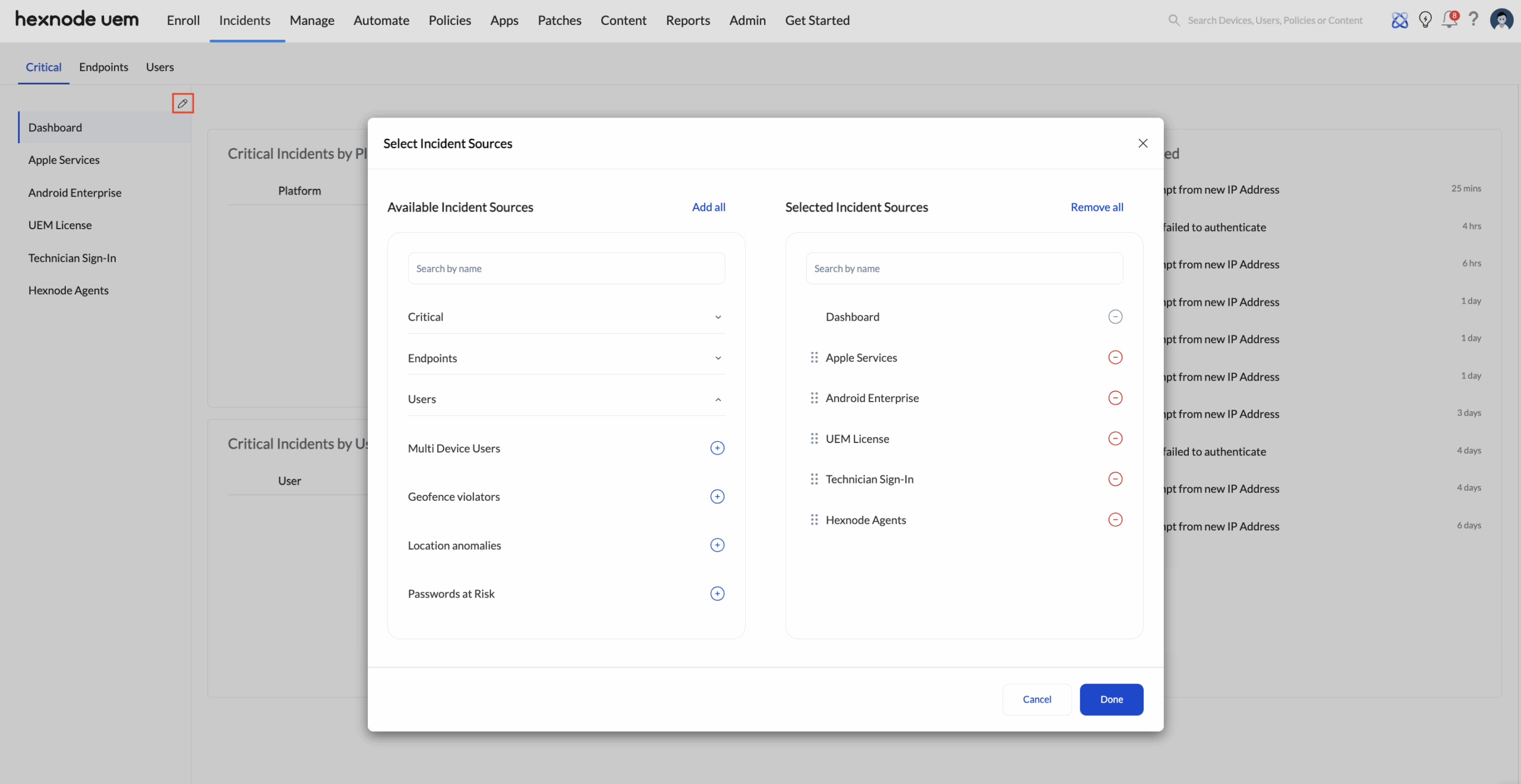
Operational Example: If an organization manages iOS devices and their APNs certificate expires, prioritizing Apple Services at the top of the Critical dashboard ensures the admin restores fleet-wide management within minutes.


