


Category filter
Automated Battery Health Monitoring: Proactive Hardware Lifecycle Management via Hexnode
Executive Summary
In large-scale enterprise deployments—spanning mobile devices, self-service kiosks, and repurposed hardware—reactive hardware replacement is a primary driver of Operational Downtime and Unplanned CAPEX (Capital Expenditure). Waiting for a battery to fail or swell on the floor inevitably disrupts workflows.
By leveraging Hexnode Unified Endpoint Management (UEM), IT teams can transition from a reactive break-fix paradigm to a proactive hardware lifecycle strategy. Utilizing deep system telemetry, custom shell scripts, and automated reporting, IT administrators can identify “End-of-Life” (EOL) batteries months before critical failure, allowing for synchronized, non-disruptive hardware refresh cycles.
1. Beyond Charge Percentage: The State of Health (SoH) Metrics
Standard MDM telemetry typically surfaces at the current charge (e.g., 85%), which is a volatile metric. To execute proactive replacements, IT must monitor the underlying State of Health (SoH). Key metrics include:
- Design Capacity vs. Full Charge Capacity: The ratio of the battery’s current maximum retainable charge compared to its original factory capacity.
- Cycle Count: The total number of full discharge/charge cycles. Enterprise laptops typically see significant chemical degradation after 500–800 cycles.
- Thermal History: The frequency of high-temperature events that artificially accelerate chemical aging and cell degradation.
- Battery Chemistry Age: The chronological age of the battery cells, which degrade over time even with minimal usage.
2. Technical Execution: Deep Telemetry Extraction via Hexnode
Because basic telemetry profiles are often sandboxed by the OS, deep chemical health metrics must be queried at the system level. Hexnode allows administrators to use the Execute Custom Script action to pull forensic-level battery data on desktop platforms. The results are piped directly into the Hexnode portal’s Action History tab, where IT can click Show Output to view the parsed data.
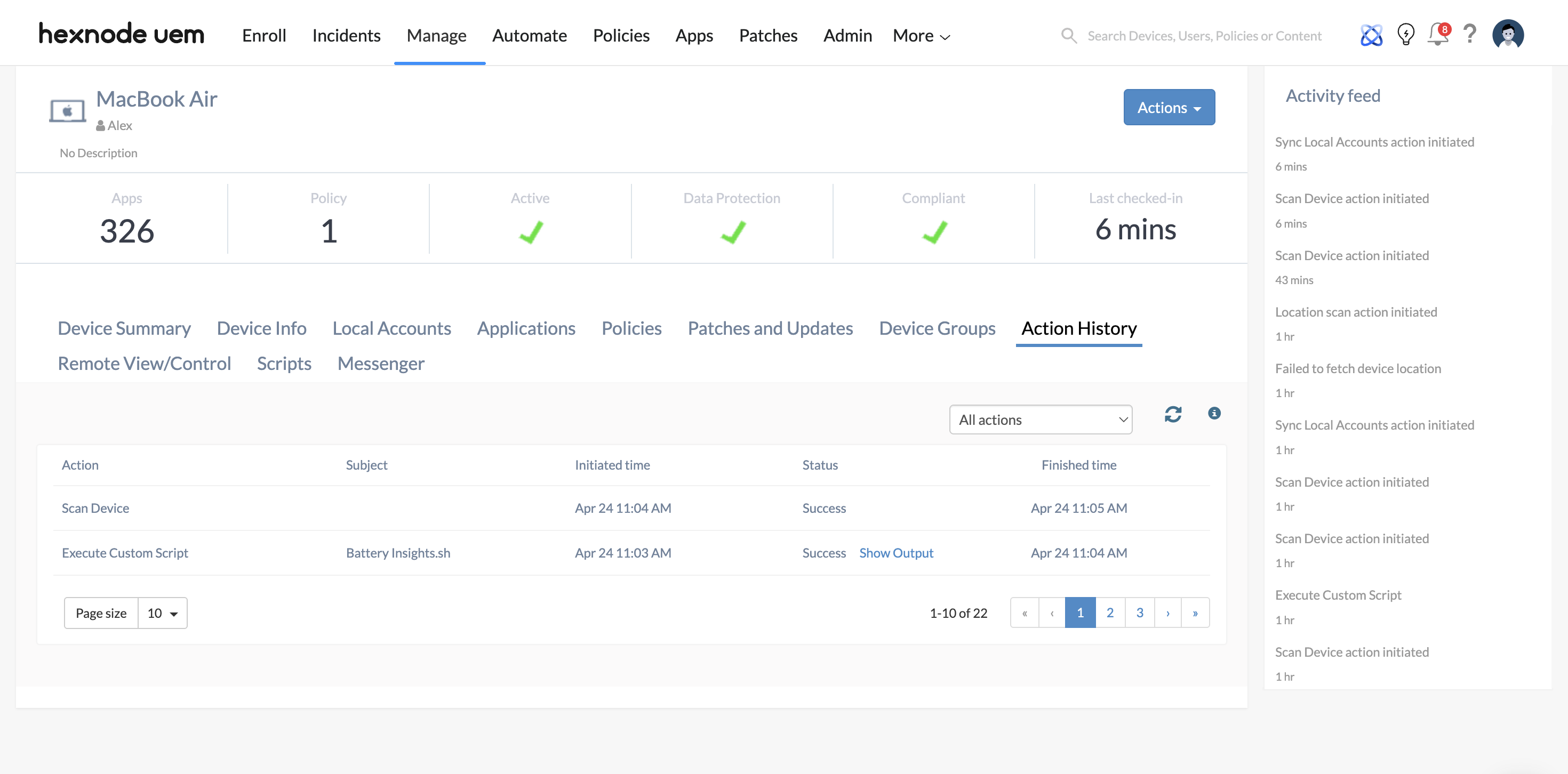
For macOS (Bash/Zsh Script)
Macs can be audited using the native IOKit and system_profiler commands to extract exact cycle counts and battery conditions.
|
1 2 3 4 |
#!/bin/zsh # Extracts Cycle Count and Maximum Capacity percentage echo "--- macOS Battery Health Audit ---" system_profiler SPPowerDataType | grep -E "Cycle Count|Condition|Maximum Capacity" |
For Windows (PowerShell Script)
Windows devices can be audited using powercfg to generate deep-dive HTML diagnostics, or by querying WMI/CIM for immediate telemetry.
|
1 2 3 4 5 6 7 8 9 10 |
# Generates a local battery report and extracts key health stats $ReportPath = "C:\Windows\Temp\battery_report.html" powercfg /batteryreport /output $ReportPath # Optional: Extract immediate live capacity state via CIM instance $Battery = Get-CimInstance -ClassName Win32_Battery Write-Output "--- Windows Battery Health Audit ---" Write-Output "Estimated Charge Remaining: $($Battery.EstimatedChargeRemaining)%" Write-Output "Status: $($Battery.Status)" Write-Output "Full Diagnostic Report Generated at: $ReportPath" |
3. The Proactive Replacement Workflow
Hexnode UEM orchestrates the transition from raw Data to Action through a tiered automation protocol.
| Phase | Hexnode Action | Strategic Outcome |
|---|---|---|
| Audit | Schedule automated Scan Device and execute the Battery Health scripts weekly. | Centralizes SoH telemetry, forcing hardware to report its exact status back to the Action History. |
| Analysis | Configure custom Device Activity Reports to filter endpoints where Maximum Capacity drops below 75%, or Cycle Count exceeds 500. | Instantly identifies the At-Risk hardware cohort before a mid-shift operational failure. |
| Automation | Trigger a Webhook via Hexnode to an ITSM platform (e.g., ServiceNow via Service Graph Connector or Jira). | Automatically generates a hardware replacement/refresh ticket assigned to the helpdesk. |
| Hypercare | Utilize Hexnode’s Target Filters to automatically deploy a Battery Optimization policy to the At-Risk cohort. | Forces aggressive Power Management (e.g., aggressive sleep timers, remote shutdowns) to prevent battery swelling while the user awaits replacement. |
4. Enterprise Use Cases & Business Impact
- Predictive Budgeting: CFOs and IT Directors can utilize Hexnode’s age and health reports to forecast hardware refresh costs 12 months in advance, successfully converting Emergency IT Spending into Planned Operational Investment.
- Zero-Downtime Refresh: If IT identifies a failing battery on a remote executive’s laptop, a replacement device can be provisioned and shipped utilizing Apple Automated Device Enrollment (ADE) or Windows Autopilot via Hexnode before the original device becomes physically unusable.
- Safety & Risk Mitigation: Identifying batteries with high cycle counts and thermal anomalies radically reduces the risk of lithium-ion swelling, preventing physical chassis damage and mitigating potential fire hazards in dense storage carts.
5. Operational Best Practices
To maximize the efficacy of this Hexnode deployment, administrators should implement the following rules of engagement:
- Establish an OS-Specific Baseline: Define what Critical Health means based on the device type. For instance, trigger alerts at 80% maximum capacity for iPhones, but 70% for ruggedized Windows warehouse tablets.
- Schedule Delta Reporting: Configure Hexnode to generate and email a customized Battery Health Degradation report on a monthly basis, specifically filtering to highlight devices that have dropped more than 5% health in a 30-day window.
- User-Side Transparency: Leverage Hexnode’s native Broadcast Message functionality to push a custom notification to users whose devices have crossed the End-of-Life (EOL) threshold. This alerts the user to back up local data and anticipate the scheduled hardware swap.


