


Category filter
Frontline Orchestration: Scaling Rugged Device Management to 100,000 Units
In the high-stakes world of logistics, warehousing, and retail, your hardware is the mission-critical engine of global commerce. When a scanner fails in a fulfillment center or a POS system glitches during a holiday rush, the cost isn’t just downtime—it’s a broken supply chain.
This guide details how Hexnode’s Strategic IoT & Rugged Management transforms basic device management into a high-availability orchestration engine designed for the frontline.
High-Availability Kiosk Clusters
Standard kiosk modes are “set and forget.” High-Availability Kiosk Clusters are different—they are engineered for environments where a device must perform multiple high-intensity roles without a single point of failure.
Multi-App Lockdown Logic
Modern frontline roles require a seamless blend of applications. A single tablet may serve as a Point of Sale (POS) terminal, an Inventory Tracker, and a Communication Hub. Hexnode’s logic engine ensures these apps coexist in a hardened, distraction-free environment.
- Dynamic Peripheral Orchestration: Remote management extends beyond the screen. Under Policies > Android > Kiosk Lockdown > Peripheral Settings, you can centrally govern:
- Display & Sound Locks: Force fixed Brightness levels for high-glare loading docks and lock Volume to ensure critical warehouse alerts are never silenced.
- The “Always-On” Failover: Configure the cluster to automatically relaunch the primary mission-critical app if it crashes, ensuring near-zero operational downtime.
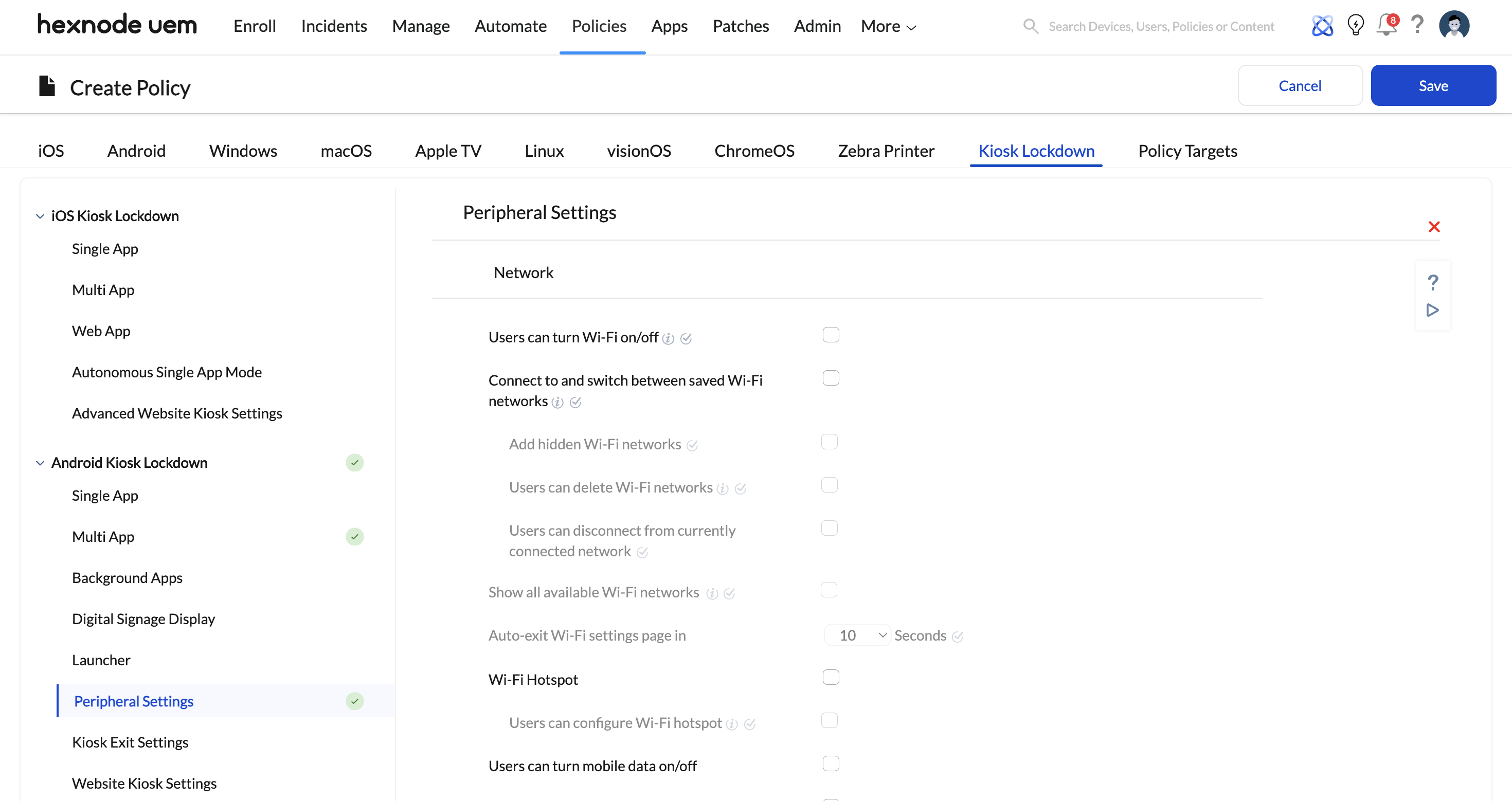
Centralized Control Interface
| Feature | Control Mechanism | Operational Benefit |
|---|---|---|
| Network Lock | Wi-Fi/Mobile Data Toggle | Prevents users from switching to unauthorized networks. |
| System Bar Control | Hide Status/Navigation Bars | Eliminates accidental exits from the POS interface. |
| App Auto-Launch | Default App Settings | Ensures the device is “work-ready” the moment it’s powered on. |
Rugged & Specialized IoT
Managing 100,000 “Brawny” devices from Zebra or Honeywell requires more than standard MDM profiles. You need hardware-level surgery.
Rugged OEMConfig Integration
Hexnode leverages OEMConfig—the industry standard for unlocking manufacturer-specific APIs directly within the MDM console. This provides “Zero-Day” support for hardware features that standard Android settings can’t touch.
- Scan Engine Fine-Tuning: Within App Configurations, you can manipulate the internal scan engine:
- Beam Intensity & Symbology: Toggle support for 1D/2D codes (QR, DataMatrix, UPC) to eliminate “false reads” in low-light aisles.
- DataWedge Profiles (Zebra): Automatically format scanned data before it even hits your inventory app.
- Radio & Connectivity Optimization: Frontline devices move through “dead zones.” Hexnode allows you to configure Advanced Wi-Fi Roaming (e.g., Honeywell’s Roaming Parameters), forcing devices to jump to the strongest Access Point faster to prevent session drops.
- Hardware Key Remapping: Turn a volume rocker into a Push-to-Talk (PTT) button or a dedicated Emergency Alert trigger for warehouse safety.
Strategic Blueprint: The 100,000 Device Playbook
Managing a fleet of this size requires moving from manual configuration to automated policy enforcement.
- Zero-Touch Deployment/strong>: Use Android Zero-Touch or Samsung Knox Mobile Enrollment to ship devices directly to the field. They configure themselves the moment they touch Wi-Fi.
- Staged Updates: Don’t break 100,000 devices at once. Use Hexnode to push OEMConfig changes to a 1% Pilot Group, then a 10% Quality Group, before a full fleet rollout.
- Battery Health Intelligence: Monitor cycle counts across the fleet. Identify “dying” batteries in a specific region before they fail mid-shift.
Troubleshooting
Q: My scanners are experiencing lag in the warehouse.
A: Navigate to your OEMConfig Policy in Hexnode. Ensure Symbology is restricted only to the codes you use (e.g., only QR and UPC). This reduces the scanner’s processing overhead, significantly cutting latency.
Frequently Asked Questions
How do I prevent "Screen Ghosting" on digital signage kiosks?
Under Peripheral Settings > Display, enable the Screen Dimming or Screensaver options to trigger during inactive hours, preserving the hardware lifespan of your POS displays.
Can I remotely fix a device that is 500 miles away?
Yes. Use Hexnode’s Remote Control/View to take over the screen of any rugged device. For Zebra/Honeywell, you can even pull real-time hardware logs via the MDM to diagnose radio or scan-engine failures.


