


Category filter
Managing the Leaver Device Lifecycle via Identity Workflows
Introduction: Identity-Driven Lifecycle Management
In an identity-centric management model, the Identity Provider (IdP) acts as the “Source of Truth.” Hexnode UEM synchronizes with this source to automate the “Joiner” and “Mover” phases of an employee’s tenure. However, the “Leaver” phase is where the integration provides the most critical security value.
When a user’s identity is severed at the IdP level, Hexnode UEM bridges the gap between a disabled user and the physical hardware still in the field. By understanding the automated disassociation logic and the remediation workflows for “Unassigned” devices, IT teams can prevent data leaks and ensure a smooth hardware transition.
Use Case 1: Automated Policy Revocation and Compliance Stripping
The Architectural Challenge: A terminated employee still has a corporate device in their possession. IT must ensure that even if the device never reaches the office, corporate Wi-Fi profiles, VPN configurations, and licensed apps are revoked the moment the user is removed from the directory.
The Hexnode UEM Execution Strategy: The security of the “Leaver” workflow relies on how administrators target their policies.
- The Logic: For effective automation, policies should be assigned to Users or User Groups (synced from the IdP) rather than individual device IDs.
- The Action: When the directory sync confirms a user has been deleted or deactivated in the IdP, Hexnode UEM identifies every device linked to that user.
- The Result: Because the user object no longer exists in the Hexnode directory, all user-targeted and user-group-targeted policies are automatically disassociated.
Use Case 2: Managing the “Unassigned” Device State
The Architectural Challenge: After a user is deleted from the IdP, the device remains in the Hexnode UEM inventory. IT needs a clear way to identify these orphaned assets to determine if they should be repurposed or retired.
The Hexnode UEM Execution Strategy: Administrators must manage the transition of the hardware state from “Occupied” to “Available.”
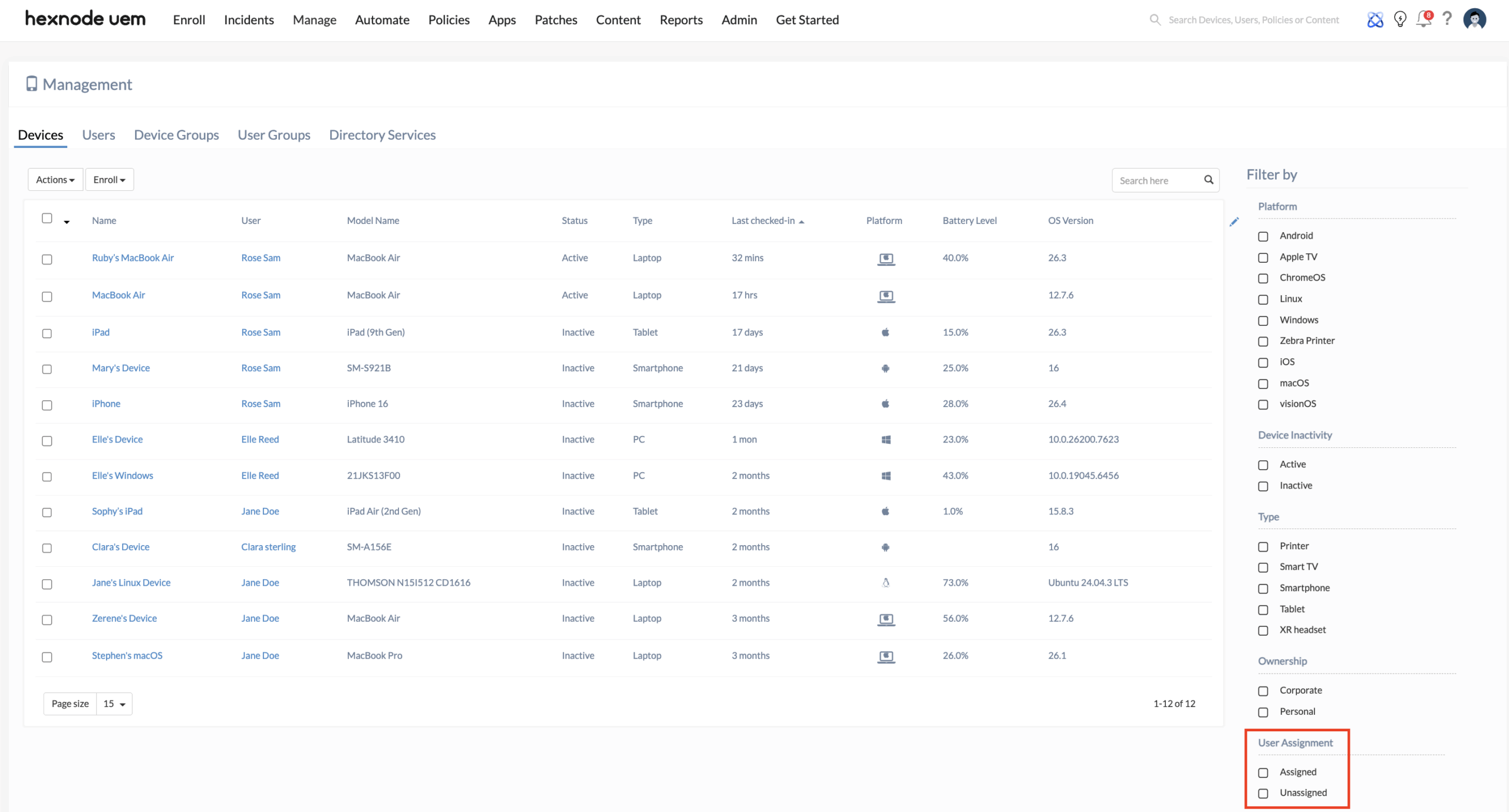
- Identifying Assets: In the Hexnode UEM console, administrators navigate to Manage > Devices. By using the User Assignment filter, IT can quickly toggle between Assigned and Unassigned devices. Any device previously belonging to a deleted user will now appear under the “Unassigned” list.
- The Decision Logic:
- Reassignment: If the hardware is staying within the company, the admin can simply reassign the device to another active directory user. This instantly pushes the new user’s targeted policies to the device.
- Disenrollment: If the device is being retired, the administrator must move to the remediation phase (Wiping) before removing it from the portal to free up a management license.
Use Case 3: Executing the “Leaver” Remediation (Wipe Logic)
The Architectural Challenge: Local data remains on the device even after the user is deactivated. IT must choose a remediation method that matches the ownership model of the device (BYOD vs. Corporate-Owned) to ensure data is destroyed without overreaching.
The Hexnode UEM Execution Strategy: Utilizing the Remote Actions, admins trigger the final cleanup.
- For BYOD (User Enrollment / Android Work Profile): Administrators should execute a Corporate Data Wipe by disenrolling the device or removing associated management policies. This targets only the managed business container. It securely destroys the cryptographically isolated Managed Apple Account volume or the Android Work Profile, leaving the employee’s personal photos and apps untouched while reclaiming all corporate data.
- For Corporate-Owned Hardware: Administrators should issue a Wipe Device remote action. This erases the entire hard drive and clears all settings. This ensures the device is completely clean and ready for reprovisioning.
Conclusion: Unified Identity and Endpoint Governance
The integration of Hexnode UEM with identity workflows transforms a high-risk manual process into a streamlined security operation. Whether IT chooses to reassign the hardware or execute a surgical Corporate Data Wipe, the ability to filter and manage “Unassigned” devices ensures that no endpoint is left as a security blind spot once an employee leaves the organization.


