


Category filter
Script to get the login information of the last logged-in user on Windows
This article will tell you how to deploy scripts to find the login information of the last logged-in user on your Windows device.
Many organizations have devices that are being used by multiple users. As an organization, have you ever wanted to monitor who’s logging into your Windows device and when? Monitoring and managing these shared devices manually can be daunting for IT admins. Hexnode lets admins automate this process with its custom scripts feature for Windows devices.
PowerShell Script to get last logged on user
The PowerShell script to fetch the last logged on user on the Windows machine is given below:
|
1 2 3 4 5 6 7 8 9 10 11 |
Get-WinEvent -LogName Security -MaxEvents 2000 | Where-Object { $_.Id -eq 4624 -and ($_.Properties[8].Value -eq 2 -or $_.Properties[8].Value -eq 10) -and $_.Properties[5].Value -notmatch 'SYSTEM|LOCAL SERVICE|NETWORK SERVICE|DWM-' } | Select-Object @{Name='TimeCreated';Expression={$_.TimeCreated}}, @{Name='User';Expression={$_.Properties[5].Value}} | Sort-Object TimeCreated -Descending | Select-Object -First 1 | Write-Output |
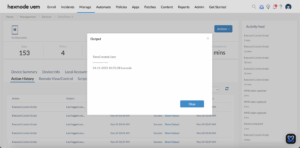
How to View Script Output in Hexnode
To review the execution results, navigate to the Action History tab of the specific device in your Hexnode UEM portal. Locate the script entry in the Subject column and click the Show Output button next to the status field to view the returned data.


