


Category filter
Ring Deployments: A 3-Tier Staging Framework for Risk-Free UEM Rollouts
Executive Summary
Implementing a staggered rollout strategy; often referred to as a “Three-Ring” or “Pilot Group” deployment; is an enterprise best practice for mitigating organizational risk. By validating configurations, updates, and applications on a small, controlled subset of devices before global deployment, IT teams can identify and resolve conflicts without disrupting business continuity.
This document outlines a comprehensive device lifecycle management framework using Hexnode UEM, encompassing everything from automated enrollment and policy association to patch management and secure disenrollment.
The 3-Tier Staging Architecture
To establish a robust staging framework, divide your device fleet into three operational rings:
- Tier 1: Alpha (Ring 0 / Canary Group) [~5% of Fleet]: Comprised of IT personnel and technically proficient volunteers. The primary goal is to identify immediate critical failures (“showstopper” bugs) such as network drop-offs or core system crashes.
- Tier 2: Beta (Ring 1 / Pilot Group) [~10-15% of Fleet]: A strategic cross-section of users representing various departments (e.g., HR, Sales, Finance). The objective is to validate that Line-of-Business (LOB) applications and daily workflows function seamlessly under new configurations.
- Tier 3: Production (Ring 2 / Global Fleet) [~80% of Fleet]: The general organizational population. Deployments reach this tier only after successful validation in the Alpha and Beta phases.
Phase 0: Constructing the Framework (Group Setup)
Before initiating any deployments, the structural foundation must be established using Hexnode’s advanced grouping capabilities.
Hexnode Implementation Steps:
- Navigate to Manage > Device Groups in the Hexnode portal.
- Utilize Custom Device Groups for manual, static assignments (ideal for the Alpha group).
- Utilize Dynamic Device Groups to automatically route devices based on predefined rules, such as Department, Serial numbers, device tags, or platform types.
- Establish your core framework by creating three distinct groups: GRP_Alpha_IT, GRP_Beta_Pilot, and GRP_Production_Global.
Phase 1: Zero-Touch Enrollment & Provisioning
Scalable staging requires devices to be automatically funnelled into their respective tiers the moment they are powered on, ensuring they immediately receive the correct baseline security posture.
Hexnode Implementation Steps:
- Out-of-the-Box Experience (OOBE): Leverage platform-native provisioning integrations, including Apple Automated Device Enrollment (ADE), Android Zero-Touch, and Windows Autopilot, connected directly to your Hexnode instance.
- Pre-Approved Enrollment Targeting: Navigate to Enroll > All Enrollments > Enterprise > Pre-approve. Import a CSV containing device identifiers (Serial Numbers, IMEIs). Assign these identifiers directly to GRP_Alpha_IT, GRP_Beta_Pilot, or GRP_Production_Global prior to unboxing.
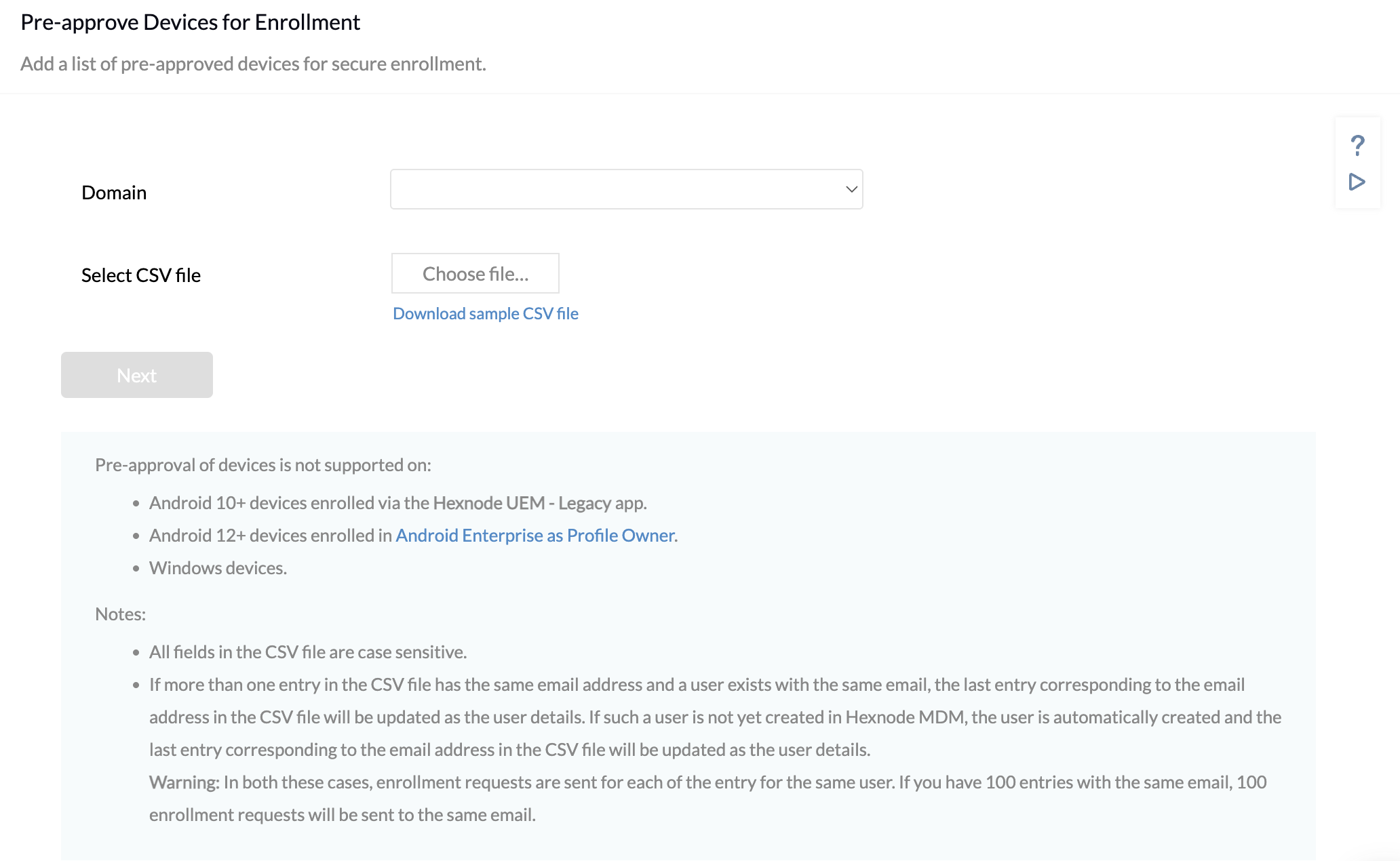
- Outcome: Upon initial boot and network connection, devices bypass manual setup, automatically enroll in Hexnode UEM, and instantly inherit the specific configurations designated for their staging tier.
Phase 2: Staged Policy Associations
Policies control security restrictions, network configurations (Wi-Fi/VPN), and compliance standards. A staggered rollout prevents enterprise-wide lockouts caused by misconfigurations.
Hexnode Implementation Steps:
- Navigate to Policies > New Policy (or clone an existing policy for iteration).
- Configure the necessary payloads and settings.
-
Execute the Staged Rollout via Policy Targets:
- Alpha Phase: Navigate to Policy Targets, select +Add Groups, and assign the policy exclusively to GRP_Alpha_IT. Monitor system logs and connectivity for 24-48 hours.
- Beta Phase: Upon Alpha clearance, modify the policy targets to include GRP_Beta_Pilot. Monitor IT helpdesk tickets for department-specific workflow interruptions.
- Production Phase: Finalize the deployment by targeting GRP_Production_Global.
Strategic Note on Conflict Resolution: If overlapping policies exist, Hexnode natively applies the most restrictive configuration. The Alpha tier is crucial for testing these precedence rules.
Phase 3: Automated Application Deployment
Distributing large Enterprise or Store applications globally can saturate network bandwidth and interrupt active user sessions.
Hexnode Implementation Steps:
- Utilize Hexnode’s Automate tab for bulk script and app execution or leverage the Required Apps policy payload for silent installations.
- Platform-Specific Execution: For Windows devices, utilize Hexnode’s capability to execute custom Pre-install and Post-install scripts alongside the executable or MSI files to ensure environmental prerequisites are met.
- The Rollout Sequence:
- Deploy the application exclusively to GRP_Alpha_IT.
- Expand the target to GRP_Beta_Pilot, actively requesting user feedback regarding app connectivity and integration with existing tools.
- Approve the global deployment to GRP_Production_Global.
Phase 4: Patch Management & OS Updates
Balancing the urgent need for security patching against the risk of system instability requires strict adherence to the Three-Ring deployment strategy.
Hexnode Implementation Steps:
-
Navigate to Policies > Security > OS Updates (supported across macOS, Windows, Android, and iOS).
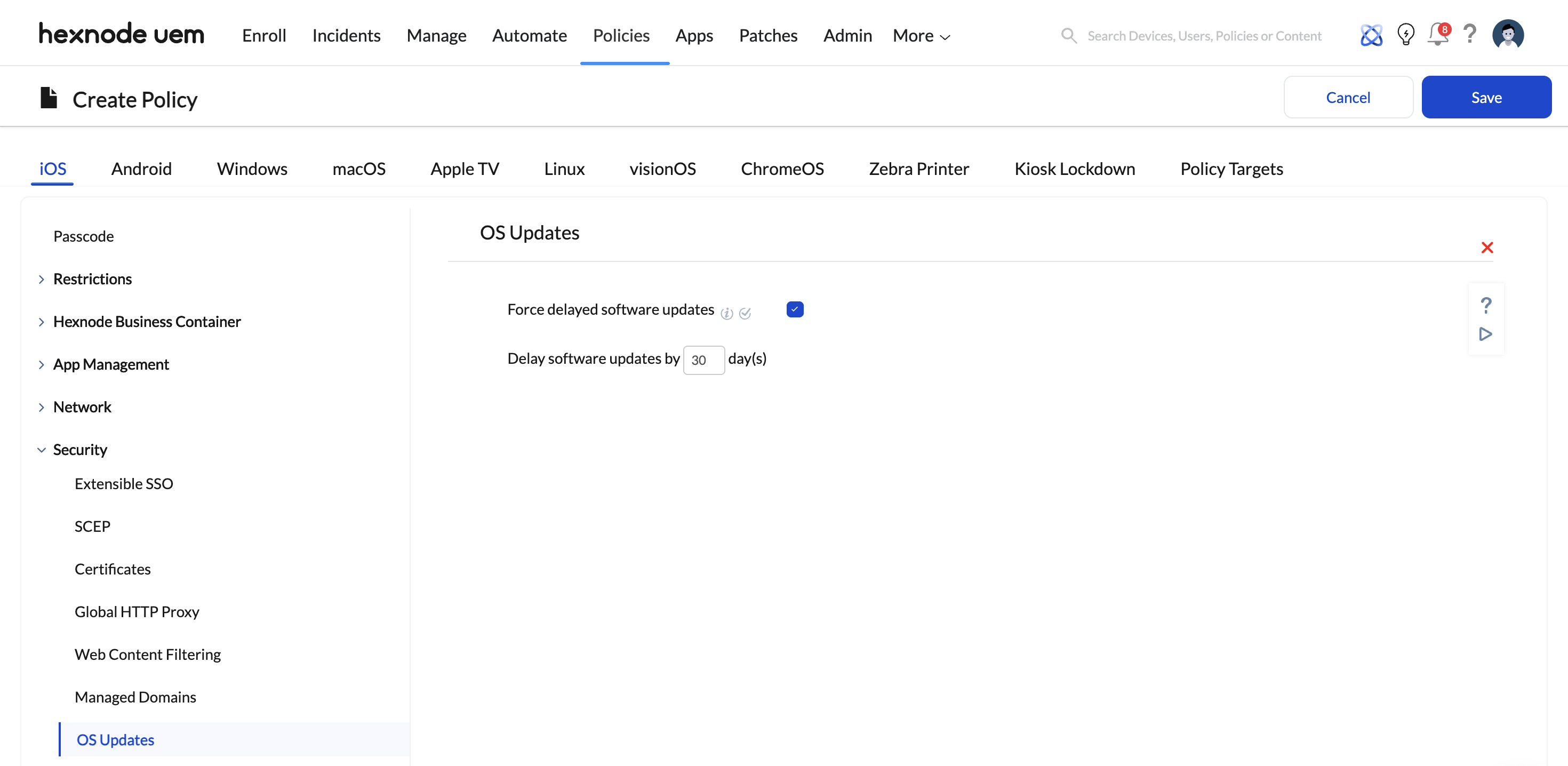
Alpha Ring (Fast-Track): Create an update policy configured to Download and Install immediately upon release. Assign this to GRP_Alpha_IT to rapidly identify major flaws (e.g., Blue Screens of Death, kernel panics).
Beta Ring (Validation): Associate the update with GRP_Beta_Pilot. Ensure that specialized LOB applications, custom CRM plugins, and legacy software remain functional.
Production Ring (Deferred Security): Create a secondary OS Update policy utilizing Hexnode’s Deferral Period settings (e.g., deferring updates by 7 to 14 days). Assign this to GRP_Production_Global. This ensures the global fleet receives vetted security patches with minimal operational disruption.
Phase 5: Automated Lifecycle Management & Disenrollment
Properly managing device retirement mitigates phantom security risks, protects corporate data, and reclaims valuable MDM license seats.
Hexnode Implementation Steps:
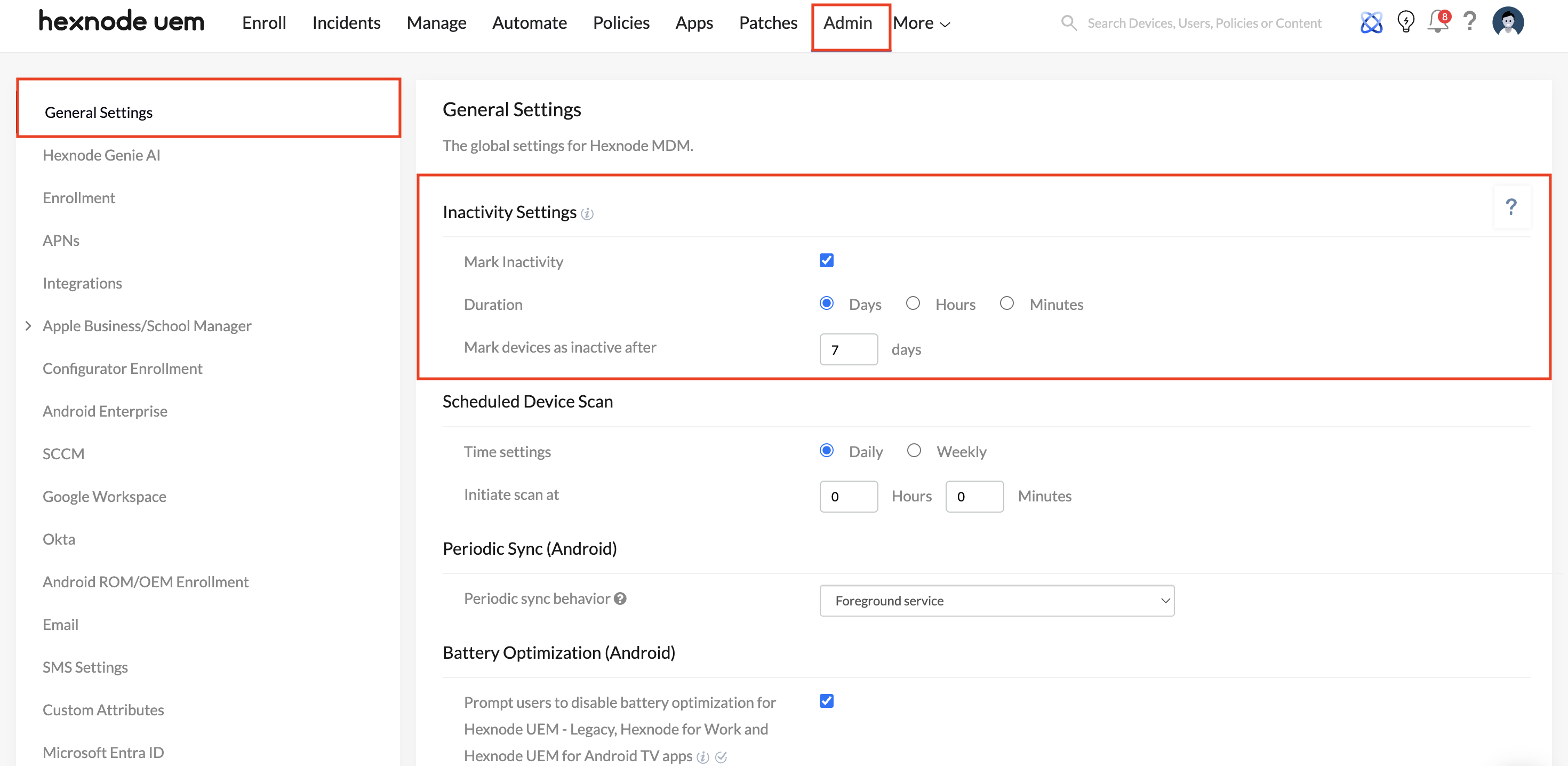
- Automated Quarantine (Inactivity Settings): Navigate to Admin > General Settings > Inactivity Settings. Configure the system to flag devices as ‘Inactive’ after a specific threshold (e.g., 30 days of no communication).
- Dynamic Filtering: Utilize Hexnode’s filtering capabilities based on “Time since last check-in” to isolate unresponsive hardware.
- The Clean-Up Protocol: Navigate to the Manage tab, filter for Inactive devices, and execute the Disenroll Device action (this can also be scheduled routinely via the Automate tab).
- Disenrollment severs the MDM certificate, executes a selective wipe of corporate data/apps, and frees the Hexnode user/device license.
- For pre-approved records that were imported but never physically enrolled, utilize the Delete Device action to sanitize your administrative console.


