


Category filter
How to make MDM profile non-removable on iOS devices
Ensuring that an MDM profile remains on a device is a boon for organizations that need to maintain constant oversight and security. Hexnode UEM allows administrators to lock the MDM profile, preventing users from manually removing management from their iOS devices.
1. Prerequisites
Apple only allows the restriction of MDM profile removal under specific conditions:
- Supervision: The iOS device must be supervised.
- Enrollment Method: The device must be enrolled via Apple Business Manager (ABM) or Apple School Manager (ASM) using:
- Automated Device Enrollment (ADE).
- Added to the portal manually via Apple Configurator.
If a device is added to ABM/ASM via Apple Configurator, there is a 30-day provisional period. During this time, the user can still remove the MDM profile even if the “non-removable” setting is active.
2. Configuration Workflow
To prevent users from removing the MDM profile, you must configure the ADE Enrollment Profile:
- Log in to the Hexnode UEM portal.
- Navigate to Admin > Apple Business/School Manager > Automated Device Enrollment.
- Select Enrollment Profiles.
- Click on your Default ADE profile or select Create Enrollment Profile to create a new one.
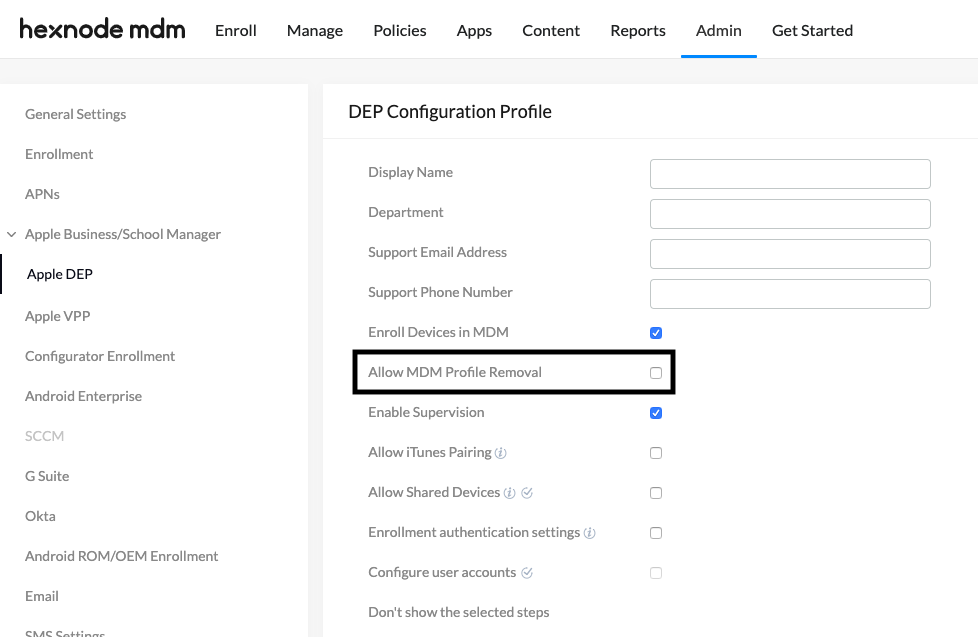
- Uncheck the option: “Allow MDM profile removal”.
- Click Save.
3. Associate ADE Profile with Devices
After saving the profile, ensure it is assigned to your hardware:
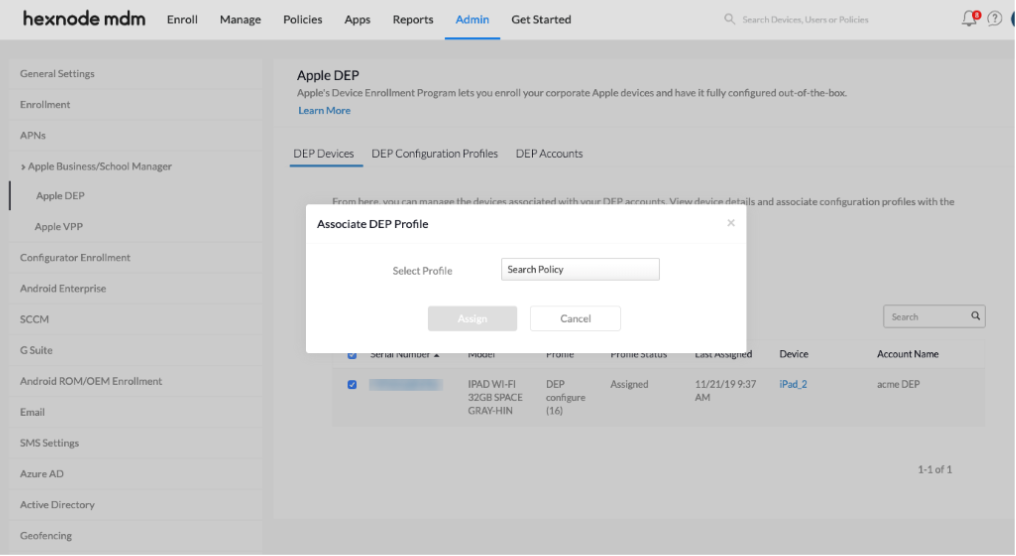
- Navigate to Admin > Apple Business/School Manager > Automated Device Enrollment > Devices.
- Select the target device(s).
- Click the Associate Enrollment Profile button at the top.
- Search for the profile you just modified/created and click Assign.
4. What Happens at the Device End?
Normally, users can go to Settings > General > VPN & Device Management, select the Hexnode UEM profile, and tap “Remove Management.” Once this configuration is applied:
- The “Remove Management” button will be completely hidden or disabled.
- The user will have no native way to exit management, ensuring the device remains under corporate control at all times.
5. Troubleshooting & FAQs
Frequently Asked Questions (FAQs)
- Can a BYOD (Personal) device profile be made non-removable?
No. Apple’s privacy policies mandate that users who enroll their personal devices (User Enrollment) must always have the option to remove management.
- What is the “30-day provisional period”?
If a device is manually added to ABM using Apple Configurator, Apple enforces a 30-day grace period. During this window, the user can still remove the MDM profile via Settings. After 30 days, the profile becomes permanently locked and non-removable.
- Can an administrator remove a non-removable profile without wiping the device?
An administrator can remotely remove a non-removable profile by selecting the Disenroll Device action within the Hexnode UEM Portal, which deletes the device management profile instantly via an over-the-air command.
Troubleshooting
- Remove Management Button Still Visible: Ensure the device is Supervised. If the device was not enrolled via ADE, Apple does not allow this restriction.
- Profile is Removable after Configurator Enrollment: Check if the device is still within the 30-day provisional window. You must wait for this period to expire for the profile to become truly locked.
- Settings Not Applying: Remember that ADE profile changes are only applied during activation. If a device was already enrolled before you unchecked “Allow MDM profile removal,” you must Wipe/Factory Reset the device to apply the lock.


