


Category filter
Script to set Wallpaper on Windows
Hexnode UEM automates the execution of proactive IT tasks on Windows with the help of
custom scripts. For example, you can create Batch file scripts or PowerShell scripts to perform necessary operations, which can be executed on the devices remotely from the Hexnode console.
This doc helps you create custom scripts to change the desktop wallpaper on Windows devices.
PowerShell script to set the wallpaper
|
1 2 3 4 5 6 7 8 9 10 11 12 13 14 15 16 17 18 19 20 21 22 23 24 25 26 27 28 29 30 31 32 33 34 35 36 37 38 39 40 41 42 43 44 45 46 47 48 49 50 51 52 53 54 55 56 57 58 59 60 61 62 63 64 65 |
$filePath = "C:\Hexnode\sample.jpg" function Get-CurrentUser() { try { $currentUser = (Get-Process -IncludeUserName -Name explorer | Select-Object -First 1 | Select-Object -ExpandProperty UserName).Split("\")[1] if (-NOT[string]::IsNullOrEmpty($currentUser)) { Write-Output $currentUser } } catch { Write-Output "Failed to get current user." Write-Output "Error occured while running script -> ",$_.Exception.Message } } function Get-UserSID([string]$fCurrentUser) { try { $user = New-Object System.Security.Principal.NTAccount($fcurrentUser) $sid = $user.Translate([System.Security.Principal.SecurityIdentifier]) if (-NOT[string]::IsNullOrEmpty($sid)) { Write-Output $sid.Value } } catch { Write-Output "Failed to get current user SID." Write-Output "Error occured while running script -> ",$_.Exception.Message } } Write-Output "--------------starting script execution--------------" $currentUser = Get-CurrentUser $currentUserSID = Get-UserSID $currentUser $userRegistryPath = "Registry::HKEY_USERS\$($currentUserSID)\Control Panel\Desktop" Set-ItemProperty -Path $userRegistryPath -Name wallpaper -Value $filePath Write-Output "--------------script execution completed successfully--------------" Write-Output "Apply Restart device action to reflect the changes immediately" |
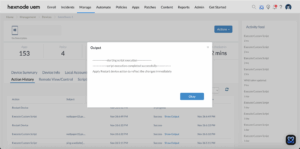
Replace file path in the $filePath parameter with your actual file path and ensure the wallpaper image exists on the device by the specified name at the designated path. Since the script works on this image, its unavailability can cause the action to fail. Also, it requires a restart action for the changes to be reflected on the device.
How to View Script Output in Hexnode
To review the execution results, navigate to the Action History tab of the specific device in your Hexnode UEM portal. Locate the script entry in the Subject column and click the Show Output button next to the status field to view the returned data.


