


Category filter
Offline-First Device Compliance: Securing Field Assets Without a Network Heartbeat
Executive Summary
Managing a fleet of remote and field devices presents unique security challenges, particularly when devices go off-grid or remain inactive for extended periods. Because Unified Endpoint Management (UEM) platforms like Hexnode require an active internet connection to execute remote commands, organizations cannot rely solely on real-time MDM server communication to trigger actions locally while entirely offline.
Instead, a robust strategy involves a hybrid approach: identifying inactive devices, utilizing geofencing automations that trigger upon boundary violations, enforcing location tracking for field visibility, and relying on OS-level, offline-capable encryption (BitLocker and FileVault) to protect data unconditionally.
1. Identifying and Managing Inactive Devices
When field devices go entirely offline, IT administrators must be quickly notified to prevent security breaches and manage hardware lifecycles.
Configuring Inactivity Settings
Hexnode UEM allows administrators to define what constitutes an “inactive” device. Under Admin > General Settings > Inactivity Settings, admins can set a specific duration (in Days, Hours, or Minutes) after which a device that has not communicated with the server is flagged as inactive.
- Admin Notifications: Administrators can configure email alerts under Admin > General Settings > Alert Profile to be notified instantly when a device is marked non-compliant or inactive, ensuring prompt investigation.
Inactivity Automations
Hexnode’s Automate tab supports automation for inactive hardware. By using the On Device Inactive or On Device Inactive For triggers, organizations can execute critical security commands upon device inactivity as they define it.
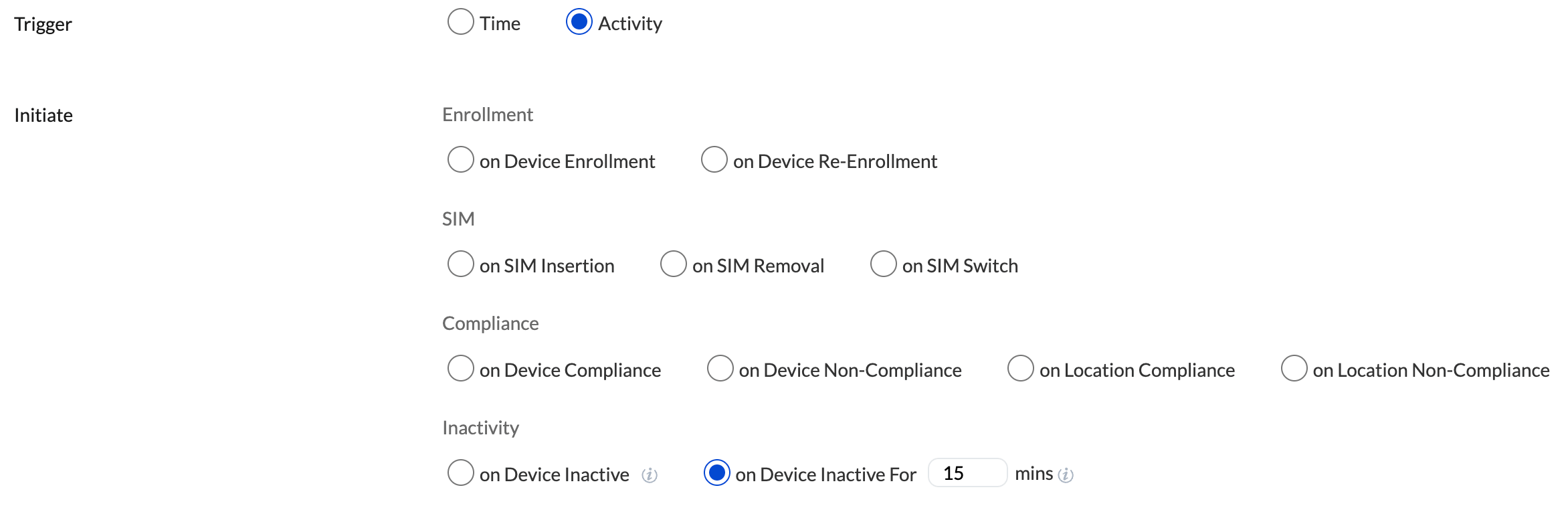
Supported Actions: Once the configured period of inactivity is reached, actions such as Lock Device, Enable Lost Mode, or Wipe Device can be triggered for the Android device.
2. Defining “Off-Grid” via Geofencing and Boundary Automations
In a field management context, “off-grid” often translates to a device physically leaving its authorized deployment area. Hexnode handles this via robust Geofencing and Location-Based Restrictions.
Establishing Geofences
Administrators can map out authorized operational areas using polygonal or circular geofences. Once a geofence is created, devices can be associated with Hexnode’s Tracking and Fencing policies to monitor their locations. Additionally, a compliance policy can be used to tag any device that crosses the geofence as non-compliant.
Automating Boundary Violations
If a device crosses the defined geographical boundary, it becomes “Location Non-Compliant.” Hexnode can automate responses to this trigger:
- Automated Security Execution: Using the On Location Non-Compliance automation trigger, Hexnode can immediately execute a Device Lock or Corporate Data Wipe as soon as the boundary breach is communicated to the server.
- Dynamic Grouping: Devices exiting a geofence can automatically be removed from a location-based Dynamic Device Group. This immediately strips the device of access to sensitive corporate apps, Wi-Fi networks, and internal configurations tied to that group.
3. Location Tracking for Continuous Visibility
To support geofencing and field operations, continuous location monitoring is imperative. Hexnode offers location tracking policies across major platforms.
- Periodic & Instantaneous Tracking: Admins can configure location update intervals ranging from 15 minutes to 24 hours; Hexnode then scans and fetches the device location at the set interval. Alternatively, the Scan Device Location remote action can fetch a real-time ping.
- Enforcing Location Services:
- Android: Location tracking can be enforced, and users can be continuously prompted or restricted from disabling GPS settings.
- iOS & macOS: Location permissions can be enabled during setup.
- Windows: Co-managed Windows devices support remote location tracking enablement.
- Historical Mapping: Administrators can export location history logs (CSV) to audit the exact routes and last-known locations of devices before they went offline.
4. Unconditional Data Protection: Integrating BitLocker and FileVault
If a device is stolen and kept in an RF-shielded bag (no internet), data protection must occur at the operating system level. OS-level encryption executes locally and remains active without any MDM.
Windows Management: BitLocker
BitLocker offers full-volume encryption that prevents unauthorized offline access to data.
- Policy Configuration: Through Hexnode, admins can enforce the Require encryption for OS and fixed data drives policy.
- Recovery Key Management: Hexnode silently escrows the BitLocker Recovery Key to the UEM portal. If a BIOS update or offline hardware tampering triggers BitLocker recovery mode, only the IT admin can retrieve the key to unlock the drive.
macOS Management: FileVault
FileVault secures macOS devices using XTS-AES-128 encryption.
- Enforcement Levels: Hexnode allows admins to silently enable FileVault and prevent standard users from modifying these settings.
- Escrowing the Personal Recovery Key (PRK): To ensure IT retains control if the user forgets their password while off-grid, Hexnode can enforce the creation of a PRK or an Institutional Recovery Key (IRK). The Escrow Personal Recovery Key setting automatically encrypts and transmits the key back to the Hexnode portal for secure administrative access.
Conclusion
By combining Hexnode UEM’s Inactivity Settings, Geofence Automations, and Location Tracking with the localized, heartbeat-independent security of BitLocker and FileVault, organizations can maintain a tight security posture over remote devices. Even if a field device goes entirely off-grid for weeks, unauthorized users will face impenetrable local encryption, and the UEM server will stand ready to instantly lock or wipe the device the moment a network connection is attempted.


