


Category filter
How to install OS updates on Linux devices?
The Update OS remote action in Hexnode UEM allows IT administrators to remotely deploy system patches, security updates, and critical fixes to managed Linux endpoints to maintain security and operational stability.
Why Prioritize Linux OS Updates?
Regularly updating the operating system mitigates vulnerabilities to malware, prevents sensitive data leaks, and ensures software compatibility. Maintaining current versions is essential for optimizing device performance and protecting organizational endpoints from emerging threats.
- Security: Closes vulnerabilities that could be exploited for unauthorized access.
- Compatibility: Ensures seamless interaction between the OS and third-party applications.
- Performance: Provides system optimizations and bug fixes to improve device stability.
Prerequisites
| Requirement | Description |
|---|---|
| Platform | Managed Linux devices enrolled in the Hexnode UEM portal. |
| Permissions | Administrator access to the Hexnode UEM console. |
Step-by-Step Guide: Enforcing OS Updates
To initiate and configure the installation of operating system updates on Linux devices:
- Log in to the Hexnode UEM portal.
- Navigate to Manage > Devices.
- Select the checkbox next to the target Linux device(s).
- Click on Actions > Updates > Update OS.
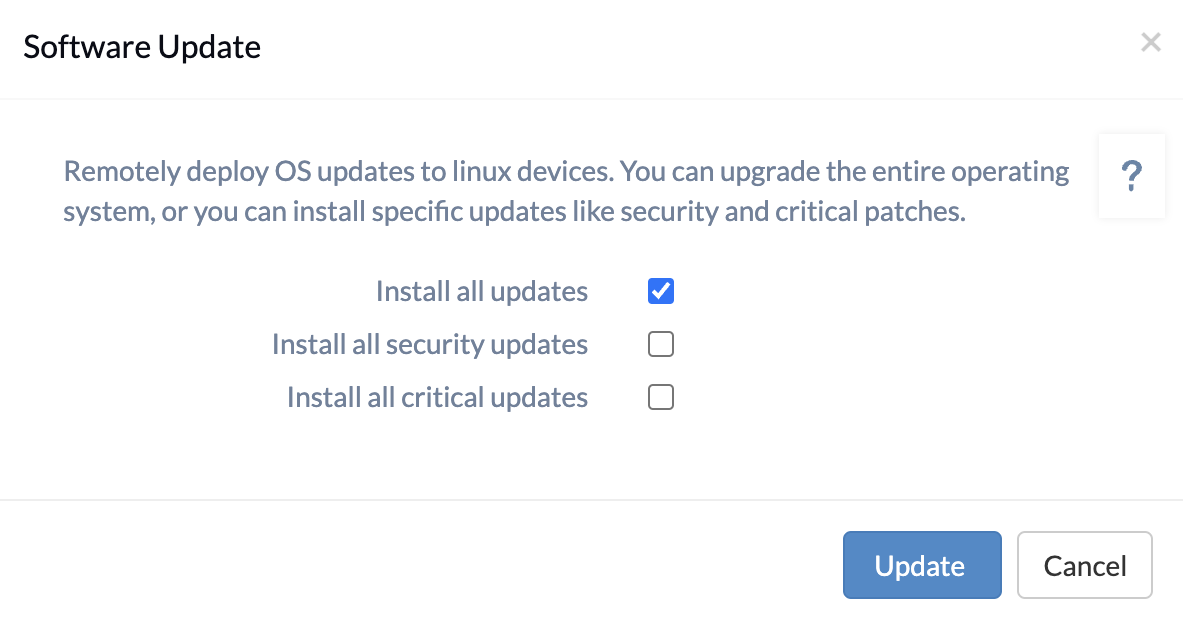
- In the configuration window, select one or more of the following update types:
Update Option Functional Description Install all updates Upgrades the entire operating system, including all available security and critical patches. Install all security updates Installs specific security update patches to protect against known threats. Install all critical updates Deploys critical software vulnerability patches required for system integrity. - Click Done (or the respective confirmation button) to execute the remote action.
Frequently Asked Questions (FAQ)
Is it possible to install only security patches on Linux devices?
Yes. By selecting the Install all security updates option, the system will prioritize and deploy only security-related patches without upgrading the entire operating system.
What is included in the “Install all updates” action?
The Install all updates action is comprehensive; it triggers an upgrade of the entire operating system, which encompasses all security, critical, and general software patches available for the device.
Why is the “Update OS” action used for vulnerability management?
Outdated Linux systems are susceptible to malware and data leaks. The Update OS action allows for the remote deployment of critical updates that specifically address software vulnerabilities, thereby securing the endpoint.


