


Category filter
How to acquire Bug Reports for Android devices enrolled as Device Owner in Android Enterprise?
The Request Bug Report remote action in Hexnode UEM allows IT administrators to collect comprehensive diagnostic data—including device logs and stack traces—from managed Android devices to facilitate technical troubleshooting.
What is an Android Bug Report?
An Android bug report is a diagnostic package containing system logs, kernel messages, and stack traces used to identify software errors or performance issues. Administrators trigger the request remotely, and users transmit the file directly to the UEM portal.
- Diagnostic Data: Captures real-time logs and system states.
- Remote Initiation: Admins can request logs without physical access to the endpoint.
- Secure Storage: Once shared, reports are stored centrally within the Hexnode portal for analysis.
Prerequisites and Support
To successfully generate and retrieve bug reports, devices must adhere to the following management criteria:
| Requirement | Specification |
|---|---|
| Android Version | Android 7.0 and above. |
| Management Mode | Enrolled as Device Owner in the Android Enterprise program. |
| Agent App | Latest version of Hexnode for Work or Hexnode UEM app. |
| User Interaction | User must manually approve the “Share” request from the device notification panel. |
Step-by-Step Guide: Requesting a Bug Report
Administrators can request bug reports for individual devices or in bulk for multiple endpoints.
1. Requesting from a Single Device
- Log in to the Hexnode portal and navigate to Manage > Devices.
- Click on the specific device name to open the Device Summary.
- Select Actions > Others > Request Bug Report.
- Click Request.
2. Requesting from Multiple Devices (Bulk Action)
- Navigate to Manage > Devices.
- Select the checkboxes for all target devices.
- Select Actions > Others > Request Bug Report.
- Click Request to initiate the command across all selected devices.
User Experience: Device-End Actions
The generation of a bug report is not entirely silent; it requires user consent to transmit the diagnostic data.
- Notification: Once the report is generated, a notification appears on the device.
- Sharing: The user must click Share from the notifications panel to send the report.
- Consent: The user has the option to either Accept or Decline the request to share logs with the Hexnode portal.
Accessing and Downloading Bug Reports
After the user approves the sharing request, the data is uploaded to the portal.
- Navigate to Manage > Devices and select the device.
- Go to the Device Summary page.
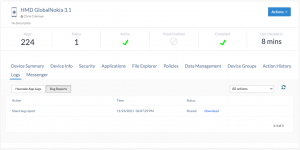
- Select the Logs tab and navigate to the Bug Reports sub-tab.
- Locate the required file and click the Download button to save the report to your local system.
Troubleshooting Guides
| Problem | Resolution |
|---|---|
| User cannot see the “Share” request in Kiosk Mode | On kiosk-enabled devices, notification panels are often restricted. Temporarily disable Kiosk Mode or ensure the “Show Notifications” permission is enabled in the policy to allow users to approve the request. |
| “Request Bug Report” action is missing or disabled | Verify that the device is running Android 7.0+ and is enrolled as a Device Owner. This action is not supported for Profile Owner (BYOD) enrollments. |
| Report status remains “Pending” in portal | The report only uploads once the user manually clicks Share. Confirm with the end-user that they have accepted the notification request on the device. |
| Bug report contains incomplete data | Ensure the device has not been restarted immediately after the request, as this can clear some temporary system log buffers. |
Frequently Asked Questions (FAQs)
Can bug reports be retrieved without user intervention?
No. Due to Android privacy and security protocols, the end-user must manually accept the request and click Share from the notification panel for the report to be uploaded to the portal.
Where are the bug reports stored in Hexnode?
Shared bug reports are found under Device Summary > Logs > Bug Reports for each specific device.
Does this feature work on Android Enterprise Profile Owner (BYOD) devices?
No. The remote Request Bug Report action is strictly supported only for devices enrolled as Device Owner (Company-Owned) in the Android Enterprise program.
What information is included in the bug report?
A standard report includes a variety of diagnostic information, such as device logs, stack traces, memory usage data, and other system diagnostic outputs.


