


Category filter
User Groups Management in Hexnode UEM
Overview
In Hexnode UEM, a User Group is a logical collection of users who share common attributes (e.g., job title, department, or location). Creating groups allows administrators to associate policies and deploy remote actions to multiple users simultaneously, rather than managing them individually.
Navigation
All group management tasks are performed under Manage > User Groups.
Creating and Modifying Groups
Creating a New Local Group
- Navigate to Manage > User Groups > New group.
- Metadata: Enter a Group Name (Required) and Description (Optional).
- Membership: Click + Add more under the Users section.
- Selection: Select the desired users from the list and click Done.
Integrating Directory Services
If you prefer to automate group creation via your existing infrastructure:
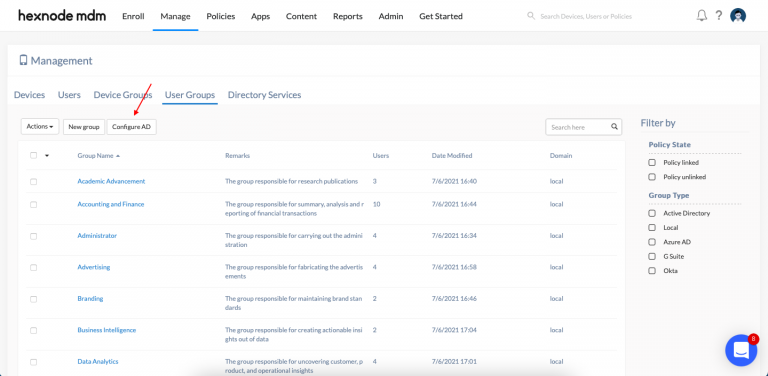
- Action: Click the Configure AD button on the User Groups page.
- Function: This allows you to add Microsoft Active Directory or Azure AD servers.
- Outcome: Once synced, the users and groups from your directory service are imported automatically into Hexnode UEM. You can monitor the sync status via the Directory Services overlay window.
Editing Existing Groups
To update a group, navigate to Manage > User Groups and click on your specific group name.
- Update Labels: Hover over the Group Name or Description and click the Edit Icon to modify the text.
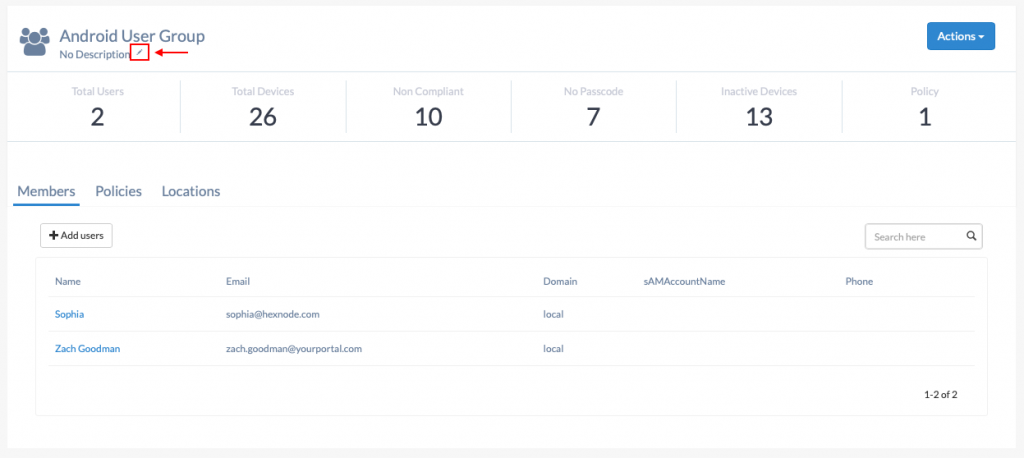
- Add Users: Click + Add users, select the individuals from the Browse Users window, and click Done.

- Remove Users: In the group’s user list, hover over a specific user row. Click the Cross (X) Icon in the far-right column and confirm.

Deleting Groups and Reporting
Deletion Process
- Navigate to Manage > User Groups.
- Select the checkbox(es) for the group(s) you wish to remove.
- Click the Actions button and select Delete Group.
- Confirm the action in the prompt.
Exporting Group Reports
- Hexnode allows you to export granular data for specific groups to assist with auditing and compliance.
- Navigate to Manage > User Groups.
- Select the target User Group(s).
- Click the Export button.
- Choose your preferred format: PDF or CSV.

Frequently Asked Questions (FAQs)
- What is the difference between a “Local” group and a “Directory” group?
Local Groups: Created directly in Hexnode. You have full control to edit, add users, or delete these groups within the portal.
Directory Groups: Synced from Active Directory (AD) or Azure AD. These are “read-only” in Hexnode. Any changes to membership or deletion must be performed on your directory console.
- If I delete a User Group, will the users inside it be deleted from Hexnode?
No. Removing a group only deletes the organizational container. The individual users remain in the Hexnode portal and will still be listed under the Users tab.
- Can I apply policies to a User Group?
Yes. This is one of the primary functions of groups. Associating a policy with a group ensures that every user (and their assigned devices) within that group automatically inherits the policy.
- Why can’t I see the “Delete Group” option for my synced AD group?
Hexnode prevents the deletion of directory-linked groups to maintain sync integrity. To remove a directory group from Hexnode, you must either remove it from the source directory or disconnect the directory instance from Hexnode.


