


Category filter
Android Enterprise Provisioning: Orchestrating 50,000+ Endpoints
1. Introduction
Managing a fleet of 500,000 Android devices creates significant logistical challenges, primarily due to the fragmentation of hardware (mixing rugged scanners with flagship smartphones) and varying user privacy needs.
This document outlines how Hexnode utilizes Android Enterprise (AE) to standardize management across this diverse fleet. By moving away from legacy management methods, we ensure a scalable, secure, and user-friendly environment. This strategy covers automated deployment (Zero-Touch), privacy-focused management (COPE), and hardware-specific controls (OEMConfig).
2. Automated Deployment: Zero-Touch Provisioning (ZTP)
For a large-scale technician team, manually setting up devices is logistically impossible. We utilize Android Zero-Touch Provisioning (ZTP) to automate the “out-of-the-box” experience.
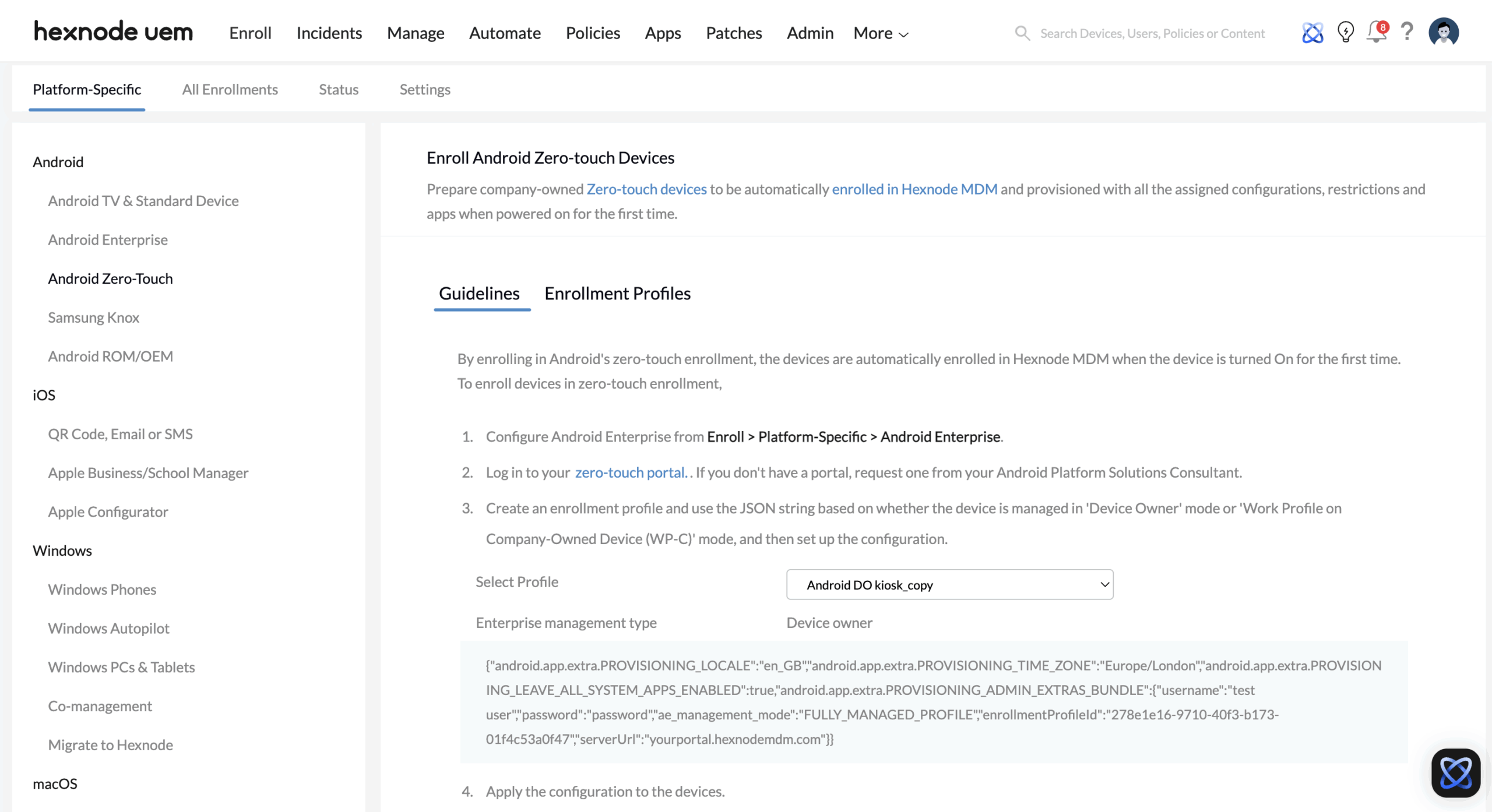
How It Works
- Procurement: Devices are purchased from an authorized reseller.
- Assignment: The reseller uploads the device identifiers (IMEI/Serial) directly to the ZTP portal, assigning them to the Hexnode Dedicated Cluster.
- Boot Up: When the user turns on the device for the first time, it checks in with Google, recognizes it belongs to the enterprise, and silently downloads the Hexnode Agent.
Key Benefits
- Theft Prevention: If a device is stolen and factory reset, it will automatically force re-enrollment into Hexnode upon reboot, rendering the device useless to unauthorized users.
- Samsung KME: For our Samsung fleet, we utilize Knox Mobile Enrollment (KME). This offers the same zero-touch experience but adds a layer of hardware-backed security verification unique to Samsung hardware.
Note: This process requires no interaction from the IT team. The device configures itself simply by connecting to Wi-Fi or Cellular data.
3. Management Modes: Balancing Control and Privacy
Hexnode supports specific management modes tailored to different user personas within the organization.
A. COPE (Corporate-Owned, Personally Enabled)
Target Audience: Executives and Knowledge Workers.
This mode addresses the privacy concerns of carrying a corporate device. It splits the device into two distinct containers:
- Corporate Zone (Work Profile): IT has full control here. We secure apps, enforce VPNs, and manage data.
- Personal Zone: The user has complete privacy. The IT team cannot see personal photos, emails, or browsing history in this zone.
Security Enforcements:
Even with privacy enabled, IT can enforce device-wide rules (e.g., minimum OS version, screen lock complexity). If a device is compromised, IT can selectively wipe only the Work Profile, protecting corporate data while leaving personal photos intact.
B. Fully Managed (COBO – Corporate-Owned, Business Only)
Target Audience: Front-line workers, logistics, and retail.
This mode assumes the device is strictly a work tool.
- Total Control: IT can disable hardware buttons, block USB debugging, and restrict camera access.
- Kiosk Mode: Devices can be locked to a single app or a specific set of apps, preventing distractions and misuse.
4. OEMConfig: Managing Hardware-Specific Features
Standard Android management covers the basics (Wi-Fi, Email). However, rugged devices (Zebra, Honeywell) and Samsung devices have unique hardware features. Hexnode uses OEMConfig to manage these without waiting for custom updates.
The Mechanism
OEMConfig acts as a “translator” app installed on the device. It accepts configurations from Hexnode and applies them to proprietary hardware settings.
- Zebra/Honeywell Scanners: We can remotely configure barcode scanner trigger logic, symbology settings, and battery health thresholds.
- Samsung Knox: We utilize the Knox Service Plugin to manage E-FOTA (Enterprise Firmware-Over-The-Air). This allows us to “pin” the entire fleet to a specific, validated Android OS version, preventing updates from breaking critical business apps.
5. Security Architecture
To protect the fleet from sophisticated threats, Hexnode integrates directly with Google’s security infrastructure.
- Play Integrity API: Hexnode performs real-time checks on the device hardware. It verifies the bootloader status and OS integrity to ensure the device hasn’t been rooted or tampered with.
- Managed Play Store: We restrict app installation to a curated list of approved apps. This prevents users from side-loading potentially malicious APKs (app files) from unknown sources.
- Network Security: Automated deployment of Always-on VPN ensures that work traffic is encrypted and never traverses the public internet unsecured.
6. Comparison: Legacy vs. Hexnode Android Enterprise
The shift to Android Enterprise offers a distinct upgrade over old “Device Admin” methods.
| Feature | Legacy Device Admin | Hexnode Android Enterprise |
|---|---|---|
| Enrollment | Manual / URL visit required | Zero-Touch / KME (Automated) |
| Privacy | Global & Intrusive (All or nothing) | Scoped (COPE separates Work/Personal) |
| App Management | APK Side-loading (High Risk) | Managed Play Store (Vetted & Secure) |
| Hardware Control | Basic / Limited | Advanced (OEMConfig / granular control) |
| Security | OS-dependent | Attested (Google Play Integrity API) |


