


Category filter
Configuring Access Point Names
Access Point Names (APN) act as a gateway between a mobile device and the internet. While carrier service providers typically set up these configurations, many organizations prefer a distinct private network to segregate corporate data from public internet traffic. This establishes a direct, secure connection to the company’s internal network.
1. APN Configuration Workflow
To configure APN settings via policy:
- Login to the Hexnode UEM portal.
- Go to Policies > New Policy > Create a fully custom policy > iOS > Network > APN and click Configure.
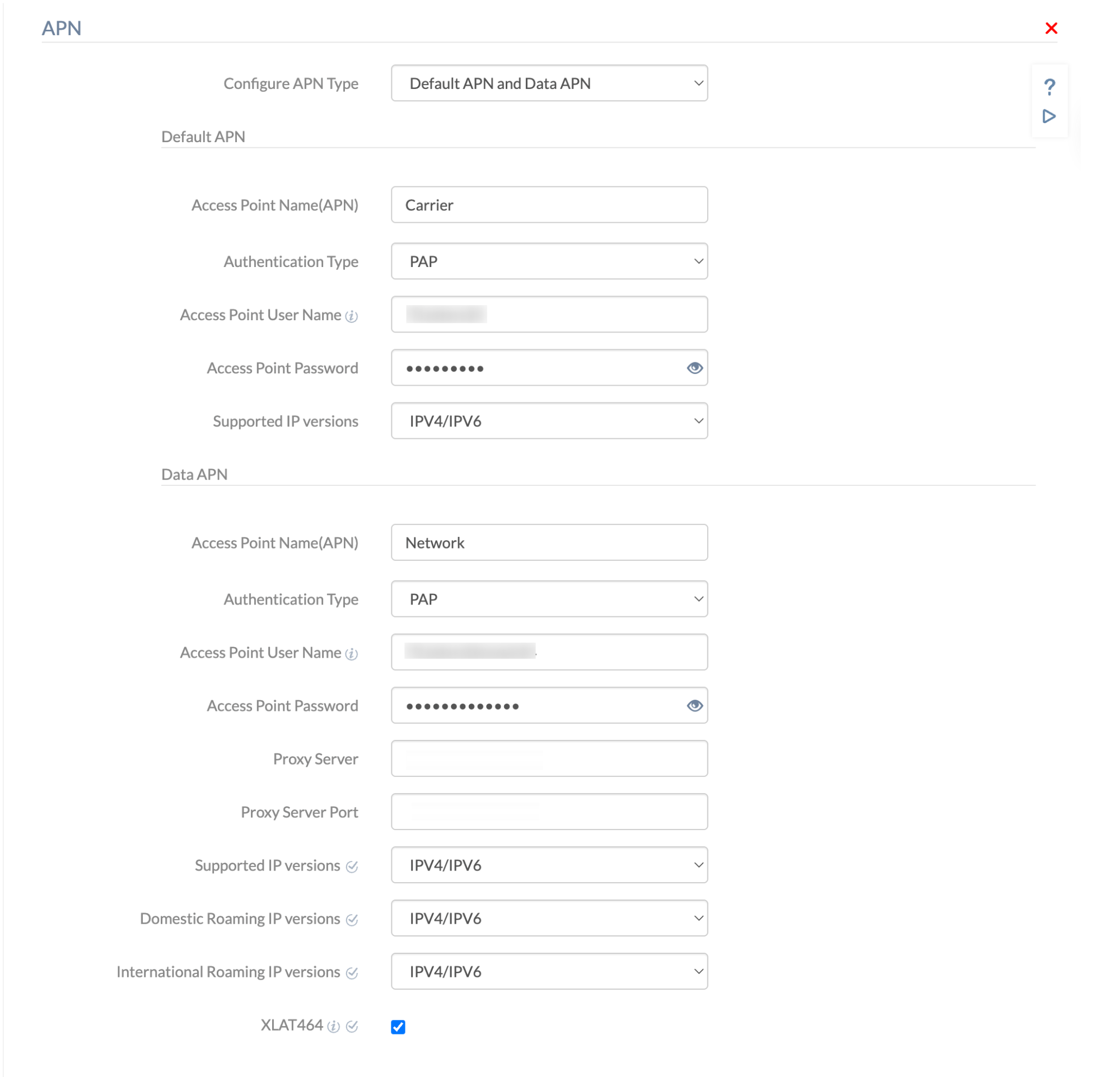
- Configure APN Type: Choose between Default APN, Data APN, or Both Default APN and Data APN.
2. Technical Parameter Breakdown
1. Default APN Settings
Configures the primary gateway for cellular network services.
| Setting | Description |
| Access Point Name (APN) | Mandatory. Enter the name of the network’s access point. This value differs from network to network. |
| Authentication Type | Specifies the security protocol for sending credentials.
|
| Access Point User Name | (Optional) The username required to authenticate the access point. |
| Access Point Password | The password associated with the access point username. |
| Supported IP versions | Choose the type of IP address used by the device: IPv4, IPv6, or IPv4/IPv6. |
2. Data APN Settings
Configures the gateway for cellular data, roaming, and proxy management.
| Setting | Description |
| Access Point Name (APN) | Mandatory. Enter the name of the network’s access point. |
| Authentication Type | Specifies the security protocol (PAP or CHAP). |
| Access Point User Name | (Optional) The username required to authenticate the access point. |
| Access Point Password | The password associated with the access point username. |
| Proxy Server | Enter the server name or IP address of the proxy server to set up a proxy between devices and the internet. |
| Proxy Server Port | The port number of the proxy server port. |
| Supported IP versions | Choose the IP address type: IPv4, IPv6, or IPv4/IPv6. |
| Domestic Roaming IP versions | Choose the IP address type used while on domestic roaming: IPv4, IPv6, or IPv4/IPv6. |
| International Roaming IP versions | Choose the IP address type used while on international roaming: IPv4, IPv6, or IPv4/IPv6. |
| XLAT464 | Enable this to allow a device with a private IPv4 address to connect to other IPv4 addresses over an IPv6 network. |
3. Both Default APN and Data APN
Selecting this option requires the configuration of all settings listed in both the Default APN and Data APN sections above. This ensures both the primary network gateway and the data-specific gateway are managed under a single policy.
3. Policy Association & Deployment
Once the settings are configured, the policy can be applied to devices using these methods:
- If the policy is not yet saved: Navigate to Policy Targets, select the target (Devices, Device Groups, Users, User Groups, or Domains/OUs), click +Add Devices, select the entities, and click Save.
- If the policy is already saved: Go to the Policies tab, select the policy, click Manage > Associate Targets, select the devices/groups, and click Associate.
4. Troubleshooting & FAQs
FAQs
- Does setting an APN affect Wi-Fi connectivity?
No. APN settings govern cellular data only. If Wi-Fi is available and connected, the device will prioritize Wi-Fi for data traffic.
- What is the maximum character limit for an APN password?
While not explicitly limited in the APN field, standard practice is to follow the carrier’s specific credential requirements.
- Is “Access Point User Name” always required?
No. This field is optional and only necessary if the carrier or private network utilizes credential-based authentication.
Troubleshooting
- Device fails to connect to cellular data: Double-check that the Access Point Name (APN) string matches the carrier’s requirements exactly. Even a small typo will prevent a connection.
- Connectivity issues while roaming: Ensure that the Domestic/International Roaming IP versions are set to IPv4/IPv6 if the carrier’s infrastructure supports both, as some networks may only support one version.
- Authentication errors: Confirm whether the network requires CHAP instead of the default PAP, as many private corporate APNs require the higher security of CHAP.


