


Category filter
Automating the Endpoint Security Lifecycle with Continuous Posture Management
Moving from “Compliance Checks” to “Continuous Posture Management”
1. Introduction: The New Security Reality
For years, endpoint security was binary: a device was either “managed” or “unmanaged.” IT teams would push a policy once and assume it remained effective.
However, in a modern landscape where threats evolve by the minute and employees work from everywhere, static compliance is no longer enough. We must shift to Continuous Posture Management. This means the security system doesn’t just check the device once; it constantly monitors the device’s “health posture”—its location, its encryption status, its OS integrity—and adapts access rights in real-time.
This document outlines how Hexnode transforms from a passive management tool into an active security orchestrator, enforcing Zero Trust principles and automating critical data protection lifecycles.
2. Zero Trust Orchestration
The General Concept: “Zero Trust” is a security framework based on the principle: Never Trust, Always Verify. Just because a user has the correct password doesn’t mean they should have access. We must also verify if the device they are using is secure.
Conditional Access Handshakes
The Bridge Between Identity and Device Health
In the past, if a hacker stole a user’s password, they could log in from any laptop in the world. Conditional Access prevents this by asking two questions:
- Who is the user? (Identity Provider)
- Is the device safe? (Hexnode UEM)
How Hexnode Powers This:
Hexnode acts as the “source of truth” for device health. It feeds real-time telemetry directly to identity providers like Microsoft Entra ID (formerly Azure AD).
- The Workflow: When a user attempts to open Microsoft 365 or Salesforce, the Identity Provider pauses and “asks” Hexnode for a status report.
- The Telemetry: Hexnode instantly reports critical metrics:
- Is the device Jailbroken or Rooted?
- Is the OS updated to a secure version?
- Is the device encrypted?
- The Consequence: If Hexnode flags the device as “Non-Compliant” (e.g., encryption is turned off), access to corporate apps is instantaneously revoked. The user is guided to fix the issue before they can work again.
Geo-Fenced Posture Shifting
Context-Aware Security
Security rules shouldn’t be “one size fits all”—they should adapt to where the user is. A device sitting in a secure corporate HQ has different risk factors than a device sitting in a public airport.
How Hexnode Powers This:
Hexnode utilizes Geofencing to create invisible perimeters around physical locations (e.g., office buildings, warehouses, high-security labs).
- Dynamic Adaptation: As a device physically crosses these digital boundaries, Hexnode automatically switches the security policy applied to that device.
- Use Case – The “High-Security” Zone:
- Entry: When an employee enters a sensitive R&D facility, Hexnode detects the coordinates. It immediately applies a restrictive policy: Cameras are disabled (to prevent IP theft), Bluetooth/USB is blocked (to prevent data exfiltration), and Wi-Fi auto-connects to the secure internal network.
- Exit: When the employee leaves for lunch, the restrictions lift automatically, returning the device to standard functionality.
3. Encryption & Key Lifecycle
The General Concept: Encrypting a hard drive (making data unreadable without a password) is the baseline defense against physical theft. However, the biggest risk in enterprise encryption isn’t the encryption itself—it’s managing the thousands of “Recovery Keys” needed to unlock devices when users forget passwords.
Orchestrated Key Escrow & Rotation
Managing BitLocker (Windows) and FileVault (macOS) at Scale
If an employee forgets their password and the IT team doesn’t have the Recovery Key, that data is gone forever. Conversely, if IT teams store these keys on spreadsheets or sticky notes, it’s a massive security breach.
How Hexnode Powers This:
Hexnode automates the entire lifecycle of these keys, balancing “Recoverability” with “Security.”
- Enforcement: Hexnode silently forces BitLocker (on Windows) and FileVault (on macOS) to activate. The user cannot turn it off.
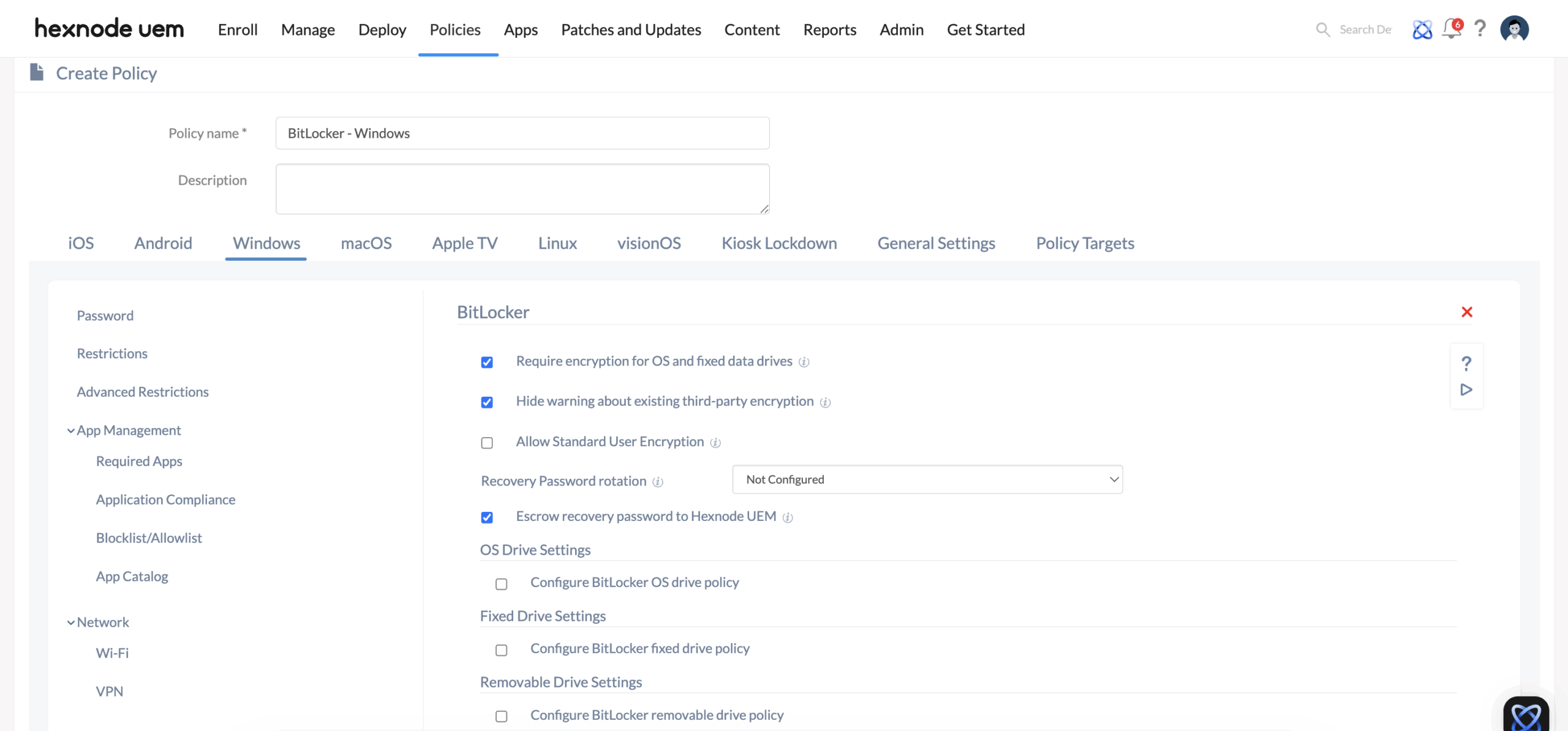
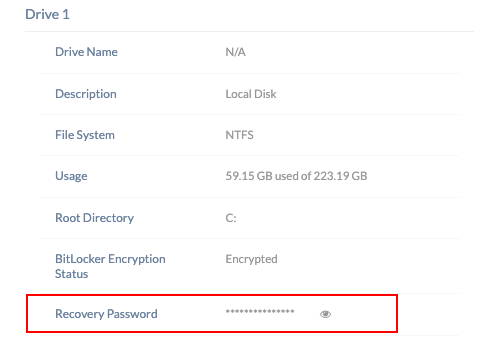
- Secure Escrow: Instead of the user writing the recovery key on a piece of paper, Hexnode intercepts the key and securely “escrows” (stores) it in the encrypted Hexnode Cloud console.
- Remote Key Rotation (The “Kill Switch”): This is a critical security feature for Windows.
Restoring Security After Access
- Scenario: A technician views a recovery key to help a user unlock their laptop. That key is now technically “exposed” (the technician knows it, the user knows it), creating a security gap.
- Remediation: With Hexnode, IT admins can instantly close this gap using the “Rotate BitLocker Recovery Password” remote action.
- The Action: Admins can trigger this command for all drives or specific ones (e.g., C: or D:) directly from the console.
- The Result: The device invalidates the old, exposed password and generates a fresh, unseen key. This new key is automatically sent back to the Hexnode portal (under the Device Summary > Drive sub-tab), ensuring the old key is rendered useless and security is restored.
4. The Security Posture Matrix
Mapping Compliance Rules to Global Frameworks
For organizations adhering to strict standards, Hexnode translates abstract requirements into concrete technical controls.
| Hexnode Control | ISO 27001 (InfoSec) | NIST SP 800-53 (Cybersecurity) | Strategic Function |
|---|---|---|---|
| Enforce BitLocker/FileVault | A.10.1.1 (Cryptographic controls) | SC-13 (Cryptographic Protection) | Ensures data is unreadable if physical hardware is stolen. |
| OS Version Compliance | A.12.6.1 (Vulnerability Mgmt) | SI-2 (Flaw Remediation) | Prevents exploitation of known vulnerabilities in outdated software. |
| App Blocklist/Allowlist | A.12.6.2 (Software restrictions) | CM-7 (Least Functionality) | Reduces attack surface by preventing unauthorized “Shadow IT” apps. |
| Remote Wipe/Lock | A.6.2.1 (Mobile device policy) | AC-20 (External Systems) | A “Kill switch” for data resident on lost or compromised assets. |
| Geofencing Restrictions | A.11.1 (Secure areas) | AC-3 (Access Enforcement) | Adds physical context (location) to digital access rules. |
5. Conclusion
Security is a process, not a product. By leveraging Hexnode for Security Orchestration, organizations move beyond simple asset tracking. They gain a living, breathing security ecosystem where devices self-report their health, locations trigger protective actions, and encryption keys manage themselves.
This is how modern enterprises ensure that while their workforce is mobile, their data remains immovable.


