Category filter
Positioning DAFS Nodes for Global WAN Optimization Network Topology
In a global enterprise, software lifecycle management represents a massive bandwidth challenge. Deploying multi-gigabit payloads across a global WAN can saturate expensive MPLS/SD-WAN links and bottleneck VPN concentrators. Hexnode DAFS (Distributed Apps and Files Servers) acts as a localized content delivery overlay, moving “content gravity” to the network edge to ensure high-speed, local fulfillment of enterprise data.
Logical Architecture: The Site-Based Distribution Model
Hexnode DAFS operates on a Site-based architecture, where devices are grouped into logical geographical locations. Each Site is associated with one or more DAFS nodes to ensure that data remains local to the user.
- The Hub (Hexnode Portal): Acts as the management core. It stores the metadata and original binaries for enterprise apps and files.
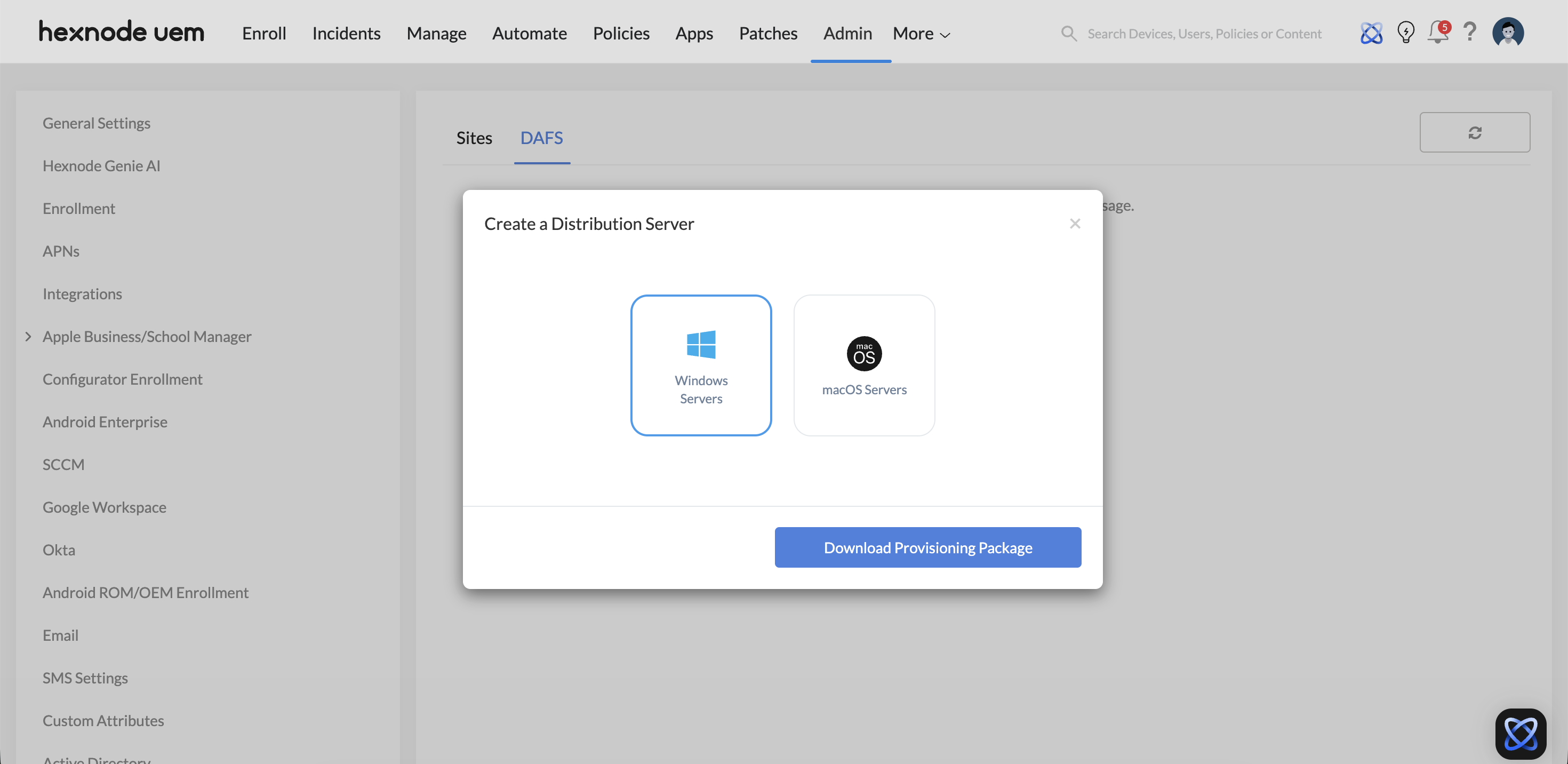
- The Node (DAFS Server): A local server (Windows or macOS) running Docker. It pulls content from the Hexnode repository and serves it to devices on the local network via HTTPS.
- The Endpoint (Hexnode Agent): Devices communicate with the Hexnode Portal for instructions (via MQTT) but pull the actual binary payloads from the assigned DAFS node.
Deployment Hierarchy & Implementation
1. DAFS Node Infrastructure
DAFS nodes are deployed on existing infrastructure within the local office or regional data center.
- Host OS Support: Windows (10 1809+, Server 2019+) or macOS (Current + 2 previous major releases).
- Containerization: Hexnode utilizes Docker Desktop to run the DAFS container, ensuring a lightweight and isolated execution environment.
- Minimum Specs: 4GB RAM (Enterprise recommendation: 16GB+ for high-concurrency environments).
2. Site Association
The distribution logic is governed by Sites.
- Site Configuration: Admin defines a Site by specifying a range of Public IP addresses or subnets.
- Mapping: When a device’s IP matches a defined Site, Hexnode automatically directs it to the DAFS node(s) associated with that specific location.
Sync Logic & Connectivity
1. Intelligent Sync Preferences
To prevent WAN saturation during business hours, DAFS allows granular control over when the local node pulls new content from the Hexnode Master Repository:
- Maintenance Hours: Syncs only during the Site’s defined maintenance window.
- Business Hours Logic: Syncing can be restricted to occur only outside of standard office hours.
- Custom Windows: Technicians can define specific daily or weekly timeframes for replication.
2. Off-Site Connectivity & Public DNS
While DAFS is primarily for LAN/WLAN optimization, it supports remote workers via Off-Site Access:
- Public DNS: If “Allow off-site devices to connect” is enabled, devices outside the corporate IP range can reach the DAFS node via a Public DNS name.
- Fallback: If the DAFS node is unreachable, the Hexnode Agent can be configured to fall back to the global Hexnode repository.
Security & Protocol Specifications
- Communication Protocol: Secure HTTPS is used for all data transfers between the node and the client devices.
- Encryption: Supports both CA-signed trusted certificates and self-signed certificates generated during the promotion process to ensure end-to-end encryption.
- mTLS/SSL: The DAFS server listens on a user-defined port (defaulting to standard secure web ports) to serve authenticated requests from the Hexnode Agent.
Scale Impact: Strategic Benefits
| Feature | Impact on Global WAN |
|---|---|
| Local LAN Pull | Reduces external WAN traffic by 90%+ for common app deployments. |
| Edge Storage | Minimizes latency; 10GB apps download at gigabit LAN speeds rather than limited WAN speeds. |
| Docker Mobility | Allows DAFS nodes to be spun up easily as lightweight VMs or on dedicated hardware. |
| Zero-Touch Routing | Automates node selection based on the device’s current network (Site) membership. |
Implementation Checklist for Administrators
- Provision Host: Ensure a Windows/macOS host with Docker Desktop is available.
- Download Script: Obtain the DAFS provisioning script (PowerShell for Win / Shell for Mac) from Admin > Sites and DAFS.
- Promote Server: Execute the script and “Promote” the discovered server in the Hexnode Portal.
- Define Site: Associate the DAFS node with a Primary Site and define the IP ranges for that location.
- Set Sync Schedule: Configure Sync Preferences to ensure content warming happens during low-traffic periods.