


Category filter
Advanced Chromebook Enterprise Management: Hardening Security & Kiosk Modes
Hexnode ChromeOS Orchestration integrates with the Google Admin Console (GAC) to provide a centralized management interface for Chromebooks. This cloud-first approach enables IT administrators to manage ChromeOS devices alongside Windows, Mac, and mobile assets within a single pane of glass, specifically targeting frontline workers and secure developer environments.
1. Zero-Touch Enrollment (ZTE) for Enterprise Scale
Hexnode streamlines the deployment of up to 500,000 Chromebooks using Google’s Zero-Touch Enrollment framework.
- Provisioning Workflow: Hardware is pre-provisioned by the reseller. Upon the initial boot, ChromeOS performs hardware-backed verification and enrolls the device into Google domain that is linked with Hexnode management via ChromeOS enrollment in Hexnode UEM.
- Security Persistence (Forced Re-enrollment): If a device undergoes a factory reset (Powerwash), it automatically re-attaches to the corporate management layer. This prevents unauthorized resale and mitigates potential data loss.
2. Configuration and Extension Orchestration
As ChromeOS is a browser-centric operating system, management focuses on the Chrome environment and web-layer security.
- Extension Allowlisting: Administrators can silently deploy mandatory Chrome Extensions (e.g., password managers, security agents) while blocking all unauthorized third-party software.
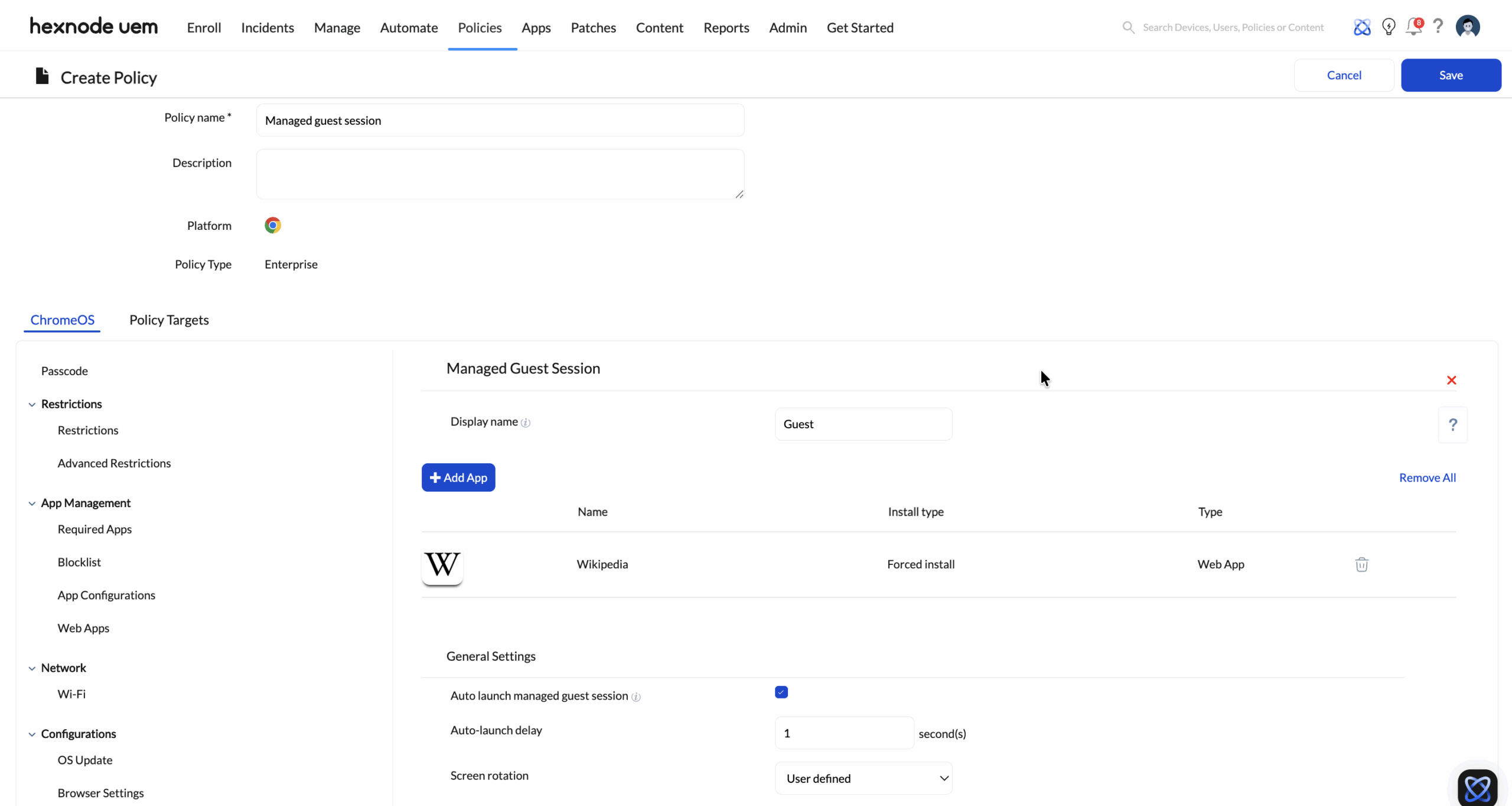
- Managed Guest Sessions: For shared hardware/kiosk environments, Hexnode configures ephemeral sessions. These sessions automatically delete all user data, including cookies, history, and downloads, upon logout.
- Network Enforcement: Configuration profiles force devices to utilize Enterprise Wi-Fi and “always-on” proxies to ensure secure web traffic routing.
3. ChromeOS Security and Specialized Kiosk Modes
Hexnode leverages native Google APIs to harden device security and restrict functionality for specific use cases.
- Verified Access: Hexnode leverages Google’s Verified Access to validate device integrity and developer-mode status before granting access to enterprise sources such as Microsoft 365 and Google Workspace.
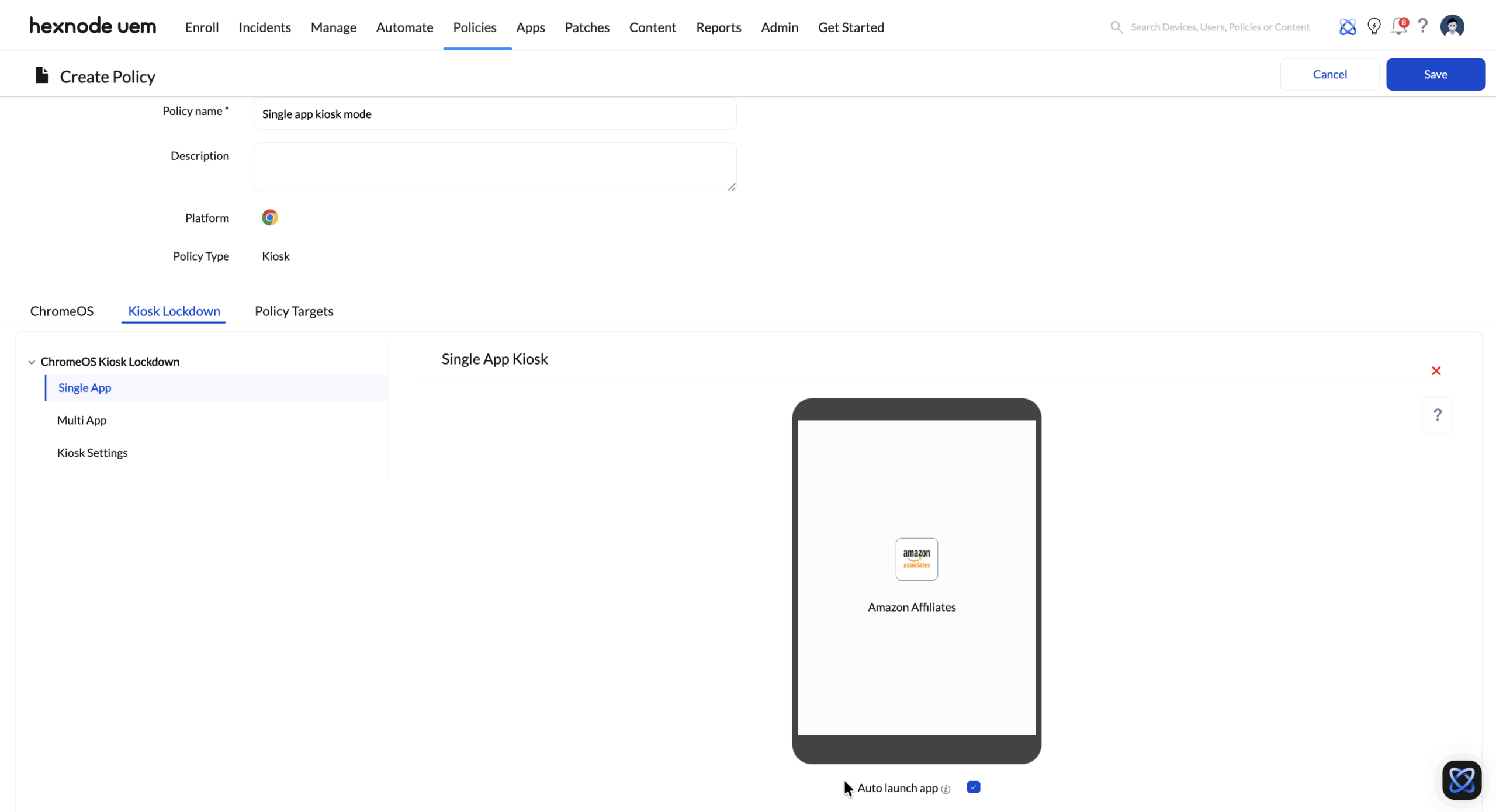
- Single-App Kiosk Mode: Converts Chromebooks into dedicated-purpose devices, such as retail Point-of-Sale (POS) systems or secure testing stations.
- Remote Powerwash: Enables IT to trigger a full device wipe via the MQTT channel in the event of theft, loss, or a security breach.
4. Technical Comparison: Google Admin Console vs. Hexnode Integration
| Feature | Google Admin Console (GAC) | Hexnode + GAC Integration |
|---|---|---|
| Inventory View | ChromeOS Only | Unified (Windows, Mac, Chrome, Mobile) |
| Cross-Platform Reporting | No | Yes (Global Compliance Dashboards) |
| ITSM Integration | Manual Export | Automated (ServiceNow/Jira API) |
| Automation Capabilities | Basic | Advanced (Hexnode Genie AI / Dynamic Triggers) |
5. Implementation Roadmap
To deploy Hexnode ChromeOS Orchestration, complete the following technical steps:
- Console Integration: Link the Google Admin Console (GAC) to the Hexnode Portal.
- License Synchronization: Sync ChromeOS Device Licenses into the Hexnode license pool.
- Persona Definition: Define Extension Policies based on user roles (e.g., Retail vs. Corporate).
- ZTE Configuration: Configure Zero-Touch Enrollment profiles within the GAC for reseller coordination.


