Hi! Is there a way to remotely check the maximum battery capacity of my Mac enrolled in Hexnode UEM? A terminal command or script that can be executed remotely would be really helpful.
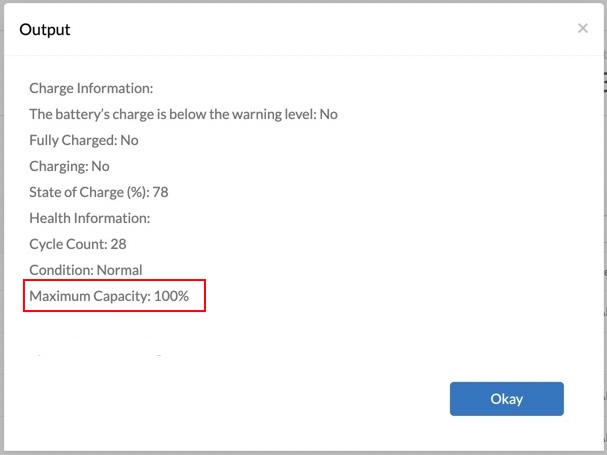
Yes! You can easily retrieve the maximum battery capacity of your MacBook remotely using Hexnode UEM. Simply execute the following shell command via Live Terminal or the Execute Custom Script remote action:
Fetch battery details
1
system_profiler SPPowerDataType|sed-n'/Charge Information:/,/System Power Settings:/p'|sed'$d'
This command will generate a detailed battery health report, including the maximum capacity. Additionally, the script output provides other key battery metrics such as:
Charge warning status – Indicates whether the battery charge has dropped below the warning level.
Fully charged status – Confirms if the battery has reached full capacity.
Charging status – Shows whether the device is currently plugged in and charging.
State of charge (%) – Displays the current charge percentage.
Cycle count – Reveals the number of charge cycles the battery has undergone.
Battery condition – Evaluates the overall health status of the battery.
By monitoring these parameters, you can gain insights into your Mac’s battery health and performance over time. Let me know if you need any further assistance!
Hi @marien! The battery warning level is a predefined threshold set by macOS. By default, macOS typically alerts users when the battery charge drops below 20%. This value is system-defined and cannot be modified manually.
 What's new

 1931 Views