Hi there, @Boaz! Thanks for reaching out to us.
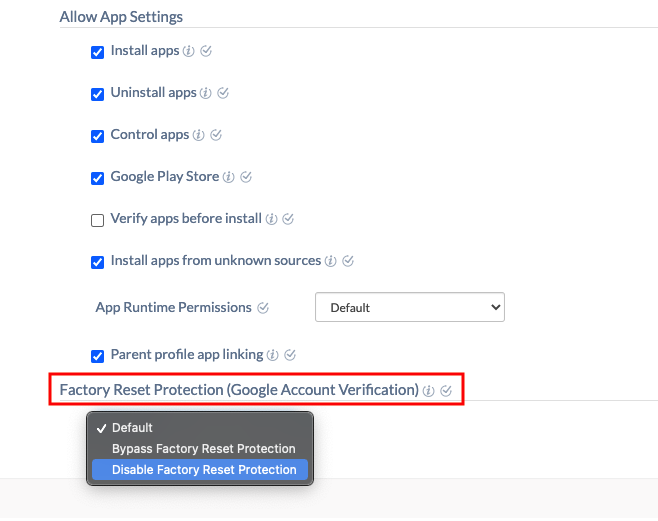
No worries, you can disable FRP from Hexnode portal! Under Policies tab, choose an existing/new policy, navigate to Android, and select Advanced Restrictions. When you scroll down, you can see Factory Reset Protection at the end of the page. From the dropdown list, choose Disable Factory Reset Protection. Now, you will be able to reset and use the device without the Google password.
Hope that answers your query.
Cheers!
Gabriel Galbraith
Hexnode UEM
-
This reply was modified 5 years, 6 months ago by
 Gabriel.
-
This reply was modified 5 years, 6 months ago by Gabriel.
-
This reply was modified 5 years, 6 months ago by Gabriel.
-
This reply was modified 5 years, 6 months ago by Gabriel.
-
This reply was modified 5 years, 6 months ago by Gabriel.
-
This reply was modified 5 years, 6 months ago by Gabriel.
-
This reply was modified 5 years, 6 months ago by
 Michelle.
-
This reply was modified 5 years, 6 months ago by Michelle.
-
This reply was modified 5 years, 6 months ago by Michelle.
-
This reply was modified 5 years, 6 months ago by Michelle.
-
This reply was modified 5 years, 6 months ago by Michelle.
-
This reply was modified 5 years, 6 months ago by Michelle.
-
This reply was modified 5 years, 6 months ago by Michelle.
-
This reply was modified 5 years, 6 months ago by Gabriel.
-
This reply was modified 5 years, 6 months ago by Michelle.
-
This reply was modified 5 years, 6 months ago by Michelle.
-
This reply was modified 5 years, 6 months ago by Michelle.
-
This reply was modified 5 years, 6 months ago by Michelle.
-
This reply was modified 5 years, 6 months ago by Michelle.
 What's new

 4522 Views


