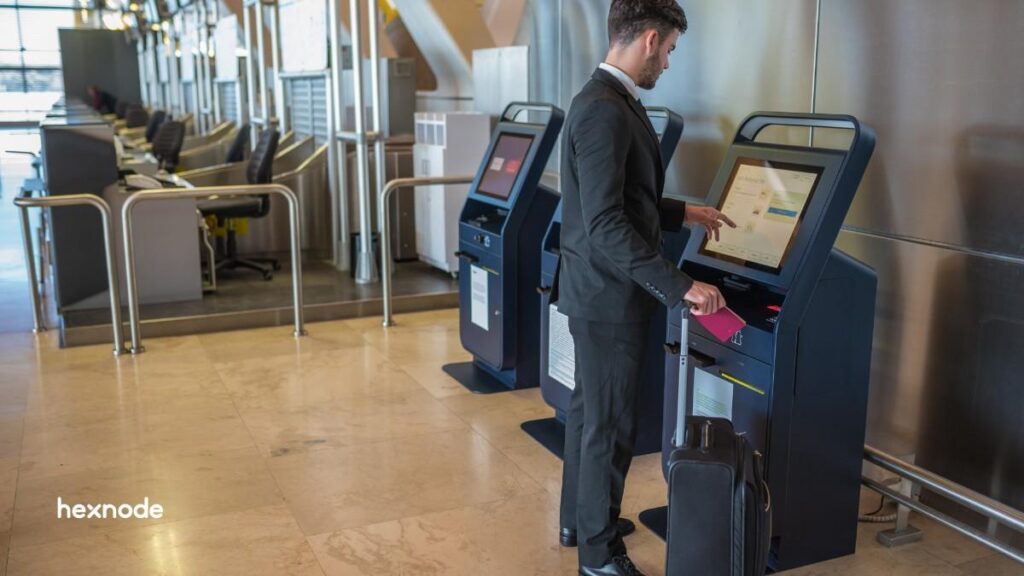
Treating airport kiosks as isolated hardware leads to configuration drift, security gaps, and high MTTR. To achieve 24/7 reliability, these units must be managed as unified infrastructure.
By transitioning to Hexnode, you can remotely orchestrate every self service kiosk airport terminal, locking devices to specific apps, pushing real-time signage updates, and resolving glitches via remote control.
As the authoritative standard for aviation, Hexnode stabilizes airport kiosk check in workflows, enforces PCI-DSS 4.0 for an airport insurance kiosk, and maximizes passenger volume across the entire fleet.
Airports run on tight windows, high passenger volume, and zero tolerance for downtime. In that environment, airport kiosks do far more than reduce queues. They move people, protect data, and keep operations predictable across terminals, airlines, and vendors.
Airport kiosks should be managed to deliver three high-impact outcomes: Digital signage that stays accurate, on-brand, and always-on, Self-service that completes tasks fast without letting passengers escape the experience, and Compliance-ready controls that reduce risk in a public, high-traffic setting.
Hexnode transforms this complexity into a streamlined, secure ecosystem. By unifying airport kiosks, digital signage, and mobile check-in tools under a single pane of glass, Hexnode ensures that your infrastructure remains as agile as your flight schedules.
What are Airport kiosks? (In 60 seconds)
Airport kiosks are managed endpoints (tablets, touch PCs, kiosks, and screens) that you lock down, update remotely, and monitor, so they deliver a consistent passenger experience at scale.
In practical terms, you use centralized management to:
Keep airport kiosk check in flows fast and predictable.
Keep every self-service kiosk airport session restricted to approved apps and sites.
Protect the check in machine airport workflow with strict device controls and rapid recovery.
The Critical Failures of Airport Kiosk Infrastructure at Scale
In the high-pressure environment of a modern terminal, airport kiosks fail due to predictable, yet costly, operational hurdles. When these endpoints are managed as standalone machines rather than unified infrastructure, the following pain points emerge:
Configuration drift and managed chaos: Without a central anchor, devices deviate from their original security baseline. This effect makes a global check in machine airport fleet impossible to patch or update consistently.
Security vulnerabilities and public tampering: Open ports, accessible system bars, and hardware buttons invite passengers to break out of the intended workflow. Whether malicious or accidental, public tampering turns a secure airline ticket kiosk into an exposed liability.
Operational bottlenecks (The MTTR Gap): When a self-service kiosk airport terminal freezes during peak hours, slow on-site response times lead to immediate congestion. Relying on boots on the ground to walk to the terminal floor for simple reboots is a scalable failure.
Workflow fragmentation: Airports run diverse hardware from an airport food kiosk for quick ordering to an airport insurance kiosk for travel coverage. Managing these across siloed platforms prevents a unified view of terminal health and security compliance.
Featured resource
The Ultimate Guide to Kiosk Management: Everything your business needs to know
Download this comprehensive whitepaper to master airport kiosk orchestration, security hardening, and global fleet scalability with Hexnode.
How Hexnode Orchestrates and Secures the Modern Airport Kiosk
Hexnode eliminates these failure modes by transforming fragmented hardware into a standardized, policy-driven appliance. By treating every kiosk machine at airport locations as a managed node, Hexnode provides:
1. Hardened kiosk lockdown and surface control
Hexnode standardizes the passenger experience by enforcing Kiosk Lockdown across Android, iOS, Windows, and Apple TV.
Single-App & Multi-App modes: Restrict an airline ticket kiosk to a focused task or a curated suite of disruption support tools.
The Hexnode kiosk browser: Secure the web surface of any airport kiosk check in portal by whitelisting trusted URLs and auto-clearing passenger PII (Personally Identifiable Information) after every session.
Peripheral blocking: Eliminate escape routes by disabling software/hardware keys, system bars, and unauthorized connectivity, ensuring passengers stay within the intended airport kiosk design.
2. Centralized digital signage and content governance
Airports use signage to monetize traffic and direct flow. Hexnode’s digital signage software allows teams to:
Global distribution: Push high-definition maps and emergency instructions to 1000 screens from a single portal.
Automated continuity: Set signage to AutoStart on boot and use native viewers for PDFs and videos, making sure an airport information kiosk always returns to approved content.
3. Real-time remote operations and zero-travel support
To maximize passenger volume, Hexnode provides advanced Remote management capabilities.
Instant recovery: Admins can diagnose and fix a frozen check in machine airport station in real-time over Wi-Fi or cellular data.
Unattended access: Perform maintenance on macOS, Windows, and Android terminals during off-peak hours without manual intervention, significantly reducing MTTR.
4. Standardized compliance and session hygiene
Hexnode enforces non-negotiable security protocols across the terminal:
Inactivity timeouts: Automatically reset a self-service kiosk airport terminal to the home state after a user walks away.
Background silent services: Run essential printing and scanning helpers as hidden background apps, keeping the UI clean and professional.
Unified policy management: Assign distinct security profiles by terminal, gate, or concession group (e.g., separate rules for an airport food kiosk vs. a check-in station) all from one console.
Designing the Perfect Android Kiosk UI: Branding Tips and Hexnode Best Practices
Learn how to customize kiosk design with Hexnode to create a branded, professional, and intuitive UI for every self service kiosk.
Airport Kiosks Compliance: How Hexnode Supports Security and Audit Readiness
Compliance in airports spans privacy, operational security, and payment handling (where applicable). You cannot buy compliance, but you can implement controls that reduce risk and support audit conversations.
Hexnode security posture you can reference in vendor reviews
Hexnode is recertified for ISO/IEC 27001:2022 by BSI.
Hexnode also attained SOC 2 Type 2 compliance (validated by an independent auditor).
Controls that make airport kiosks defensible in audits
Use Hexnode to implement repeatable controls:
Lock down access to approved apps/sites (least privilege)
Restrict UI and system access in public space
Centralize configuration so you can show consistency across terminals and vendors
Airport Kiosks Rollout Blueprint: Implement Hexnode in 7 steps
Use this playbook to deploy airport kiosks at a terminal scale, ensuring zero configuration drift across your global fleet.
Classify your fleet. Split signage, passenger check‑in, and service kiosks into separate policy families.
Define airport kiosk design standards. Specify what users can do, what they can’t do, and how sessions reset.
Enroll and group devices by zone. Group by terminal, airline, gate, or concession area for targeted policies.
Apply kiosk lockdown. Lock devices to single‑app, multi‑app, or web kiosk as needed.
Configure signage where needed. Publish playlists and apply display controls centrally.
Enable remote support. Use remote view/control to cut time‑to‑repair across the fleet.
Measure and iterate. Track uptime, MTTR, session success, and drift incidents.
Hexnode policy templates you can standardize in airports
When you want airport kiosks to behave consistently, you should start with repeatable policy templates. Here are four that airports commonly deploy in Hexnode:
Check‑in kiosk (single‑app or web kiosk): Lock the device to the airline app or a dedicated portal; restrict web access to allowlisted domains via kiosk browser; disable navigation/escape paths; enforce session reset rules.
Information and wayfinding kiosk (web kiosk): Allowlist mapping/FAQ domains; auto‑refresh pages; block downloads; keep system UI locked.
Concessions ordering kiosk (single‑app): Lock ordering to one app; keep payment flow isolated; run required services as hidden background apps where needed.
Digital signage kiosk: Publish playlists centrally; control display settings; loop media reliably; prevent any user interaction that disrupts playback.
These templates keep operations predictable, and they make onboarding new terminals or new partners far easier.
This process scales check‑in reliably and keeps every self‑service lane consistent even when devices run different operating systems.
Conclusion
Reliable airport kiosks require consistent lockdown, fast remote recovery, and simple policy-based control across terminals. Hexnode makes this easier by standardizing digital signage and airport kiosk check in workflows, securing every self-service kiosk airport session, and reducing drift and onsite troubleshooting.
Start with one terminal pilot, measure uptime and completion rates, then scale the same policies across every check in machine airport and passenger-facing kiosk type.
Standardize Your Terminal Fleet
Scale your airport kiosks with zero-touch deployment, PCI-DSS 4.0 compliance, and centralized remote control.
How does Hexnode prevent unauthorized access to an airport kiosk?
Hexnode utilizes an advanced Kiosk Lockdown mode to restrict every airport kiosk to a purpose-specific interface. By blocking UI escape routes, disabling hardware buttons, and limiting access to only approved apps or websites, Hexnode ensures passengers cannot exit the secure environment of a check-in machine in an airport terminal.
Can Hexnode manage digital signage on an airport information kiosk?
Yes. Hexnode provides centralized content distribution that transforms any airport information kiosk into a dynamic signage hub. IT teams can remotely push high-definition media, real-time flight updates, and emergency alerts across the terminal network without needing to physically visit a single kiosk machine at airport locations.
How can I support an airport kiosk check in fleet during peak traffic hours?
To maintain high volume for airport kiosk check in workflows, administrators can use Hexnode’s Remote View and Control to diagnose software glitches in real-time. By enforcing kiosk policies that automatically reset sessions after inactivity, ensure each check in machine airport station remains ready for the next passenger.
What security measures are essential for self-service kiosk deployment?
A secure self-service kiosk deployment requires a multi-layered defense: restricting the OS to a secure kiosk browser, whitelisting specific URLs, and blocking all peripheral ports. Hexnode’s airport kiosk design capabilities allow you to enforce these lockdowns while maintaining rigorous PCI-DSS 4.0 compliance for self-service payment terminals.
How do I reduce downtime across a check in machine airport network?
To minimize disruption, use Hexnode to eliminate configuration drift by standardizing policies across your entire check in machine airport fleet. By hiding background services, you can restore a malfunctioning self-service kiosk airport terminal to its compliant state instantly.
I write at the intersection of technology, process, and people, focusing on explaining complex products with clarity. I break down tools, systems, and workflows without any noise, jargon, or the hype.