




Category filter
Hexnode XDR Archived Policies: Secure Configuration History and Recovery
Rather than permanently deleting vital data, the Archive preserves an immutable historical ledger. This approach seamlessly supports critical administrative workflows, providing a verifiable paper trail for regulatory compliance audits, serving as a reliable rollback reference if new configurations disrupt production, and enabling precise forensic tracking during post-incident reviews.
Administrative Use Cases: When to Archive a Policy
IT Administrators should transition an active policy to the Archive state under the following operational scenarios:
- Decommissioning Legacy Configurations: When replacing an outdated security standard or corporate policy with a newer version, archiving retains the legacy data instead of permanently deleting it.
- Post-Project Cleanup: Upon the conclusion of temporary events requiring high-restriction policies, the policy should be archived.
- Workspace Decluttering: To maintain an optimized administrative interface, archiving removes outdated rules from the active Published subtab while preserving configuration history.
Strategic Benefits: Why Archive Instead of Delete
Permanently deleting a policy destroys critical historical data. Archiving is the recommended Hexnode XDR best practice due to:
- Compliance Paper Trails: Regulatory frameworks (SOC 2, ISO 27001, HIPAA) require proof of historical security postures. The Archive subtab provides an immutable ledger where administrators can open a mini-dashboard to demonstrate historical compliance.
- The “Rollback” Safety Net: If a newly deployed policy causes production issues, administrators can access the Archive subtab to review previous configurations and restore known-good rules or exclusions.
- Forensic Auditing: During post-incident reviews, extended metadata columns (such as Created By and Last Modified By) allow security teams to verify the exact lineage and modification history of a specific policy.
Step-by-Step Workflow: How to Restore an Archived Policy
To restore an archived policy in Hexnode XDR, execute the following steps:
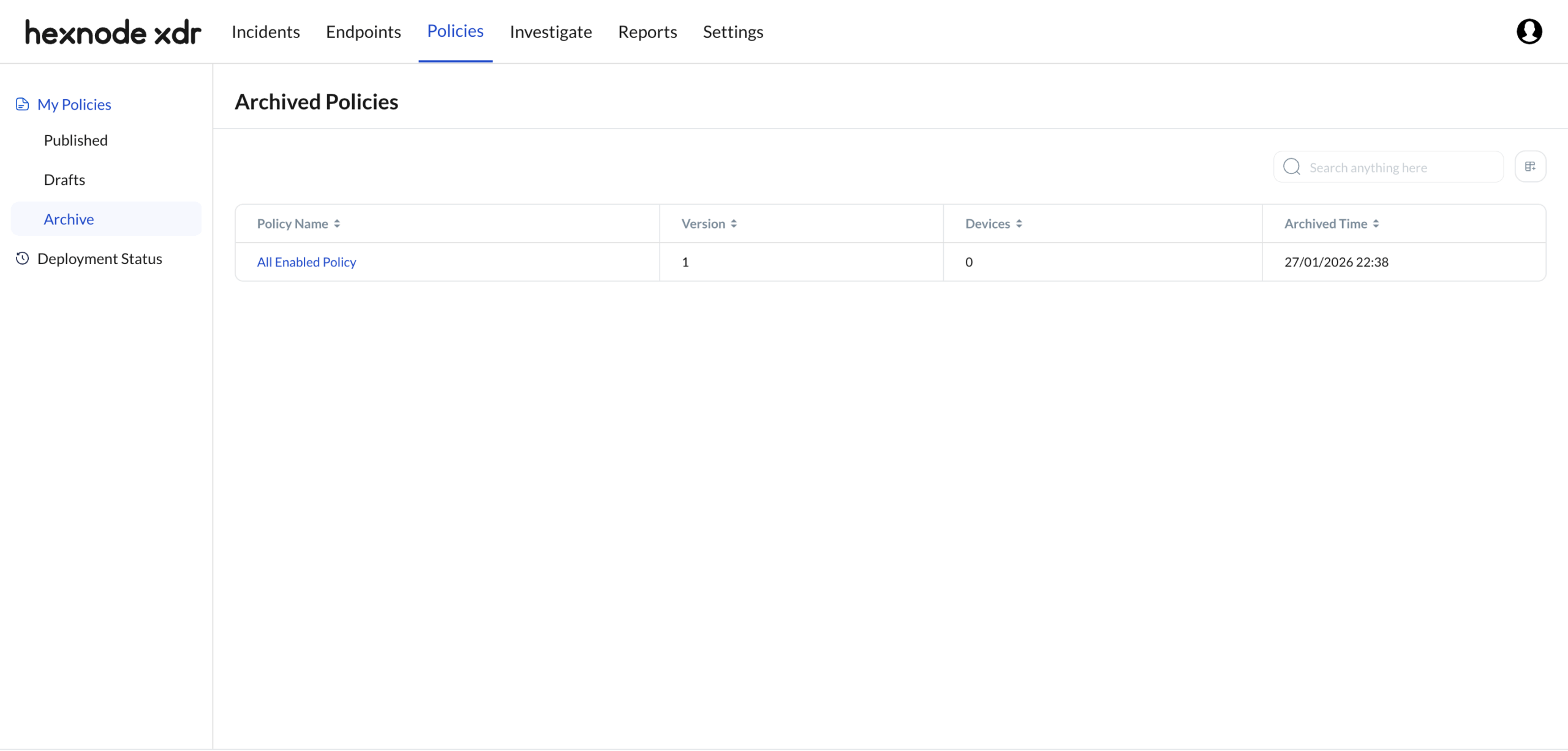
- Locate the Policy: Navigate to Policies > My Policies > Archive. Utilize the search bar to filter large policy inventories.
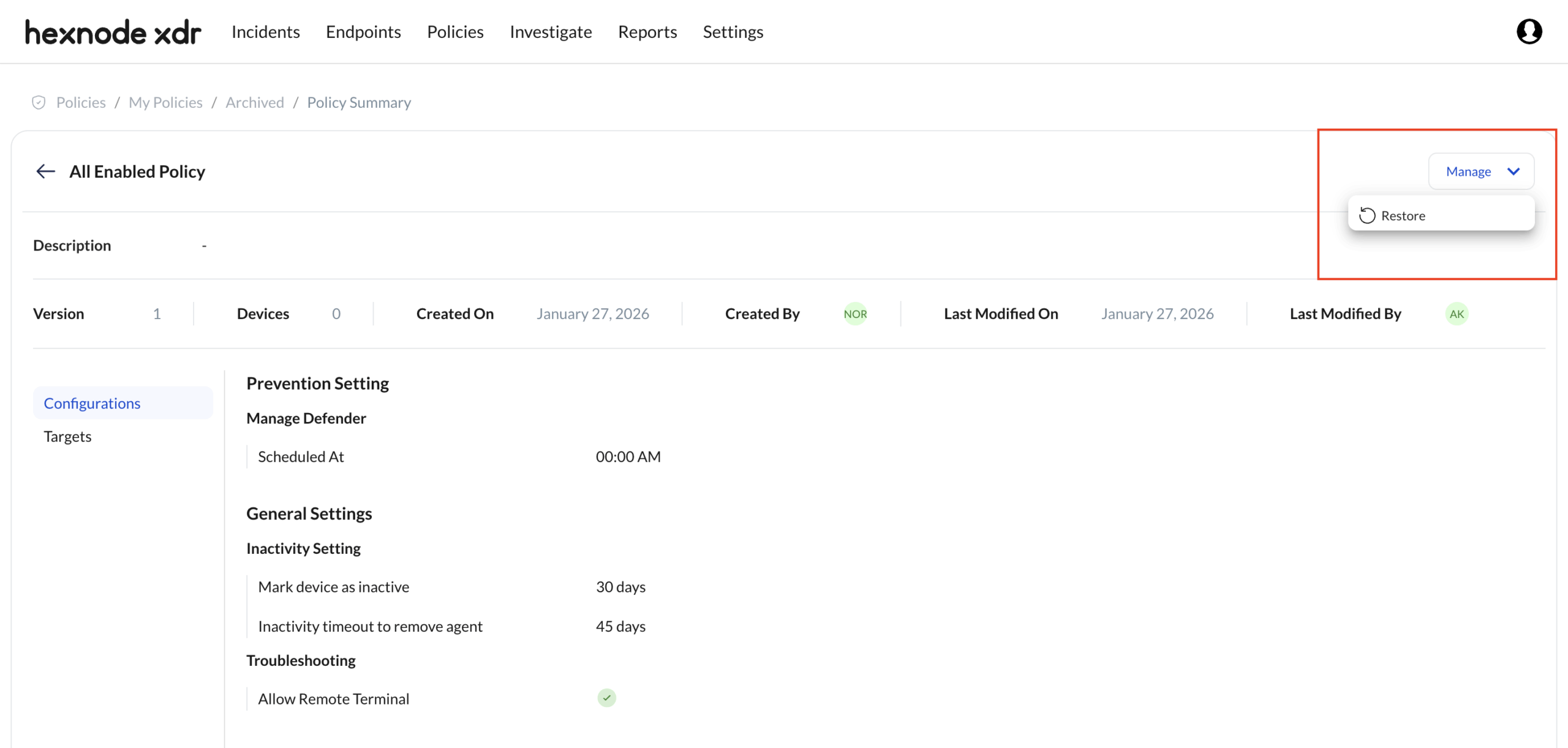
- Review the Configuration: Click the specific Policy Name. This triggers a read-only Mini-Dashboard displaying the exact rule sets, version history, historical device associations, and settings configured prior to archiving.
- Execute Restore: Click Manage and select Restore. This action migrates the policy out of the Archive and back into the Drafts subtab for active editing and deployment.
Archive Interface and Metadata Schema
The Archive subtab utilizes a customizable data table to track policy metadata. Administrators can use the column configuration tool to toggle the following data points:
| Metadata Column | Definition |
| Policy Name (Default) | The designated title of the policy. Acts as a hyperlink to the read-only mini-dashboard overview. |
| Version (Default) | The specific numerical iteration of the policy captured at the exact moment of archiving. |
| Devices (Default) | The total number of managed endpoints currently associated with the policy (defaults to 0 upon archiving and detachment). |
| Archived Time (Default) | The precise timestamp denoting when the policy was transitioned to the archive state. |
| Created By | The authenticated technician account that originally generated the policy. |
| Created Time | The precise timestamp denoting the initial creation of the policy. |
| Last Modified By | The authenticated technician account responsible for the final configuration change or the archive action. |
| Last Modified Time | The precise timestamp of the final configuration save prior to the policy being archived. |
Troubleshooting
- Issue: A technician cannot identify who archived a specific policy.
Resolution: By default, the Archive subtab displays a condensed column view. To resolve this, click the column visibility settings icon adjacent to the search bar and enable the Last Modified By and Last Modified Time columns. The technician listed as the last modifier is the user who executed the archive command.
- Issue: Technician cannot edit policy rules when clicking on an archived policy name.
Root Cause: The system intentionally restricts editing. The Archive subtab functions as an immutable repository to guarantee historical integrity for auditing and compliance verification.
Workaround: To utilize an archived configuration, open the mini-dashboard to view the historical settings. From there, restore or manually recreate the required rules within a new draft located in the Drafts tab.
Frequently Asked Questions
Can a Hexnode XDR archived policy be actively deployed to endpoints?
No. Archived policies are detached from active endpoint management and placed in a read-only state. This is verified by the Devices column, which consistently displays 0 for archived entries.
What is the architectural difference between deleting and archiving a policy in Hexnode XDR?
Deletion is a destructive action that permanently removes the policy and its data from the Hexnode XDR system. Archiving is a non-destructive action that safely stores policy configurations, version history, and administrative metadata for future reference while removing it from the active deployment dashboard.
How do I customize the visible data columns in the Archive subtab?
Administrators can customize the interface by clicking the column configuration icon located on the right side of the interface table. This allows toggling of hidden metadata columns, including Created By and Last Modified Time.


