Streamlining Device Management with Apple’s Automated Device Enrollment (ADE)
Automated Device Enrollment simplifies Apple device provisioning, configuration, and enterprise management.

Get fresh insights, pro tips, and thought starters–only the best of posts for you.

Today’s companies are embracing device flexibility, a trend accelerated by BYOD, COPE, and the rise of remote work. With more employees choosing Macs as their device of choice, the stakes for IT are higher than ever. The initial moment an employee interacts with their new Mac is crucial, since it is the first touchpoint that builds engagement and loyalty. Getting this right is the goal of your macOS onboarding strategy. But how can IT teams efficiently and securely scale this personalized experience to every new hire, ensuring a seamless start across a large fleet of devices?
Manually configuring each Mac device is a complex procedure. It is also time-consuming and error-prone. Hence, there is a need for a centralized onboarding and management strategy that keeps the process bottleneck-proof.
Unified Endpoint Management platforms, such as Hexnode, offer seamless macOS onboarding solutions. It automates the onboarding process from start to finish, securely provisioning devices based on organizational needs. Hence, one efficient way to onboard Mac devices in bulk is by leveraging UEM solutions.
macOS onboarding is the process of setting up and enrolling a Mac device into a UEM system. Using a device management solution like Hexnode, organizations can completely automate device enrollment, policy deployment, and devices compliant with company standards.
A well-executed macOS onboarding process is not just setting up systems for employees, but is a foundational factor in IT strategy, security, and employee experience. A smooth and efficient onboarding process is crucial in an enterprise setting for multiple reasons –
Without an MDM solution, onboarding devices can be a strenuous task, especially with Macs. Here are some of the common challenges faced by IT teams in setting up and enrolling macOS devices.
Investing in a UEM platform like Hexnode helps automate and streamline a fleet of macOS devices with simple configurations. The UEM acts as a command center, transforming the onboarding workflow from a manual, inconsistent, fragmented process to a highly efficient, secure, and automated process. The setup only happens once, and the devices and users are enrolled using different methods.
Hexnode’s strength lies in its ability to automate enrollment on a massive scale. It can directly integrate with Apple’s Automated Device Enrollment (ADE), offering a “zero-touch” experience. When a new Mac, purchased through an authorized Apple reseller, is unboxed and powered on, it automatically communicates with Hexnode. This way, the devices are enrolled, and the IT team will be able to push a set of configurations as policies without any user intervention.
To summarize, using a UEM solution like Hexnode automates and streamlines the entire onboarding workflow. This makes the process efficient and secure. Using Hexnode, IT teams can –
A well-curated macOS onboarding strategy is critical, and mobile device management becomes its cornerstone. The solution helps organizations move beyond inefficient manual setups and offers several business benefits.
Let’s take a closer look:
An automated process is much faster and more efficient than manual configuration. It significantly reduces onboarding time, allowing employees to be productive from day one.
Security policies such as disk encryption, password requirements, and firewall settings can be configured using a UEM solution, enhancing the overall security posture.
Automating device settings and restrictions ensures that all devices meet regulatory and compliance standards consistently.
A UEM/MDM solution significantly reduces IT workload by automating repetitive tasks, allowing IT teams to focus on more strategic initiatives.
Employees receive preconfigured Mac devices, with all necessary tools and access, enabling them to start working immediately and productively.
Devices are set up in a standardized manner, offering a uniform experience for all users and reducing support-related issues.
Automating the process using a UEM solution improves employee experience and creates a positive first impression for new hires.
Using a UEM solution offers a comprehensive overview of all the Mac devices enrolled in it. Additionally, the IT team gains visibility into device status and compliance posture.
Hexnode is a platform that offers various enrollment methods, accommodating different business needs and scenarios. It can be a large-scale corporate deployment or even a BYOD environment; Hexnode’s dynamic onboarding methods enable companies to manage devices securely.
The choice of enrollment method is mainly based on three factors –
Automated Device Enrollment (ADE) via Apple Business Manager
ADE is one of the most common and preferred methods of Mac enrollment. It offers a zero-touch enrollment experience, where devices get enrolled without being physically touched by an IT administrator.
How it Works –
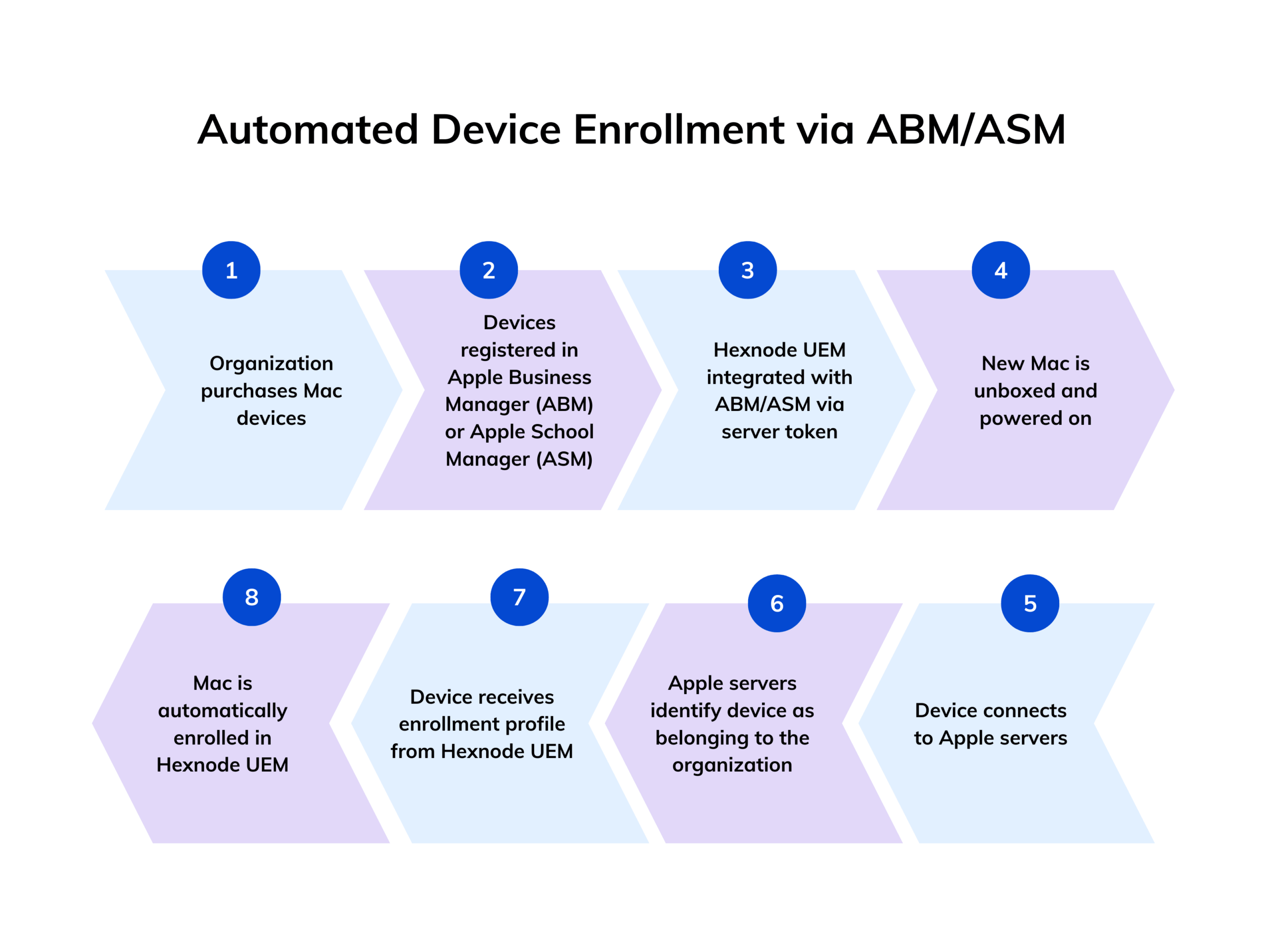
ADE is offered by Apple for automated device provisioning. An organization buys Mac devices from Apple or from an authorized reseller and registers them with the company’s Apple Business Manager (ABM) or Apple School Manager (ASM) account. Hexnode is integrated with ABM/ASM via a server token.
When a new Mac is unboxed and powered on, it connects to Apple’s servers. The servers will recognize that the device belongs to a specific organization. The device will be automatically directed to enroll in the Hexnode UEM.
Key Benefits –
This method is commonly used for small-scale deployments or for devices that cannot be enrolled automatically through Apple’s Automated Device Enrollment (ADE), typically because they weren’t purchased through a certified Apple reseller. The two ways through which manual enrollment can be achieved are
How it Works –
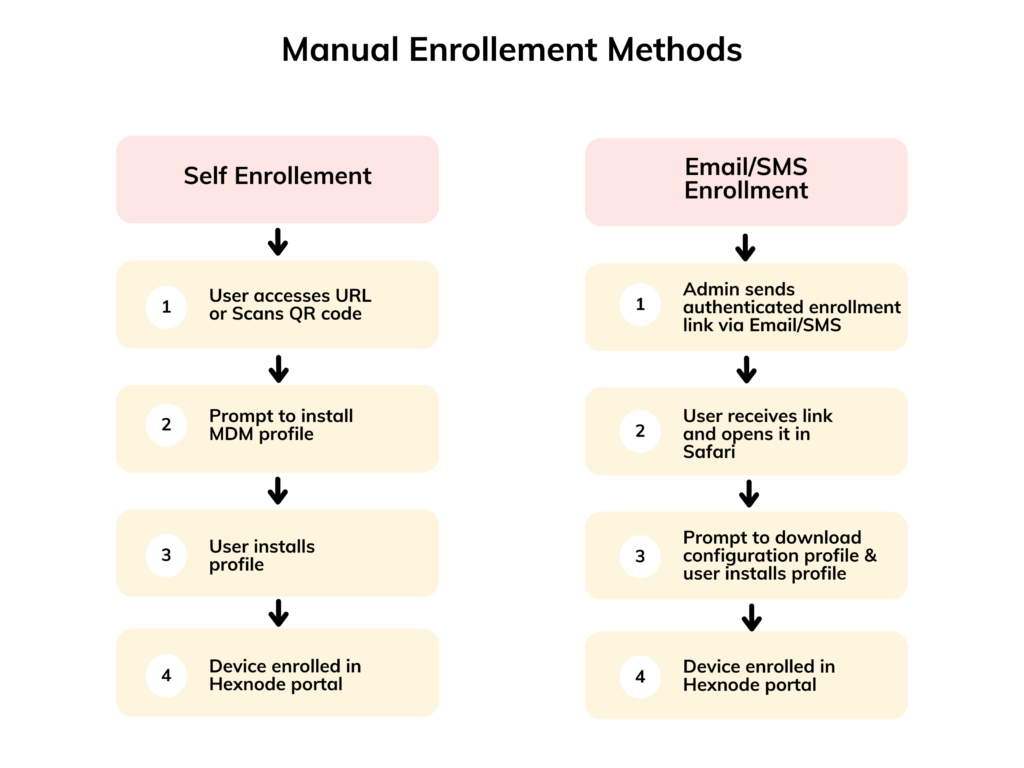
In self-enrollment, the users can initiate enrollment by accessing the URL generated by Hexnode or scanning the QR code. This will prompt them to install the MDM profile. This method is best for BYOD or small-scale deployments.
The Email/SMS method requires the IT administrator to send the user an authenticated enrollment invitation via email or SMS. It is a provision to directly send the enrollment URL, where users can authenticate themselves.
Once this is done, the user will be able to access the provided enrollment URL in Safari. Here, they are prompted to download a configuration profile. Upon installation, the device is finally enrolled in the Hexnode portal. This approach is particularly useful for remote employees or freelancers, enabling decentralized and flexible onboarding.
Key Benefits –
Account Driven Device Enrollment
This is a simplified enrollment method for corporate-owned Macs that are not eligible for ADE. It is a user-friendly process best for corporate-owned devices that are not purchased through certified resellers and older Macs that were not added to the ABM. While it lacks ADE’s zero-touch capabilities, it still provides many of the same management benefits.
How it Works –
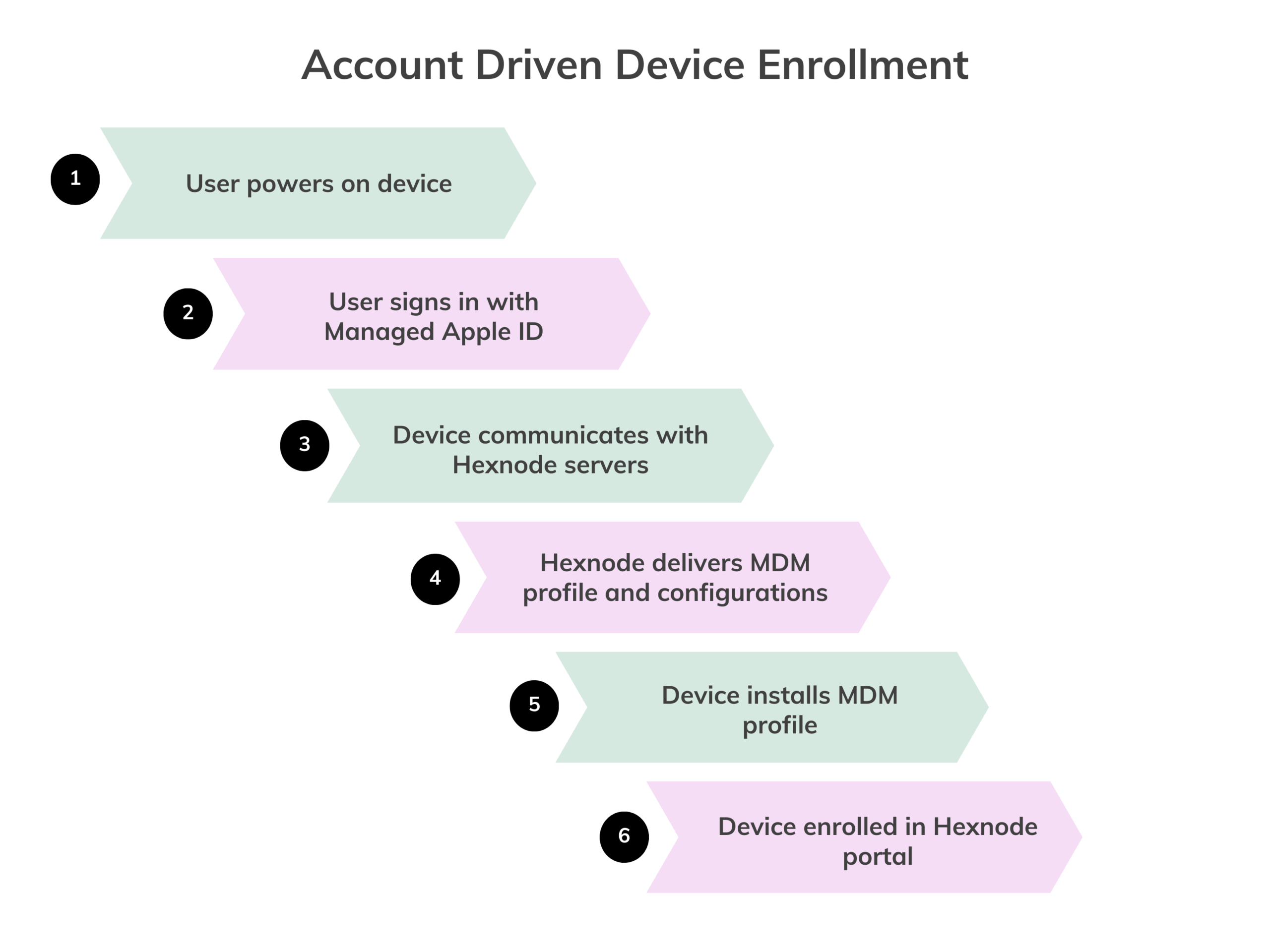
The user initiates the enrollment by signing in with their Managed Apple ID provided by the organization directly on the device. This managed Apple ID assists the device to directly communicate with Hexnode’s servers, which in turn delivers the MDM profile and configurations.
Key Benefits –
Account Driven User Enrollment
This method is specifically designed for BYOD (Bring Your Own Device) scenarios. It provides a clear separation between corporate and personal data on the employee’s Mac.
How it Works –
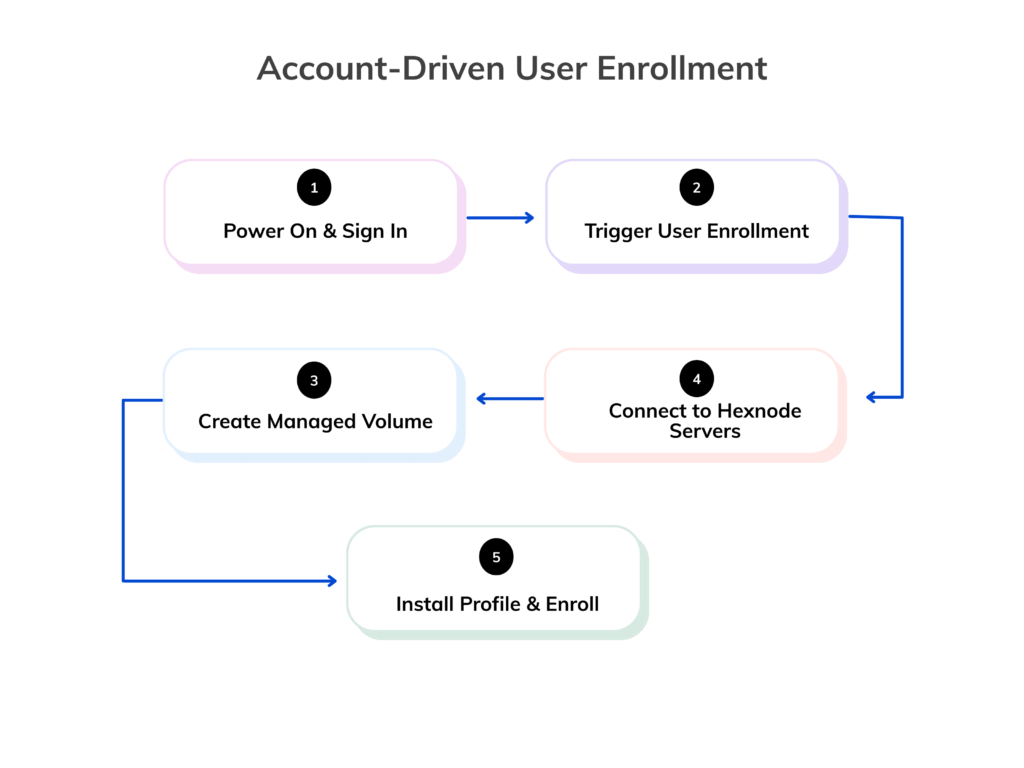
Similar to Account Driven Device Enrollment, the user signs in with their Managed Apple ID. However, this method creates a separate, managed volume on the device for work data and apps.
Key Benefits –
Hexnode simplifies the complex macOS onboarding process by turning it into a secure, automated, and streamlined workflow. With an extensive set of features, it simplifies and automates key tasks and creates a smooth onboarding experience for the end user.
Hexnode’s integration with Apple’s automated Device Enrollment offers zero-touch onboarding. This creates an automatic connection between the organization’s Apple Business/School Manager account and can automatically enroll devices into Hexnode UEM.
Pre-configured policies are a significant time-saving feature. Once devices enroll, the system automatically applies the correct configuration profiles and policies based on department, role, or device type,
Hexnode supports bulk app deployment by automatically installing required applications on enrolled devices. Users don’t need to download apps manually, ensuring a consistent and ready-to-use setup.
Hexnode enforces robust device security from the start. FileVault, firewall settings, and OS update enforcement protect corporate data from device activation.
Remote access and control on Hexnode extend its security capabilities. IT teams can monitor every device from a centralized console, push updates, and troubleshoot issues without physically accessing the devices.
Hexnode acknowledges and accommodates the rise of Bring Your Own Device (BYOD). The platform offers secure and privacy-centric solutions like Apple’s Account-Driven User Enrollment. Employees can use their personal Macs for work without compromising privacy, thanks to Hexnode’s privacy-centric features.
To truly unlock the benefits of a modern Mac fleet, a well-defined onboarding strategy is essential. Following these best practices ensures the process is not only efficient and secure but also creates a positive, lasting impression on your employees.
Use Automated Device Enrollment (ADE) to ship Macs directly to employees. Once unboxed and connected to Wi-Fi, the device automatically configures itself, saving valuable setup time.
Create standardized “blueprints” using configuration profiles. This ensures every employee receives the right apps, settings, and security controls, every time.
Integrate Hexnode with your organization’s user directory so employees can use their existing credentials. Their access, apps, and policies are applied automatically.
Use Account Driven User Enrollment for BYOD scenarios. It secures company data while keeping personal files and settings untouched.
Pilot any new policy with a small group first to identify issues early and refine configurations before deploying it across the organization.
Manage and secure Mac devices across their lifecycle with Hexnode, from deployment and onboarding to kiosk lockdown.
DOWNLOADUse case: Macs for software engineers, data scientists, and DevOps teams.
Modern software development relies heavily on Macs for their powerful, UNIX-based architecture. For these teams, every minute counts. With Hexnode, IT teams can automate the setup of developer Macs. Developers receive fully provisioned Macs on day one – complete with IDEs, code repositories, and security settings, so they can start coding immediately. You can automatically push essential developer software, enforce firewalls, and block unapproved apps. This means developers can get straight to building without waiting for IT to manually configure their machines.
Use case: Macs for traders, analysts, and client-facing advisors.
In finance, security isn’t just a priority—it’s everything. Hexnode helps automate the setup of macOS devices, ensuring they meet strict security and compliance standards. For traders, you can pre-configure Macs with secure trading platforms. In public areas, Single App Kiosk Mode locks devices to one specific, secure app, preventing unauthorized access. IT teams can remotely wipe lost or stolen devices and use geofencing to prevent sensitive financial data from leaving secure locations.
Use case: Hospital-grade iPads for staff and patient engagement.
In hospitals, devices need to be secure, clean, and reliable. With Hexnode, you can easily deploy and manage iPads for doctors, nurses, and administrative staff. Single App Kiosk Mode locks devices to a single app, which is perfect for patient check-in or bedside use, preventing tampering. Administrators can configure devices to meet HIPAA standards and remotely manage or lock them if lost or stolen, minimizing risks to sensitive patient data.
Use case: Macs for consultants, project managers, and remote workers who travel frequently.
For a consulting firm, a highly mobile workforce needs to be ready for anything. Hexnode ensures every consultant device is ready to go, whether at client sites, airports, or home offices, with preloaded tools, secure network access, and ongoing remote support. Hexnode automates the provisioning of Macs, pre-configuring them with VPN and Wi-Fi settings so consultants can securely connect to company and client networks from anywhere. The remote access features allow IT to troubleshoot issues for employees in different time zones.
Embracing macOS in the workplace is a smart move, but manual macOS onboarding can be slow and inefficient. Hexnode simplifies the process with automated workflows that save time and boost security. Through zero-touch deployment and bulk app provisioning, IT teams can set up devices without lifting a finger.
The system enforces critical policies automatically, reduces risk, and ensures compliance. It also prepares devices in advance, installs apps, and enables new employees to be productive from day one. Hexnode turns a complex setup into a seamless experience, making it the go-to solution for businesses that value efficiency, security, and employee satisfaction.
Automate Mac enrollment, enforce policies, and deploy apps for secure macOS onboarding.
SIGN UP NOWIt depends on the enrollment type. For a corporate-owned, supervised device, only the organization’s IT department can remove it. Users can remove the MDM profile themselves on unsupervised devices enrolled through account-driven user enrollment or manual enrollment.
As an IT admin, simply log in to your Hexnode console, find the device under the Devices tab, and check its summary page. On the user end, navigate to System Settings, click General, and choose Device Management (or Profiles on Older macOS).
For new, corporate Macs, MDM activation is automatic through ADE. For existing or personal Macs, you must enroll manually using a configuration profile URL or your work with Apple ID sign-in.
MDM can see device information like OS version and serial number, but generally not personal files, photos, or browsing history.
Using Account Driven User Enrollment for BYOD, your organization creates a separate, managed volume on your Mac. This is where corporate apps, documents, and data reside, while your personal files and data remain completely private and unmanaged.