The Definitive Guide to Kiosk Management and Strategy
Master the fundamentals first. Explore the Definitive Guide to Kiosk Management to align your technical strategy.

Get fresh insights, pro tips, and thought starters–only the best of posts for you.

In the modern enterprise, “Manual Provisioning” is a liability.
We have normalized Infrastructure as Code (IaC) for the cloud—using Terraform or Ansible to spin up thousands of servers with a single commit. Yet, when it comes to Physical Endpoint Management, many organizations remain stuck in “ClickOps.” Admins log into a GUI, manually click through wizards, and hope they didn’t miss a checkbox.
For a fleet of 10,000 retail kiosks or logistics tablets, this manual approach guarantees configuration drift, security gaps, and slow rollout times.
It is time to treat your Kiosk Fleet like a Kubernetes Cluster.
This guide details how to leverage the Hexnode API to architect a true IaC pipeline for physical devices. We will move beyond simple automation to build a resilient, audit-ready provisioning system that creates locations, enforces policies, and manages state without a single UI interaction.
Before we dive into the code, let’s look at why the industry is shifting from manual console management (ClickOps) to Infrastructure as Code (IaC).
| Feature | Manual (ClickOps) | IaC (Hexnode API) |
| Setup Speed | 15–30 mins per device | < 1 second for the entire fleet |
| Audit Trail | Fragmented system logs | Git History (Commit Hash & Author) |
| Configuration Drift | High risk; requires manual audits | Auto-detected and self-remediated |
| Consistency | Human error-prone | 100% bit-identical across 10,000 sites |
| Scalability | Linear effort (More devices = More work) | Exponential (10 devices = 10,000 devices) |
The core philosophy is simple: The Source of Truth is Git, not the Console.
Instead of configuring a store location inside the Hexnode portal, you define the store’s “Desired State” in a version-controlled JSON or YAML file.
|
1 2 3 4 5 6 7 8 9 10 11 12 13 14 15 |
The Enterprise Blueprint (store_manifest.json): JSON { "location_code": "NYC-042", "metadata": { "contact": "ops-nyc@enterprise.com", "cost_center": "CC-90210" }, "target_group": "Kiosk-NYC-042-Active", "compliance_profile": "PCI-DSS-Lockdown-v3", "mandatory_apps": [ {"id": "com.hexnode.pos", "version": "2.1.0"}, {"id": "com.hexnode.scanner", "version": "1.4.5"} ] } |
Our provisioning engine reads this manifest and orchestrates the Hexnode API to enforce this state. If the manifest changes, the fleet updates automatically.
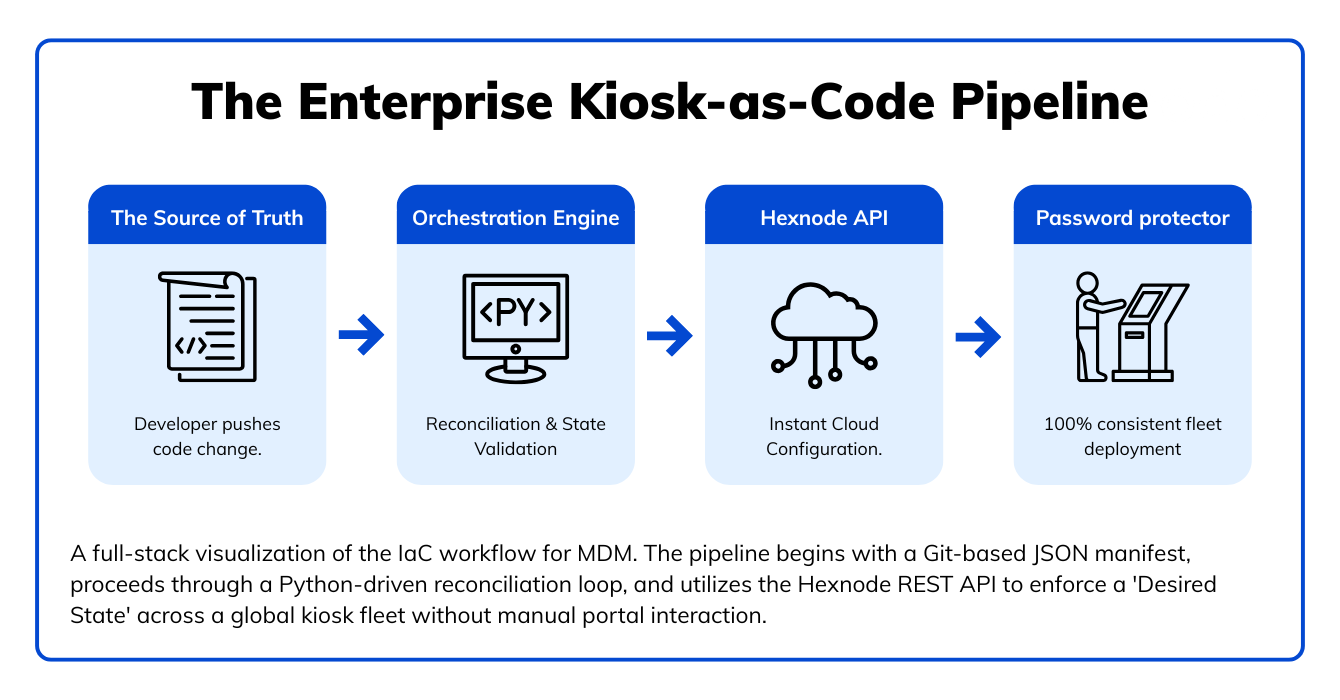
To build this pipeline, we need a secure bridge between your Code Repository and the Hexnode Infrastructure.
Prerequisites:
In an enterprise environment, scripts must be idempotent. Running the script 100 times should result in the same state as running it once, without creating duplicate groups or errors.
Before running the engine, we must define our Desired State. This is the “Code” in Infrastructure as Code.
Create a file named store_manifest.json. This acts as your configuration file for a specific retail site or fleet branch.
|
1 2 3 4 5 6 |
The Manifest (store_manifest.json): { "location_code": "NYC-042", "target_group": "Kiosk-NYC-042-Active", "policy_id": "1024" } |
For security, do not hardcode your credentials. Set the following environment variables on your local machine or within your CI/CD runner (e.g., GitHub Secrets):
HEXNODE_API_KEY: Your secret API Key from the Hexnode Portal.
HEXNODE_PORTAL_URL: Your portal address (e.g., company.hexnodemdm.com).
Here is the logic for a robust provision_store.py script:
|
1 2 3 4 5 6 7 8 9 10 11 12 13 14 15 16 17 18 19 20 21 22 23 24 25 26 27 28 29 30 31 32 33 34 35 36 37 38 39 40 41 42 43 44 45 46 47 48 49 50 51 52 53 54 55 56 57 58 59 60 61 62 63 64 65 66 |
import requests import json import sys import os # Configuration: Load from Environment Variables for Security API_KEY = os.getenv("HEXNODE_API_KEY") PORTAL_URL = os.getenv("HEXNODE_PORTAL_URL") # .hexnodemdm.com HEADERS = { "Authorization": API_KEY, "Content-Type": "application/json" } def get_existing_group_id(group_name): """ Check if group exists by iterating through all paginated API results. """ # Start with the initial URL url = f"https://{PORTAL_URL}/api/v1/device_groups/" while url: response = requests.get(url, headers=HEADERS) if response.status_code != 200: print(f"Error fetching groups: {response.status_code}") break data = response.json() groups = data.get('results', []) # Check current page for the group for group in groups: if group['groupname'] == group_name: return group['id'] # Update url to the 'next' page link; if it's None, the loop ends url = data.get('next') return None def create_device_group(group_name): """Creates a group only if it doesn't exist.""" existing_id = get_existing_group_id(group_name) if existing_id: print(f"🔹 Idempotency Check: Group '{group_name}' already exists (ID: {existing_id}).") return existing_id url = f"https://{PORTAL_URL}/api/v1/device_groups/" payload = { "groupname": group_name, "description": "Provisioned via IaC Pipeline [DO NOT EDIT MANUALLY]" } response = requests.post(url, headers=HEADERS, json=payload) if response.status_code == 201: group_id = response.json().get('id') print(f"✅ Created New Group: {group_name} (ID: {group_id})") return group_id else: print(f"❌ Critical Error: Failed to create group. {response.text}") sys.exit(1) def enforce_policy(policy_id, group_id): """ Associates a pre-existing policy to a specific device group. Ensures the 'Desired State' is mapped correctly. """ url = f"https://{PORTAL_URL}/api/v1/actions/associate_policy/" # Payload requires IDs in list format payload = [{ "policies": [policy_id], "devicegroups": [group_id] }] response = requests.post(url, headers=HEADERS, json=payload) if response.status_code == 200: print(f"✅ State Enforced: Policy {policy_id} mapped to Group {group_id}") else: print(f"❌ Mapping Error: {response.status_code} - {response.text}") def main(): # Load Manifest with open("store_manifest.json") as f: config = json.load(f) print(f"🚀 Initializing Provisioning for: {config['location_code']}") # 1. State Enforcement: Device Group group_id = create_device_group(config['target_group']) # 2. State Enforcement: Security Policy policy_id = config['policy_id'] enforce_policy(policy_id, group_id) print("🎉 Infrastructure State Enforced Successfully.") if name == "main": main() |
In the world of Terraform, State is the source of truth that tracks what you actually deployed. Without a state file, your script is blind to what it did yesterday.
To turn our Python engine into a professional IaC tool, we implement a local_state.json. This file records the mapping between your human-readable manifest and the unique IDs returned by the Hexnode API.
Why State Matters:
How the code evolves:
|
1 2 3 4 5 6 7 8 9 10 11 12 13 14 15 16 17 18 19 20 21 |
Python def update_local_state(location_code, group_id, policy_id): """ Saves the successful deployment metadata to a local state file. """ state_file = "fleet_state.json" # Load existing state or create new if os.path.exists(state_file): with open(state_file, 'r') as f: state = json.load(f) else: state = {} # Update state for this specific location state[location_code] = { "hexnode_group_id": group_id, "enforced_policy_id": policy_id, "last_synced": "2026-01-07T15:30:00Z" } with open(state_file, 'w') as f: json.dump(state, f, indent=4) print(f"💾 State updated for {location_code}") |
Writing the script is Step 1. Running it at scale requires a strategy for Governance and Observability.
The biggest risk in IT is “Shadow Configuration”—a local admin manually changing a policy to troubleshoot an issue and forgetting to revert it.
Never hardcode API keys.
By moving to IaC, you gain a perfect audit trail for free.
When an auditor asks, “Who changed the Kiosk Lockdown Policy on Tuesday?”, you don’t look at logs; you look at the Git History.
Configuring a group and a policy is only half the battle. The true power of IaC is realized when a device is taken out of the box, powered on, and automatically finds its “Desired State” without an admin ever touching the screen.
Instead of waiting for devices to check in, we use the Hexnode API to “Pre-Provision” them. By fetching Apple DEP or Android Zero-Touch profiles via the API, you can map serial numbers to your IaC-created groups before the hardware even leaves the warehouse.
Enterprise Workflow:
You can automate the generation of enrollment requests so that store managers receive an automated “Setup” email or SMS the moment your script finishes running.
|
1 2 3 4 5 6 7 8 9 10 11 12 |
def trigger_enrollment(email, group_id): """ Sends an automated enrollment request to the store manager. """ url = f"https://{PORTAL_URL}/api/v1/enrollment/email/" payload = { "email": email, "device_group": group_id } response = requests.post(url, headers=HEADERS, json=payload) if response.status_code == 200: print(f"📩 Enrollment request dispatched to {email}") |

Ready to scale globally? Access our comprehensive guide on security, compliance, and lifecycle management for enterprise architects.
Download the White Paper!Transitioning to Infrastructure as Code elevates the role of the Endpoint Administrator. You are no longer a “ticket clicker” but a Platform Architect.
By adopting this Hexnode API-driven workflow, you ensure that 1,000 stores look exactly like 1 store. You eliminate human error, secure your configuration chain, and gain the agility to deploy complex fleets in minutes, not months.
Stop clicking. Start coding.
Transition from ClickOps to IaC with our expert deep dives. Start your 14-day Hexnode free trial now.
Signup Now!📍 Can I manage MDM using Infrastructure as Code (IaC)?
Yes. By leveraging the Hexnode REST API, IT teams can manage physical device fleets using IaC principles. Instead of manual console configuration, administrators define device groups, policies, and app assignments in code (JSON/YAML) and use scripts to automatically provision and enforce these states across thousands of devices.
📍How do I automate Kiosk provisioning with Python?
You can automate Kiosk provisioning by writing a Python script that interacts with the Hexnode API.
The script should: