Fire OS has emerged as a cost-effective platform for enterprise kiosk deployments across retail, healthcare, hospitality, logistics, and education. However, building a fully kiosk Fire OS environment requires more than choosing the right tablet or display device. Organizations need a device management solution to manage enrollment, control apps, lock down devices, enforce security, provide remote support, and handle device lifecycle tasks. By pairing Fire OS hardware with a unified endpoint management platform such as Hexnode UEM, enterprises can deploy secure, scalable, and operationally reliable kiosks.
In the current technological landscape, enterprise IT departments face a dual challenge: electronic hardware costs continue to rise amid shifting semiconductor dynamics and increased investment in AI infrastructure. Simultaneously, the demand for dedicated, single-purpose endpoints across retail, hospitality, healthcare, and logistics has reached an all-time high. Against this backdrop, Amazon’s Fire OS ecosystem has emerged as a strategically viable alternative to high-cost iPad and Windows-based kiosk deployments.
However, transforming a consumer-grade Fire OS tablet into a fully kiosk Fire OS endpoint requires more than selecting the right device model. Effective kiosk deployments depend on aligning hardware performance with use-case requirements and ensuring long-term security update viability. More importantly, effective deployment depends on implementing a management solution capable of locking down, securing, and maintaining devices at scale.
This guide provides a practical approach to selecting the right hardware and management framework to achieve a fully kiosk Fire OS environment in 2026.
What is Fire OS and Why is it Preferred for Kiosk Deployments?
Fire OS is a mobile operating system developed by Amazon and built as a customized form of the Android Open-Source Project (AOSP). It retains the Android core and API compatibility but removes Google Mobile Services (GMS), instead relying on Amazon’s proprietary ecosystem, including the Amazon Appstore, Alexa voice services, and the Silk web browser. Fire OS devices typically run Android-style apps distributed via the Amazon Appstore or as enterprise APKs, rather than through Google Play.
For enterprises evaluating kiosk platforms, Fire OS presents a distinct set of advantages over traditional Android and Apple-based deployments:
AOSP flexibility, allowing deep customization and lockdown without reliance on Google services.
Consistent hardware availability, with a clearly segmented tablet and display portfolio.
Simplified replacement and lifecycle management, critical for high-turnover kiosk environments.
Strong alignment with single-purpose use cases, where consumer ecosystem features are unnecessary.
These characteristics make Fire OS particularly well suited for organizations pursuing a fully kiosk Fire OS strategy focused on cost efficiency, control, and operational predictability.
Fire OS Device Options by Deployment Requirement
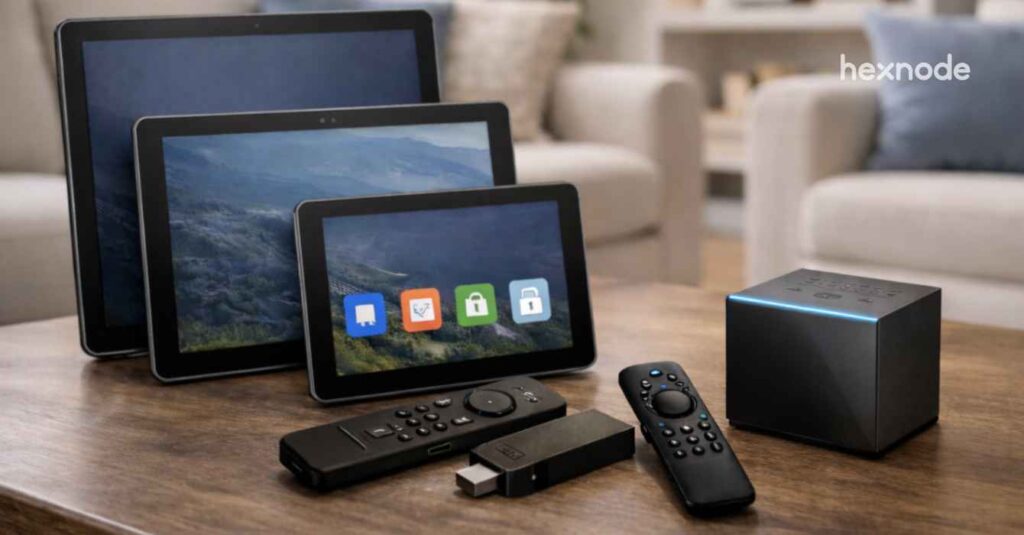
Fire OS runs on a wide range of Amazon hardware. This includes interactive tablets used in enterprise kiosk deployments, HDMI-based streaming devices, and large-format displays. As a result, it has become one of the most widely deployed Android-derived platforms outside Google’s ecosystem.
Selecting the right Fire OS device depends on aligning your operational requirements with the appropriate balance of performance, physical durability, display characteristics, and deployment economics. The sections below outline how different Fire OS devices map to common kiosk scenarios.
Enterprise-Grade Build and Security
For deployments involving sustained public interaction or premium staff-facing terminals, the Fire Max 11 represents Amazon’s most durable and security-oriented tablet. Unlike earlier Fire tablets with plastic bodies, it features an aluminum chassis made with approximately 55% recycled aluminum, improving overall durability and build quality. The device also introduces the first fingerprint sensor in the Fire tablet lineup, integrated into the power button, enabling biometric authentication for faster and more secure device access.
Ideal for: High-end retail point-of-sale systems and hospital concierge hubs where reliability, heat management, and access control are critical.
Display and Interaction Standard
When display size and visual clarity are key considerations, the Fire HD 10 provides a strong balance between affordability and usability. It features a 10.1-inch display with a 1920 × 1200 Full HD resolution, offering sufficient sharpness for reading, web applications, and high-definition media playback. The tablet’s size also makes it practical for mounted or stationary tablet deployments where a larger screen improves visibility and interaction.
Ideal for: Bedside medical terminals, interactive wayfinding stations, and educational kiosks that benefit from USI 2.0 active stylus support for form input and annotation.
Scalable Performance and Cost Efficiency
For organizations prioritizing portability and cost-efficient deployments, the Fire HD 8 (2024 refresh) is one of the most affordable options in Amazon’s tablet lineup. The device features a 2.0 GHz hexa-core processor and configurations with up to 4 GB of RAM, representing a memory upgrade over earlier Fire HD 8 models. This increase improves overall responsiveness and reduces lag when switching between applications on entry-level hardware.
Ideal for: Handheld inventory management in logistics, tabletop restaurant ordering, and high-volume employee time-clock deployments where unit cost and ease of replacement are key considerations.
Large-Format Content Delivery
For passive large-screen kiosk and digital signage deployments, HDMI-based Fire TV devices offer a compact and cost-effective media playback option. Devices such as the Fire TV Stick 4K Max and Fire TV Cube connect directly to a display’s HDMI port, allowing monitors or TVs to function as content playback endpoints without requiring a full desktop computer. For more dedicated signage deployments, Amazon also offers the Amazon Signage Stick, a purpose-built media player designed for digital signage. When paired with compatible content management software, the device can automatically launch signage applications and operate in unattended display environments.
Ideal for: Digital menu boards, internal corporate communications, and retail advertising loops that require centralized control and minimal on-site maintenance.
Fire OS Use Cases at a Glance
While device selection varies by performance and form factor, Fire OS consistently enables a broad range of kiosk and dedicated-purpose deployments across industries.
Use Case
Device Type
Why It Works
Retail & POS
Fire HD tablets
Stable hardware with kiosk lockdown. It simplifies ordering and payments.
Digital Signage
Fire tablets, Fire TV
Looping content on large screens. It removes the need for PC infrastructure.
Hospitality
Fire tablets
Controlled interfaces for guests. Perfect for check-in and concierge apps.
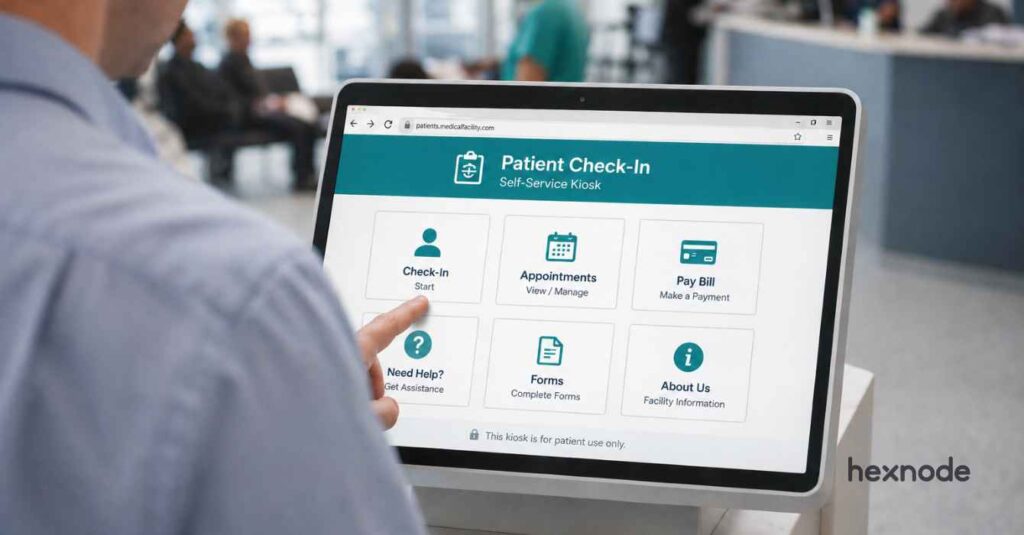
Healthcare
Fire tablets
Secure patient workflows. It features remote wipe capabilities for data safety.
Logistics
Fire tablets with enclosures
Lightweight design and long battery life. Offers rugged mounting options.
Education
Fire tablets
Managed access for students. It locks devices to approved apps and sites.
Selecting the right Fire OS hardware based on performance, durability, and display requirements is only the first step. The real complexity of a fully kiosk Fire OS deployment emerges once devices are powered on when organizations must enforce dedicated-use lockdowns, manage application distribution, and maintain uptime across distributed fleets.
The Operational Challenges of Fully Kiosk Fire OS Deployments
While Fire OS offers a cost-effective and flexible AOSP-based platform, it lacks many of the built-in enterprise controls found in Android Enterprise or Apple ecosystems. As deployments scale, organizations must contend with challenges like:
Manual or app-based enrollment workflows
Limited kiosk enforcement
Fragmented app distribution
Challenges in maintaining configuration consistency
Constrained remote troubleshooting
Complex network provisioning
Limited visibility into device health and compliance, and
Ongoing security and lifecycle management requirements.
Taken together, these challenges are not isolated issues but symptoms of a broader requirement: fully kiosk Fire OS deployments demand purpose-built management capabilities. Addressing these challenges consistently and at scale requires more than ad-hoc configuration. It requires a structured management approach designed specifically for dedicated-use Fire OS environments.
Featured Resource
The Ultimate Guide to Kiosk Management: Everything your business needs to know
Download the whitepaper to learn how you can adopt the right kiosk management strategy for your business.
Management Capabilities Required for Fully Kiosk Fire OS Environments
To overcome the operational constraints inherent in Fire OS and maintain reliability at scale, organizations must adopt a management approach purpose-built for dedicated-use devices. This is possible with a kiosk lockdown software with the following core management capabilities:
Flexible Enrollment and Provisioning Workflows
Enrollment is the most critical phase of a fully kiosk Fire OS rollout. Fire OS does not support Android Enterprise, Samsung Knox–specific enrollment, Google Workspace enrollment, or Zero-touch enrollment, so onboarding must rely on Fire OS–compatible methods.
Hexnode streamlines this by offering diverse enrollment options such as
Open Enrollment (no authentication) for rapid staging,
Authenticated enrollment (via Email/SMS or Self enrollment) for user-bound deployments,
QR Code enrollment for faster setup, and
Pre-Approved and Bulk enrollment (CSV-based) for large fleets.
Centralized Application Distribution and Control
In Fire OS environments, application distribution differs from traditional Android because Fire OS cannot access Google Play Services; apps must instead be sourced from the Amazon Appstore or deployed as enterprise APKs.
The ideal management solution must therefore enable centralized deployment of both store and enterprise apps, enforce application allowlists, and maintain version control across devices. Here, Hexnode’s app management suite allows you to silently push enterprise APKs to Fire OS devices and create a customized App Catalog, ensuring users only access vetted, business-critical software while version control is handled centrally.
Dedicated Kiosk Enforcement and System Lockdown
A fully kiosk Fire OS deployment depends on strict enforcement of dedicated-use modes. A management solution must support multiple kiosk configurations, including:
Multi App Kiosk for controlled workflows requiring access to a limited set of applications
Web Kiosk for browser-based experiences
Digital Signage mode for passive content display.
Beyond app-level restrictions, kiosk enforcement must suppress system UI elements, navigation controls, notifications, and access to device settings to prevent user escape. These controls are essential to maintaining operational integrity in unattended or public-facing Fire OS kiosk environments.
With Hexnode, admins can instantly lock Fire tablets into Single-App or Multi-App Kiosk modes, effectively replacing the standard Amazon home screen with a branded, secure interface that restricts navigation to authorized tasks.
Granular Device and Hardware Restrictions
In unattended kiosk environments, controlling device behavior at the system and hardware level is essential. An ideal management solution must allow administrators to restrict access to system settings, disable navigation controls, and suppress system dialogs to prevent tampering. It should also support hardware-level restrictions, such as disabling cameras, microphones, USB access, external storage, screenshots, and factory reset options where applicable.
Hexnode provides granular policy controls to disable physical buttons, cameras, and USB ports on Fire OS devices, ensuring the hardware remains a secure, single-purpose endpoint that cannot be repurposed by unauthorized users.
Policy-Based Configuration Management
As fully kiosk Fire OS deployments scale, managing devices individually becomes operationally unsustainable. A management solution must support policy-based configuration, allowing administrators to define standardized profiles for kiosk behavior, restrictions, network settings, and application access, and apply them consistently across device groups. These policies should be centrally managed, dynamically updated, and automatically enforced to remediate configuration drift.
Hexnode’s policy-driven architecture allows you to create configurations for Fire OS groups, ensuring that any new device added to the fleet automatically inherits the correct kiosk settings, Wi-Fi credentials, and security restrictions.
Network Provisioning and Secure Connectivity
Reliable connectivity is foundational to fully kiosk Fire OS deployments, particularly across multi-site environments with varying network infrastructure. A management solution must support centralized Wi-Fi configuration, including SSID provisioning, authentication methods, and network prioritization. It should also enable secure connectivity controls, such as VPN configuration and enforcement, to protect data in transit and restrict device communication to trusted networks.
Hexnode automates network setup by remotely pushing Wi-Fi configurations and VPN settings to Fire OS kiosks, ensuring they remain connected to secure corporate networks without requiring local staff to handle complex credentials.
Remote Visibility and Troubleshooting
Fully kiosk Fire OS devices are often deployed in locations where physical access is limited or impractical. A management solution must provide remote visibility into device screens and remote control capabilities to diagnose application crashes, frozen interfaces, or misconfigurations in real time.
Hexnode’s Remote View capability allows admins to see exactly what is on the kiosk screen in real-time, making it possible to diagnose app crashes or user errors from a central dashboard and reducing the need for expensive on-site technician visits.
Monitoring, Compliance, and Alerting
Maintaining uptime in fully kiosk Fire OS environments requires continuous visibility into device health and operational status. A management solution must support real-time monitoring of device connectivity, application status, and policy compliance, along with configurable alerts when devices go offline or deviate from defined configurations. Proactive monitoring enables IT teams to detect and remediate issues early, reducing service disruption in customer-facing or mission-critical kiosk deployments. Compliance tracking also ensures devices remain aligned with security and operational standards throughout their deployment lifecycle.
Hexnode provides a comprehensive dashboard that tracks the real-time status of Fire OS fleets, triggering instant alerts if a device goes offline or if a kiosk app is closed, allowing for proactive remediation before the downtime impacts the business.
Essential Fire OS management services for your device fleet
Discover the key services you need to effectively manage and secure your Fire OS device fleet at scale
How Hexnode UEM Enables Fully Kiosk Fire OS Deployments at Scale
A successful Fire OS kiosk deployment requires more than just choosing the right device. Since Fire OS lacks built-in enterprise controls, it must be paired with a management platform that fills those gaps.
Hexnode UEM does this by managing Fire OS devices through its Android framework, extending full enterprise-grade control to devices built on the Android Open Source Project (AOSP).
With Hexnode, IT teams can:
Enroll Fire OS devices with supported workflows
Lock devices into single or multi-app kiosk modes
Distribute apps and content remotely
Apply granular restrictions and secure network settings
Monitor devices in real time and troubleshoot issues remotely
This unified approach simplifies management across large, distributed deployments. It reduces manual effort, prevents downtime, and ensures every kiosk remains secure, consistent, and fully under IT’s control at scale.
Frequently Asked Questions (FAQs)
1. What is required to set up a fully kiosk Fire OS deployment?
A fully kiosk Fire OS setup requires more than choosing the right device. Because Fire OS lacks native enterprise controls, organizations need a management solution to handle enrollment, app distribution, kiosk enforcement, security restrictions, and remote support. Platforms like Hexnode UEM provide these capabilities to securely deploy and manage Fire OS kiosks at scale.
2. What is the difference between Fire OS kiosk mode and Android kiosk mode?
Fire OS is based on AOSP but does not support Android Enterprise or Google Mobile Services. As a result, Fire OS kiosk deployments rely on alternative enrollment workflows and app distribution methods. And Android Enterprise offers native device-owner controls and zero-touch provisioning. Fire OS kiosks therefore require purpose-built management to achieve equivalent lockdown and scalability.
3. Is Fire OS suitable for large-scale enterprise kiosk deployments?
Fire OS is well suited for large-scale kiosk deployments when paired with the right management solution. Its low hardware cost and flexible form factors make it attractive for kiosks. However, enterprise-grade management is essential to handle enrollment, application control, security enforcement, and ongoing operations across distributed environments.
Lock Down Your Fire OS Kiosks with Confidence
Remotely enforce kiosk mode, push apps, and manage every Fire OS device securely with Hexnode UEM
Curious, constantly learning, and turning complex tech concepts into meaningful narratives through thoughtful storytelling. Here I write about endpoint security that are grounded in real IT use cases.