A quick guide to executing custom Windows scripts via MDM
Learn how to remotely execute custom PowerShell and batch scripts on Windows devices using Hexnode UEM.

Get fresh insights, pro tips, and thought starters–only the best of posts for you.

In 2021, the Log4j vulnerability (Log4Shell) was disclosed, and every CISO in the world asked the same two questions.
While modern DevSecOps tools generate a Software Bill of Materials (SBOM) for the application or software you build, they are blind to what you deploy. They cannot tell you if the 3rd-party Digital Signage Player on your 500 kiosks is actively loading an outdated, vulnerable Java library. In 2026, even though regulations like Executive Order 14028 and EU Cyber Resilience Act are making SBOMs mandatory, a static list of components in a PDF is futile if you cannot map them in real-time.
This guide explains how to use Hexnode UEM as a dynamic, runtime tool can ensure your software supply chain security by finding the needle in the haystack across 50,000 or more servers, endpoints, and kiosks across endpoints.
To close the gap between what your developers intend and what your devices execute, you must first distinguish between the two pillars of visibility: Build-Time and Runtime.
1. Build-Time SBOM (The Developer’s View)
Generated during the CI/CD pipeline, this lists the constituents of the app (like files and packages) before it is compiled. It is theoretical. It assumes that what was built is what was deployed.
2. Runtime SBOM (The Operator’s View)
This is the inventory of software actually executing on your endpoints. It accounts for:
Understanding the difference isn’t just a technicality. A Build-Time SBOM tells you what should be there, but it is blind to the silent risks that enter your fleet post-deployment. Without the Runtime view, a CISO might believe a vulnerability is patched because the latest build is clean, while thousands of physical devices remain compromised due to failed updates or local configuration changes.
A Runtime SBOM isn’t a single document. It’s an operational state. Achieving this software supply chain security requires moving beyond basic inventory lists and transforming your UEM into a proactive security tool.
To secure your fleet in real-time, we have identified three distinct strategies using Hexnode UEM that range from hunting for hidden vulnerabilities deep within the file system to validating the integrity of software before it ever executes on a corporate device.
The challenge with supply chain vulnerabilities (like Log4j) is that they aren’t always listed in the “Add/Remove Programs” menu. They are often hidden inside other applications (e.g., a .jar file nested inside a .exe).
A standard UEM inventory scan would not be able to detect these deep-seated files. However, this is possible with Hexnode by employing scripts. You can deploy a script to crawl the file system and identify specific vulnerable libraries by their filename or hash.
Consider a case where a critical zero-day is discovered in a common compression library used by multiple third-party vendors. Your Build-Time SBOM says your proprietary code is safe, but you suspect your fleet’s Digital Signage apps might be using the vulnerable library under the hood.
Here is the detection-to-collection logic used to find the vulnerable file:
Here is a sample Bash script which helps you perform the above:
|
1 2 3 4 5 6 7 8 9 10 11 12 13 |
#!/bin/bash TARGET_FILE="lib-executable.jar" FOUND=$(find / -name "$TARGET_FILE" -type f 2>/dev/null | head -n 1) if [ -n "$FOUND" ]; then echo "1" else echo "0" fi exit 0 |
One of Hexnode’s greatest strengths is the simplicity of its deployment engine. You don’t need to be an expert to hunt for vulnerabilities. You just need a script and a target. With Hexnode, you can just:
Once the script identifies the vulnerable library, you are no longer hunting in the dark. With the definitive file path in hand, you can use Hexnode to take immediate action across your fleet:

Learn about the types of cybersecurity frameworks and the role UEM holds in improving cybersecurity
Get the white paper
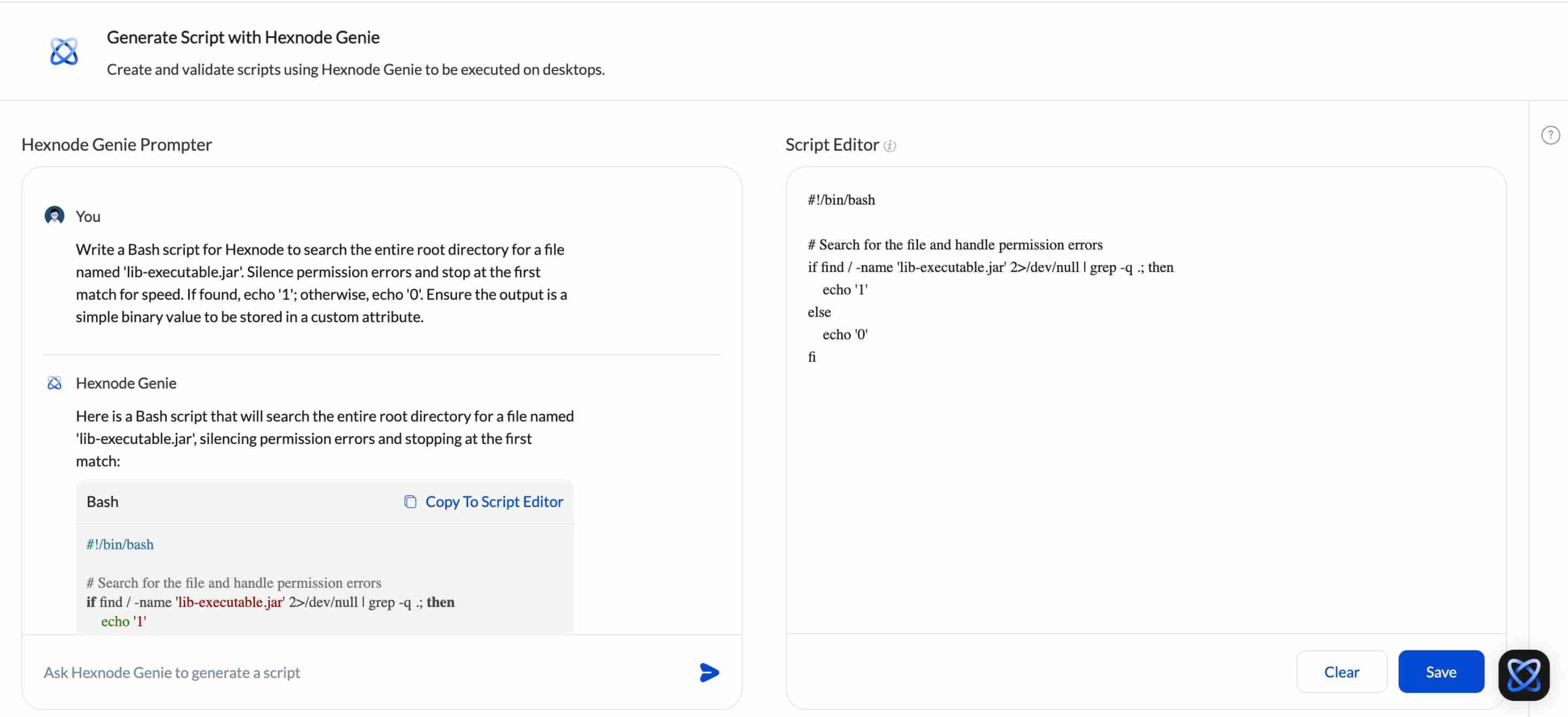
The most significant hurdle in achieving software supply chain security is often the specialized knowledge required to write custom audit scripts. Not every IT administrator is a Bash or PowerShell expert, and in a zero-day crisis like Log4j, time to build scripts are very low.
This is where Hexnode Genie, our AI-driven scripting assistant, transforms the workflow. Instead of searching forums for code snippets, you can describe your security requirement in plain English. For example, you can just type in “Write a Bash script to find and hash all instances of lib-vulnerable.jar” and Genie generates the precise, production-ready code instantly. By removing the technical friction of script creation, Hexnode Genie allows your security team to move from a threat announcement to a fleet-wide scan in minutes, not hours. It turns complex hunting logic into an accessible, click-and-deploy reality for every admin.

To prevent this, you can move beyond simple deployment and implement hash verification using Hexnode. This ensures that the file sitting on your endpoint is the exact, bit-for-bit match of the version released by the vendor.
Consider a scenario where you are deploying a mission-critical update to 10,000 global endpoints. Instead of trusting that the file arrived untampered, you can use Hexnode to automate a pre-execution sanity check.
This zero-trust approach to deployment ensures that compromised code never gains a foothold on your corporate network.
The web browser can be your fleet’s most active application and also one of the biggest blind spots. Browser extensions are mini apps with deep permissions to read web data and capture session cookies. Since extensions update automatically and ownership often changes, a safe tool can quickly turn into a data-exfiltrating backdoor. Hexnode provides a streamlined way to enforce extension integrity:
While these controls are natively integrated for Windows and ChromeOS, Hexnode extends this security to macOS and Linux via its scripting engine. You can deploy scripts to programmatically audit local extension directories, identify unvetted IDs, and force-remove unauthorized plugins. This ensures a consistent, zero-trust browser environment across your entire infrastructure.
In the modern threat landscape, trust is no longer a viable security strategy. As supply chain attacks become more sophisticated, you cannot assume that your software is safe simply because it was purchased from a reputable vendor or passed a build-time scan.
To achieve true resilience, you need to verify reality at the edge. Hexnode UEM provides the granular, file-level visibility required to audit your endpoints in real-time, effectively bridging the gap between the code and the endpoint. By implementing a Runtime SBOM strategy, you transform your management platform from a simple inventory tool into a proactive security asset. You gain the power to hunt for hidden vulnerabilities, govern the invisible browser supply chain, and verify the integrity before it executes.
1. Can MDM help with SBOM (Software Bill of Materials)?
Yes. While MDM does not generate a build-time SBOM (like a compiler tool), it provides the essential capability to perform Runtime SBOM check. Hexnode UEM can scan and list every installed application and version across the fleet, providing the real-world inventory needed to verify if vulnerable software components are actually present on your devices.
2. How can I find vulnerable files (like Log4j) on Linux servers?
You can use Hexnode Custom Scripts. By deploying a shell script to your Linux servers via Hexnode, you can crawl the file system to locate specific vulnerable libraries (like .jar files) that standard inventory scans might miss.
3. What is the difference between Build-Time and Runtime Supply Chain Security?
Build-Time security analyzes code during development (CI/CD) to find risks before software is created. Runtime security (handled by UEM) analyzes the endpoints to find risks in software that is already deployed and running. You need both to fully secure the enterprise supply chain.
Take control of your runtime reality and deploy consistent, verified security policies across all your enterprise endpoints effortlessly.
SIGNUP NOW