Rugged kiosk selection succeeds when durability, workflow fit, connectivity, security and centralized management are evaluated together.
Unsuitable or over-specified hardware can increase downtime, security exposure, support effort and total ownership costs.
Build a requirements matrix covering environmental tolerance, form factor, peripherals, power, connectivity, application compatibility and software support.
Pilot shortlisted devices under real operating conditions; Hexnode supports compatible Android fleets through kiosk lockdown, zero-touch enrollment, OEMConfig, remote troubleshooting and scheduled OS updates.
Why Is Choosing the Right Rugged Kiosk Device Difficult?
Rugged kiosk device selection is difficult because durability requirements vary by environment and workflow. A warehouse scanner may face concrete-floor drops, dust and Wi-Fi dead zones, while a field-service tablet must withstand rain, temperature shifts, vehicle vibration and intermittent cellular coverage. Logistics devices may encounter several of these conditions during a single shift.
Consumer-device specifications may not cover the durability, environmental, scanning or service requirements of a specific industrial deployment. Even a generic “rugged” designation provides limited guidance unless the stated drop resistance, ingress protection and operating-temperature range match actual deployment conditions. Physical resilience alone does not guarantee reliable scanning, application performance or all-day operation.
IT teams must therefore assess the complete operational profile: environment, device form factor, required peripherals, network availability, application compatibility, centralized management support and expected service life. A device that meets durability requirements but cannot integrate with existing scanners, mounts, applications or management workflows can still disrupt operations and increase support effort.
What Happens When an Organization Selects the Wrong Rugged Device?
Selecting unsuitable rugged hardware increases downtime, security exposure and total ownership costs. Devices that cannot tolerate operating conditions may fail during shifts, interrupt barcode scanning or lose connectivity at critical workflow stages. Workers must then switch devices, repeat transactions or wait for technical support, delaying warehouse throughput, field-service appointments and delivery completion.
The wrong device can also weaken the security baseline. Incomplete kiosk lockdown may expose system settings or unauthorized applications, while an unsupported operating system can prevent timely security updates. Inconsistent patching, accessible USB ports and unmanaged Bluetooth or Wi-Fi interfaces further expand the attack surface.
Over-specification creates a different cost problem. Organizations may pay for specialized scanners, extreme environmental ratings, oversized displays or premium support contracts that the workflow never uses. Larger or heavier devices can also reduce usability. Effective rugged kiosk device selection must therefore balance operational resilience and security with practical requirements, rather than maximizing every available specification.
What Is a Rugged Kiosk Device?
A rugged kiosk device is a rugged handheld, tablet, vehicle-mounted computer or terminal configured as a dedicated device to run one application or an allowlisted set of applications. Unlike a standard consumer device, it combines restricted user access with hardware designed for sustained operational use.
The category includes several distinct form factors:
Rugged handhelds for scanning, inventory and mobile task execution.
Vehicle-mounted computers for forklifts, trucks and material-handling workflows.
Rugged tablets for field forms, diagnostics, navigation and visual applications.
Fixed industrial terminals for check-in, production or shared workstation tasks.
These devices are not interchangeable. Screen size, mounting, portability, controls and peripheral support must align with the intended workflow. A successful deployment depends on more than physical durability; it requires the right combination of workflow-specific hardware, operating system support, application compatibility and kiosk manageability throughout the device’s service life.
How Do Rugged Device Requirements Differ Across Warehouses, Field Service and Logistics?
Requirements differ because each workload exposes devices to distinct environmental, connectivity and usability constraints. The appropriate form factor and configuration must follow the work being performed.
Requirement
Warehouses
Field service
Logistics
Operating environment
Dust, drops, cold storage
Rain, sunlight, temperature shifts
Vibration, depots, changing weather
Typical workflows
Picking, packing, inventory
Inspection, repair, documentation
Navigation, scanning, proof of delivery
Preferred form factor
Handheld or vehicle-mounted
Rugged tablet or handheld
Handheld or vehicle-mounted
Peripherals
Scanner, trigger, cradle
Camera, GPS, keyboard
Scanner, signature capture, dock
Connectivity
Roaming Wi-Fi
Cellular with offline support
Cellular, GPS and depot Wi-Fi
Power model
Swappable batteries or charging cradles
Full-shift battery
Vehicle charging or replaceable battery
Primary failure risks
Drops and Wi-Fi gaps
Weather and screen visibility
Vibration and coverage loss
These are workload profiles, not universal hardware recommendations. A warehouse-ready device may still fail in mobile field operations.
What Should Warehouses Look for in a Rugged Kiosk Device?
Warehouses should prioritize reliable scanning, rapid shift handovers and consistent operation across demanding indoor environments. Devices need fast barcode capture, glove-compatible controls, dependable Wi-Fi roaming and sufficient drop resistance for repeated impacts on concrete floors.
Hardware must also match facility conditions. Dust exposure, freezer temperatures and wireless interference across racks or large floor areas can affect device performance. Replaceable batteries help sustain multi-shift use, while compatibility with charging cradles and forklift or vehicle mounts supports predictable storage and power management.
For shared devices, IT teams must plan how workers authenticate, end sessions and return hardware. Kiosk applications should reset between users without retaining sensitive data. Charging processes, session timeouts and role-based access must support quick reassignment without creating operational delays.
What Should Field Service Teams Look for in a Rugged Kiosk Device?
Field service teams need devices that remain usable outdoors, on the move and beyond reliable network coverage. Priorities include daylight-readable displays, wet-touch or glove input, cellular connectivity, GPS, cameras, long battery life and dependable offline application behavior.
The hardware should tolerate rain, temperature variation and repeated vehicle vibration. Because remote worksites may lack charging facilities or on-site IT support, technicians must be able to complete core tasks, store data locally and synchronize it when connectivity returns.
Form factor requires a practical compromise. Larger screens make technical drawings and forms easier to use, but add weight and reduce mobility. Compact handhelds support safer one-handed operation, while rugged tablets better suit workflows requiring detailed data entry or visual inspection.
What Should Logistics and Transportation Teams Look for?
Logistics teams should select devices around proof-of-delivery, route navigation, package scanning, signature capture and dispatch communication. Drivers need portable hardware that supports these tasks reliably during loading, transit and delivery stops, while vehicle-mounted systems must remain stable under continuous vibration.
Connectivity testing should cover LTE or 5G availability and depot Wi-Fi handoffs, while location testing should separately assess GPS accuracy across actual routes. Teams should also verify dock compatibility, vehicle charging and whether removable or hot-swappable batteries are necessary for extended shifts.
Driver devices and fixed terminals serve different purposes. Handhelds must balance portability, scanning speed and battery life. Terminals installed at depots, loading areas or distribution hubs can prioritize larger displays, continuous power, peripheral connections and shared-workstation usability.
Which Specifications Matter Most for Rugged Kiosk Device Selection?
The most important specifications fall into three groups: environmental durability, workflow hardware and operational manageability. Evaluating them together prevents teams from choosing a physically robust device that cannot support the application, peripherals or management controls required in production.
Environmental criteria include ingress protection, drop tolerance, temperature range and resistance to vibration or cleaning chemicals. Workflow hardware covers the display, scanner, camera, physical controls, battery and compatible accessories. Manageability includes operating system support, enrollment, kiosk configuration, application deployment, security updates and remote troubleshooting.
Each specification should be assessed against the actual use case, shift duration, application stack and planned replacement cycle. Teams can formalize this assessment with a requirements matrix that classifies every feature as mandatory, preferred or unnecessary. This keeps evaluations consistent, exposes trade-offs and prevents attractive but irrelevant capabilities from influencing procurement.
How Should You Evaluate Ruggedness Ratings and Environmental Tolerance?
Evaluate ruggedness ratings against the conditions the device will encounter, not the label printed on its specification sheet. Review IP ratings, drop-test height and surface, vibration tolerance, operating-temperature range, humidity resistance and display performance under wet or bright conditions.
Quick fact:
An IP rating measures enclosure protection against solids and water. It does not measure drop resistance, vibration tolerance or overall device durability.
Check the manufacturer’s exact testing method and configuration. Review the exact IP test conditions and MIL-STD-810 methods, severities and tested configuration; neither standard guarantees overall or indestructible device durability.
Operational testing should account for repeated drops rather than a single impact, exposed charging or data ports, protective-case compatibility and routine chemical cleaning. Devices intended for freezers or outdoor sites should also be tested for battery degradation, condensation, touchscreen response and readability under direct sunlight.
Which Workflow Features and Peripherals Does the Device Need?
The device needs only the features required to complete its assigned workflow efficiently. Evaluate integrated barcode scanners, RFID or NFC, cameras, GPS, programmable buttons, push-to-talk controls, payment accessories and signature input against specific tasks rather than general availability.
Compatibility with existing equipment is equally important. Confirm support for charging docks, vehicle mounts, printers, scanner sleds, headsets and other peripherals used at warehouses, depots or field locations. Check connector types, wireless protocols, drivers and physical dimensions before procurement.
In scan-intensive workflows, integrated scan engines and physical triggers may improve speed and ergonomics compared with some camera-based implementations, but organizations should test both options using representative devices and barcodes. Camera scanning may remain sufficient for occasional use, making scan frequency and accuracy better selection criteria than feature count alone.
What Connectivity, Battery and Platform Requirements Should You Check?
Connectivity must match where and how the device operates. Compare supported Wi-Fi standards and roaming behavior, cellular bands, private LTE or 5G compatibility, Bluetooth, GPS accuracy and offline synchronization. Test transitions between warehouse Wi-Fi, mobile networks and disconnected operation without losing transactions.
Battery specifications should be validated under real shift conditions. Screen brightness, scan frequency, navigation, background synchronization and weak cellular signals can reduce runtime considerably. Multi-shift operations may require removable or hot-swappable batteries rather than relying on advertised capacity alone.
Platform checks should cover the installed OS version, Android Enterprise support, the manufacturer’s security-update commitment and OEMConfig availability. IT teams must also confirm that the device and enrollment mode support their UEM controls, kiosk application, required permissions and planned management lifecycle.
How Do You Choose a Rugged Kiosk Device Step by Step?
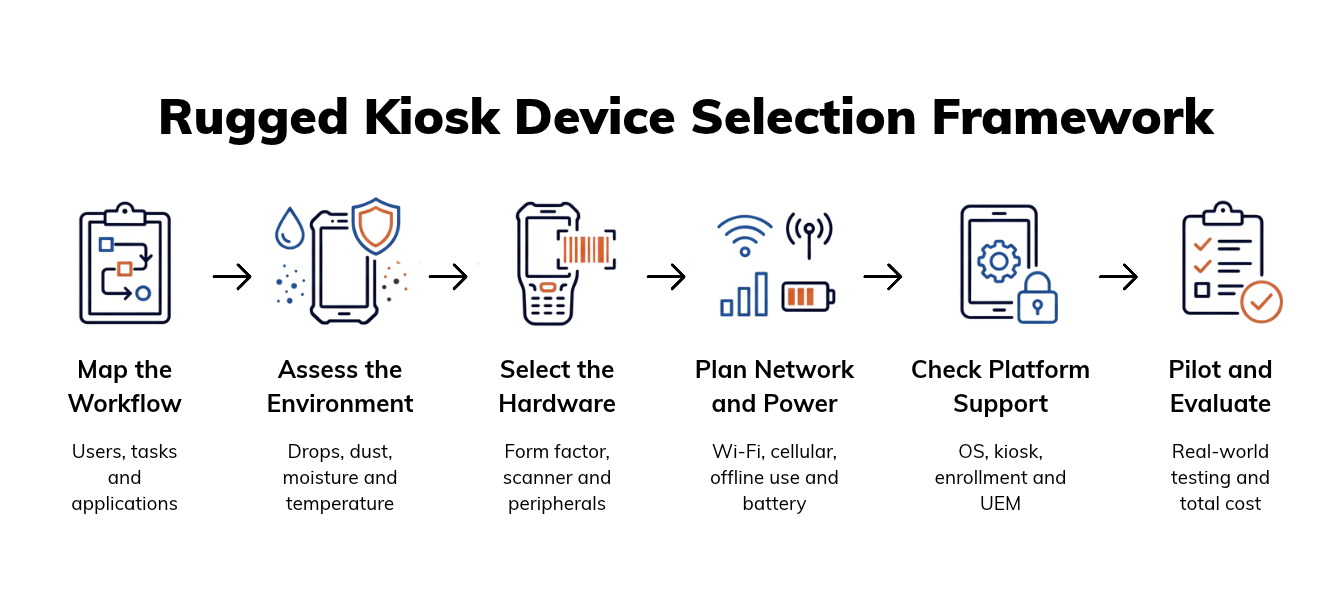
Choose a rugged kiosk device by translating operational requirements into measurable selection criteria before comparing models.
Map the workflow: Document who uses the device, which applications and peripherals they need, and how tasks move between locations.
Record environmental conditions: Identify exposure to drops, dust, moisture, vibration, chemicals, sunlight and temperature extremes.
Define mandatory hardware: Specify the form factor, scanner, camera, controls, mounts and accessories required.
Set connectivity and power requirements: Establish network coverage, offline behavior, roaming, shift length and charging options.
Verify platform support: Check OS support, security-update commitments, kiosk compatibility, enrollment and remote management.
Create a shortlist: Remove models that fail any mandatory requirement.
Rugged Kiosk Device Selection Framework
Operations, IT, security, application owners and frontline workers should review the requirements together. Score each shortlisted model using weighted criteria for workflow fit, durability, manageability, support period, unit cost and expected downtime. This makes trade-offs visible before pilot testing begins.
How Can You Verify Kiosk Management and Security Compatibility?
Verify compatibility by testing whether the device, operating system and enrollment method expose every control required by the deployment. Confirm support for single-app or multi-app kiosk mode, silent application deployment, configuration enforcement, remote troubleshooting and controlled OS updates.
Rugged hardware may also require manufacturer-specific management. Check whether scanner settings, button mapping, USB restrictions, peripheral behavior and firmware options can be configured through OEMConfig or another documented management interface. Do not assume that standard OS controls include access to proprietary hardware functions.
Review provisioning and security requirements separately. Verify zero-touch enrollment options, device encryption, certificate deployment, Wi-Fi and VPN configuration, and remote actions for lost devices. The manufacturer should also document its security-update commitment, including update frequency and support duration. Validate these capabilities on the shortlisted hardware because availability can vary by model, OS version and management mode.
Why Rugged Device MDM Requires a Unified Approach for Frontline IT
See why rugged fleets need unified provisioning, kiosk controls, OEMConfig and remote troubleshooting.
How Should You Pilot Devices and Calculate Total Cost of Ownership?
Pilot shortlisted devices under real operating conditions before approving fleet-wide procurement. Include representative sites, shifts, network zones, applications, accessories and worker roles so testing reflects normal operations and difficult edge cases.
Measure scan accuracy, network roaming, battery endurance, application stability, user error and device failure rates. IT teams should also track provisioning effort and the time required to diagnose and resolve issues remotely. These results reveal operational differences that specification sheets cannot show.
Calculate total cost of ownership across the planned service life. Include device hardware, accessories, management licenses, spare units, repairs, replacements, support contracts, staging labor and downtime. A lower purchase price does not provide better value if failures, manual configuration or short support periods increase recurring costs.
Pro tip:
Test each device under the hardest expected conditions—not just normal operation. Include weak network zones, maximum screen brightness, repeated scanning, low temperatures, full-shift battery use and every required accessory.
How Does Hexnode Support Rugged Kiosk Deployments?
Hexnode supports rugged deployments through Android kiosk lockdown, automated enrollment, manufacturer-specific configuration and remote maintenance. Its single-app and multi-app kiosk modes can restrict devices to one operational application or an approved set of applications while limiting access to system settings.
Android Enterprise zero-touch enrollment can provision supported devices without manual setup. IT teams can then deploy managed applications and use OEMConfig to apply supported hardware configurations to Zebra and Honeywell devices.
For ongoing support, Android Remote View and Control can help IT diagnose device issues without an on-site visit. Administrators can also schedule Android OS updates around operational windows. Feature availability and management depth depend on the device model, OEM, OS version and enrollment method.
Can the same rugged kiosk device be used in warehouses and field operations?
Yes, but only if the device meets the environmental, connectivity and workflow requirements of both settings. A warehouse-ready device may lack the cellular coverage, daylight readability or weather resistance required for field operations.
Can rugged kiosk applications continue working without internet access?
Yes, if the application supports offline processing and local data storage. Teams should test how transactions are queued, protected and synchronized when connectivity returns.
Is a higher IP rating always better for a rugged device?
No, the appropriate IP rating depends on the expected exposure to dust and water. Buyers should review the tested conditions and avoid paying for protection levels the workflow does not require.
When should a rugged device use a native barcode scanner instead of a camera?
A native scan engine is generally better suited to frequent, high-volume barcode capture. Camera-based scanning may be sufficient when scanning is occasional and speed is not operationally critical.
What should IT ask about a rugged device’s software support lifecycle?
IT should confirm the supported OS versions, security-update frequency, support duration and available upgrade controls. The device should remain compatible with required applications, kiosk policies and management tools throughout its planned service life.
Can Hexnode manage Zebra and Honeywell rugged Android devices?
Yes, Hexnode documents OEMConfig support for applying supported manufacturer-specific configurations to Zebra and Honeywell devices. Available settings depend on the device model, OEM, OS version and enrollment method.
Featured Resource
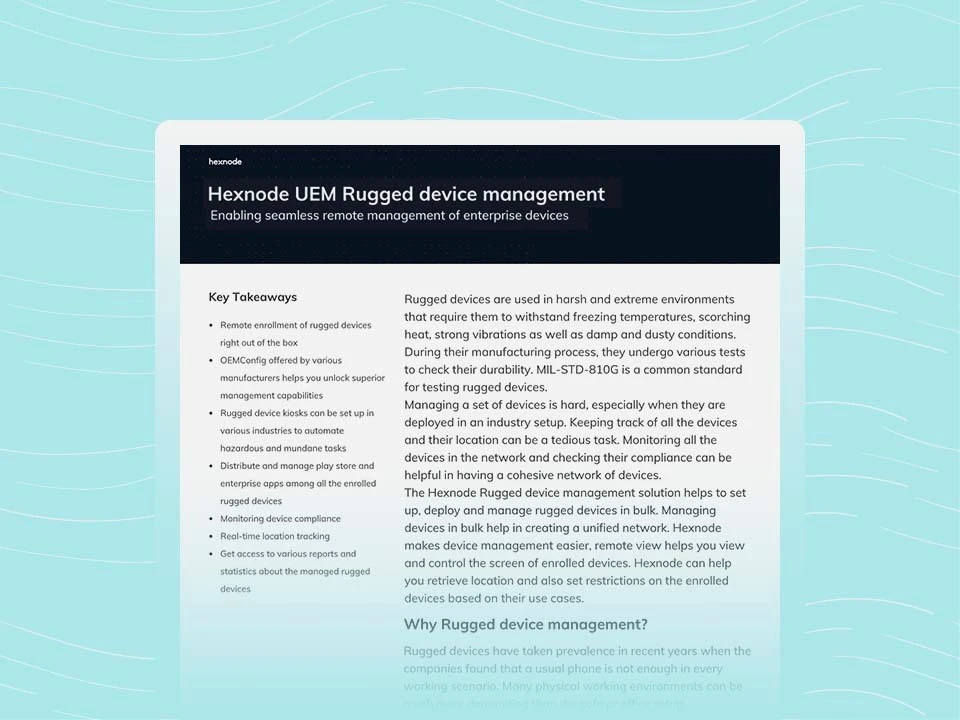
Hexnode UEM Rugged Device Management
See how Hexnode centralizes kiosk lockdown, OEM controls and remote support for rugged device fleets.
A rugged device must do more than survive harsh conditions. It must support the required workflow and remain secure, configurable and serviceable throughout its operational life. Evaluate physical durability, workflow performance and centralized manageability as a single procurement decision. Pilot shortlisted hardware across real sites, users, networks and shifts before approving a fleet-wide purchase.
Manage rugged devices with Hexnode UEM
Deploy, secure and support rugged Android devices from one centralized management console.
Associate Product Marketer at Hexnode focused on SaaS content marketing. I craft blogs that translate complex device management concepts into content rooted in real IT workflows and product realities.