IT Admin’s Guide to Patch Management
Dive into the complete technical guide on configuring automated patch policies and minimizing deployment risks.

Get fresh insights, pro tips, and thought starters–only the best of posts for you.

On the morning of July 19, 2024, the enterprise world woke up to a new reality that highlighted the critical need for Real-Time MDM Recovery.
A single faulty channel file update from a leading EDR vendor sent 8.5 million Windows devices into a boot loop. Airlines grounded flights. Hospitals cancelled surgeries. Banks went dark. The cost? An estimated $5.4 billion in direct losses.
But for the IT Admins on the front lines, the horror wasn’t just the crash. It was the Wait.
Admins using legacy UEM platforms found themselves staring at dashboards that hadn’t updated in 4 hours. They had the remediation script ready. They knew exactly which file to delete. But they couldn’t push the fix because their devices weren’t scheduled to “check in” until noon.
That outage taught us a brutal lesson: In a crisis, Latency is Liability.
If your MDM architecture relies on “Polling” (devices checking in every 4-8 hours), you do not have a Disaster Recovery plan. You have a “Hope and Wait” plan.
At Hexnode, we built our architecture differently. We built it for Real-Time MDM Recovery. This guide explains the engineering difference between “Managing” a fleet and “Saving” one.
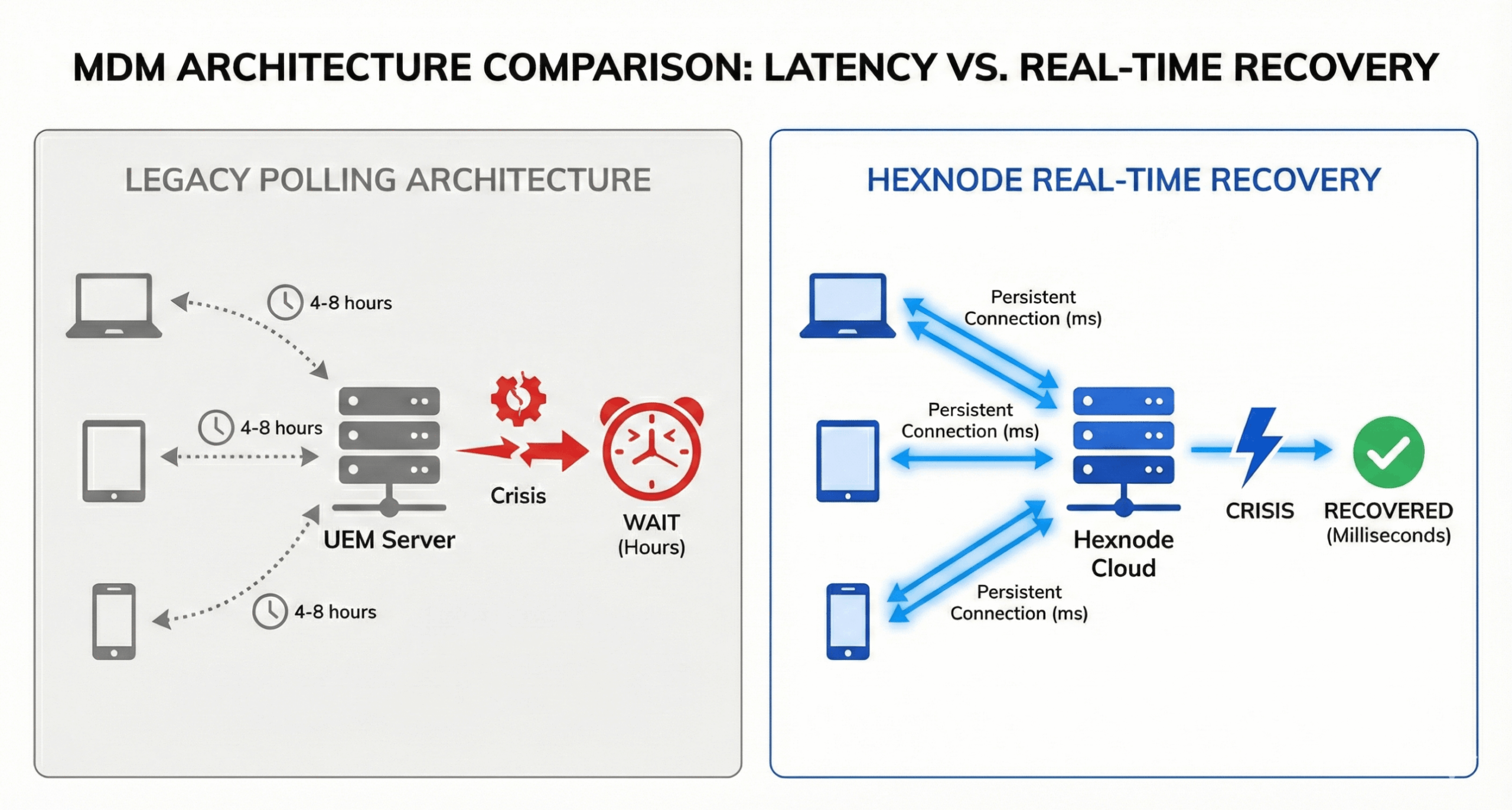
To understand why some companies recovered in minutes while others took days, you have to look at the communication protocol between the Device and the Server.
The Legacy Model: HTTP Polling
Most UEM tools (including the biggest names in the Gartner Quadrant) use a Polling Architecture.
Hexnode rejects the polling trade-off. We utilize Persistent WebSocket Connections to ensure true real-time MDM recovery capabilities.
“A ‘Real-Time Dashboard’ is useless if it’s backed by a 4-hour polling interval. That’s not real-time; that’s just a live view of history.”
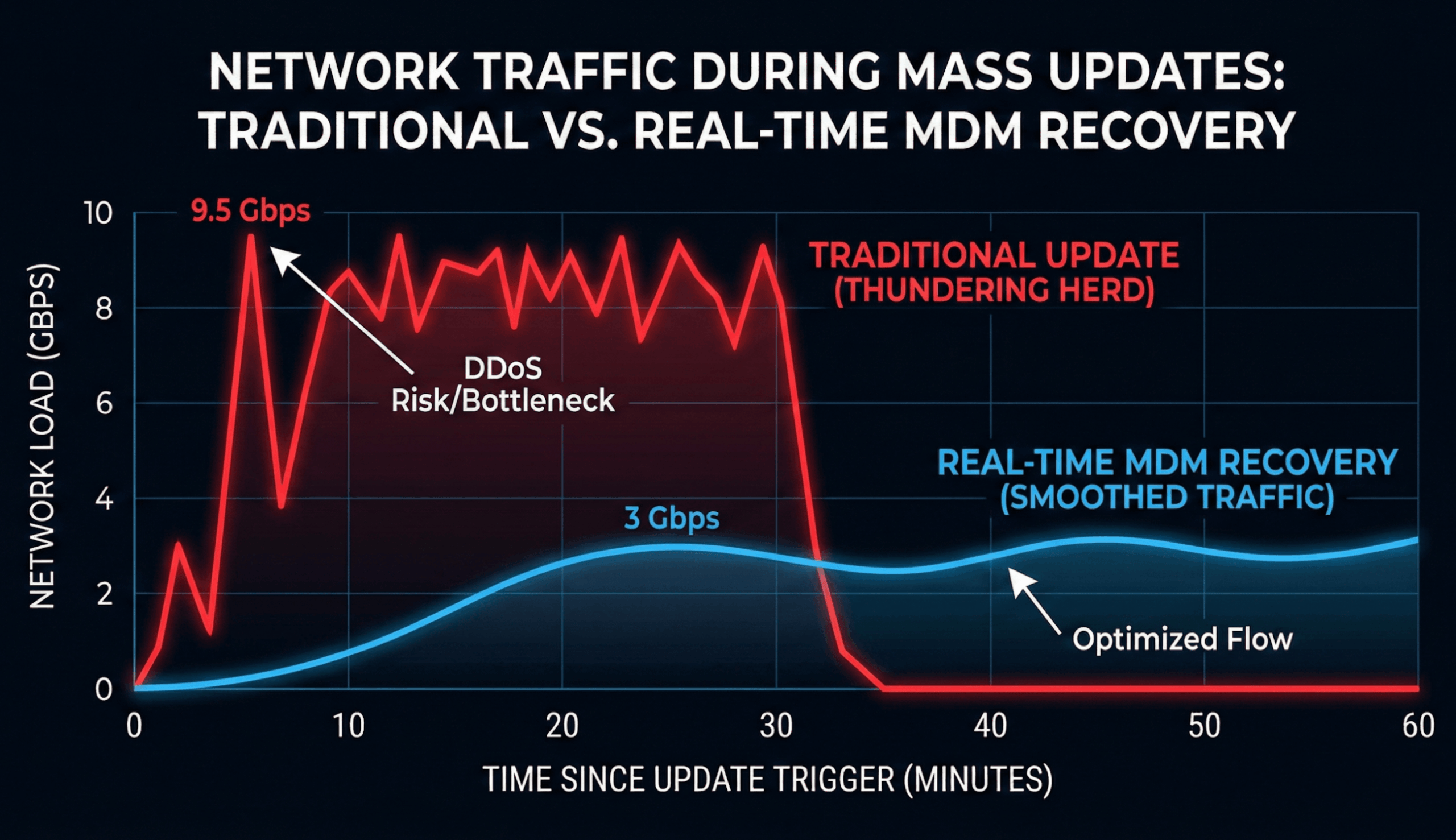
The second challenge of a “Bad Patch” is the Recovery Spike. Imagine you manage 50,000 kiosks. You push a fix that reboots them all. If they all come back online instantly and try to download the 500MB OS repair file, you will inadvertently DDoS your own network (and your MDM server).
This is called the “Thundering Herd” problem.
How Hexnode Engineers Resilience
We don’t just push commands; we orchestrate the flow.

Download this one-pager to discover how Hexnode streamlines patching for Windows and macOS.
Download DatasheetYou cannot predict when the next bad update will hit. But you can script your survival. Here is the Hexnode Rapid Response Playbook.
When news breaks of a bad OS patch (e.g., “iOS 18.2 breaks Wi-Fi”), your first move must be to stop the bleeding.
Legacy Way: Try to delete the update profile (requires a check-in).
Hexnode Way: Use a pre-configured “Emergency – Pause Updates” policy.
If the bad update is a driver or app (like a faulty security sensor), you need to rip it out without wiping the device.
The Tool: Hexnode Remote Scripting Engine.
The Windows Command:
# Example: Uninstall a specific KB or Driver

wusa.exe /uninstall /kb:5044033 /quiet /norestart
The Mac Command:
# Example: Remove a Rapid Security Response

/usr/bin/sudo /usr/bin/apply_snapshot_revert
Why Hexnode Wins: You can target this script based on granular criteria. “Run this ONLY on devices where App Version = Bad_Version_2.0.” You don’t waste cycles fixing healthy devices.
In the CrowdStrike incident, many machines were “Blue Screening” (BSOD) before the agent could load.
The Strategy: Use Hexnode’s Out-of-Band (OOB) management capabilities (for Intel vPro/AMT supported devices) or script a “Safe Mode” boot trigger if the device is semi-functional.
The Fix: Force the device into “Safe Mode with Networking.” This often loads the generic network drivers without loading the faulty 3rd-party security agent.
The Recovery: Once online in Safe Mode, the Hexnode agent connects, pulls the “Uninstall” script, and heals the device.
How does polling frequency affect Disaster Recovery (RTO)?
Polling frequency is the single biggest bottleneck in Endpoint Recovery Time Objective (RTO). If an MDM relies on a 4-hour polling interval, the minimum RTO for a crisis response (like a rollback) is 4 hours. Real-time MDMs like Hexnode use WebSockets to eliminate this delay, reducing RTO from hours to seconds.
Can MDM uninstall a bad Windows Update remotely?
Yes. Hexnode allows admins to push PowerShell scripts (e.g., wusa /uninstall) or Custom Policies to uninstall specific Windows KB patches. Because Hexnode uses real-time connections, this command is executed immediately, stopping the spread of instability across the fleet.
What is the “Thundering Herd” problem in MDM recovery?
The “Thundering Herd” occurs when thousands of devices reconnect simultaneously after an outage, potentially crashing the management server. Hexnode mitigates this using Intelligent Jitter (randomized back-off timers) and Edge Caching, ensuring that mass-recovery events do not overwhelm the infrastructure.
For the last decade, CISO mandates have focused on “Patch Velocity” (How fast can we patch?). The lesson of 2024 is that we must pivot to Recovery Velocity (How fast can we un-patch?).
An enterprise that takes 4 days to recover from a bad update loses customers. An enterprise that recovers in 40 minutes earns trust.
The Hexnode Promise: We cannot prevent Microsoft or CrowdStrike from shipping buggy code. But we can promise you the Speed of Control required to survive it. When seconds matter, do not rely on a tool that checks in every 4 hours.
Real-Time Threats require Real-Time MDM Recovery.
Experience the speed of Hexnode’s Real-Time WebSocket architecture firsthand.
Start Free Trial