Vulnerability Assessment with Hexnode UEM + XDR
Learn how to turn static patch lists into an automated "Kill Chain" that neutralizes exploits in seconds.

Get fresh insights, pro tips, and thought starters–only the best of posts for you.

In the modern Security Operations Center (SOC), visibility is currency. Yet, many organizations struggle with a fragmented XDR mobile telemetry integration.
You have spent millions on an Extended Detection and Response (XDR) platform. You have dashboards that can see a PowerShell script executing on a server in London or a registry change on a laptop in Tokyo. But if you look closely at your fleet, you will notice a massive, terrifying dark spot.
Mobile.
While traditional XDR has “God Mode” visibility into Windows and macOS, it is effectively blind on iOS and Android. It might see that an iPhone is connected to the network, but it lacks the context. Is that device jailbroken? Is it running a sideloaded app? Is the OS patch level from 2023?
This is the Mobile Telemetry Gap. In an era where 60% of corporate data is accessed via mobile, this gap is where the next breach will happen.
This guide explains why standalone EDR agents fail on mobile and how Hexnode XDR provides the “Missing Signal” your SOC needs to achieve true Zero Trust.
To understand the problem, we have to look at the OS architecture.
On Windows/macOS, an EDR agent runs with System or Kernel privileges. It can see everything: every file open, every process spawn, every memory injection. It is an omniscient observer.
On iOS/Android, the OS is designed to prevent exactly this through strict Sandboxing.
Mobile EDRs have tried to evolve—they use tricks like Network Extensions to peek at traffic. But at the end of the day, a standalone security app is… just an app. It stays in its lane because the OS forces it to.
The result? Your multi-million dollar security tool is effectively “Context-Poor.” The massive blind spots remain:
It sees the “smoke,” but it has no idea where the “fire” is.
You need a sensor that lives outside the sandbox. You need the MDM.
What Is the Difference Between UEM and XDR and why you need both?
In its recent CSMA Mandate, Gartner highlights that point tools are no longer enough. For a true Cybersecurity Mesh Architecture, security and management must converge to eliminate the ‘blind spots’ that attackers exploit.
Hexnode XDR operates at a privilege level that no standalone app can touch: The Management Plane. Because the device is enrolled in UEM, Hexnode has querying rights that bypass standard app sandboxing. We see the OS version, the encryption status, the app inventory, and the root integrity.
We send the signals that indicate risk:
How does this work in practice? It’s a native, two-way conversation between Management (Hexnode UEM) and Security (Hexnode XDR). In 2026, we’ve collapsed the gap between “knowing” and “acting.”
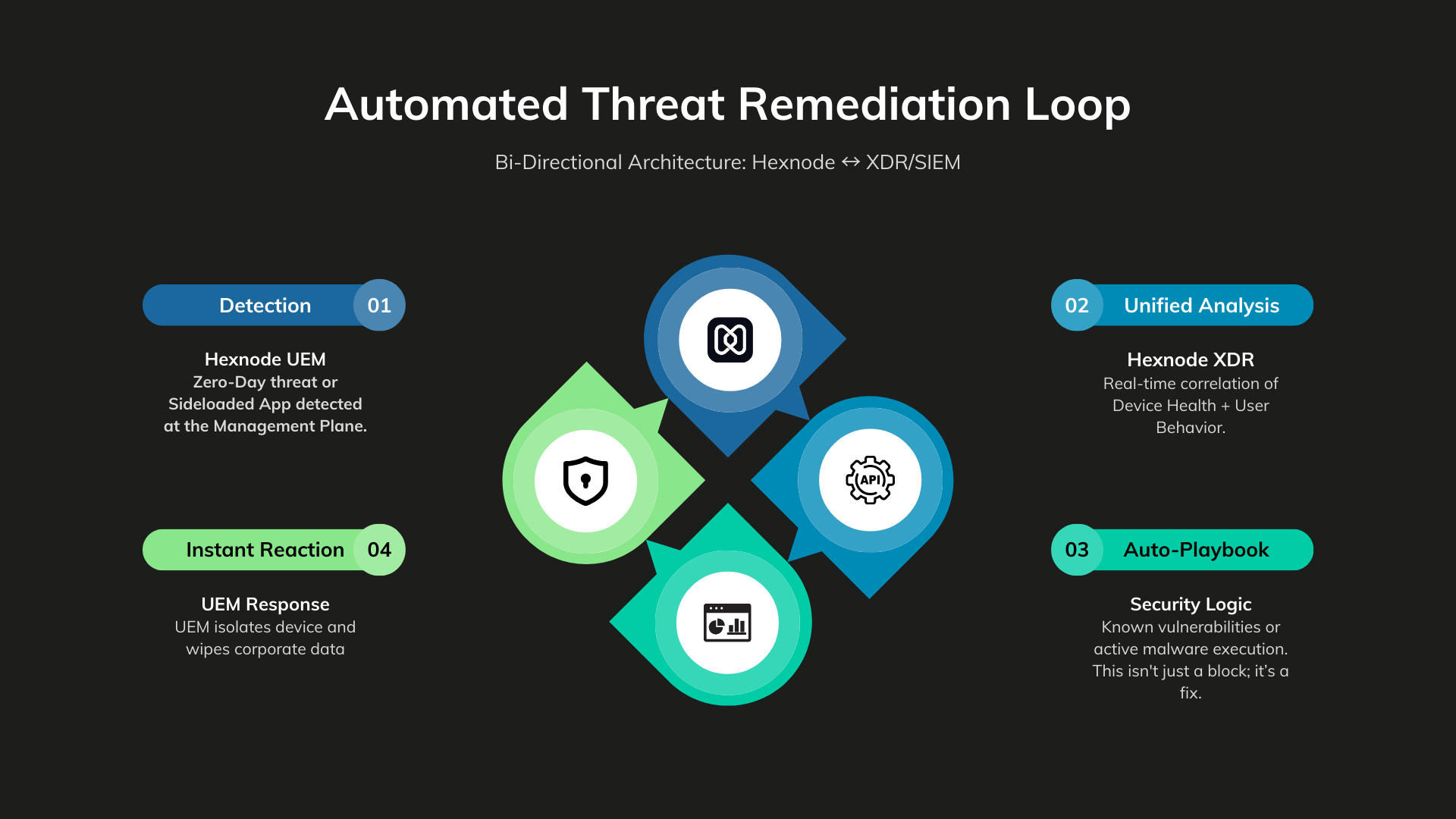
Hexnode detects that a user has installed a “Sideloaded” app.
The XDR sees the Non-Compliant signal. It correlates this with user behavior (e.g., “User is trying to access Salesforce from an unmanaged IP”).
Hexnode XDR signals the management plane to take physical action.
Total Time: < 15 Seconds.
A Sales Director jailbreaks their corporate iPad to install unauthorized software.
Hexnode flags the Jailbreak. The XDR triggers a Conditional Access policy. The Sales Director opens Outlook and sees “Access Denied: Device Compromised.” The breach is stopped before malware can scrape the email cache.
Your CISO bans a specific app due to data residency compliance.
Hexnode XDR provides the “Hit List” of non-compliant devices. The Security team uses the management plane to automate a “Remove App” command, sanitizing the fleet instantly.
In a Zero Trust architecture, passwords can be stolen and MFA can be fatigued. Device Trust is the hardest factor to spoof. By using Hexnode XDR, you are adding the critical “Device Health” variable to your access equation.
The Zero Trust Equation:
ACCESS= IDENTITY (Okta)} + THREAT STATUS (Hexnode XDR) + DEVICE HEALTH (Hexnode UEM)
If any variable is zero, the result is Access Denied.
Audit your mobile security posture across six critical domains. Move from "blind spots" to proactive defense with this actionable checklist.

Featured Resource
Mobile Threat Defense checklist: Empowering organizations against mobile threats
You wouldn’t run a laptop fleet without an EDR agent. Why are you running a mobile fleet without XDR?
The “Mobile Blind Spot” is a choice. By adopting Hexnode XDR, you turn your management tool into a high-fidelity security sensor, ensuring that your SOC sees the full picture—not just the desktop.
Don’t just manage your mobile fleet. Defend it.
Stop flying blind on mobile. Turn your management plane into your strongest security sensor with Hexnode XDR.
Start your 14-day free trial today!Why can’t traditional EDR fully secure mobile devices?
Unlike desktops, iOS and Android enforce strict App Sandboxing. Standalone apps cannot scan the file system or other apps. Hexnode XDR solves this by leveraging UEM-level privileges to provide “outside-the-sandbox” telemetry.
What mobile telemetry does Hexnode XDR provide?
It provides critical signals including Root/Jailbreak status, App Inventory (Shadow IT), OS Patch levels, and Encryption status—data that standalone security apps cannot reach.
How does Hexnode XDR help with Zero Trust?
In a Zero Trust architecture, access is granted based on Identity and Device Health. Hexnode XDR validates health (e.g., “Is the OS secure?”) and feeds this signal to the access gateway, ensuring only healthy devices can touch corporate data.