Structured visionOS enrollment planning enables IT teams to onboard Apple Vision Pro pilots without sacrificing zero-trust security or user adoption.
Unstructured setup creates manual IT overhead, rogue endpoint risks, data exfiltration vectors, and skewed pilot validation metrics.
Open enrollment enables rapid onboarding for shared sandbox trials, while authenticated enrollment enforces IdP and MFA verification for sensitive 1:1 workflows.
Hexnode UEM centralizes both account-driven workflows, automating directory sync, silent VPP app delivery, and day-one network and device restrictions.
The Spatial Endpoint Blindspot: Why Pilot Onboarding Determines Enterprise Success
visionOS enrollment is the cryptographic framework and management protocol through which enterprise Unified Endpoint Management (UEM) platforms provision, secure, and govern Apple Vision Pro hardware. Supporting declarative management and standard configuration profiles, visionOS integrates into enterprises via Automated Device Enrollment (ADE) and account-driven workflows. In account-driven setups, users sign in with a Managed Apple Account (MAA) under Settings, triggering service discovery to bind identity, policies, and certificates.
For IT and endpoint administrators, structured vision pro enrollment planning resolves a fundamental pilot paradox. Forcing evaluators through manual provisioning rituals and disconnected credential handoffs disrupts onboarding and skews adoption metrics. Conversely, treating spatial headsets as unmanaged peripheral sandbox devices introduces unmonitored blindspots into corporate subnets.
Organizations evaluate Vision Pro pilots to validate high-impact, compute-intensive spatial workflows:
Collaborative digital twin modeling and real-time computer-aided design (CAD) manipulation.
Immersive 3D technical training across industrial, aviation, and healthcare operational environments.
Spatial multi-window telepresence and distributed command-and-control visualizations.
Accelerating these workflows cannot compromise security postures. From initial setup, IT must enforce zero-trust identity verification, Wi-Fi payloads, automated app delivery, and corporate data separation without adding user friction.
The Hidden Costs of Poor Enrollment Architecture in Vision Pro Pilots
Bypassing structured vision pro enrollment planning exposes IT teams to immediate operational friction. Without automated onboarding, administrators resort to manual credential entry, temporary Wi-Fi profiles, and spreadsheet tracking. This drains IT helpdesk hours, drives credential sprawl, and creates unmapped “ghost endpoints.”
Unauthenticated or loosely restricted enrollment workflows create entry points for rogue hardware to register against enterprise services. Because Vision Pro processes proprietary 3D models and internal communications, untracked headsets on corporate subnets become high-risk exfiltration and lateral movement vectors.
Inadequate enrollment also corrupts pilot KPIs by introducing setup friction that skews user feedback. Without clear data on endpoint health, ownership, and compliance, leadership hesitates to approve broader procurement.
Architecture Breakdown: Open vs Authenticated visionOS Enrollment
Designing a scalable visionOS pilot requires making two sequential architectural decisions: choosing the foundational enrollment framework based on hardware ownership, and defining how the UEM server verifies user identity during onboarding.
Architectural Foundation: Automated Device Enrollment (ADE) vs. Account-Driven Enrollment
Before selecting an authentication flow, IT teams must decide between zero-touch Automated Device Enrollment (ADE) and Account-Driven Enrollment (mdm-adde or mdm-byod):
Automated Device Enrollment (ADE): Built for corporate-owned headsets procured through Apple or an Apple Authorized Reseller and linked to Apple Business Manager (ABM). Triggered during initial out-of-box setup (or after a full device erase), ADE provisions Vision Pro in Supervised mode with a non-removable MDM profile, unlocking the strictest administrative controls and full remote device wipes.
Account-Driven Enrollment (mdm-adde / mdm-byod): Built for retail-purchased headsets, already-unboxed pilot units, or BYOD trials where erasing the device or binding hardware serials in ABM is impractical. Users enroll directly inside visionOS Settings using a Managed Apple Account (MAA). Because account-driven workflows leave the headset unsupervised, end users retain the ability to remove the management profile from Settings—making account-driven setup ideal for agile, low-friction pilot evaluations before committing to full ABM/ADE procurement.
Open vs. Authenticated Account-Driven Flows
When running an account-driven pilot, IT must choose how the UEM server verifies user identity during discovery:
In open enrollment, the UEM server registers the device upon initial domain discovery without a secondary authentication challenge. When a user signs in with their Managed Apple Account (MAA) under Settings > General > VPN & Device Management, visionOS queries https://<yourdomain.com>/.well-known/com.apple.remotemanagement, resolves the server BaseURL, and deploys baseline profiles over the MAA trust chain.
Conversely, authenticated enrollment adds an identity verification gate before profile installation. When the headset sends an enrollment POST request to the resolved BaseURL, the UEM server returns an HTTP 401 challenge, launching an OAuth 2.0/OIDC ASWebAuthenticationSession federated with enterprise IdPs (Microsoft Entra ID, Okta, or Google Workspace). Once the user satisfies Conditional Access and MFA policies, the server binds the signed MDM profile to the device.
Effective vision pro enrollment planning requires configuring the JSON service discovery payload (replacing <PortalName> with your Hexnode UEM instance name) to define the enrollment type:
The declared Version parameter determines data separation and administrative scope across the spatial computing environment:
Account-Driven User Enrollment (mdm-byod): Built for BYOD pilots, isolating corporate apps and data on a dedicated APFS volume while preventing admins from wiping the device or viewing personal apps and spatial captures.
Account-Driven Device Enrollment (mdm-adde): Built for corporate-owned pilot devices enrolled without Automated Device Enrollment (ADE). While MDM-ADE remains unsupervised, it unlocks broader configurations than User Enrollment while maintaining cryptographic data separation. Full supervision and complete device wipes require Automated Device Enrollment (ADE). Administrators must deploy visionOS 2.0 or later—including visionOS 26 and visionOS 27 releases—to support those controls.
visionOS Device Management: Apple Vision Pro at Work
Explore Apple Vision Pro enrollment paths, security controls, app compatibility, and reassignment workflows.
Decision Matrix: Open vs Authenticated Setup for Spatial Computing Trials
Evaluation Vector
Open Setup (Account-Driven)
Authenticated Setup (Account-Driven)
User Onboarding Friction
Minimal: Single MAA entry; no secondary redirection
Moderate: Requires IdP credential authentication and MFA completion
Directory Binding
Basic: Resolves via domain-level service discovery
Strict: Direct identity federation with Entra ID, Okta, or Google Workspace
Identity Assurance
Baseline: Validates domain matching without user binding
High: Zero-trust identity verification tied to specific corporate credentials
Shared/Floating: Best for lab testing pools and rotating shifts
Dedicated (1:1): Mandatory for assigned endpoints accessing sensitive systems
Supervision & Profile Control
Unsupervised: User-removable MDM profile (use ABM/ADE for non-removable supervision)
Unsupervised: User-removable MDM profile (use ABM/ADE for non-removable supervision)
Deploying these architectures maps directly to specific enterprise pilot personas:
Open Setup Persona (Internal Sandbox & UI/UX): Developers and UX teams testing spatial app rendering or non-sensitive mockups who need rapid provisioning and frequent resets without repeated directory prompts.
Authenticated Setup Persona (Production Data & Field Operations): Healthcare, aerospace, or executive users handling restricted data on production subnets who require strict directory binding and Conditional Access enforcement.
Before provisioning hardware, administrators validate three core infrastructure prerequisites for visionOS onboarding. This baseline ensures smooth pilot execution across Apple Vision Pro devices:
Apple Push Notification service (APNs) Certificate: Verify that an active APNs certificate is linked to your endpoint management architecture to maintain a persistent, cryptographically secure push channel for declarative management notifications.
Apple Business Manager (ABM) Federation: Establish directory federation between ABM and your enterprise Identity Provider (such as Microsoft Entra ID or Okta) to dynamically issue Managed Apple Accounts (MAAs), or pre-provision dedicated test accounts.
Domain Service Discovery Hosting: Host the JSON file at https://<yourdomain.com>/.well-known/com.apple.remotemanagement with a valid SSL certificate, application/json MIME type, and a single BaseURL (https://<PortalName>.hexnodemdm.com/enroll) for mdm-adde or mdm-byod.
Featured Resource
Mastering ABM and ASM: The Complete Handbook
Learn how to configure Apple Business Manager, Managed Apple Accounts, and VPP apps alongside Hexnode UEM.
Define Device Ownership: Choose Corporate-Owned (mdm-adde) for broader management scope or Personal/BYOD (mdm-byod) to isolate pilot data on an encrypted partition.
Specify Enrollment Mode: Toggle between Open Setup (instant registration resolving solely to the validated MAA domain) or Enforce Authentication (injecting an identity verification gate before profile generation).
Pre-Stage Core Profiles: Assign Enterprise Wi-Fi settings, SCEP certificates, and spatial VPP apps to the target enrollment group for immediate post-enrollment deployment.
Users first connect to a staging network before starting device setup. When Authenticated Enrollment is enforced, they open their Email or SMS invitation link to proceed. From there, enrollment proceeds natively inside visionOS:
Open Settings > General > VPN & Device Management and tap Sign In to Work or School Account.
Enter the Managed Apple Account (user@company.com) to trigger the .well-known discovery query, then review and accept the Hexnode EULA.
Complete IdP authentication and MFA in the Hexnode portal when Authenticated Enrollment is enforced. Next, enter the Managed Apple Account password to sign in to iCloud.
Review the Remote Management prompt and tap Allow (or Continue) to bind device identity and apply baseline policies.
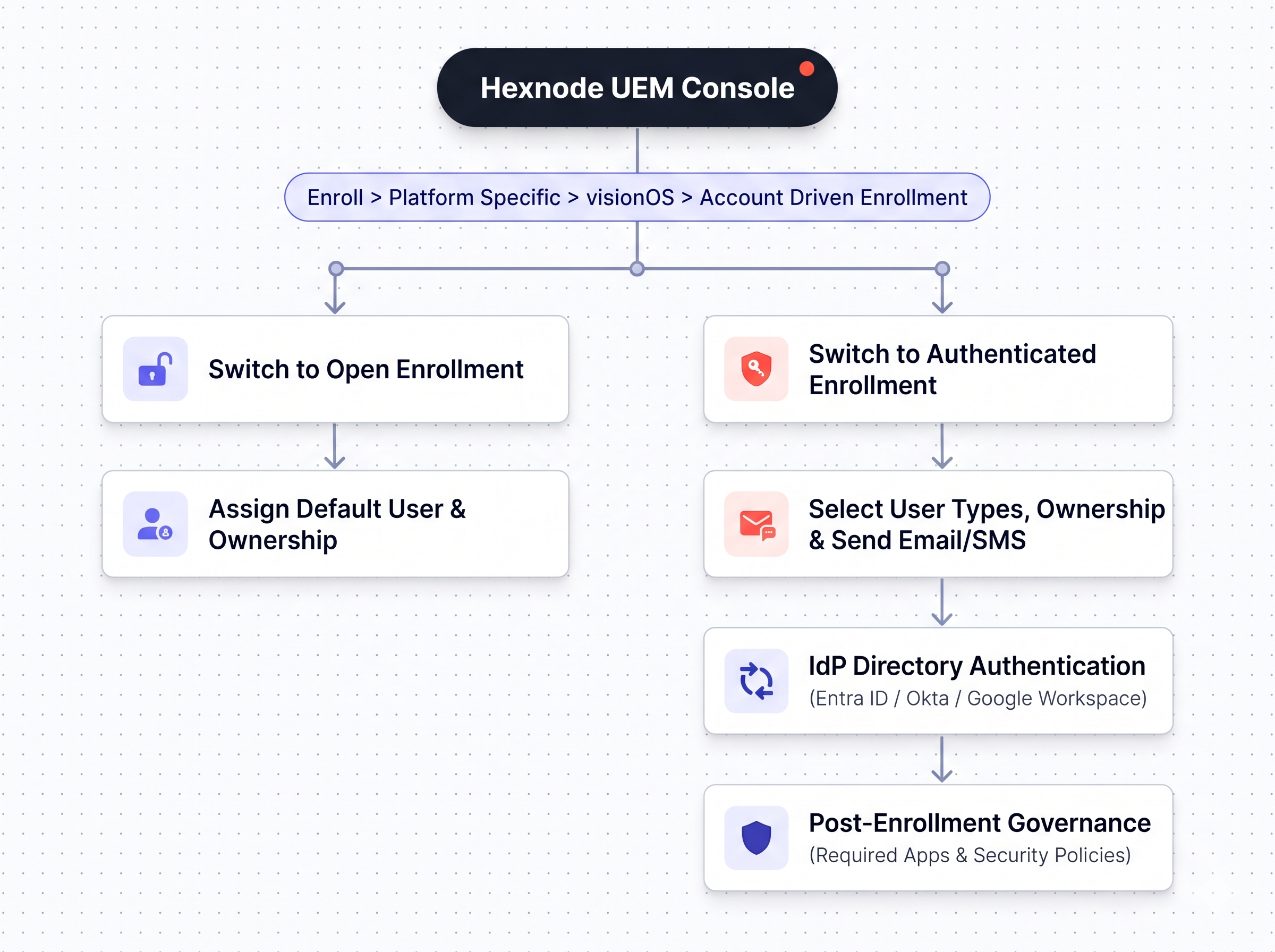
Orchestrating visionOS Pilots with Hexnode UEMHexnode UEM operationalizes enterprise vision pro enrollment planning by streamlining device onboarding once Apple’s declarative service discovery endpoint routes requests to the Hexnode portal. Administrators manage spatial device lifecycles through a purpose-built console interface located at Enroll > Platform Specific > visionOS > Account Driven Enrollment.IT teams manage both open and authenticated visionOS onboarding workflows from this dedicated dashboard. To streamline shared provisioning, administrators select Switch to Open Enrollment to assign a default user and domain. For identity-bound deployments, selecting Switch to Authenticated Enrollment dispatches Email or SMS invitations directly to target users.
Hexnode UEM’s Account Driven Enrollment console workflow for visionOS
For authenticated workflows, Hexnode integrates directly with enterprise directory infrastructures, including Microsoft Entra ID, Okta, and Google Workspace. Directory synchronization imports corporate users and groups from configured domains into Hexnode. Administrators then dispatch visionOS enrollment invitations via Email or SMS. Simultaneously, they scope post-enrollment policies across users, user groups, devices, device groups, or domains. Upon receiving the invitation, users initiate enrollment on the headset with their Managed Apple Account and accept the Hexnode EULA. The Hexnode portal then verifies their identity using enterprise directory credentials alongside their Managed Apple Account password for iCloud sign-in. Once verified, Hexnode automatically maps each Apple Vision Pro to its assigned user groups and policy targets. Immediately after onboarding, Hexnode applies automated day-one security controls to the device:
Mandatory Spatial Software Delivery: On devices running visionOS 1.1 and later, the Required Apps policy engine silently enforces the installation of Volume Purchase Program (VPP) apps and in-house enterprise visionOS applications upon enrollment.
Zero-Trust Network Access: Automatically provision Enterprise Wi-Fi settings (WPA/WPA2 Enterprise) and deploy encrypted VPN profiles with VPN On Demand rules to ensure spatial computing traffic traverses secure corporate tunnels.
Granular System Restrictions: On devices running visionOS 2.0 and later, enforce controls such as disabling screen capture and blocking managed app data synchronization with iCloud—while reserving supervision-dependent restrictions like locking connectivity to MDM-configured Wi-Fi networks for devices enrolled via Automated Device Enrollment (ADE).
FAQs
Does Account-Driven Device Enrollment (mdm-adde) enable device supervision or full remote wipes on Apple Vision Pro?
No, mdm-adde leaves Apple Vision Pro unsupervised and only removes the MDM profile and corporate data during a wipe. Full device supervision and complete Erase All Content and Settings wipes require Automated Device Enrollment (ADE). Hexnode enforces these controls across visionOS 2.0 and later, including visionOS 26 and visionOS 27 releases.
How can IT admins transition a visionOS pilot from open to authenticated enrollment in Hexnode?
Administrators enforce identity-verified visionOS onboarding directly from the Hexnode console. Selecting Switch to Authenticated Enrollment under Enroll > Platform Specific > visionOS > Account Driven Enrollment activates the workflow. Once enabled, Hexnode dispatches Email or SMS enrollment invitations directly to directory-synced users. Headsets previously onboarded under open enrollment must be re-enrolled to enforce secondary IdP authentication.
What types of applications can be silently deployed to Apple Vision Pro during an account-driven pilot?
Hexnode automates zero-touch application provisioning immediately upon visionOS enrollment. On devices running visionOS 1.1 or later, administrators silently deploy both Volume Purchase Program (VPP) and in-house enterprise apps. Standard consumer App Store apps not procured through VPP cannot be deployed silently.
Deliberate vision pro enrollment planning enables IT teams validate Apple Vision Pro workflows through structured enrollment planning. Disciplined rollout controls preserve zero-trust security, automated policy delivery, and endpoint governance.
Take command of your spatial fleet from the initial out-of-box experience. Validate automated open and authenticated visionOS onboarding workflows in your lab environment.
Start Your 14-Day Free Trial of Hexnode UEM
Test open and authenticated visionOS enrollment, VPP app delivery, and security policies in your lab for free.
Associate Product Marketer at Hexnode focused on SaaS content marketing. I craft blogs that translate complex device management concepts into content rooted in real IT workflows and product realities.