Essential features of a remote monitoring system
An expert analysis of the technical features required to build and maintain a high-availability remote monitoring infrastructure.

Get fresh insights, pro tips, and thought starters–only the best of posts for you.
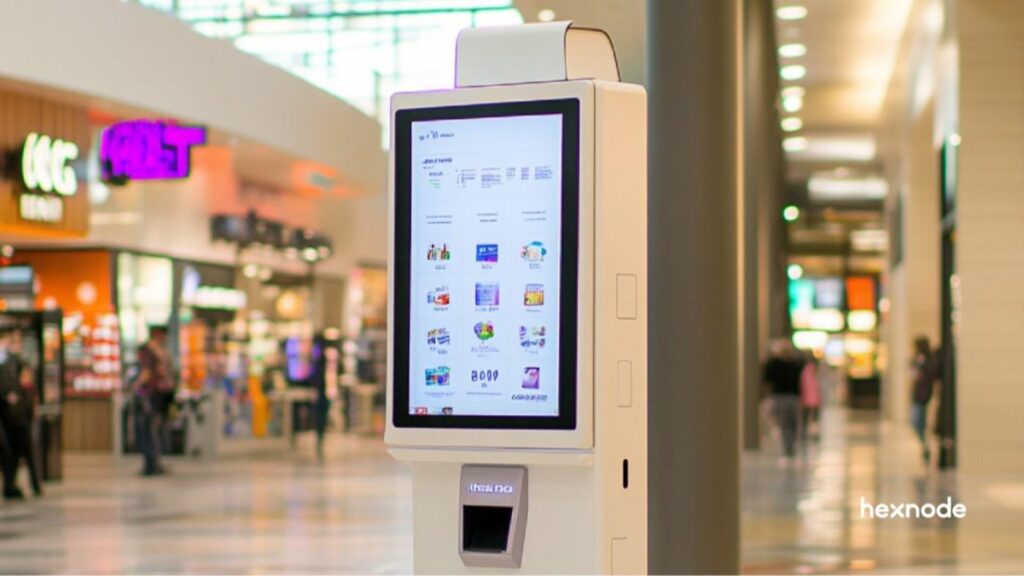
In an era where customer experience is defined by speed and autonomy, the out-of-order sign is a business’s worst enemy. Whether it is a self-checkout station in a retail hub or a digital directory in a hospital, a single minute of downtime translates to lost revenue and frustrated users. Consequently, this is where remote kiosk management becomes the backbone of modern operations.
In order to maintain a competitive edge, businesses can no longer rely on manual checks. Furthermore, achieving consistent 24/7 uptime requires sophisticated kiosk remote monitoring and the ability to intervene from across the globe. Therefore, in this guide, we explore how Hexnode empowers IT administrators with a comprehensive remote management kiosk software suite to eliminate downtime and secure unattended devices.
At its core, remote kiosk management is the centralized oversight and control of a fleet of dedicated devices. In contrast to standard mobile device management (MDM), which focuses on employee productivity, kiosk management is a purpose-driven lockdown.
Essentially, a kiosk is a device, be it a tablet, PC, or smart TV, restricted to a specific set of functions. Because of this, remote kiosk management allows an IT admin in a central office to view device health, update software, and secure settings for a device located thousands of miles away.
By specifically using remote management kiosk software like Hexnode, businesses can transform off-the-shelf hardware into high-performance, secure self-service terminals.
Admittedly, not every device needs the same level of oversight. However, for mission-critical kiosks, kiosk monitoring is non-negotiable.
The global interactive kiosk market is expected to reach $47.76 billion in 2026, a growth fueled by the rapid adoption of self-service technology in retail and healthcare sectors.
Retail kiosks handle everything from inventory lookups to payments. In the event that remote kiosk management isn’t active, a simple app crash could halt sales for hours. To address this, Hexnode allows retailers to manage varied fleets, including Android tablets for signage and Windows terminals for Point of Sale (POS).
Kiosks in healthcare must be both functional and HIPAA-compliant. In addition, kiosk monitoring ensures that these devices are always encrypted and that any unauthorized attempt to break out of the kiosk app is immediately flagged.
Ticketing kiosks at airports or bus stations must stay available for long operating windows. To achieve this, Hexnode helps IT teams monitor them with Battery Level Alerts for low-battery notifications and Mark Inactivity to identify devices that have stopped checking in. As a result, this gives teams earlier visibility into battery-related issues and kiosk outages across distributed transit locations.
Operating a kiosk network without a centralized management tool leads to reactive IT, which is not only expensive but also inefficient. Specifically, here are the primary risks:
Hexnode is built to handle the complexities of modern, cross-platform kiosk deployments. Moreover, it provides a single pane of glass view for all your devices.
While Hexnode offers a deep array of features, understanding the distinction between monitoring (visibility) and management (action) is key to a 24/7 uptime strategy. Accordingly, the following table highlights how these two components work in tandem within the platform:
| Capability | Remote Monitoring (The Eyes) | Remote Management (The Hands) |
| Primary Goal | Persistent awareness of device health. | Direct action to fix issues or update the device. |
| Key Metrics | Battery, storage, and network signal. | OS patches, app installs, and reboots. |
| Alerting | Logs events in the Incidents tab. | Triggers Remote Control sessions. |
| User Impact | Silent; no interruption to the user. | Active; may require app restarts. |
| Hexnode Tool | Real-time Telemetry & Health Reports. | Remote Actions & Custom Scripting. |
Hexnode doesn’t just hide apps; it locks the system.
Hexnode’s dashboard provides instant telemetry. You can track:
Whenever kiosk monitoring alerts you to an issue, you can jump into action. Hexnode’s Remote View allows you to see exactly what the customer sees. Furthermore, on supported devices, Remote Control lets you navigate the screen and fix the issue in real-time without leaving your desk.
In 2025, Hexnode introduced Hexnode Genie, a conversational AI assistant. Instead of digging through reports, an admin can simply ask:
“Genie, show me all kiosks in the London branch that are currently offline.”
Notably, Genie can even execute commands, making remote kiosk management faster than ever.
Remote management kiosk software should also handle your marketing. Hexnode allows you to push images, videos, and PDFs to your screens remotely. In fact, you can schedule content to change based on the time of day, ensuring your digital signage is always relevant.
Ensuring total uptime is not a one-time configuration but rather a continuous operational lifecycle. By following this strategic framework, IT administrators can transition from reactive troubleshooting to a proactive, self-healing environment.
Enterprise-grade security must be established before the device is deployed. For example, by integrating Hexnode with Apple Business Manager or Android Zero-Touch, administrators create a permanent, hardware-level link between the device and the management portal. As a result, in the event of a factory reset, the device will automatically re-enroll and return to its managed kiosk state, preventing unauthorized and unmanaged downtime.
After enrollment, the priority shifts to the elimination of human error and external tampering. This phase involves applying a rigorous policy layer that removes all non-essential operating system functions. By disabling physical hardware buttons and restricting peripheral access, such as USB and Bluetooth, the device is transformed into a dedicated, tamper-proof terminal that cannot be bypassed or repurposed by unauthorized users.
Sustained uptime is achieved through continuous telemetry. Rather than waiting for a hardware failure to be reported, administrators utilize the Hexnode dashboard to identify pre-failure trends, such as battery degradation or network instability. Addressing these issues at the data level allows for remediation before the failure impacts the end-user experience.
This technical checklist serves as the standard for maintaining high-availability kiosk networks. Use these specific settings within the Hexnode Unified Endpoint Management console to ensure maximum reliability.
The secret to successful remote kiosk management lies in being proactive rather than reactive. By utilizing kiosk remote monitoring and the advanced toolset provided by Hexnode, you can ensure that your devices remain secure, updated, and most importantly operational 24/7. From AI-driven troubleshooting with Hexnode Genie to robust multi-app lockdown, Hexnode is the premier remote management kiosk software for the modern enterprise.
Set up your first kiosk lockdown policy and see why Hexnode is the premier choice for operational uptime.
Start Your Free TrialYes. Hexnode is a unified platform. You can monitor a Windows-based POS system and an Android-based digital signage from the same dashboard using the same remote kiosk management policies.
A standard browser like Chrome allows users to enter new URLs or access settings. The Hexnode Kiosk Browser locks the user into whitelisted sites and allows the admin to remotely clear cookies and history.
While you cannot see real-time data when a device is offline, Hexnode logs the last known status. As soon as the device reconnects, it syncs all logs and executes any pending remote kiosk management commands.
Yes. Hexnode employs enterprise-grade encryption and complies with international security standards (SOC 2, GDPR), making it suitable for high-security environments like fintech and healthcare.