Apps can be downgraded. Yes, you read that right. Updating the applications to the most recent version allows access to the most recent features while improving app stability and security. However, it is not as smooth as it sounds and, in some cases, you might need to downgrade apps. Furthermore, the latest updates can come with bugs as the application developers may overlook to repair significant errors. Also, the devices might not be compatible with the new update, and this might cause the app to crash multiple times. Some app updates may increase storage requirements, depending on the code, features and assets introduced in the new version.
Before you downgrade Android apps, check whether the older version is compatible with the device and operating system. An APK built for a different architecture or Android version may fail to install or work correctly.
You should also back up important app data before starting. Downgrading can remove local data, and an older version may not understand data created by the newer release. This can result in crashes or lost settings after the rollback.
Security is another consideration. An older app version may contain vulnerabilities that developers fixed in subsequent releases. Therefore, organizations should treat downgrading as a temporary remediation measure rather than a substitute for a stable, patched update.
For enterprise deployments, test the required version before rolling it out across the device fleet. This helps identify compatibility, data and functionality issues before they affect a larger number of users.
How to downgrade Android apps
Now that we have seen why we have to downgrade an app, it is essential to know the different ways for downgrading.
Downgrade an Android app (and keep the existing data)
To downgrade an app to a previous version without erasing its data, you must install the older version on top of the newer one. Typically, Android does not permit this, and the installation would either fail quietly or display an error. Android normally prevents an APK with a lower version code from replacing a newer installed version. Android also provides a rollback framework that can be enabled when installing an update, allowing an eligible update to be rolled back later.
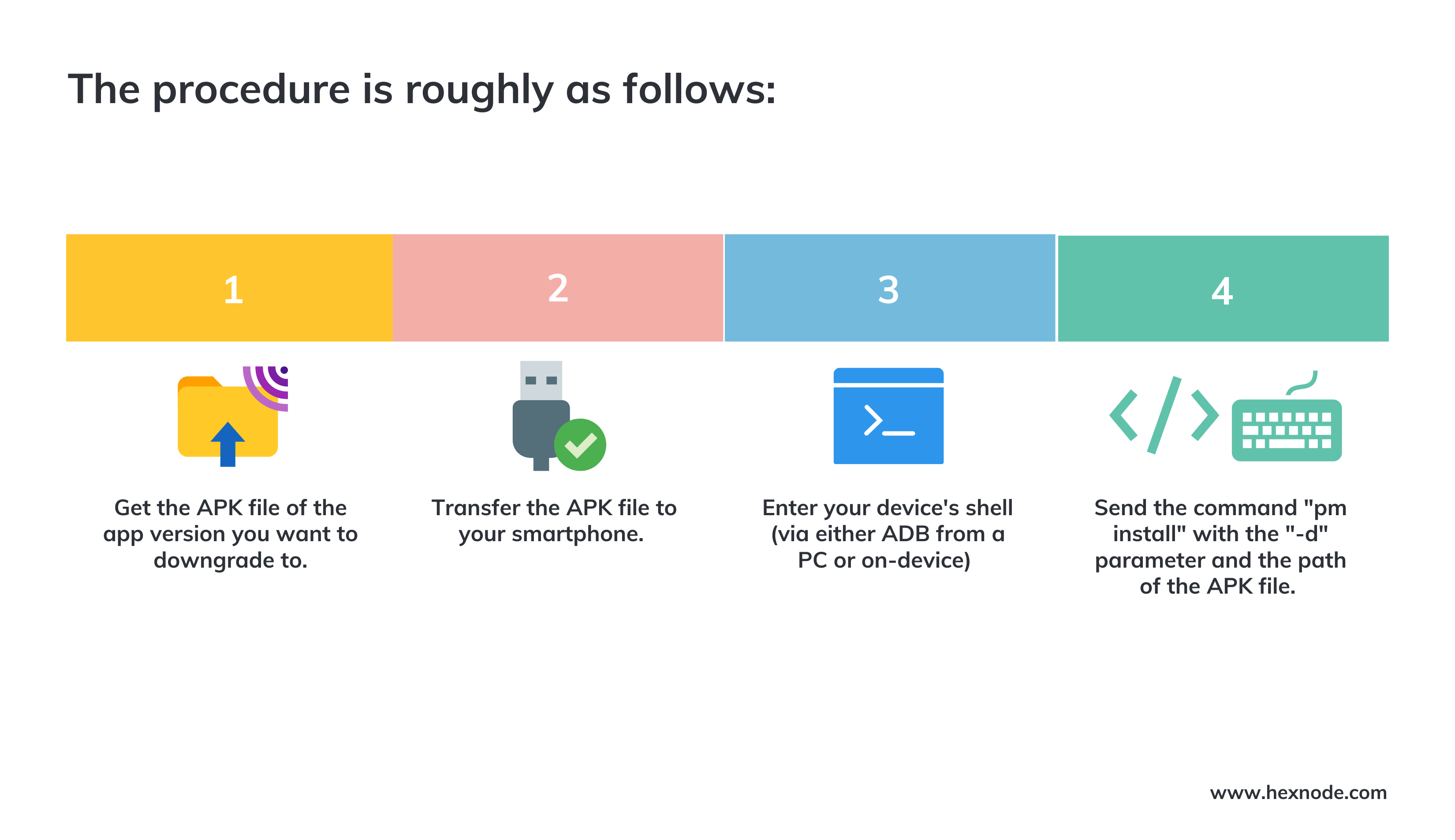
Steps to downgrade an Android app and keep the existing data
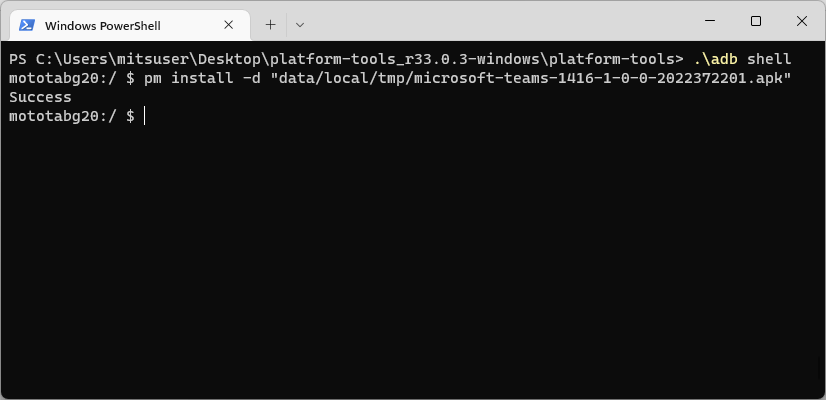
Snippet of the Powershell script to downgrade an app
Once the command is executed, the app gets downgraded to the required version.
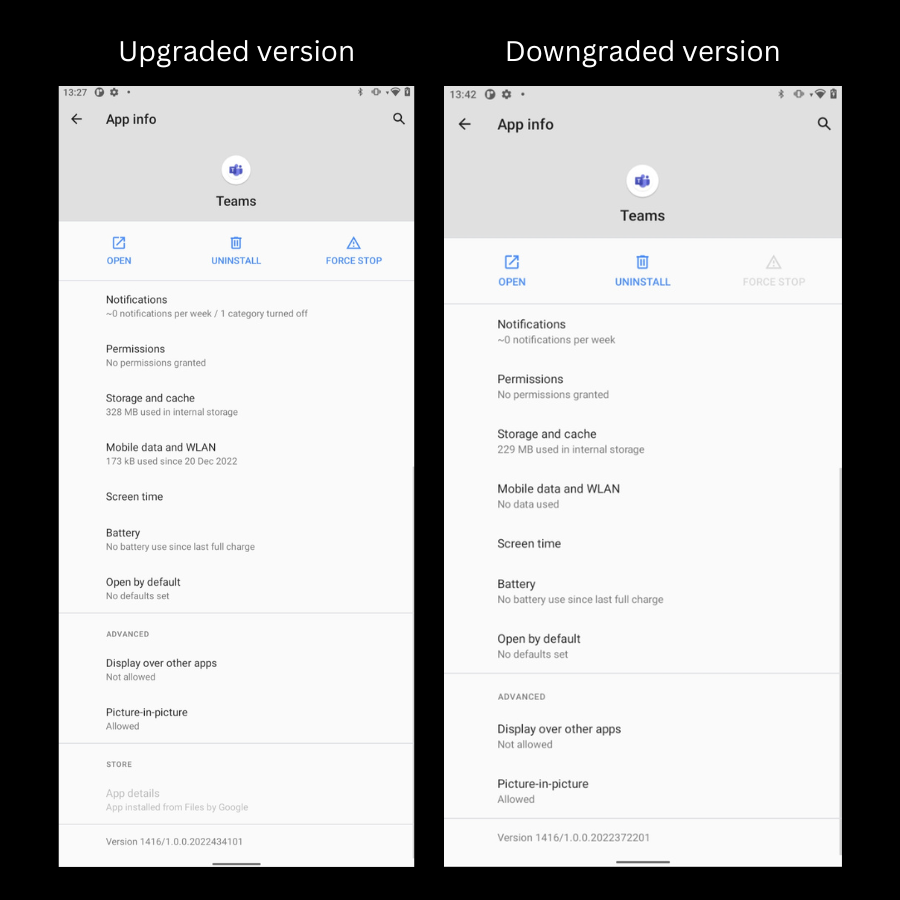
Teams app downgraded in an Android device
How to roll back an Android app update (and restore the old data)
Google needed to make sure that any changes to Android’s modular system components could be reversed if something went wrong during the development of Project Mainline for Android 10. For updates with rollback available, Android’s PackageWatchdog can trigger a rollback when a package experiences five ANRs or process crashes within one minute. Repeated native-service crashes and certain failed health checks can also trigger rollback.
However, Google has included a manual rollback method using a shell command. To perform a rollback,
You have to add the ‘-enable-rollback’ option to the ‘pm install’ command when upgrading an app.
Then, send the ‘pm rollback-app package’ command to initiate a rollback.
When an Android rollback is performed, the earlier app version is restored. How application data is handled depends on the rollback data policy, which can restore backed-up data, retain current data or wipe the app’s data.
Why does an Android app downgrade fail?
Android app downgrades can fail even when you have the correct APK. Android normally prevents a package with a lower version code from replacing a newer version already installed on the device.
The application signature also matters. Android verifies the signing certificate when one app version replaces another. If the older APK uses a different signing key, the operating system may reject the installation.
Compatibility can cause additional problems. An APK built for a different CPU architecture or Android API level may refuse to install or crash after installation. Newer app data can also be incompatible with the older application’s data structure.
Finally, successfully installing an older APK does not guarantee that the app will work. Some applications depend on server-side services that require a minimum client version. In such cases, the downgrade may complete, but the application can still prevent users from signing in or accessing online features.
Downgrading apps using 3rd Party Software
Third-party programs can also be used for this purpose. There are several Android and iOS Downgrade applications to select from. You may download and install any of these programs for free or for a one-time cost on a compatible computer.
Why use Hexnode to downgrade Android apps?
Imagine all your corporate device got updated to the latest version of an application that has several bugs. It will be very tedious for the IT admins to downgrade the apps on every device individually.
Featured resource
Hexnode App Management solution
Learn how Hexnode’s App Management solution helps businesses ensure seamless deployment, configuration, regulation, monitoring, and supervision of enterprise apps and software on end-user devices.
Hexnode’s smart security package adapts to the demands of the modern workplace. Organizations can support granular management capabilities over all aspects of device management using Hexnode. The UEM solution lets the IT admins downgrade an app on the managed Android devices if they face any problem with the latest update. The benefits of downgrading apps through Hexnode are:
It doesn’t need scripting.
App management on multiple endpoints is a hassle-free process.
The engaging UI makes it easier to carry out tasks with just a few clicks.
Furthermore, the IT admin can do all these without physically touching the device, thanks to Hexnode’s remote management configurations.
What is an enterprise app?
A company designs an enterprise app, also known as an in-house app, for usage within the company. They cannot disseminate some programs intended for internal use to the general public. As a result, they are not available in the Play Store.
Steps to downgrade apps
If the corporate program you released includes security flaws or other faults due to some bugs from the developer’s side, it might lead to a massive IT disaster. You can downgrade corporate apps and distribute them to Android smartphones using Hexnode. To accomplish this, one can upload the earlier version to the Hexnode app repository.
To downgrade an enterprise app, the higher version must have been installed using the Required Apps policy. In that same policy, navigate to Android > App Management > Required Apps and enable Enforce app downgrade. Then upload the older app version to the Hexnode app repository and push it to the target devices.
In the Apps tab in the Hexnode portal, select the app you want to downgrade. Next, select edit by clicking the gear icon in the App details box. Tap on Change (adjacent to the APK file) and upload the older version APK of the app.
You can also create a new enterprise app with the lower version of the app and then send it to the device.
How to prevent an Android app from updating after a downgrade
Downgrading an app solves little if the device immediately installs the latest version again. After completing a rollback, check how updates for that application are being delivered.
For apps managed through Google Play, automatic updates can cause the downgraded version to be replaced with the latest available release. Users can disable automatic updates for an individual app from its Google Play Store listing when appropriate.
This becomes particularly important in enterprise environments. If devices receive applications through centralized management, IT teams should also review the existing application deployment configuration. Otherwise, an existing update workflow may redeploy the problematic version after the rollback.
Once developers resolve the original issue, organizations should reassess the downgrade and move devices back to a supported, patched application version.
How to downgrade iOS apps?
In iPhones and iPads, there are multiple ways in which you can downgrade apps.
Downgrade an app on iOS with iTunes
Firstly, make sure that the ‘Automatic Downloads’ option is off. This will prevent applications from installing new updates automatically.
Next, locate the previous version’s IPA File, where Apple historically referred to an .ipa file as an iOS App Store Package; current documentation generally describes it as an iOS App file. An IPA is an Apple app archive with the .ipa extension used to package applications for supported Apple platforms. Under the hood, an IPA is a ZIP-based archive containing the application bundle and related files. It is similar to the Android Application Package or APK files deployed on Android devices.
You can find the previously synchronized IPA files saved on the PC by default.
Go to /Users//Music/iTunes/iTunes Media/Mobile Applications on a Mac.
Go to C:\Users\\Music\iTunes\iTunes Media\Mobile Applications on Windows.
The legacy iTunes workflow for managing and syncing iOS applications is no longer supported in current iTunes releases. Appropriately signed and provisioned IPA files can instead be installed through supported tools such as Xcode or Apple Configurator.
App management 101: A comprehensive guide
App management is the process of managing, monitoring, and securing mobile applications used by individuals or companies.
Downgrade Apps on iOS with Apple Configurator
Apple Configurator can install supported apps and appropriately provisioned proprietary IPA files on connected devices, but Apple does not document it as a general method for downloading and restoring arbitrary older App Store versions.
The first step is downloading and installing Apple Configurator on your Mac PC.
Next, log in to your Apple account using the same credentials for your iPhone or iPad.
Then connect your device to the PC using a USB cable and navigate to your Mac computer’s folder containing all downloaded IPAs.
Locate the temporary folder under the Mobile Apps folder. Typically, one designates temporary folders with arbitrary numbers. Each of these folders represents a program and contains a randomly numbered folder containing the IPA. Move the IPA to a location that is more convenient for you.
For an appropriately provisioned proprietary app, select the device in Apple Configurator, choose Add > Apps > Choose from my Mac, select the relevant .ipa file and add it to the device.
Can an Android app be downgraded without deleting its data?
Yes, an Android app can sometimes be downgraded while retaining existing data. However, the older version must be compatible with the data created by the newer release, or the app may fail or behave unexpectedly.
Why does an Android app downgrade fail even with the correct APK?
Android may block a downgrade when the installed version has a higher version code or when the APK uses a different signing certificate. Compatibility with the device architecture and Android version can also affect installation.
Should enterprises test an older app version before rolling it out?
Yes, enterprises should test the older version before deploying it broadly. Testing helps identify compatibility, data, and functionality problems before they affect a larger number of managed devices.
Conclusion
In conclusion, one can downgrade apps on managed iOS devices through iTunes or Apple Configurator. For Android devices, one can do it using Hexnode UEM, scripts or using 3rd party apps. There are several reasons why someone might need to downgrade an app, such as bugs in the latest update, compatibility issues with their device, or lack of storage space. By following the steps outlined in the article, you can easily find and install the previous version of an app on your managed iPhone, iPad or Android phones.
It’s important to note that one cannot downgrade all apps and not all older versions of apps are available for download. It’s always a good idea to double-check that the app version you are trying to install is still available and compatible with your device before proceeding.
Looking for a software to downgrade apps?
Give Hexnode a go! Try out the 14 day free trial of Hexnode UEM to downgrade your Android apps easily.



 Wayne Thompson