




Category filter
Assign Users/Groups to Applications for Enterprise Single Sign-On
In Hexnode IdP, you can manage access to your enterprise applications by assigning users and groups directly to them. This ensures that only authorized identities can access your organization’s tools and data. You can control access by assigning users or user groups directly to individual applications (SAML 2.0 or OIDC), or you can streamline access management by assigning them to app groups.
This article guides you through assigning and unassigning user or group access to applications and app groups.
Prerequisites
Before assigning access, ensure that:
- You are logged in to the Hexnode IDP portal as an administrator.
- The application (SAML 2.0 or OIDC) has been configured and added under Applications > MyApps, or an App Group has been created under Applications > App Groups.
Assign access to an individual application
Follow these steps to grant or deny access to a single application in your directory.
- Log in to the Hexnode IDP portal.
- Navigate to Applications > MyApps.
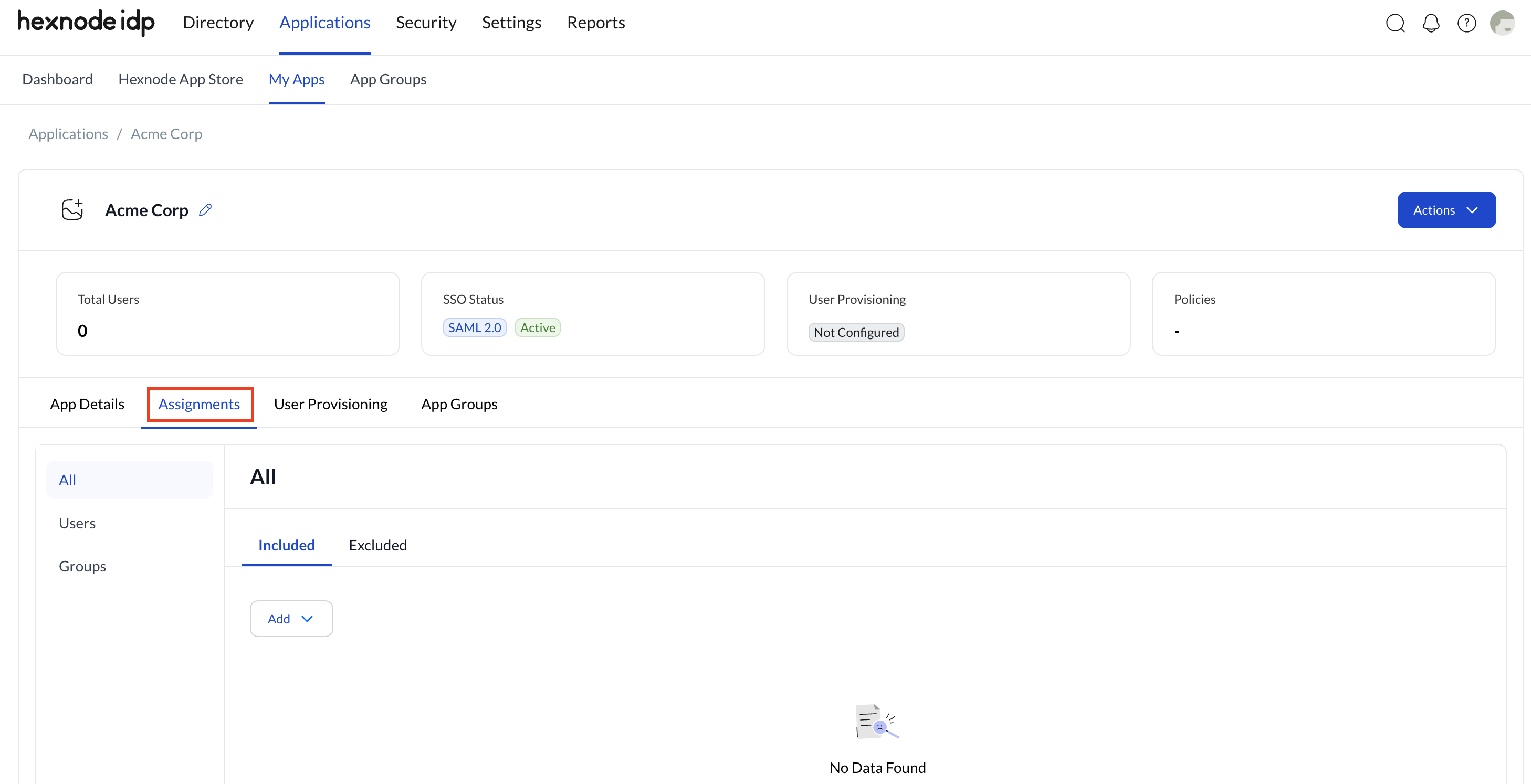
- Select the application you want to manage and navigate to the Assignments section.
- On the left side of the screen, choose the category of identities you want to view: All, Users, or Groups.
- From any of these tabs, you can choose to Include or Exclude specific users or groups by clicking the Add button.
- Include grants access to the application.
- Exclude prevents access, even if the user is part of an included group.
- Once you have completed the assignments, click on Save.
Unassign users or groups from an application
If a user or group no longer requires access, or if an exclusion rule needs to be lifted, you can remove their assignment.
- Log in to the Hexnode IDP portal.
- Navigate to Applications > MyApps.
- Select the application you want to manage and navigate to the Assignments section.
- On the left side, choose the category of identities you want to view: All, Users, or Groups.
- Select the Included or Excluded tab where the user or group is currently assigned.
- Select the specific users or groups you want to unassign.
- Click the Remove (x) option to remove the assignment.
Assign access using App Groups
As your organization grows, managing access to each application individually can become difficult. App Groups allow administrators to bundle previously integrated applications based on teams, roles, or business functions, and assign access to all of them in a single action.
- Log in to the Hexnode IDP portal.
- Navigate to Applications > App Groups.
- Select an existing App Group from the list.
- Navigate to the Assignments section.
- On the left side, choose the category of identities you want to view: All, Users, or Groups.
- From any of these tabs, you can choose to Include or Exclude specific users or groups by clicking the Add button.
- Include grants access to the application.
- Exclude prevents access, even if the user is part of an included group.
- Once you have completed the assignments, click on Confirm.
Unassign users or groups from an App Group
To remove bulk access granted via an App Group:
- Log in to the Hexnode IDP portal.
- Navigate to Applications > App Groups.
- Select the existing App Group you want to manage and navigate to the Assignments section.
- On the left side, choose the category of identities you want to view: All, Users, or Groups.
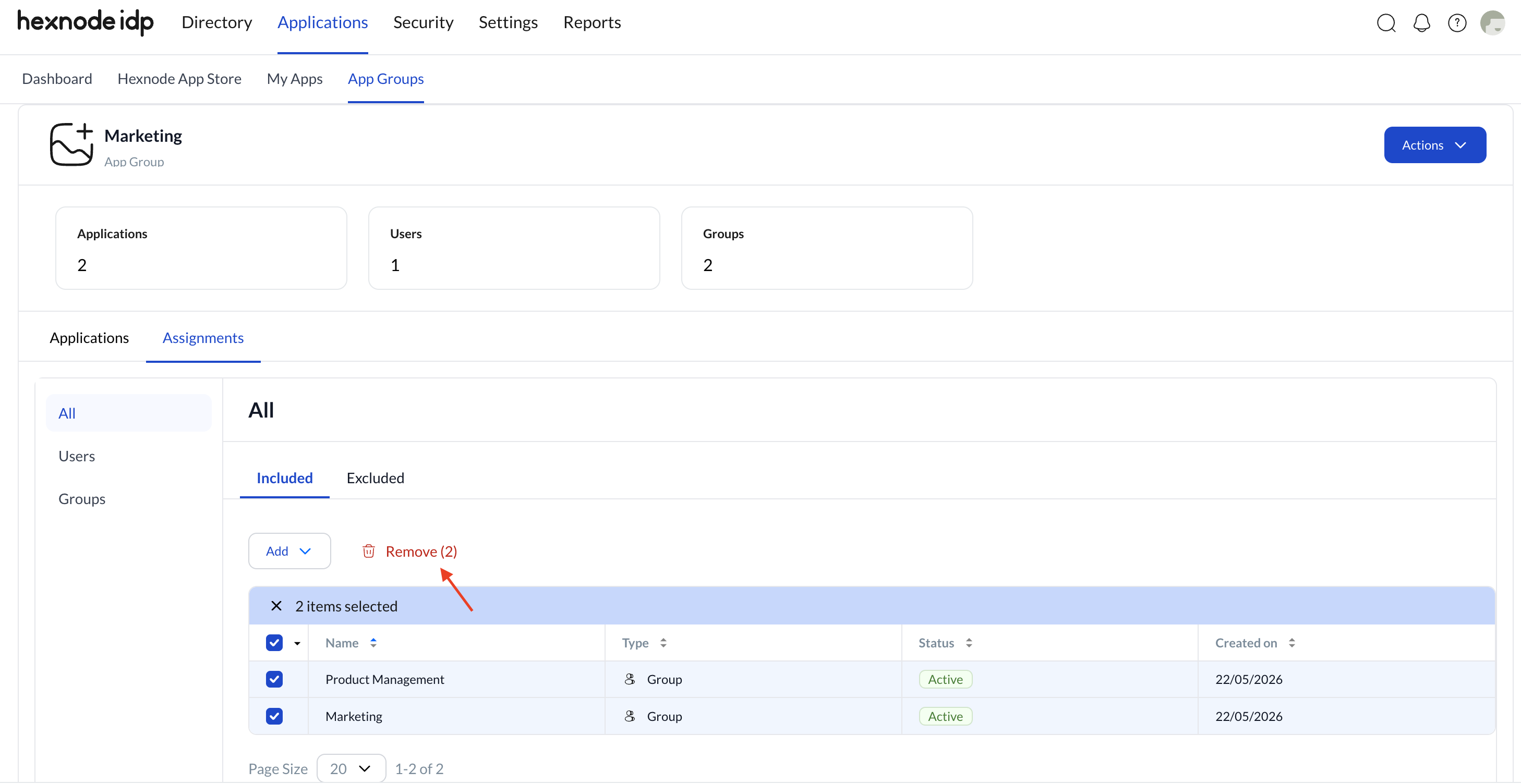
- Select the Included or Excluded tab where the user or group is currently assigned.
- Select the specific users or groups you want to unassign.
- Click the Remove (x) option to clear their assignment from the App Group.
Frequently Asked Questions
How do you create an App Group in Hexnode IDP?
Creating an App Group involves initializing the group and then adding your configured applications to it:
- Log in to the Hexnode IDP portal and navigate to Applications > App Groups.
- Click Add App Group.
- Click the edit icon next to Untitled App Group to provide a meaningful name, optionally add a description, and click Save.
- In the Apps section, click the Add Apps button to display a list of all integrated applications.
- Select the applications you wish to include, click Confirm to bundle them, and click Next to proceed to the assignment phase.
Can you add both SAML 2.0 and OIDC applications to the same app group in Hexnode IDP?
Yes. App Groups can contain any applications that have already been configured and integrated into Hexnode IDP, including both SAML 2.0 and OIDC applications. There are no restrictions on mixing different authentication protocols within the same group.


