Hi @timo-liam, welcome to Hexnode Connect!
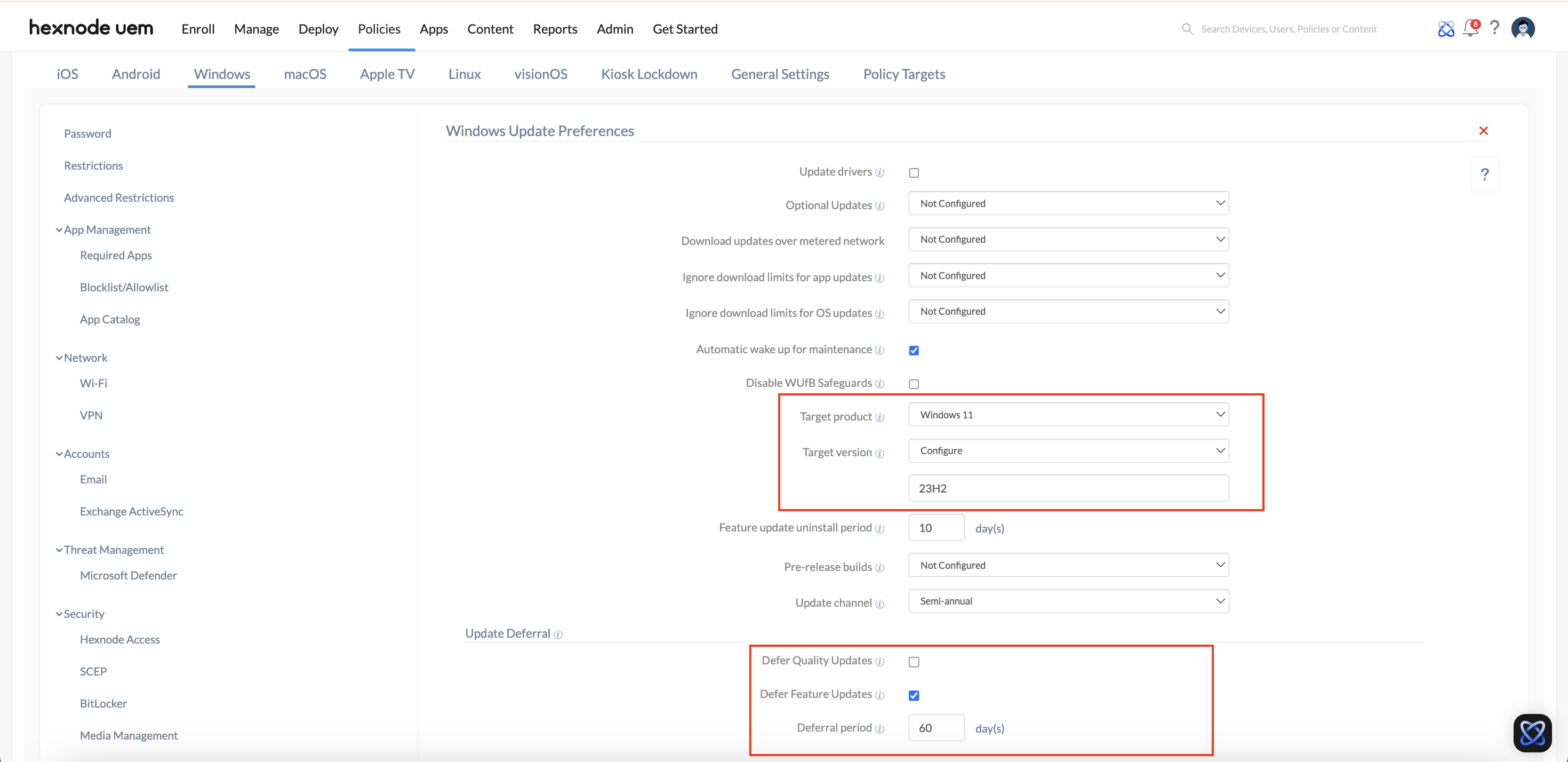
To temporarily block the Windows 11 24H2 feature update you can use Hexnode’s Windows Update Preferences feature. Here’s how to configure it:
- On your Hexnode UEM portal, navigate to the Policies tab.
- Enter the policy name and description in the provided fields.
- Select Windows as the platform and click on Windows Update Preferences under Patches & Updates.
- Click on Configure to manage Windows updates on your device.
- Under Update Deferral, enable Defer Feature Updates.
- Set the Deferral Period to a range from 0 to 365 days. Note that the deferral period begins when Microsoft releases the update.
To ensure your devices remain on Windows 11 version 23H2,
- Select Target Product and configure it to Windows 11.
- Select Target Version to Configure and specify the target version as 23H2.
- Save the policy and associate the policy to the device.
For more information, check out our help documentation on managing Windows Update Preferences.
Regards,
Sienna Carter
Hexnode UEM
 What's new

 1686 Views



