Hello @ronnie, welcome to Hexnode Connect! You have a valid concern there and we’re here to help you out. As @aurora mentioned, it is possible to create administrator accounts on DEP-enrolled devices on their initial setup using Hexnode.
To configure the admin account, you can follow these steps:
- Navigate to the Enroll tab on your Hexnode UEM console.
- Under Enroll, select macOS > Apple Business Manager/School Manager.
- Click DEP Configuration Profiles and then Configure DEP Profile to open the configuration window.
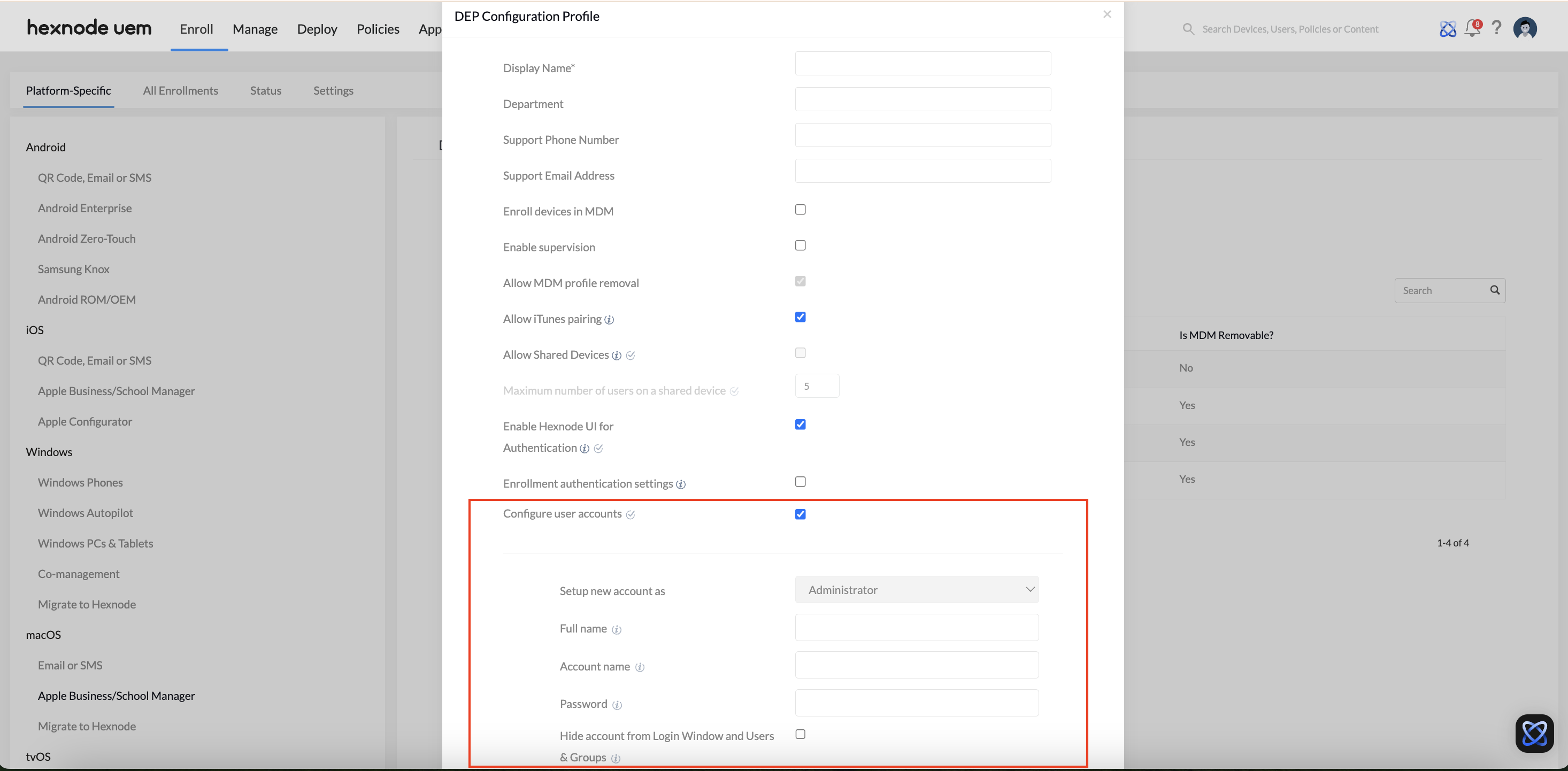
- In the configuration window, click Configure User Accounts. By default, the Set up new account as option will be auto filled as “Administrator“.
- Provide the required details, including Full Name, Account Name, Password, and optionally select Hide account from Login Window and Users & Groups.
- Click Save to save the configuration profile.
- Once your device is enrolled in Apple Business Manager of Hexnode, navigate to the DEP Devices section to view the listed device.
- Select the device, click Associate DEP Profile, and choose the profile you created.
- Click Assign to associate the DEP profile with the device.
The DEP profile will now be configured for the selected device.
For more information, you can check out our help documentation on adding admin account via DEP configuration profile on macOS devices.
Best Regards,
Sienna Carter
Hexnode
 What's new

 1726 Views





