Why Device Refresh and Retrieval Put Client Data at Risk
Device collection creates a security gap when employees leave, change roles, receive replacement hardware or work remotely. Unreturned endpoints remain a critical security risk until physical custody is restored and data sanitization is verified, as unmonitored assets expose the organization to unauthorized physical access, compromised storage environments, and persistent tenant access.
Automate Your IT Offboarding Checklist with Hexnode APIs
See how Hexnode APIs can automate device actions when employees leave and reduce manual offboarding delays.
A returned device can still contain locally stored client files, cached credentials, browser sessions, authentication certificates and managed applications. Even after the assigned user loses account access, offline data or persistent sessions may remain available. The risk increases when retrieval is delayed, the device is shipped without appropriate safeguards or IT cannot confirm its management and connectivity status.
For this reason, secure device refresh and retrieval must be treated as a controlled security workflow rather than a routine logistics task. Every handoff should include access containment, asset verification, chain-of-custody controls, data sanitization and confirmation that the device is safe to reassign, repair or retire.
What Can Go Wrong During an Uncontrolled Device Handoff?
An uncontrolled handoff can leave client data accessible, prevent IT from proving that it was removed and delay the device’s return to service. Delayed retrieval, incomplete sanitization and uncertain custody increase the likelihood of unauthorized access while weakening the audit trail needed for internal and regulatory reviews.
Remote security actions also depend on the device remaining reachable. If an endpoint is powered off, disconnected or no longer communicating with the management platform, a wipe command may remain pending or fail. Without accurate ownership, enrollment and asset records, IT may struggle to verify which user held the device, whether the correct endpoint was wiped or whether sensitive data remains on it.
Even after retrieval, the hardware may not be ready for reuse. Lingering local accounts, residual configurations and Apple Activation Lock can prevent reassignment. Inconsistent re-enrollment can also return a reset device without the required policies, applications or security controls, increasing downtime and forcing administrators to perform additional manual recovery and provisioning work.
What Does a Secure Device Refresh and Retrieval Process Include?
Secure device refresh and retrieval is a documented lifecycle covering pre-collection protection, chain of custody, data sanitization, verification and reassignment or retirement. Each stage must define who is responsible, what action is required and how its completion will be confirmed.
Hexnode UEM provides the control layer for reviewing the managed endpoint, initiating supported remote actions and retaining action records for operational verification. However, IT cannot apply one universal workflow to every device. The appropriate action depends on the ownership model, operating system, enrollment method, connectivity and current device state. IT administrators must evaluate data governance requirements to determine the appropriate sanitization scope—selecting selective container wipes to preserve personal data partitions or executing complete cryptographic endpoint sanitization.
How Should IT Secure a Device Before It Is Retrieved?
Before collection, IT should restrict access while the endpoint is still enrolled and communicating with Hexnode UEM. The Lock Device remote action restricts access on supported platforms. iOS, Android, Windows and Linux require the appropriate device or user credentials to regain access, while macOS requires the administrator-defined System Lock PIN.
For supervised iOS devices, administrators can enable Managed Lost Mode. This locks the device at the system level and displays a recovery message, contact number and optional instructions for the person handling or finding it. Enabling Lost Mode also initiates Scan Device Location, allowing IT to retrieve the device’s latest coordinates and review available location information from the portal.
Remote management payloads must be dispatched prior to endpoint shutdown, network disconnection, or management unbinding. Remote command execution strictly requires an active endpoint power state, established internet connectivity, and operational communication with the Hexnode UEM control plane.
How Can IT Protect Data While a Device Is in Transit?
IT should create a custody record before the device leaves the employee’s possession. The record should include the device identifier, serial number, asset tag, assigned user, collection time and responsible custodian, providing a traceable link between the endpoint and each handoff.
Hexnode’s device inventory and available location information can help administrators confirm that the hardware received is the managed asset expected for collection. IT should compare the physical serial number and asset tag with the corresponding device record rather than relying only on the model or employee name.
UEM visibility does not replace physical chain-of-custody controls. Organizations still need approved couriers, tamper-evident packaging, tracking references, recipient verification and documented handoffs. Together, these measures reduce opportunities for substitution, loss or unauthorized access during transit.
Should IT Use a Corporate Wipe or Complete Device Wipe?
IT should choose the action based on device ownership, the required data outcome and what will happen to the hardware next. A corporate wipe removes data, applications and settings deployed through Hexnode while leaving personal content intact. It is therefore better suited to employee-owned devices that are leaving management.
Hexnode’s Wipe Device action performs an irreversible factory reset, removing both corporate and personal data. It is appropriate for corporate-owned devices being reassigned, retired or treated as lost or compromised. Exact wipe and post-wipe management behavior varies by operating system and enrollment method.
Ownership type
Intended use
Required outcome
Recommended action
Employee-owned
Returned to employee
Remove managed resources; preserve personal data
Corporate wipe
Corporate-owned
Reassign or retire
Remove all local data
Wipe Device
Lost or compromised
Prevent access to any remaining data
Wipe Device
Continue with same user
Preserve approved data
Investigate before wiping
How Do You Build a Secure Device Refresh Workflow with Hexnode?
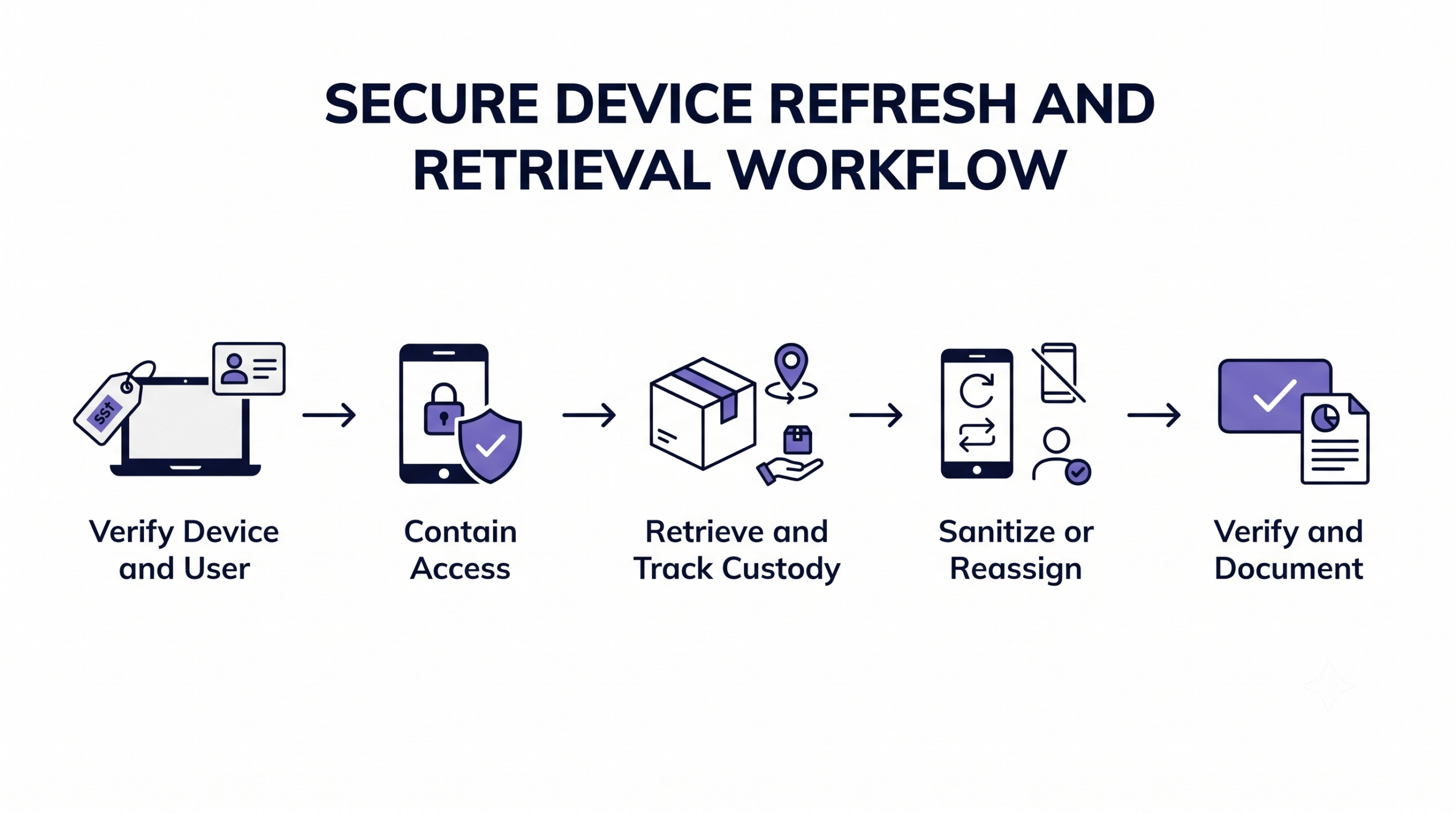
A secure workflow should identify the asset, contain access, retrieve the endpoint, apply the appropriate sanitization action, verify completion and then reassign or retire the hardware. Each stage should have a defined owner, approval requirement and completion record.
Hexnode UEM provides the console for maintaining device context and initiating supported security, device-control and reassignment actions throughout this process. Administrators must still validate OS and enrollment prerequisites before selecting an action. They should also monitor command status at every stage because an offline or unmanaged endpoint may leave a critical action pending or unable to execute.
Secure Device Refresh and Retrieval Workflow
Step 1: Verify the Device, User and Management State
Open the device record in Hexnode UEM and verify the ownership type, assigned user, serial number, asset tag, operating system, enrollment method and management status. Compare these details with the collection request to prevent IT from locking, wiping or reassigning the wrong endpoint.
Next, confirm that the device is online and communicating with the portal. Remote lock, location, wipe and disenrollment commands cannot complete while an endpoint is unreachable, and their status may remain pending until communication resumes.
Identify platform-specific blockers before sanitization. For supported Apple devices, check the Activation Lock status and availability of a bypass code. For encrypted Windows or macOS endpoints, confirm that the required BitLocker or FileVault recovery information is available.
Step 2: Contain Access Before Collection
After confirming the device record and communication status, use Hexnode’s Lock Device action where the platform supports it. Locking limits immediate access while the endpoint awaits pickup or delivery, but it does not remove locally stored data.
For eligible supervised iOS devices, enable Managed Lost Mode when IT needs stronger recovery controls. The action locks the device at the system level, displays administrator-defined recovery information and supports location retrieval. Use Scan Device Location only when the operating system, device configuration, organizational policy and applicable privacy requirements permit location collection.
Proceed to Wipe Device when an endpoint is lost, stolen, compromised or unlikely to be recovered and its remaining data presents an unacceptable risk. Confirm the device identity, ownership and selected platform-specific options before authorization. A wipe is irreversible and cannot be cancelled, paused or reversed after it has been initiated.
Step 3: Validate the Returned Device and Record Custody
When the device arrives, compare its physical serial number and asset tag with the corresponding record in Hexnode UEM. Confirm the model, assigned user and device identifier before initiating any destructive action. This check prevents an incorrectly labelled or substituted endpoint from being wiped.
Update chain-of-custody records with personnel IDs and handoff timestamps. Document physical device condition alongside the status of issued remote commands. Photograph visible damage or tampering where organizational procedures require evidence.
If the device shows unexpected modifications, damaged seals or other signs of compromise, isolate it from production networks and resources. Preserve its current state and route it for security review before sanitization, troubleshooting or reuse.
Step 4: Sanitize and Prepare the Device for Reassignment
Choose Wipe Device when the endpoint requires a full factory reset. Use Disenroll Device when IT needs to remove Hexnode-delivered configurations and terminate the management relationship without applying a complete wipe. Disenrollment behavior depends on the operating system and management model. This dictates whether agent dissociation retains or automatically purges enterprise profiles, applications, and data.
Before reassigning a supported supervised Apple device, check whether Activation Lock could require the former user’s Apple Account credentials. Hexnode provides the Bypass Activation Lock action for supported devices; administrators can also enable Clear Activation Lock when configuring the Wipe Device action. Should remote sanitization fail to disarm Apple Activation Lock, technical operations must apply the escrowed bypass key to release identity-bound lock controls before re-enrolling or reassigning the endpoint. For a disenrolled device, retrieve the Activation Lock bypass code from Reports > Device Reports > Disenrolled devices > Device info.
For a managed device that does not require a complete reset, use Change Owner to associate it with the new user. Hexnode removes the previous user’s policies and applies those assigned to the new owner. Profile disassociation retains installed enterprise applications by default. Automatic uninstallation requires enabling ‘Remove apps on policy removal’ prior to profile revocation.
Step 5: Verify Completion and Preserve Evidence
Confirm that every lock, wipe, disenrollment or reassignment action shows the expected completion status. A submitted command is not evidence that the endpoint processed it; investigate actions that remain pending or report failure.
Use Hexnode Action Reports to review the device name, action name, execution status, created time and completed time. Query UEM administrative audit logs to establish non-repudiation and verify identity attribution whenever administrative accountability is required for remote lifecycle actions. Export the relevant records when the organization must retain evidence for security reviews, client assurance or compliance audits.
For an offline device, attempt to restore power, connectivity and communication without exposing production resources. Escalate persistent failures to the security and asset-management teams. If endpoint recovery efforts prove unsuccessful, incident response protocols must classify the asset as lost or stolen, sustain active security containment controls, and formally log within ITAM compliance records that physical media sanitization remains unverified.
How Does Hexnode Secure the Complete Refresh and Retrieval Lifecycle?
Hexnode UEM centralizes the controls needed to contain access, support recovery, sanitize data, reassign ownership and verify administrative actions during secure device refresh and retrieval.
Before collection: Lock Device restricts immediate access on supported platforms. Managed Lost Mode can lock eligible supervised iOS devices, display recovery information and support location retrieval through Scan Device Location.
During sanitization: Wipe Device performs a factory reset, while Disenroll Device removes Hexnode-delivered configurations and terminates management according to the platform and management mode.
Pre-Reassignment Protocol: Prior to hardware reassignment, administrators must neutralize Apple Activation Lock controls—either by issuing pre-wipe bypass commands or enabling lock-clearing parameters within the remote wipe payload—and apply escrowed bypass keys during setup if lock-state enforcement persists. Executing ‘Change Owner’ re-indexes IdP asset ownership and re-evaluates configuration profiles. Installed software is retained unless explicit uninstall parameters are declared.
After action: Action Reports provide execution details that administrators can review and export.
Zero-touch provisioning automatically re-binds devices to management following a reset. However, hardware serial numbers must remain registered within enterprise deployment portals. However, remote commands require device communication. Wipe capabilities and Managed Lost Mode vary significantly by operating system. Executing a complete wipe indiscriminately erases both corporate and personal data.
What should IT do if a remote wipe remains pending?
Administrators must confirm target device power, network availability, and active Hexnode UEM agent telemetry; if network connectivity fails, IT must log the media sanitization state as unconfirmed and initiate lost/unrecoverable endpoint escalation protocols.
Does changing a device owner remove the previous user’s local data?
Changing the owner reassigns the enrolled device, removes the previous owner’s user-based policies, and applies the new owner’s policies. Hexnode also provides an optional setting to delete the former user’s location history. Use Wipe Device when complete device erasure is required.
Can a wiped device automatically re-enroll in Hexnode UEM?
Yes, eligible devices can re-enroll when configured through supported automated enrollment methods such as Apple Automated Device Enrollment, Android zero-touch enrollment or Samsung Knox Mobile Enrollment. Re-enrollment behavior depends on the platform, enrollment configuration and required prerequisites.
What evidence should IT retain after wiping or reassigning a device?
IT should retain the device identity, assigned user, custody history, action performed, execution status and relevant timestamps. Hexnode Action Reports can provide device and action details, while Audit Logs can identify the administrator who initiated the action.
Is a corporate wipe appropriate for employee-owned devices?
Yes, a corporate wipe is suitable when IT must remove managed applications, configurations and organizational data without erasing personal content. The exact result depends on the operating system, management mode and applicable app-removal settings.
What should IT check before deleting an Apple device from Hexnode?
IT should verify the device’s Activation Lock status and, for a disenrolled device, retrieve any available bypass code from Reports > Device Reports > Disenrolled devices > Device info.
Protect Client Data at Every Device Handoff
Recovering the hardware does not complete the security process. Secure device offboarding requires pre-collection access controls and verified data sanitization. Documented custody then ensures a controlled transition to reassignment or retirement.
Hexnode UEM standardizes operational steps across all supported endpoints. It unifies device context, remote security controls, ownership changes, and audit logs into a single workflow.
Secure Every Device Handoff
Control access, verify actions and prepare devices for secure reassignment from one UEM console.
Associate Product Marketer at Hexnode focused on SaaS content marketing. I craft blogs that translate complex device management concepts into content rooted in real IT workflows and product realities.